Read before this
Read these direct prerequisites in order. Each guide lists any earlier context it assumes.
Trace a credit change to the job that used it
A team notices the balance dropped after creating a customer video. Locate the matching activity and open its project to understand the charge before starting another generation.
If finance needs a payment record, use Billing & Pricing. The activity entry describes credit use rather than the purchase receipt. Download the purchase record.
Find the matching activity (illustrated guide)
Use Usage when you need to explain a credit charge, confirm whether a failed or incomplete operation consumed credits, or gather evidence because a purchased balance is missing. Usage is a record of activity; it cannot approve a refund or restore credits.
Before you start
Open Account & Settings → Usage and confirm the active account or team. Keep the affected project or conversation URL and approximate event time available.
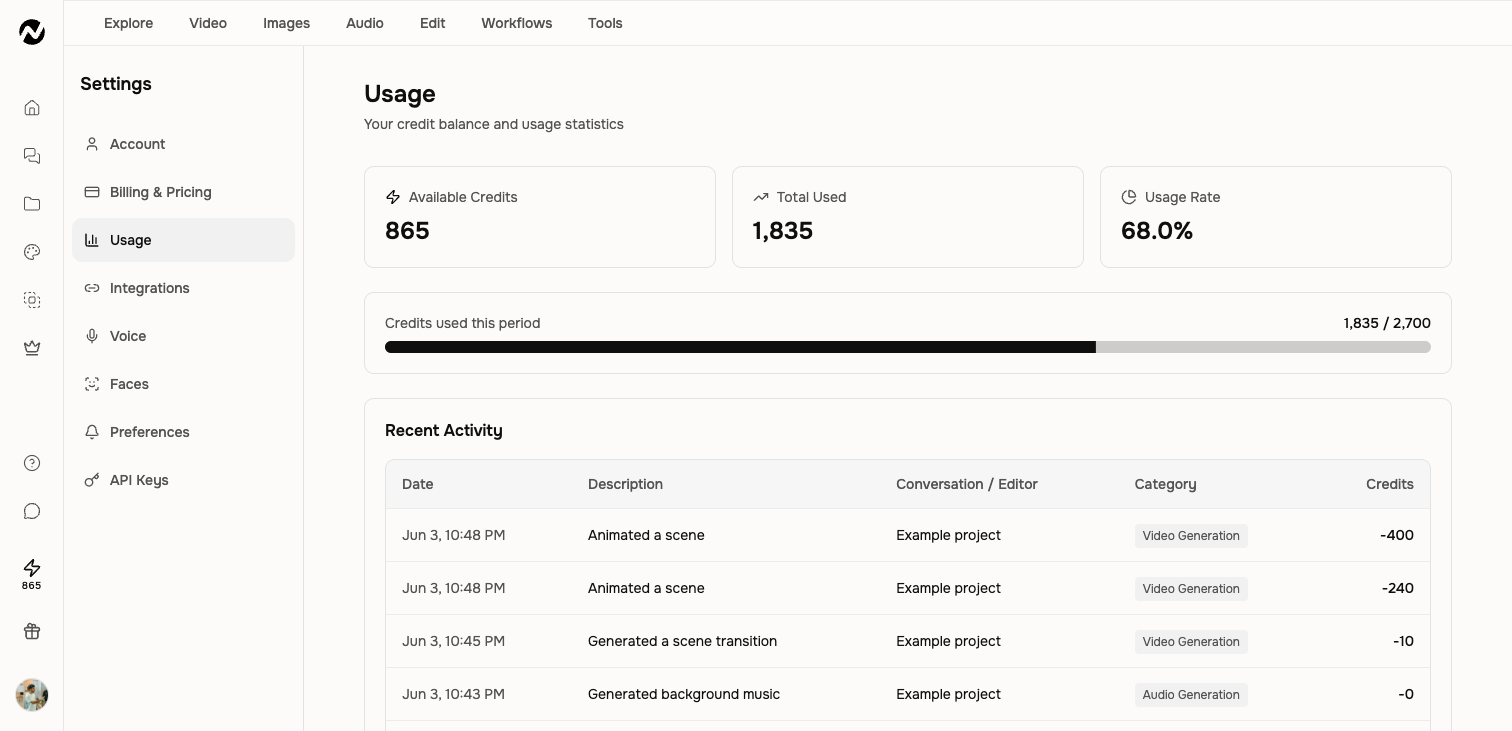
Summary cards
- Available Credits: the balance currently available to new work.
- Total Used: credits consumed in the active period.
- Usage Rate: the share of the period's available allocation already used.
Recent activity
Each row includes the time, a human-readable description such as Wrote a script or Animated a scene, the related conversation or editor, a category, and the credit amount. A zero-credit row can represent an included or free operation rather than an error.
Investigate a charge
- Find the event by time and description.
- Open the linked conversation or editor when a link is present.
- Compare the selected model, duration, and number of generated scenes with the activity rows.
- Use pagination or the 30-day chart for older activity.
Get help
If the activity still does not match the work you ran, or a failed result has a charge, do not run the same charged operation again. Contact Support with the event time, description, amount, linked project URL, visible failure state, browser, and whether one retry was already attempted. Credit and refund outcomes are reviewed case by case. Do not send an API key, payment-card number, or other secret.
Before you finish
You should finish with the matching activity row, amount, and related project identified. Save receipts or project URLs needed for later review and recheck the live confirmation state. Do not rely on a price, reward, limit, or renewal rule copied from an old screenshot.
Usage history FAQ
Keep going
Understand credit estimates, reservations, charges, plan grants, top-ups, and auto top-up.
Review current Free, Basic, Premium, Ultimate, and Enterprise plan behavior.
Troubleshoot slow, stopped, failed, or disconnected video generation without relying on fixed time promises.
Prepare a billing or credit-review request without assuming a refund is guaranteed.