Read before this
Read these direct prerequisites in order. Each guide lists any earlier context it assumes.
Choose a style that explains the subject
A maintenance lesson needs to show what moves inside a sealed component. Choose Machine anatomy and brief the specific mechanism to illustrate. For a question-and-answer lesson with distinct speakers, choose Conversation and identify their roles.
When the goal is to preserve approved fonts, colors and logos across a series, use Brand Kit. A visual style guides how a story looks; it does not maintain the team’s reusable brand assets. Set reusable brand assets.
Watch how Machine anatomy shows the inside of a compressor
A style gives the video a visual direction. Choose it when you know how the explanation should look, or leave the choice to ngram when the brief matters more than a named treatment.
Before you start
Sign in, prepare the source facts and select a director that supports the treatment you want. Presenter styles need a compatible director; Machine anatomy uses Opus 5.5. Check the options and estimate shown in your account.
Choose a style in Studio
- Open Home and choose Prompt to video.
- Browse Start from a style and choose the style you want. A selected style appears beside the brief.
- Write the audience, main idea and source instructions in Video brief. Review Model, Voice, Presenter, Length and Format.
- Choose Create video, review the plan containing the script and approve it when ready.
- Play the generated result and request a change to any scene that misses the intended treatment.
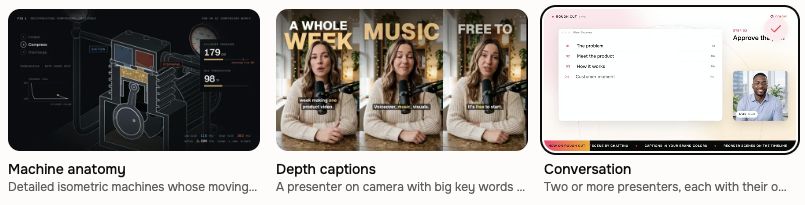
Choose the treatment that fits the explanation
Conversation gives two or more on-screen avatars distinct roles and voices. Use Opus 5.5 with Presenter and Voice on Auto, and describe the discussion in Video brief. Depth Captions places selected key words behind a large presenter; ordinary subtitles remain separate. Machine anatomy explains physical mechanisms through labeled parts, motion and cutaways.
Create a conversation video with two or more avatars
Start from the website gallery
Browse the video style gallery, open a style and customize its brief. Choose Use this style to continue through sign-in with that style and the supported settings ready for review in Studio.
Style, task template and Brand Kit
A style sets visual treatment. A task template supplies a reusable brief for a particular job. Brand Kit stores identity and reusable slide designs. Choose the kit and any saved intro or outro separately for each video.
Check the result
Review the composition, pacing and source accuracy in the first complete preview. The style is a starting direction; the audience and source still shape the video. Your conversation remains in Projects.
If a choice is missing or the result misses the style
Check the selected director and the availability message in Studio. If a selected style was not followed, keep the project and name the affected scene and intended treatment in chat. Review the estimate before requesting a revision. Contact Support if the choice remains unavailable or the same targeted correction fails again.
Visual styles FAQ
Keep going
Understand text, image, and video model roles without relying on a stale model catalog.
Create, import, and manage personal or team Brand Kits and current plan limits.
Create a first ngram video from the current Home and agentic workflow.
Use Auto to cast a two-avatar Q&A, approve its dialogue and review the result.