viaSocket integration that turns workflow events into videos.
Choose an app event in viaSocket and map its data into ngram's Create Video From Text action. Check the render or continue the flow when the video completes.
- Create Video From Text — map a prompt into the Create Video From Text action
- Track every render — View Video Status returns queued, processing, failed or ready-to-download state
- Continue on video.completed — use viaSocket's completed-video trigger to start the next workflow step
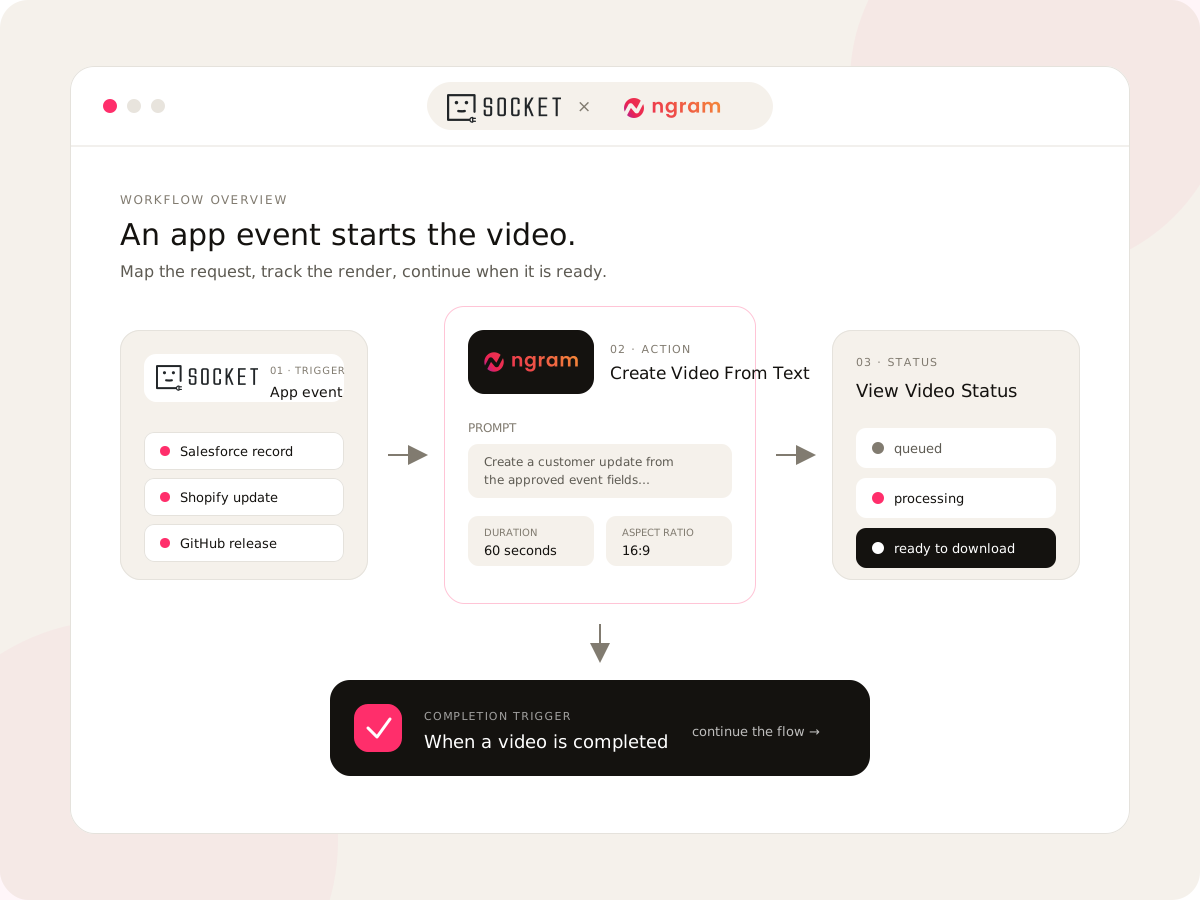
Build the ngram step inside a viaSocket flow.
The live viaSocket connector covers the create, status and completion parts of the ngram render lifecycle.
Choose the event
Pick the connected app and event that should start the workflow, such as a CRM update, form response or commerce event.
one eventConnect ngram
Add ngram from viaSocket's action picker and connect the ngram account that will submit and track the render.
one connectionMap the video request
Choose Create Video From Text, then map the prompt from earlier workflow steps.
one actionHandle the result
Check the render with View Video Status or continue through the completed-video trigger when the render reaches its terminal state.
status or triggerThe ngram render lifecycle, exposed as workflow steps.
viaSocket turns the public ngram video endpoints into one completion trigger and two actions you can place inside a larger automation.
Create from mapped text
Turn text assembled by earlier viaSocket steps into the prompt for a new ngram video render.
Map the video prompt
Pass approved text from the triggering app into the Create Video From Text action.
React to video.completed
Use viaSocket's completed-video trigger when the ngram render reaches its terminal state.
Read processing status
Retrieve whether a render is queued, processing, failed or ready to download before the next step runs.
Trigger on video.completed
Start a follow-up flow through viaSocket's completed-video trigger after ngram finishes the render.
Connect to 2,300+ apps
Use the ngram actions alongside viaSocket's app marketplace, which lists more than 2,300 additional connections.
Four events that can start useful video work.
Each example begins with a specific business event and ends with a video another team can review or use.
A shipped release becomes an announcement video.
Use a GitHub or project-system event to map approved release text into the ngram action, then route the completed video into the launch workflow.
See the feature announcement workflowA CRM change starts a prospect-ready video.
Use HubSpot or Salesforce fields to build the video prompt, check the render, and hand the ready link to the next sales step.
See the sales prospecting workflowA new customer starts an onboarding render.
Map approved account context into a customer onboarding prompt, then continue the setup flow after ngram reports the video complete.
See the onboarding video workflowA Shopify update starts a product video.
Use product details from a Shopify event to request a fresh video and pass the completed result into the next commerce or campaign step.
See the Shopify product workflowStart ngram from the apps already in your viaSocket flow.
These connections appear on the live ngram listing in viaSocket. Each can provide the event or data that reaches the ngram action.
What ngram does after viaSocket sends the request.
The workflow trigger changes where the job starts. The video still runs through ngram's planning, production and editing system.
Script Generation
ngram turns the prompt mapped in viaSocket into a video script, storyboard, scene plan and call to action.
See script generationAI Visuals
Scene imagery is generated against the message and source context carried into the automated render.
See the visual systemAI Voiceover
The generated script becomes narration that stays connected to the video scenes created by the workflow.
Hear how voiceover worksBrand Kit
The viaSocket action sends the prompt only. Use Zapier, n8n, MCP or the API when a video must apply a specific Brand Kit.
Open the brand systemCaptions & Subtitles
Open the finished video in ngram to turn on captions when a caption track is available and choose their style.
See caption controlsMotion Graphics
ngram adds text overlays, product callouts and scene transitions after viaSocket submits the prompt.
See motion graphicsVideo Editing
Open a completed automated render in ngram when the script, narration, canvas or timeline needs a human pass.
Explore editingThree inputs that fit a viaSocket video workflow.
Use these conversion paths to shape the source material, then place the approved message into the automated ngram request.
Text to Video
Test the prompt or approved brief in ngram before mapping the same text into viaSocket's create action.
Convert text to videoRelease Notes to Video
Shape shipped changes into a clear source message that a release event can send through viaSocket.
Convert release notesProduct Page to Video
Ground the video in current product copy and images before automating repeatable requests around that page.
Convert a product pageTest the input, then finish the returned render.
Use a focused ngram tool when the automated prompt needs rehearsal or the finished video needs a final edit.
Who benefits when a business event can start a video.
These teams already have source data moving through connected apps. viaSocket gives that data a repeatable path into ngram.
A release or project event can start the first announcement render while the launch team keeps working.
HubSpot or Salesforce record changes can supply the approved context for a sales video request.
An account event can start an onboarding render and return the completed result to the customer workflow.
A support or email event can request a focused answer video and continue when that asset is ready.
Pick the trigger surface that matches the work.
viaSocket is one route into the same ngram render system. These integrations fit different teams, infrastructure and moments.
 Zapiercreate
Choose Zapier when the surrounding automation already lives in Zaps; choose viaSocket when the workflow already lives in its app marketplace and logic builder.
Explore Zapier integration n8ncreate
Choose n8n when self-hosting, code steps or technical workflow control matter more than a managed viaSocket flow.
Explore n8n integration MCP Servercreate
Choose MCP when an AI agent should call ngram inside a conversation; viaSocket fits event-driven app workflows.
Explore MCP Server integration Chrome Extensioncreate
Choose the Chrome extension when a person looking at a webpage should start the video; use viaSocket when an app event should start it.
Explore Chrome ExtensionviaSocket, Zapier, n8n or the API: which trigger fits?
All four routes can start ngram work. The right choice depends on where the event lives and who owns the workflow.
ngram + viaSocket you are here | Zapier app automation | n8n technical workflows | REST API application code | |
|---|---|---|---|---|
| Build surface | viaSocket flow builder with app and logic steps | Managed visual Zaps | Visual canvas with code steps | Your code and infrastructure |
| ngram lifecycle | Create from text, view status, trigger on completion | ngram actions and lifecycle steps in a Zap | ngram workflow node and status handling | Submit prompts, retrieve videos and manage assets |
| Hosting model | Managed viaSocket workflow | Managed Zapier workflow | n8n Cloud or your infrastructure | Your application infrastructure |
| Best fit | App events and viaSocket logic around a video render | Teams whose automations already run in Zapier | Technical teams that need code or self-hosting | Products embedding ngram into their own experience |
| Who owns it | Operations or automation builder | Business automation builder | Technical workflow owner | Software engineering team |
FAQ
Common questions about the viaSocket integration
Still curious? Still curious? Talk to us
Let the business event start the video.
Open the live ngram connector in viaSocket, map the request, and continue the workflow when the render is ready.