Video hosting for finished business video
Share a public watch link or embed your video on every plan, including Free. Choose Basic or above for unlisted links, or Ultimate and Enterprise to add clickable buttons, quizzes, and polls.
- Share a rendered video on its live ngram watch page
- Copy an embed code from the share flow for a website or help center
- Use the access controls available in the current share flow
- On Ultimate and Enterprise, add buttons, quizzes, and polls
Trusted by teams at












A finished MP4 is still a file someone has to move
Downloading a video solves the render. It does not give the team a clean page to share, a player to embed, or a live surface for interactive viewer prompts.
File handoffs create another publishing job
Someone downloads the MP4, uploads it somewhere else, copies a new link, and repeats the process when the video changes.
Website playback needs more than a file URL
A landing page, help article, or customer portal needs a player and embed code rather than a loose download link.
A file attachment is easy to lose
People have to download it, find a compatible player, and keep track of the latest version on their own.
Interactive elements disappear in an MP4
Use the hosted or embedded player to let viewers answer quizzes and polls or follow a clickable button.
The live page keeps playback and sharing in one place. The embed puts the same player where your audience already is.
Move from download-only to a hosted page or embed
Open the Share controls, publish the rendered video to a live watch page, and copy its embed code when the player belongs on your site.
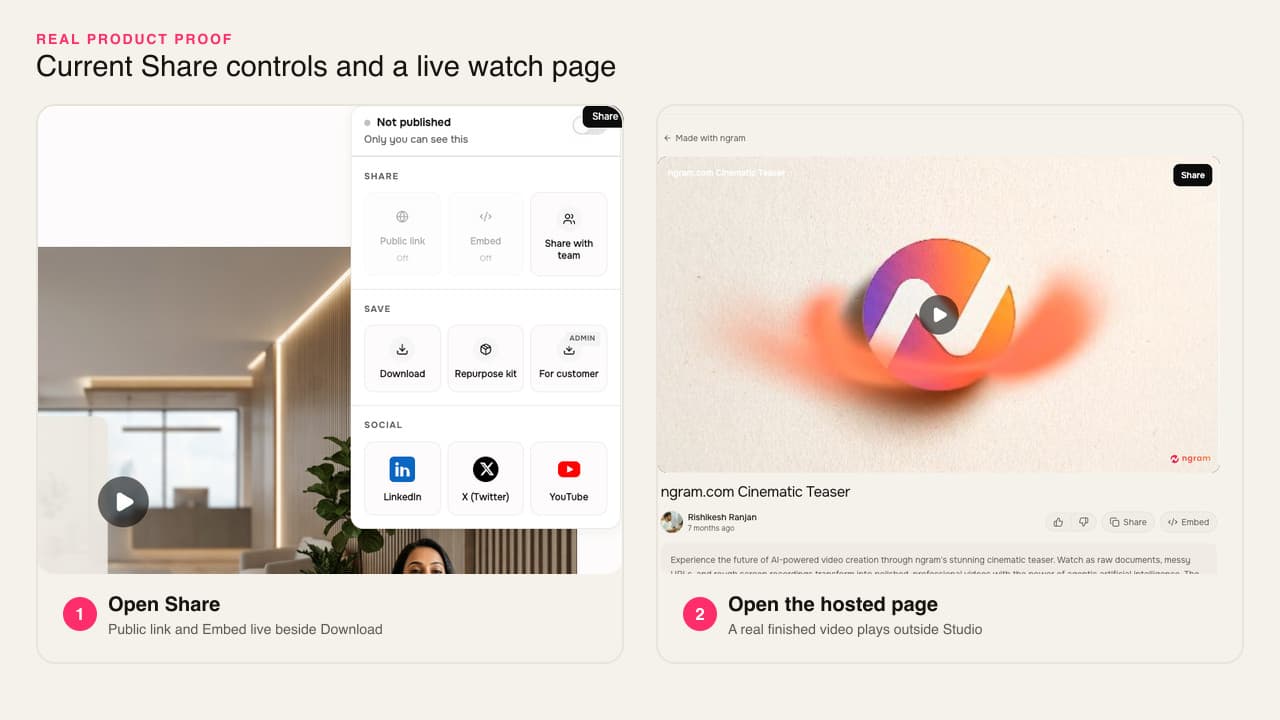
The final video moves from the project to a watchable link or embedded player without another upload.
Share a live watch page
Publish the rendered video to an ngram URL, use the available access controls, and send the link wherever people need to watch.
Embed the player on your site
Copy the embed code from the Share controls and place the video on a landing page, help article, or other website.
Add a prompt inside the player
On Ultimate and Enterprise, add clickable buttons, quizzes, and polls to your hosted or embedded video. Review viewer responses after publishing.
The watch page is ready when the render is
Share a watch link or website embed on every plan. On Ultimate and Enterprise, add clickable buttons, quizzes, and polls to the player.
A live page for the finished video
The watch page carries the video and its basic details without another upload to a separate host.
A player for the page you already own
Use the publish modal's embed code when the video belongs inside a landing page, help center, customer portal, or other website.
The sharing controls stay with the video
Use the access options available in the Share controls before sending the live page to its audience.
Buttons, quizzes, and polls
On Ultimate and Enterprise, add clickable buttons, quizzes, and polls to your hosted or embedded video. Review viewer responses after publishing.
How video hosting works in ngram
Finish the video, publish its live watch page, then copy the embed when the player belongs on another site.
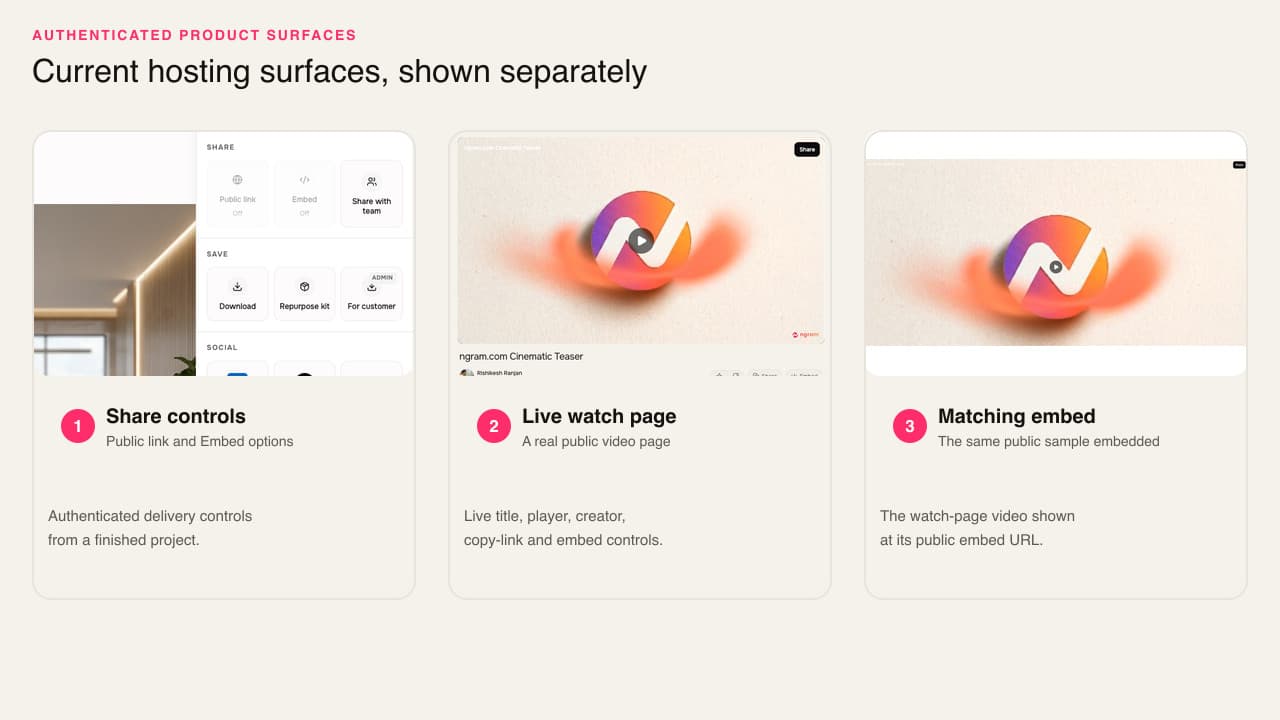
Open Share
Start from the rendered ngram video and open its Share controls. Publish the video so the watch link is ready to open.
Open the live watch page
Follow the published link and check the real viewer experience before sending it to customers, prospects, or teammates.
Copy the website embed
Return to Share, copy the embed code, and place the same player in a landing page, help article, or customer portal.
Who uses video hosting
Teams use a hosted page or embed when the finished video needs to reach people outside the editor without becoming another file-management task.
Product marketing
Embed the finished product story on a launch or feature page, then share the hosted URL in the campaign handoff.
Customer success
Host onboarding and feature-education videos so customers can watch outside a meeting without downloading a large attachment.
Sales enablement
Share a hosted follow-up page that a champion can open and forward without passing a large video file around the buying group.
Support teams
Place a polished walkthrough in the documentation where customers already look for the next step.
Where video hosting fits in the work
Use hosted pages and embeds when a finished video belongs on a website, in a help center, inside an email handoff, or with a customer or prospect.
Landing Page Video
Paste the landing page URL or drop in a rough product walkthrough. A landing page video maker built for SaaS hands you back a 60-second hero cut with captions, motion graphics, and brand polish — the version that auto-loops on mute and earns the scroll.
Marketing Email
A marketing email video pipeline built for senders whose open rates look fine but whose click rates flatline at two percent. Drop in a product clip, a blog draft, or an email copy doc. Get back a short, captioned video plus a play-button thumbnail and a hosted landing page in under thirty minutes.
Help Center Video
A knowledge base video maker for support teams turns an article or screen recording into a polished tutorial with captions, clear visual guidance, and a hosted or exportable version for your help center.
Sales Demo Followup Video
Your demo went great. Now send a 90-second recap. A sales demo followup video maker hands you back a polished recap with smart zooms on the features they cared about, captions, and brand polish — ready before your prospect's attention fades.
Customer Onboarding Video
Turn help docs or a screen recording of the setup flow into a polished customer onboarding video new accounts actually finish. Reach first-value the same day, not the following week, without booking another live kickoff call.
Product Walkthrough Video Creator
Drop in a rough screen recording or paste your help-center article. A product walkthrough video creator built for SaaS hands you back a step-by-step guide with smart zooms, callouts, captions, and your brand kit — without a freelancer brief or a timeline editor.
Video hosting compared with file-only handoffs
The table compares ngram with a downloaded-file workflow and a separate hosting service, from the final render through sharing and embedding.
| Capability | ngram | Downloaded file | Separate video host |
|---|---|---|---|
| Creation-to-publish handoff | ● Publish from the finished ngram project | × Download and move the MP4 by hand | ~ Upload the final file after creation |
| Hosted page and website embed | ● Hosted URL plus embed code | × No hosted player by itself | ● Core job of a dedicated host |
| Interactive viewer elements | ● Buttons, quizzes, and polls on Ultimate and Enterprise | × A downloaded MP4 cannot collect responses | ~ Varies by hosting service |
| Interactive response results | ● Viewer and response results for saved interactions | × No way to collect an in-player answer | ~ Varies by hosting service |
| Access controls | ● Optional controls on hosted sharing | ~ Depends on the file-sharing service | ~ Varies by hosting service and plan |
Pair video hosting with the work that prepares the viewer experience
Finish the cut and burn in readable captions before you publish. Keep the same brand direction on the watch page and in the embedded player.
Video Editing
Trim the story, correct a scene, balance its audio, and export the final MP4 before publishing the hosted version.
Captions & Subtitles
Burn branded captions into the video so the hosted page and website embed still communicate when the player starts muted.
Brand Kit
Apply the workspace logo, palette, typography, tone, and phrase guardrails before the video moves into its hosted experience.
Turn the source your team already has into a hosted video
Start with a help article, screen recording, product page, or PDF. Finish the video in ngram, then publish the hosted page or embed.
Help article to Video
Turn approved support steps into a walkthrough you can embed beside the original article.
Screen recording to Video
Polish a rough product capture before sharing its hosted page with customers or prospects.
Product page to Video
Build a video from approved product-page copy, then embed the result back on the page.
PDF to Video
Turn a report, guide, or proposal into a narrated video that is easier to share as a link.
Use focused tools before or beside the hosted version
Finish the cut, add burned-in subtitles, reduce the downloadable file size, or make a short GIF that links to the full hosted video.
Video Editor
Finish the script, scenes, captions, audio, and timeline before the video moves to its hosted page.
Add Subtitles to Video
Burn readable subtitles into the picture so the hosted or embedded player works with sound off.
Video Compressor
Create a smaller MP4 when someone still needs a downloadable file alongside the hosted link.
Video to GIF
Turn one short product moment into an inline loop, then link viewers to the complete hosted video.
Use connected social channels when the same video belongs in a feed
Keep the evergreen version hosted or embedded, then use ngram's Beta social publishing workflow for LinkedIn, X, or YouTube when the video also needs channel distribution.

Social Publishing is in Beta. Connect LinkedIn with OAuth and publish a finished hosted video now or on a one-off schedule.

X (Twitter)
Social Publishing is in Beta. Connect X with OAuth and publish a finished hosted update video now or on a one-off schedule.

YouTube
Social Publishing is in Beta. Connect YouTube with OAuth and publish a finished hosted tutorial now or on a one-off schedule.
Social publishing is Beta and currently supports LinkedIn, X, and YouTube. Hosting and website embeds remain separate distribution choices.
Explore integrationsQuestions about video hosting
What is video hosting?
How do I host a video in ngram?
Can I embed an ngram video on a website?
Does ngram video hosting include access controls?
Can I add interactive elements to a hosted video?
Can I review responses to an interactive video?
What is the difference between a hosted video and a downloaded MP4?
Should I attach a video file to an email?
Finish the video, then give it a place to play
Share the finished video as a link or embed it on your website. On Ultimate and Enterprise, add clickable buttons, quizzes, and polls.
Publish a hosted page or website embed from the same ngram workflow that created the video.
Live watch page. Website embed. One finished video.