Social media scheduler for business video
ngram's social media scheduler connects LinkedIn, X, and YouTube to a built-in content calendar. Compose the post there, then choose a one-off or recurring schedule. Publishing now is also available in the Social Publishing Beta.
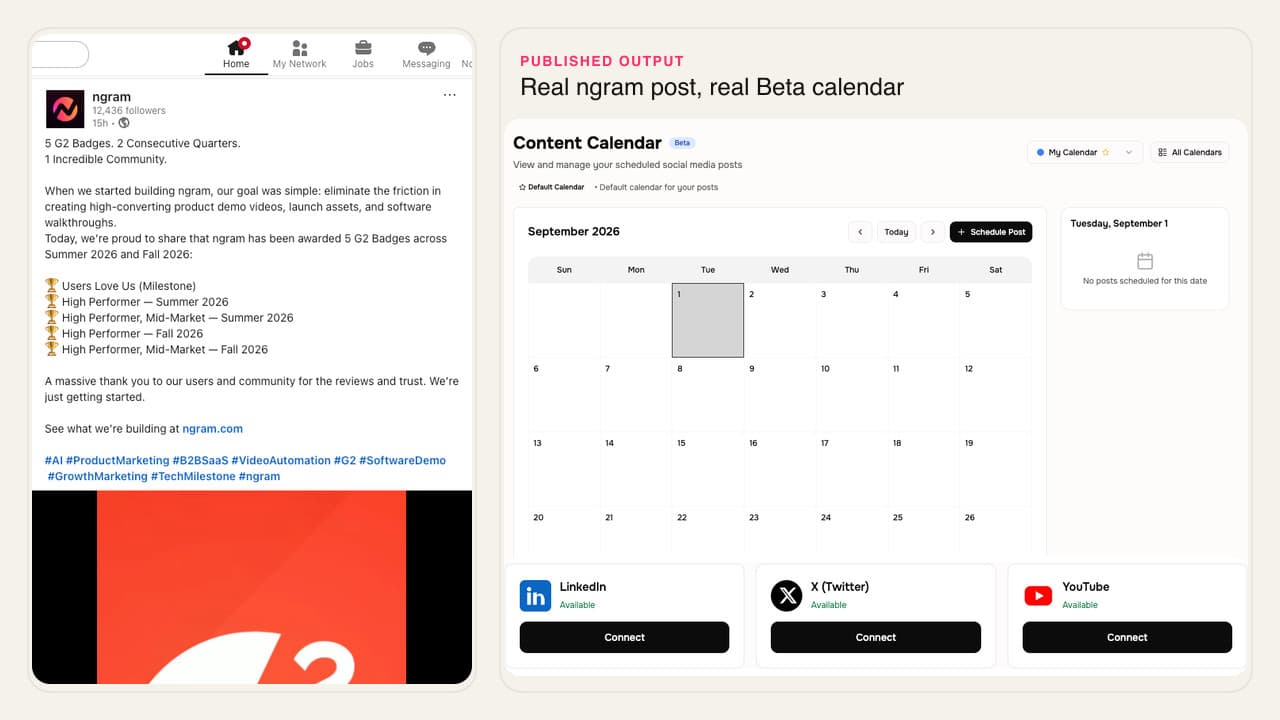
- Connect LinkedIn, X, and YouTube through their OAuth flows
- Compose posts beside the video work your team already finished
- Schedule one-off or recurring posts in the built-in calendar
- Share a public read-only calendar when others need the schedule
Trusted by teams at









Publishing video should not mean three separate upload queues
The video can be approved while distribution still lives in browser tabs, native upload forms, and a campaign spreadsheet. That last handoff makes launch timing harder to see and easier to miss.
Finished videos wait for a manual upload
Someone downloads the file, finds the right account, re-enters the post copy, and checks the destination settings again.
The campaign schedule lives away from the asset
A calendar row can say a post is ready while the finished video and destination details sit in different tools.
Available and coming-soon channels get confused
A visible channel card does not always mean publishing is live, so teams need a clear boundary before they plan the campaign.
A scheduled post still needs a final check
The destination, copy, and connected account all need review before a business video goes live.
Social Publishing keeps the supported connections and posting calendar in ngram, with the Beta boundary stated up front.
One calendar for three live channels
Connect a supported account, compose the post, and choose when it should publish without rebuilding the distribution handoff in another planning tool.
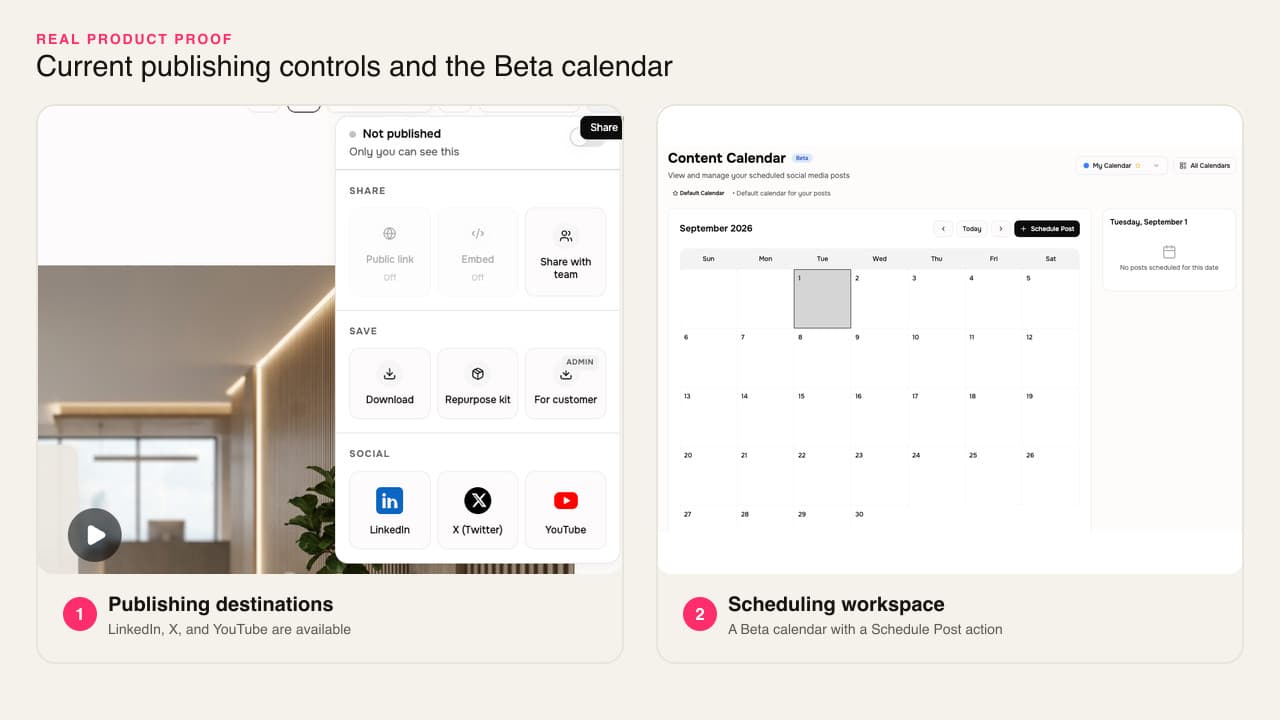
The approved video and its publishing schedule stay close together.
Three supported destinations
Connect LinkedIn, X, or YouTube through OAuth. Instagram, Facebook, and TikTok are not available in this Beta.
One-off and recurring scheduling
Compose a post in the calendar, choose a connected destination, and schedule it once or on a recurring cadence.
Publish, then verify
Publish from ngram and check the result on the destination platform before the campaign link goes to the wider team.
A publishing path with named boundaries
Social Publishing covers the connection, composition, calendar, and publish steps that are live today. It does not imply support for every social network.
OAuth for the three available channels
Connect LinkedIn, X, or YouTube in settings, then confirm the intended account or channel before publishing.
A calendar for one-off or recurring posts
Place a post on the built-in calendar and choose a single scheduled time or a recurring cadence.
A public read-only calendar link
Share the calendar without giving the recipient editing access when they only need to see what is planned.
Coming-soon channels stay out of the promise
Instagram, Facebook, and TikTok are excluded until their Connect actions and publishing services are available.
How Social Publishing works
Connect the account, draft the post in the calendar, choose its timing, then check the published result on the destination.
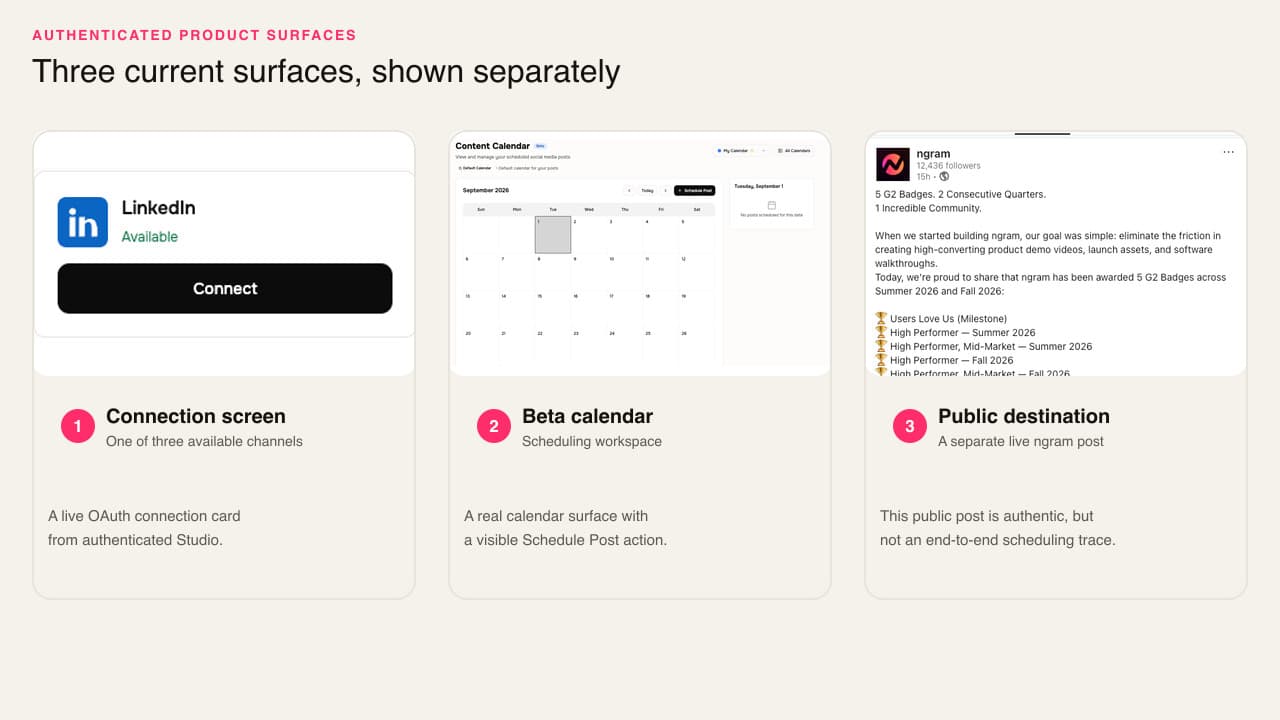
Connect a supported account
Open social settings, choose LinkedIn, X, or YouTube, complete OAuth, and confirm the account appears as connected.
Compose the post
Open the content calendar, choose the connected destination, and add the video and post copy you want to publish.
Choose the schedule
Publish now, pick a one-off date and time, or set the post to recur on the cadence the campaign needs.
Publish and verify
Let the calendar publish the post, then open the destination and confirm the account, copy, and video are correct.
Who uses Social Publishing
This Beta fits business teams that finish videos in ngram and need a visible posting schedule for the supported destinations.
Product marketing
Schedule the approved launch or feature video to a connected LinkedIn, X, or YouTube destination beside the rest of the release work.
Growth marketing
Place finished social videos on a shared calendar, choose each supported destination, and keep the planned cadence readable.
Founders
Take a finished founder clip into the calendar, add the post copy, and schedule it for LinkedIn, X, or YouTube.
Where Social Publishing fits in the campaign
Create the video for a real business job, approve the cut, then use the Beta calendar for the supported publishing destination.
LinkedIn Video
A LinkedIn video maker built for founders, marketers, and operators who keep meaning to post. Drop in a rough selfie clip or a blog post you already published. Get back a captioned, branded LinkedIn video sized 4:5 for the feed in about fifteen minutes.
Marketing Social Clips
This social media video maker turns a recording or blog post into an on-brand clip for the channel you choose. Build each additional channel version as a separate edit with its own framing and captions.
Founder Social Content
Record a quick thought on your phone. A founder social content video maker hands you back polished, captioned, brand-styled clips formatted for LinkedIn, X, TikTok, and Shorts — without ever opening CapCut or hiring a content team.
Growth Social Clips
A social media video maker for growth teams turns one source asset into an on-brand clip for the channel you choose. Test the next hook or framing as a separate edit, then download each finished MP4.
PMM Social Content
Stop posting screenshots while competitors post 30-second product clips. A social media video maker built for PMMs spins a webinar recording, a product walkthrough, or a blog URL into platform-ready cuts for LinkedIn, Reels, Shorts, and TikTok in under twenty minutes.
Product Launch Video Maker
Turn the feature PRD, the screenshots, or a rough screen recording into a launch-ready video. A product launch video maker built for SaaS hands you back motion graphics, captions, brand polish, and a reviewed edit for each channel you need, without an agency invoice or a missed release window.
Social Publishing compared with the usual handoff
ngram's Beta is strongest when the video already lives in ngram. Native platform tools and broader schedulers remain useful when a campaign needs destinations outside the current three-channel scope.
| Capability | ngram Beta | Manual upload | General scheduler |
|---|---|---|---|
| Supported destinations | ~ LinkedIn, X, and YouTube only | ● Any destination you upload to directly | Coverage depends on the provider and plan |
| Connection to the video project | ● Calendar sits beside ngram video work | × Requires download and separate upload | ~ Usually starts after the video is exported |
| One-off and recurring scheduling | ● Both are available in the calendar | ~ Native scheduling varies by destination | ● Scheduling is the core job |
| Read-only calendar sharing | ● Public read-only calendar link | × No shared cross-channel calendar | Availability depends on the scheduler |
| Product maturity and channel breadth | ~ Beta with three live channels | ● Uses each platform's established uploader | Often broader; verify each provider |
Social Publishing starts with an approved cut
Create the video, finish the edit, and make it readable in the feed before placing the post on the calendar.
AI Video Generation
Turn a campaign brief or source file into the business video that will move into the social media posting schedule.
Video Editing
Tighten the script, scene, captions, and audio before the social calendar sends the approved version live.
Captions & Subtitles
Burn branded captions into the video so the scheduled post still communicates when someone watches with sound off.
Turn the source message into the scheduled video
Use the text your team already approved, create the video, then carry the finished cut into Social Publishing.
LinkedIn post to Video
Turn approved LinkedIn copy into a branded video, then schedule the finished post to a connected LinkedIn account.
X post to Video
Convert an X post into a concise video before adding the final copy and publish time to the calendar.
Blog post to Video
Repurpose a published article into a social video that can join a LinkedIn, X, or YouTube posting plan.
Approved text to Video
Build the video from a campaign brief or script, review it, and place the approved result on the social calendar.
Make the video before you schedule the post
Use a focused maker when the campaign still needs a channel-ready video, then send the approved result through a live publishing connection.
AI Social Media Video Maker
Create separate social video edits from one campaign brief before choosing which supported posts belong on the calendar.
LinkedIn AI Video Maker
Build the LinkedIn video and captioned cut first, then schedule it through the connected LinkedIn publishing path.
Twitter AI Video Maker
Turn a product update or founder note into a concise X video before adding its copy and publish time.
YouTube AI Video Maker
Create the YouTube video from product knowledge or a campaign idea, review it, then schedule the approved upload.
Connect the channels Social Publishing supports today
These three publishing pages are the live destination set for this Beta. Other social networks remain outside the current promise.

Social Publishing is in Beta. Connect LinkedIn with OAuth and publish a finished business video from the calendar now or on a one-off schedule.

X (Twitter)
Connect X through OAuth, compose the post in the Beta calendar, and choose when it should publish.

YouTube
Social Publishing is in Beta. Connect YouTube with OAuth and publish a finished business video from the calendar now or on a one-off schedule.
This Beta supports LinkedIn, X, and YouTube. Instagram, Facebook, and TikTok are coming soon and are not publish destinations yet.
Explore publishing integrationsQuestions about Social Publishing
What is ngram's social media scheduler?
Which social channels can I connect today?
Can I schedule recurring social posts?
Can I publish a post immediately?
Where do I connect LinkedIn, X, or YouTube?
Can other people view the content calendar?
Does Social Publishing create the video too?
Does the Beta report social performance analytics?
Put the finished video on the publishing calendar
Social Publishing is currently in Beta for LinkedIn, X, and YouTube. Other social networks are not available publish destinations yet.
Connect a supported account, compose the post, and choose when it goes live.
OAuth connections, one-off or recurring schedules, public read-only calendar