AI avatars that speak your script
Create AI avatar talking-head videos without filming a new take. Choose a pre-built avatar or an approved team face, add the script and voice, then render synchronized lip movements in the same ngram project.
- Turn an approved script into an avatar-led talking-head clip
- Choose a pre-built avatar or an approved face from the team library
- Pair the presenter with generated or approved team voiceover and synced lip movement
- Edit narration and scenes before downloading the finished MP4
Trusted by teams at











Talking-head video should not require a camera day
Presenter videos are useful, but filming them creates a second production workflow. The team needs a speaker, a script, a setup, retakes, and another edit whenever the message changes.
Scheduling slows urgent updates
A product launch, training note, or founder update waits on availability instead of moving from script to video.
Script edits restart the shoot
A better line, legal change, or localized version can mean another take and another review pass.
Presenter clips drift from the main video
Voice, captions, B-roll, brand styling, and exports often live in different tools.
Teams need control over likeness
A face library needs workspace governance rather than scattered files and one-off requests.
Dynamic AI Avatar Talking Head keeps the presenter, narration, and scene edits in the same ngram project.
Script and approved face in, talking-head clip out
Use a script and a pre-built avatar, approved team face, or user-supplied face image or short clip to create a talking-head video with synchronized lip movements.
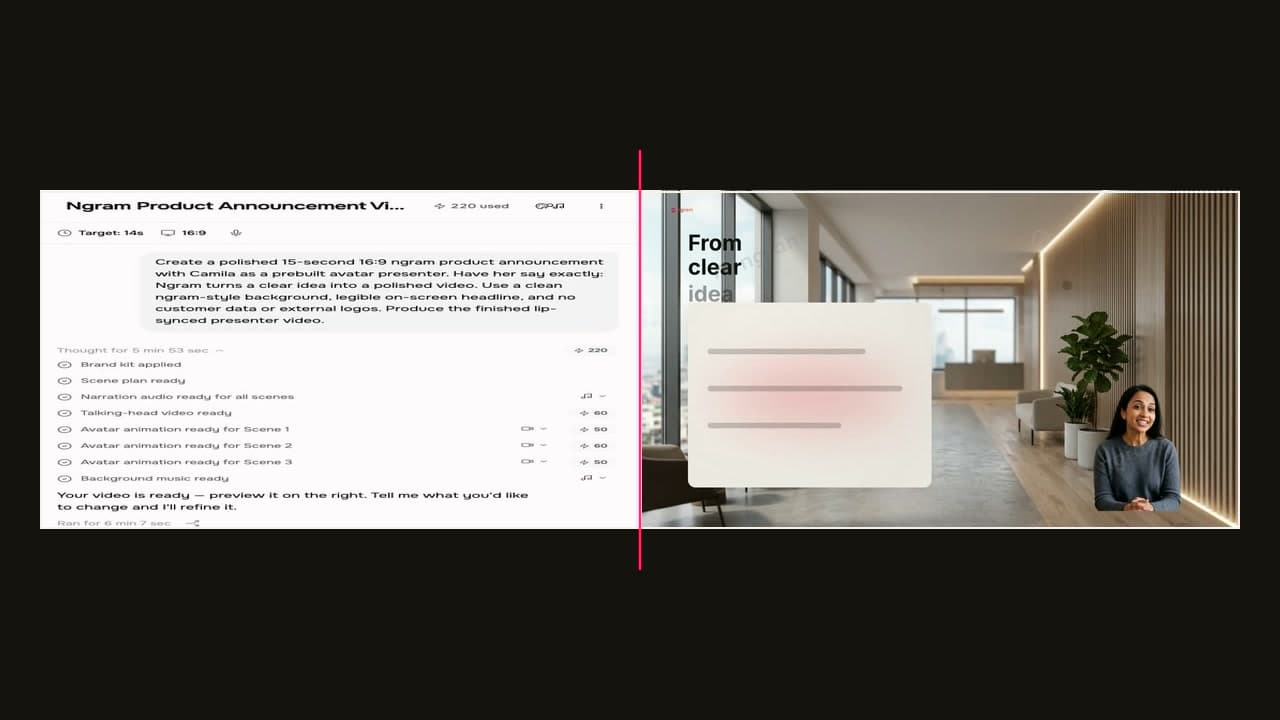
A presenter clip without a filming workflow.
Start from the presenter source
Choose a pre-built avatar, select an approved face from the team library, or provide a face image or short clip for the talking-head workflow.
Generate speech and lip sync
ngram pairs the script with selected voiceover and creates synchronized mouth movement for the avatar or supplied face.
Edit the whole video together
Revise narration scene by scene, update visuals and captions, then download the finished video as MP4.
What makes the presenter useful in ngram
The avatar works as one scene direction inside a video that still has a script, storyboard, brand kit, captions, and export path.
Presenter options stay flexible
Use the filterable pre-built avatar picker, or select an approved face from the per-team library when the video needs a familiar presenter.
Delivery follows the approved words
The presenter follows the video script. Update narration scene by scene, then re-voice the affected scene while retaining its visuals.
Team voices stay available to the project
Choose a voice from the picker or use a consented cloned voice or uploaded recording saved in the per-team voice library.
Translated speech can keep lip sync
For avatar or talking-head videos, ngram can regenerate lip movements to match translated voiceover through agentic chat.
How Dynamic AI Avatar Talking Head works
Choose the presenter source, add the script, generate the talking-head scene, then refine the rest of the video in ngram.
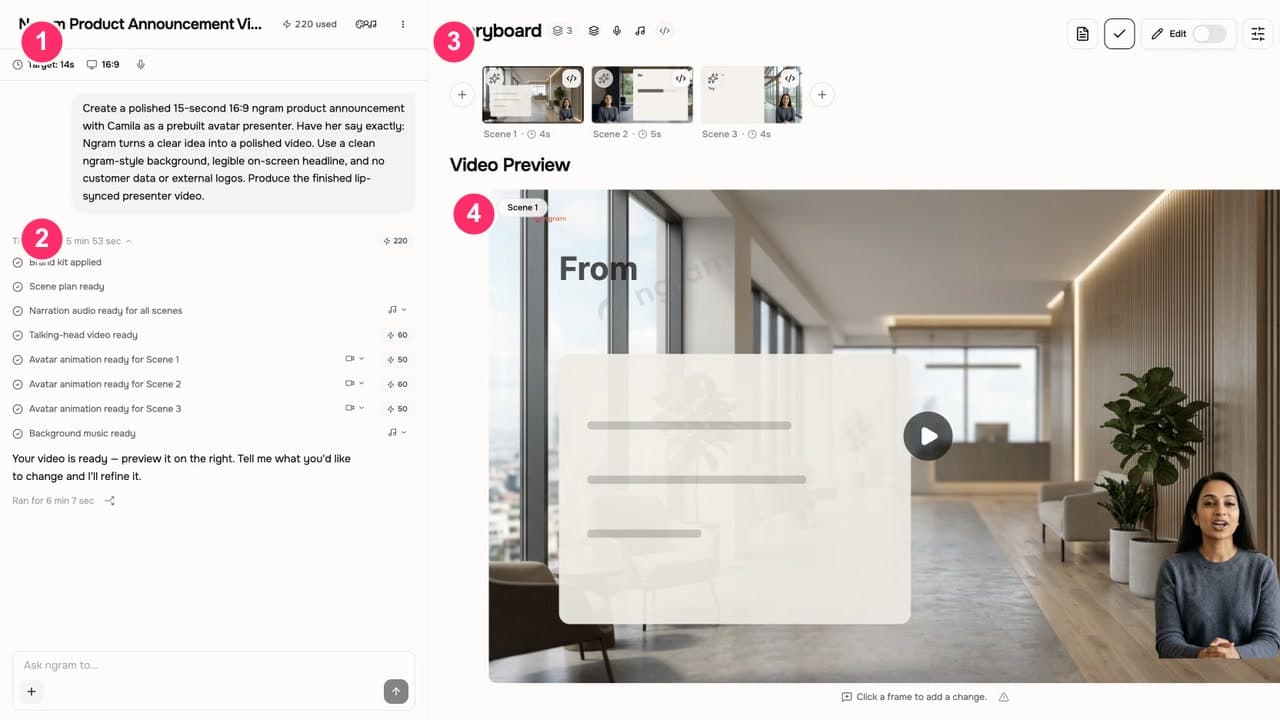
Choose the avatar or face
Pick a pre-built avatar, select an approved face from the team library, or provide a face image or short clip for talking-head lip sync.
Add the script and voice
Use the generated script or paste approved copy, then choose a voice from the picker or a consented cloned or uploaded team voice.
Generate the talking head
ngram creates the avatar or talking-head clip with selected voiceover and synchronized lip movements in the video project.
Review, revise, and export
Edit narration and scenes, review captions, then download the finished video as MP4.
Who uses AI avatar talking heads
AI avatar talking heads help teams explain, sell, train, and update audiences when a real presenter would slow the work down.
Product marketing
Create feature announcements and product explainers with an avatar that introduces the message before the screen demo or motion graphics begin.
Customer success
Turn support docs, SOPs, or walkthrough scripts into presenter-led lessons that customers can watch on demand.
Sales enablement
Use avatar-led intros or recaps when a rep needs a polished message but cannot record a custom take for every account.
HR and internal comms
Use an approved presenter style for recurring internal updates, onboarding modules, and training clips.
Where can you use Dynamic AI Avatar Talking Head?
Use avatar presenters anywhere a script needs a human-style opening, explanation, recap, or localized delivery.
Training Video
Turn your SOPs, screen recordings, and process docs into a corporate training video in under thirty minutes. Smart zooms on every click, step labels on every menu, captions burned in, branded intro applied — ramp new hires faster without booking a video team.
Customer Onboarding Video
Turn help docs or a screen recording of the setup flow into a polished customer onboarding video new accounts actually finish. Reach first-value the same day, not the following week, without booking another live kickoff call.
Feature Announcement Video
Paste your release notes, the PRD, or the product URL. Get back a polished feature announcement video with motion graphics, captions, and your brand kit — ready to ship the same sprint the feature does.
PMM Product Launch
Stop briefing agencies while your launch window closes. A product launch video maker built for PMMs turns your positioning doc, screen recording, and brand kit into the hero film, the social cuts, and the sales walkthrough — all rendered the same afternoon.
Sales Prospecting Video
Record a quick webcam intro or paste a prospect's LinkedIn URL. A sales prospecting video maker hands you back a polished, captioned, branded clip in under five minutes — the kind cold inboxes actually click on instead of archiving.
HR Employee Onboarding Video
An employee onboarding video maker built for HR teams. Turn screen walkthroughs and orientation talks into a modular library new hires can watch, rewatch, and reference months later — instead of a five-hour Monday they forget by Wednesday.
LinkedIn Video
A LinkedIn video maker built for founders, marketers, and operators who keep meaning to post. Drop in a rough selfie clip or a blog post you already published. Get back a captioned, branded LinkedIn video sized 4:5 for the feed in about fifteen minutes.
AI Explainer Video Maker
Evaluate an AI explainer video maker on the source facts it keeps and the edits you can make. Bring one approved document, review the script, then check a specific revision before choosing your workflow.
Dynamic AI Avatar Talking Head compared with the usual alternatives
This comparison uses workflow categories instead of named-competitor claims. In ngram, the avatar or talking head stays connected to the script, voiceover, scenes, and edits.
| Capability | ngram | Filming workflow | Template avatar tool | Point lip-sync tool |
|---|---|---|---|---|
| Presenter source options | ● Pre-built avatars and approved team faces | × Requires a real speaker | ~ Often starts from a fixed library | ~ Usually starts from one supplied face |
| Script connection | ● Presenter speaks from the active video script | × Script changes need another take | ~ Script may live outside the edit | ~ Clip generated apart from storyboard |
| Voiceover and lip sync | ● Voiceover and mouth movement generated together | × Captured during the shoot | ~ Depends on tool setup | ● Core task for the tool |
| Brand, captions, and scenes | ● Connected to the full ngram project | ~ Handled during post-production | ~ Often template-bound | × Usually a separate clip asset |
| Localization and final download | ● Supports translated voiceover and matching lip sync; downloads finished video as MP4 | × Requires a new take or edit for each change | ~ Depends on the selected product and plan | ~ Often needs a separate editor for the final video |
Avatar talking heads work best inside the full video workflow
Use Dynamic AI Avatar Talking Head with the adjacent ngram features that handle script, voice, visuals, brand, motion, collaboration, and export.
AI Voiceover
Generate the spoken track that drives the presenter's lip movement and scene timing.
Script Generation
Draft the message first, then turn the approved script into an avatar-led clip.
Brand Kit
Keep lower thirds, captions, colors, intros, outros, and motion style aligned around the presenter.
AI Visuals
Add generated B-roll, product scenes, and backgrounds around the avatar section.
Motion Graphics
Use callouts, lower thirds, transitions, and animated text to support what the presenter says.
Video Converter
Finish the presenter cut and download its MP4, then convert that single file to MOV, WebM, or MKV. The conversion keeps the existing framing and handles only that file.
Start avatar videos from the source you already have
Bring the script, doc, deck, URL, or image that already contains the message. ngram can turn it into a video project with an avatar presenter section.
Text to Video
Paste a script or prompt and turn it into an avatar-led video draft.
Docs to Video
Turn internal notes, SOPs, and support docs into presenter-led explainers.
PDF to Video
Use a PDF as source material for a scripted avatar explainer or training clip.
PPT to Video
Turn slide content into a narrated video with an avatar intro or recap.
URL to Video
Use a product page, release note, or article URL as the source for a presenter-led video.
Image to Video
Start from a still image and build a video around a presenter, captions, and motion.
Tools that support avatar talking-head videos
Use focused tools when an avatar video needs a script, voice, captions, translation, gaze correction, or final timeline polish.
AI Avatar Video Generator
Create a talking-head video from text when the presenter is the main output.
AI Voice Generator
Generate the spoken narration that drives avatar delivery and lip movement.
Text to Speech Video
Turn written narration into a voiced video with captions and visuals.
Eye Contact AI
Correct off-camera gaze in real presenter footage when you are improving a recorded take.
Video Translator
Translate the script, captions, on-screen text, and voiceover for localized video variants.
Voice Dubber
Dub an existing video when the voice track needs to change for another language or market.
Add Subtitles to Video
Add readable captions to avatar videos before publishing or sharing.
Video Editor
Use the timeline when the avatar scene needs trims, B-roll, audio, or final polish.
Use avatar videos with the integrations already live in ngram
Start avatar-led video work from live creation integrations, then publish finished videos through the live publishing integrations.

Chrome Extension
Turn a source webpage into a video project when an avatar-led explanation should start from existing page content.

Zapier
Trigger ngram workflows from Zapier when a form response, CRM update, or source event is ready for video.

n8n
Connect self-hosted or managed n8n workflows to ngram for repeatable avatar video jobs.

MCP Server
Let AI agents call ngram through the MCP endpoint when a prompt or script should become a video.

Social Publishing is in Beta. Connect LinkedIn with OAuth and publish a finished avatar-led explainer now or on a one-off schedule.

YouTube
Social Publishing is in Beta. Connect YouTube with OAuth and publish a finished avatar tutorial now or on a one-off schedule.

X (Twitter)
Social Publishing is in Beta. Connect X with OAuth and publish a finished avatar-led update video now or on a one-off schedule.
These are the live integration routes available in ngram today. Native product surfaces like chat, face settings, and voice settings are product capabilities, not integrations.
Explore integrationsQuestions about Dynamic AI Avatar Talking Head
What does Dynamic AI Avatar Talking Head do?
Can I use a pre-built avatar?
Can I upload my own face or a teammate's face?
Can I use a custom team voice?
How does the lip sync work?
Can the same presenter speak localized scripts?
Can I edit the script after generation?
Does this replace the rest of the video workflow?
Put your next script on camera
Choose the avatar or face, add the script and voice, generate synchronized speech, then review the final video in ngram.
Create an avatar-led talking-head video, then revise narration and scenes before downloading the finished MP4 from the same project.
Avatar or face, voiceover, captions, scene edits, MP4 download.