Caption generator for branded business videos
Use ngram as a caption generator for business videos. Every video gets auto-generated captions burned in by default, styled through the active brand kit, and ready for translation in a localized cut.
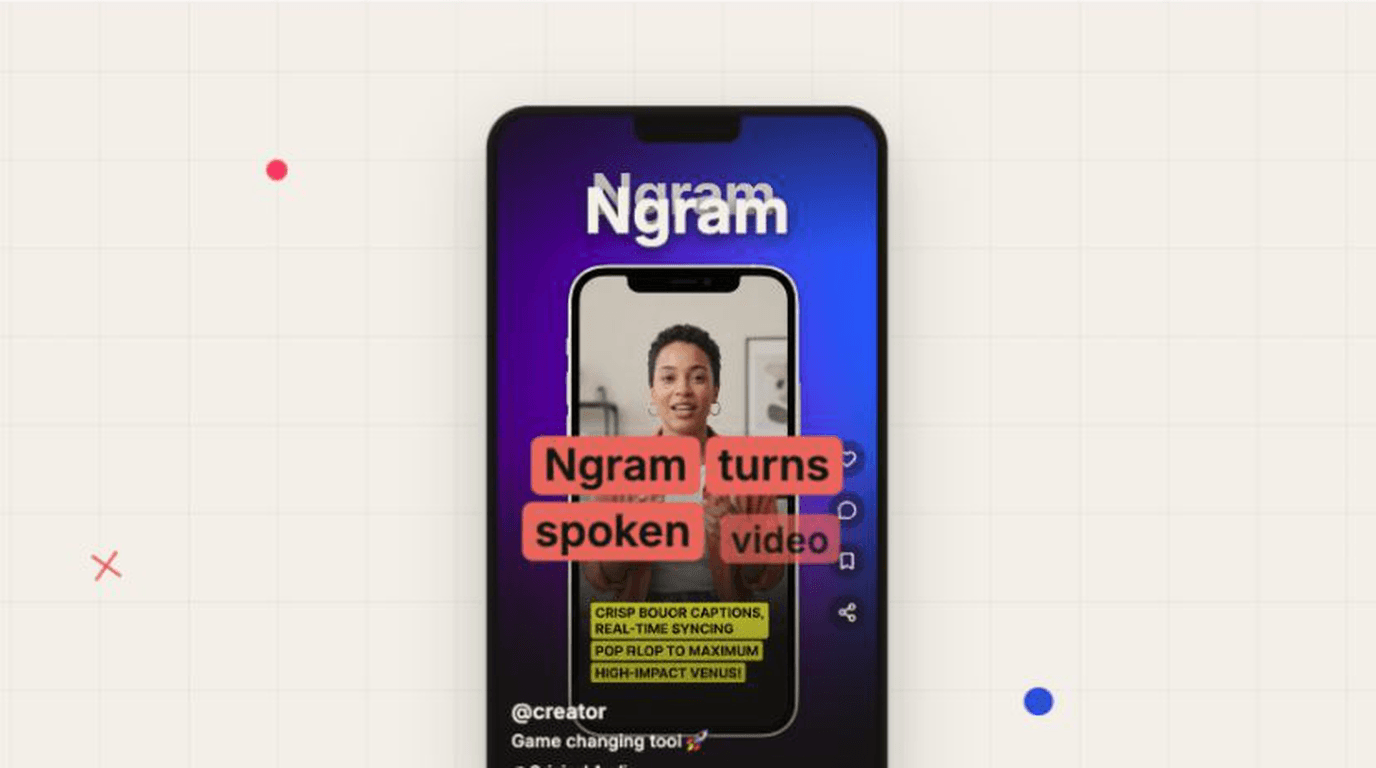
- Auto-generate captions for every video without a separate subtitle pass
- Burn captions into the rendered video so the message works with sound off
- Style caption font, color, and position from the active brand kit
- Translate captions as part of a localized video version
Trusted by teams at


Captions become another editing job when they live outside the video
Most teams treat captions as a last step. Someone exports the video, waits for a transcript, fixes timing, copies brand colors by hand, checks mobile readability, then starts over when the cut changes.
Sound-off viewing exposes missing captions
Launch clips, demos, tutorials, and sales videos often autoplay muted, so the message disappears when captions are not part of the render.
Manual styling drifts from the brand kit
Subtitle tools rarely know your approved font, caption color, safe area, or lower-third style.
Edits break timing
Trim a clip or rewrite a line and the captions need another timing review before the export is safe.
Localization multiplies the work
A translated cut needs the same captions, styling, and layout decisions in the target language.
Captions & Subtitles keeps caption generation, brand styling, localization, and MP4 export inside the same ngram project.
Generate captions, burn them in
ngram creates captions with the video, applies your brand kit, and renders them into the final output by default.
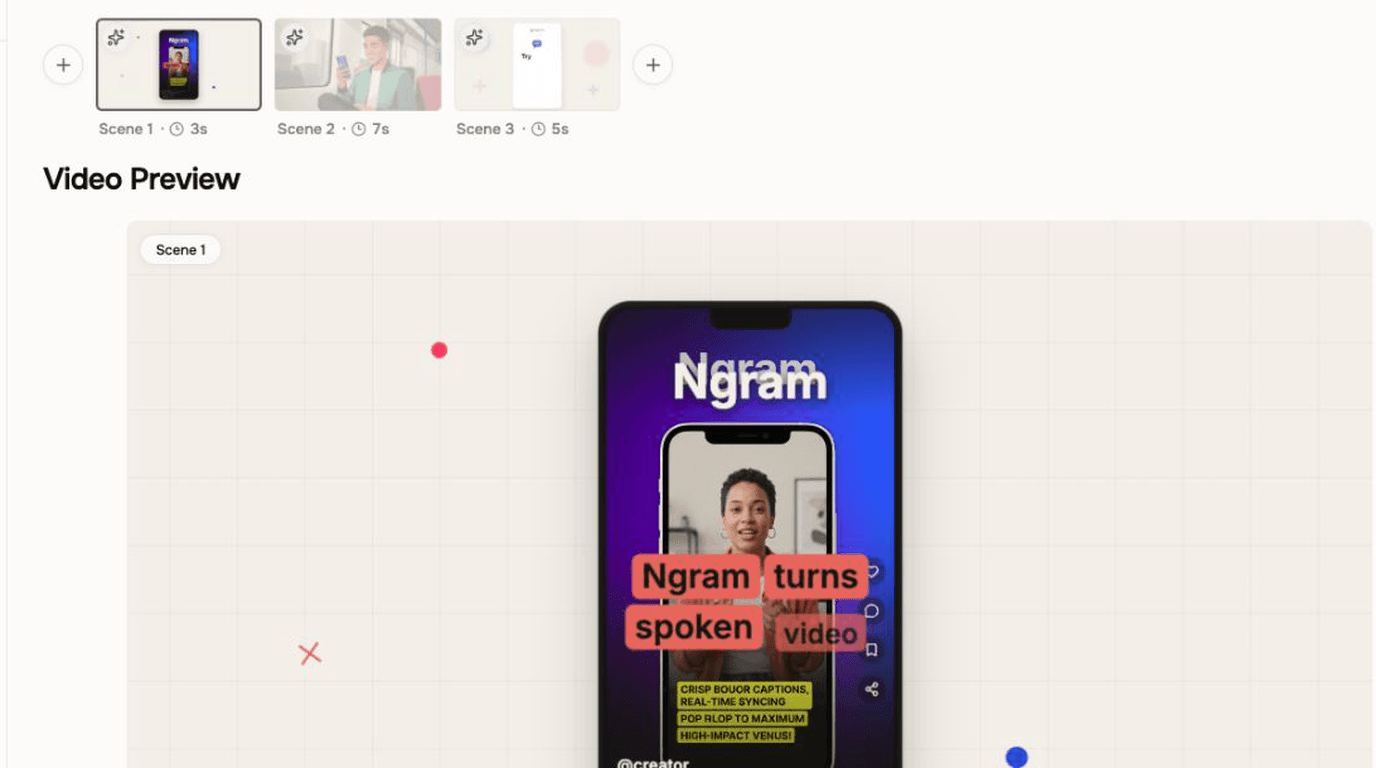
Captioned output stays in the video workflow from the first render through export.
Generate captions automatically
ngram adds captions as part of the video render, so each generated draft arrives with readable text already visible.
Apply the brand kit
Caption font, color, and position follow the active brand kit so the text belongs with the rest of the video.
Translate for localized cuts
The localization workflow translates captions and burns them into the localized version alongside other on-screen text.
What changes when captions are part of the project
Captions stay with the script, brand kit, localization workflow, and export. The team reviews one video project instead of moving subtitle files between tools.
Captions appear on every generated video
The caption layer is part of the draft, so teams do not need to remember it after the video is already exported.
Caption style follows approved rules
Font, color, and position come from the brand kit, keeping demos, tutorials, social clips, and training videos consistent.
Captioned output follows the project
Edit narration scene by scene or work in the timeline, then render a captioned version from the same project.
Captions travel with localized versions
Translate the video in chat, then render the localized version with translated captions and on-screen text.
How Captions & Subtitles works in ngram
Generate or upload a video, apply the active brand kit, localize it when needed, and export an MP4 with captions burned in.
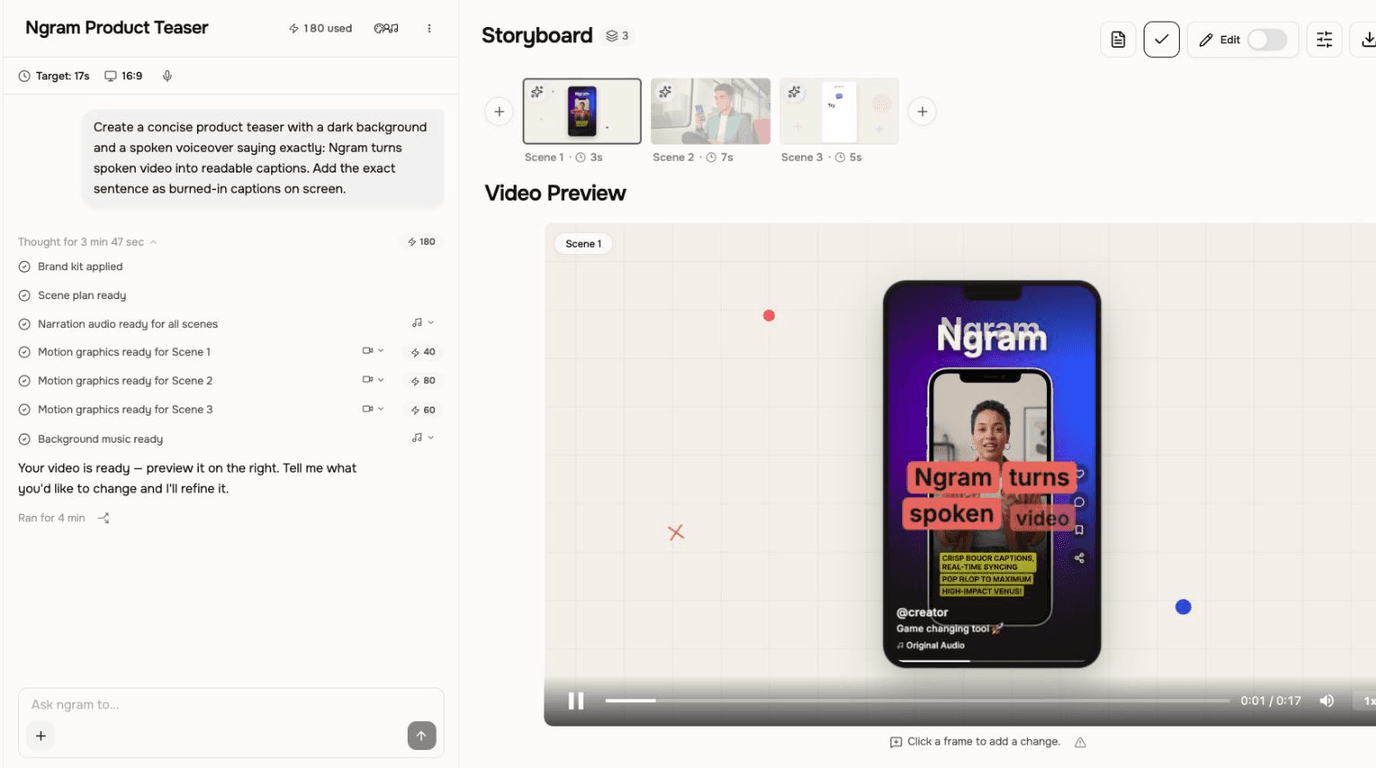
Create or upload the video
Start from a prompt, doc, URL, screen recording, existing video, or finished ngram project.
Render the captioned draft
ngram generates the video with captions burned in by default, so the first rendered draft already works for sound-off viewing.
Refine the project
Use the script editor for narration changes or the timeline for direct video edits, while the active brand kit supplies the caption style.
Localize and export
Ask ngram to translate the video when needed, then export the final captioned version as MP4.
Who uses Captions & Subtitles
Teams use captions when the video must work in muted feeds, shared workspaces, help centers, training libraries, and localized campaigns.
Product marketing
Add branded captions to product demos, feature launches, and social clips so the message lands before someone turns sound on.
Customer success
Caption onboarding and support videos so viewers can follow the walkthrough in a meeting, office, or help-center article.
Learning and development
Burn captions into training videos so employees can scan, pause, and revisit instruction without relying on audio.
Sales enablement
Caption demo recaps and personalized videos so prospects can understand the pitch from their inbox or phone.
Where can you use captions?
Captioned videos help when the audience is watching at work, on mobile, in a help center, or across markets.
Product Demo Video
Drop in a rough screen recording or paste your product URL. A product demo video maker built for SaaS hands you back a clean walkthrough with smart zooms, captions, and brand polish — no timeline editor in sight.
Sales Demo Video
Record your product once. Spin up a prospect-specific sales demo video for every deal in your pipeline — branded, captioned, and ready in fifteen minutes. No SE waitlist, no agency invoice, no "picture your data here."
Customer Onboarding Video
Turn help docs or a screen recording of the setup flow into a polished customer onboarding video new accounts actually finish. Reach first-value the same day, not the following week, without booking another live kickoff call.
Support Help Video
A customer support help video maker built for the broader knowledge base — troubleshooting flows, multi-step fixes, error-state recoveries. Smart zooms on every click, captions for muted browsing, embedded across the help center, chatbot, and in-app drawer. Fewer tickets. Faster resolutions.
Training Video
Turn your SOPs, screen recordings, and process docs into a corporate training video in under thirty minutes. Smart zooms on every click, step labels on every menu, captions burned in, branded intro applied — ramp new hires faster without booking a video team.
LinkedIn Video
A LinkedIn video maker built for founders, marketers, and operators who keep meaning to post. Drop in a rough selfie clip or a blog post you already published. Get back a captioned, branded LinkedIn video sized 4:5 for the feed in about fifteen minutes.
Marketing Social Clips
This social media video maker turns a recording or blog post into an on-brand clip for the channel you choose. Build each additional channel version as a separate edit with its own framing and captions.
Webinar Clips
Upload your Zoom or Teams recording. A webinar clips workflow built for content teams returns ten polished, captioned cutdowns of every key moment, sized for LinkedIn, Shorts, and Reels — no scrubbing, no Premiere, no letting the recording rot in a shared drive.
Caption generation without a second subtitle workflow
ngram keeps captions tied to the video project, brand kit, edits, translation, and final export instead of handing the work to a separate subtitle tool.
| Capability | ngram | Manual workflow | Caption tools |
|---|---|---|---|
| Caption creation | ● Generated with the video project | ~ Transcript and timing pass | ● Caption-first workflow |
| Burned-in output | ● Burned in by default | ~ Depends on editor setup | ~ Varies by tool |
| Brand styling | ● Uses brand-kit font, color, position | ~ Copied by hand | ~ Style presets or manual controls |
| Edits and timing | ● Reviewed with clips, audio, effects | ~ Retiming after edits | ~ Often separate from project edit |
| Caption translation | ● Translated for supported languages | ~ Separate localization pass | ~ May need another export flow |
| Final video workflow | ● Captions stay in the same project | × Scattered files and approvals | ~ Strong for captions only |
Use Captions & Subtitles with the rest of ngram
Captions work best when the script, edit, voice, brand kit, localization, and export stay connected in one video project.
Video Editing
Edit the captioned video's narration, clips, audio, effects, and scenes without moving the project into a separate editor.
Brand Kit
Keep caption font, color, placement, intros, outros, and CTAs aligned with the brand.
Translation & Localization
Translate captions alongside script, voiceover, on-screen text, and localized video variants.
AI Voiceover
Pair captions with generated narration, pronunciation controls, and scene-level re-voicing in the same captioned video.
Script Generation
Start with a clear script so captions, voiceover, and scenes carry the same message.
Screencast Understanding and Editing
Turn rough screen recordings into captioned demos and explainers with context-aware edits.
Start captions from the material you already have
Use these converter pages when captions start from subtitle text, screen recordings, scripts, docs, slides, or webinars.
Captions to Video
Turn approved caption lines into a branded video, then render the project with captions included.
Screen recording to Captioned demo
Turn a rough product capture into a polished demo with captions, smart zooms, and the active brand kit.
Text to Captioned video
Start from a script, announcement, or prompt and render a video with captions included.
Document to Captioned explainer
Turn docs into a video project where captions follow the approved script and scene plan.
Slides to Captioned presentation video
Convert a deck into a captioned video for training, sales, or customer education.
Webinar to Captioned clips
Cut long recordings into shorter clips and add captions for social, email, or follow-up use.
Tools that support captions and subtitles
Use focused tools when a video needs captions, subtitles, transcript cleanup, translation, editing, or export prep.
Video Caption Generator
Use a one-shot caption workflow for an existing launch clip, demo, social video, or tutorial.
Auto Subtitle Generator
Use a focused subtitle workflow when an existing recording needs captions before handoff.
Add Subtitles to Video
Use a focused subtitle pass for a finished source video that needs a captioned handoff.
Video to Text
Extract transcript text when captions, summaries, or follow-up copy need review.
Video Editor
Make direct timeline and scene edits to a captioned project before rendering its MP4 export.
Video Translator
Translate an existing video when the job is a one-shot localization handoff rather than a full project.
Add Text to Video
Add titles, callouts, and labels that work with the caption layer.
Video Converter
Convert a finished captioned MP4 into another file format after the Studio export is complete.
Use captioned videos with the integrations already live in ngram
Start captioned video work from live creation integrations, then publish approved captioned videos through live publishing integrations.

Chrome Extension
Use the Chrome Extension when a webpage or product flow should become source material for a captioned video.

Zapier
Trigger ngram work from Zapier when a form, CRM event, or request should create a captioned video task.

n8n
Connect n8n workflows to ngram when internal systems need to request captioned videos.

MCP Server
Let AI agents call ngram through MCP when a prompt, file, or source bundle should become a captioned video.

Social Publishing is in Beta. Connect LinkedIn with OAuth and publish a finished captioned product demo now or on a one-off schedule.

YouTube
Social Publishing is in Beta. Connect YouTube with OAuth and publish a finished captioned tutorial now or on a one-off schedule.

X (Twitter)
Social Publishing is in Beta. Connect X with OAuth and publish a finished captioned update video now or on a one-off schedule.
Only the integration detail pages that are live on ngram are listed here.
See all integrationsCommon questions about captions and subtitles
Still curious?
Ship videos people can watch on mute
Start with a prompt, recording, file, or existing video, then render a captioned MP4 ready for review.
Create captioned videos with brand-kit styling and translated subtitle options in the same ngram project.
Auto-generated captions. Brand-kit styling. Localized versions.