Read before this
Read these direct prerequisites in order. Each guide lists any earlier context it assumes.
Review the explanation before producing visuals
A compliance reviewer must approve the order and wording of a policy lesson. Correct the script and scene plan while those decisions are still being reviewed. Check the exact term and instruction the learner will hear.
If the explanation is already right and a graphic merely arrives too early, adjust the timeline of the finished cut. Align an element with the narration.
Check the claims before production (illustrated guide)
Review and approve one plan before video production. The plan contains the script that will appear in your video. Check the message, facts, scene order, and call to action here; no separate script or storyboard approval is required.
Before you review the plan
Start a video from Home and wait for the plan. Keep your source material available so you can check the script and claims before approving the plan.
Review and approve the plan
- Read the script inside the plan to check the proposed narration.
- Open Production details to review the planned approach.
- Choose Request changes if the direction needs work. Explain the change and what should stay.
- Review the revised plan.
- Choose Approve plan when you are ready for production. This also approves the script within the plan.
After approval, the conversation moves into production. Reading Script is a review action; use Request changes or chat to change its wording rather than assuming it is an editable text field.
After production, use View plan above the preview to revisit the saved direction. This example shows the speaker roles and scene instructions for a completed Q&A.
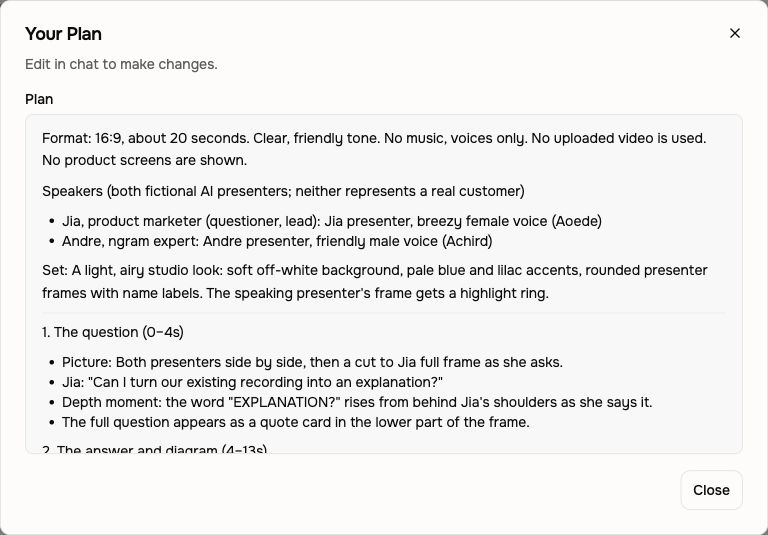
Check the dialogue and visual explanation
For Conversation, check who asks each question and who answers it. Name the speakers or roles when requesting a change, and keep approved facts intact. A presenter’s words should not be presented as a real customer testimonial unless you supplied and authorized that testimony.
For uploaded footage, say which original speech to keep, clean, replace or mute. Check where labels or diagrams appear over the recording and where a full-frame graphic replaces the picture while speech continues.
For Machine anatomy, check the planned parts, labels and sequence against your source. For Depth captions, review the emphasis words separately from ordinary subtitles. Choose saved Brand Kit intro/outro slides explicitly when you want them in the video.
If production has not started
Check whether the plan is waiting for approval or whether the conversation needs another answer. After requesting a change, review the revised plan before approving it. Avoid approving an older plan while a new revision is still being prepared.