AI script generator for source-led videos
Use ngram as an AI script generator for video. Turn a prompt, PDF, Markdown file, URL, screenshot, recording, deck, or raw video into a script, storyboard, scene plan, and CTA.

- Create scripts from prompts, PDFs, Markdown files, URLs, recordings, and decks
- Map each line to scenes, visuals, timing, and CTA
- Edit the script directly or ask ngram to revise it
Trusted by teams at












A blank script delays the whole video
Most teams already have the material: release notes, decks, product pages, tickets, recordings, or support docs. The hard part is turning it into a clear video structure.
Source material is not a script
Docs and pages contain useful facts, but they do not decide the hook, scene order, or CTA.
Generic AI drafts need reshaping
Paragraphs still need to become scenes, narrator lines, visual cues, and timing.
Edits ripple through the project
A script change affects visuals, captions, voiceover, and the final timeline.
Script Generation turns source material into a reviewable video plan before rendering begins.
Script and storyboard, built together
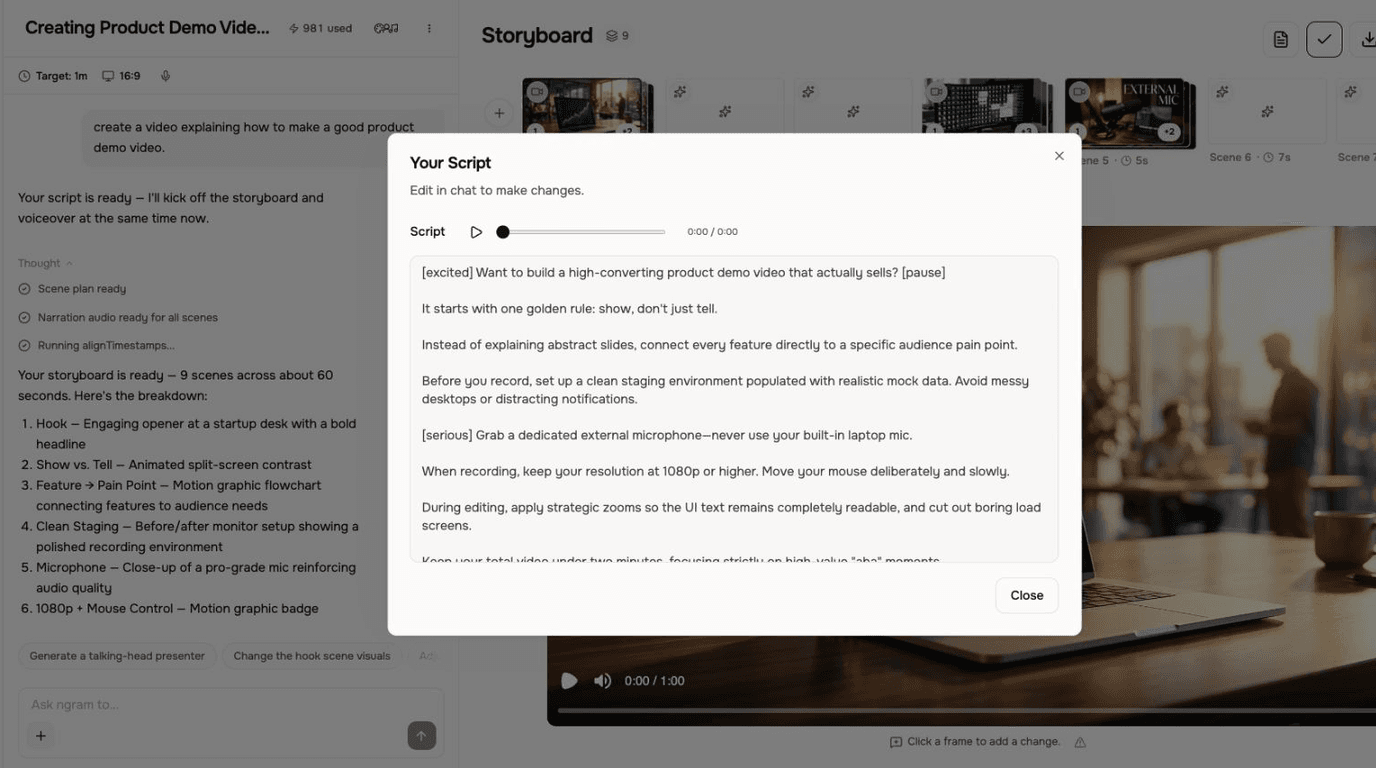
Script Generation turns source material into a scene-by-scene script and storyboard that the rest of the video workflow can use.

The script becomes the control layer for the whole video.
Reads real source material
Use a prompt, PDF, Markdown file, URL, screenshot, screen recording, deck, or raw video as input.
Plans scenes and timing
ngram maps the script to scenes with visual direction, timing, audience context, and a CTA.
Editable after generation
Edit the narration in Edit → Script or ask in chat, then regenerate the affected scene when the plan changes.
The script is built for the renderer
Script Generation does not stop at prose. It creates a script and storyboard that downstream video features can use.
Starts from business material
Prompts, PDFs, Markdown files, URLs, recordings, screenshots, decks, and raw video can feed the script.
Scene plan included
The output includes narration, visual direction, timing, and CTA decisions.
Edits stay connected
Script changes can guide storyboard, voiceover, captions, and scene regeneration.
How Script Generation works
Bring source material, define the audience and goal, review the script and storyboard, then revise and render the video.
Add source material
Use a prompt, PDF, Markdown file, URL, screenshot, recording, deck, or raw video.
Set audience and goal
Tell ngram who the video is for, where it will go, and what the CTA should be.
Generate and review the plan
ngram drafts the script and storyboard; review the hook, scene order, visual direction, timing, and CTA.
Revise, regenerate, and render
Edit the script or ask in chat, regenerate the affected scene, then render the finished video.
Who uses Script Generation
Script Generation helps business teams turn existing material into clearer videos without separating the feature from the main ngram workflow.
Product marketing
Turn release notes, pages, and product context into a script and storyboard.
Agencies
Create structured video scripts for different client brands and audiences.
Customer success
Turn help content and SOPs into scenes with narration and visual direction.
Founders
Turn notes, decks, and product context into a clear video outline.
Where Script Generation fits in the real work.
Use Script Generation in the moments where a business message needs to become a clear, polished video for a specific audience, channel, or workflow.
Product Launch Video Maker
Turn the feature PRD, the screenshots, or a rough screen recording into a launch-ready video. A product launch video maker built for SaaS hands you back motion graphics, captions, brand polish, and a reviewed edit for each channel you need, without an agency invoice or a missed release window.
Sales Prospecting Video
Record a quick webcam intro or paste a prospect's LinkedIn URL. A sales prospecting video maker hands you back a polished, captioned, branded clip in under five minutes — the kind cold inboxes actually click on instead of archiving.
Training Video
Turn your SOPs, screen recordings, and process docs into a corporate training video in under thirty minutes. Smart zooms on every click, step labels on every menu, captions burned in, branded intro applied — ramp new hires faster without booking a video team.
Customer Onboarding Video
Turn help docs or a screen recording of the setup flow into a polished customer onboarding video new accounts actually finish. Reach first-value the same day, not the following week, without booking another live kickoff call.
Explainer Video
Paste your landing page URL, a product doc, or a rough script and get a polished explainer video back inside 30 minutes. An explainer video maker built for SaaS — no animation skills, no agency brief, no six-week production cycle.
Feature Announcement Video
Paste your release notes, the PRD, or the product URL. Get back a polished feature announcement video with motion graphics, captions, and your brand kit — ready to ship the same sprint the feature does.
Script Generation compared with the usual alternatives
Script Generation is built into the ngram video workflow. The comparison below uses conservative workflow categories instead of unsupported competitor claims.
| Capability | ngram | Manual workflow | Template editor | Point tool |
|---|---|---|---|---|
| Input context | ● Prompts, files, URLs, recordings, decks | × Manual research and notes | ~ Template prompt fields | ~ Text prompt only |
| Video structure | ● Script, storyboard, scenes, CTA | × Written by hand | ~ Template outline | ~ Usually prose output |
| Downstream use | ● Feeds visuals, voiceover, captions, render | × Manual handoff | ~ Template-dependent | ~ Copy and paste |
| Revision path | ● Edit script or ask in chat | × Rewrite manually | ~ Adjust template sections | ~ Generate another draft |
Script Generation is stronger as part of a full video workflow
Use Script Generation with the adjacent ngram features that handle script, visuals, voice, brand, motion, collaboration, and export.
AI Voiceover
Turn the generated script into narration in the same project
Brand Kit
Use tone, approved phrases, blocked phrases, and CTAs while the script takes shape
Collaboration
Share the project, source assets, conversation, and versions with your workspace
Video Editing
Take the generated plan into the timeline, canvas, and agentic chat for a focused edit
Motion Graphics
Turn the script's visual direction into branded overlays, callouts, and animated graphics
Start Script Generation from the source you already have
Already have a doc, recording, page, or deck? Use a converter to create the first draft, then refine the result with this feature in the editor.
Text to Video
Turn prompts, outlines, and rough scripts into a storyboarded video draft with scenes ready to refine.
Blog post to Video
Convert long-form writing into a narrated video with a tighter hook, sections, and visual beats.
Release notes to Video
Turn a changelog or product update into a clear announcement video for customers or prospects.
Product docs to Video
Transform help docs and product pages into explainers that show what changed and why it matters.
URL to Video
Give ngram a live page and let it pull source context into a video plan.
Docs to Video
Start from internal docs, SOPs, or briefs and generate a structured video draft.
Small utilities that help finish Script Generation videos
Use these focused tools on their own or as part of a bigger ngram workflow when a video needs cleanup, captions, conversion, or packaging.
Video Script Generator
AI Video Generator
YouTube Title Generator
YouTube Description Generator
Audio to Text
Video to Text
Auto Subtitle Generator
Add Subtitles to Video
Connect ngram to the tools your team already uses
Use the live integration routes for automation, browser capture, agent access, and publishing. Keep video creation close to the work that starts it.

Zapier
Trigger ngram workflows from Zapier when a source event or form submission is ready for video.

n8n
Connect self-hosted or managed n8n workflows to ngram for repeatable video jobs.

MCP Server
Let AI agents call ngram through the Model Context Protocol endpoint when a video needs to be created.

Chrome Extension
Capture web context from the browser and send it into ngram as source material for a new video.

YouTube
Social Publishing is in Beta. Connect YouTube with OAuth and publish a finished script-led tutorial now or on a one-off schedule.

Social Publishing is in Beta. Connect LinkedIn with OAuth and publish a finished script-led product update video now or on a one-off schedule.

X (Twitter)
Social Publishing is in Beta. Connect X with OAuth and publish a finished script-led update video now or on a one-off schedule.
Need to start video work from another system? Explore the live integration routes and keep the script connected to its source project.
Explore integrationsQuestions about Script Generation
Still curious?
Create your next video with Script Generation
Script Generation works inside ngram, so the script, scenes, brand, assets, and export path stay connected from first draft to final video.
Built for business video teams. Connected to the ngram workflow.