Video collaboration in one team workspace
Use ngram for video collaboration in a shared team workspace. Invite teammates, use the same brand kits and assets, reopen past projects, and share an agentic conversation with the team.
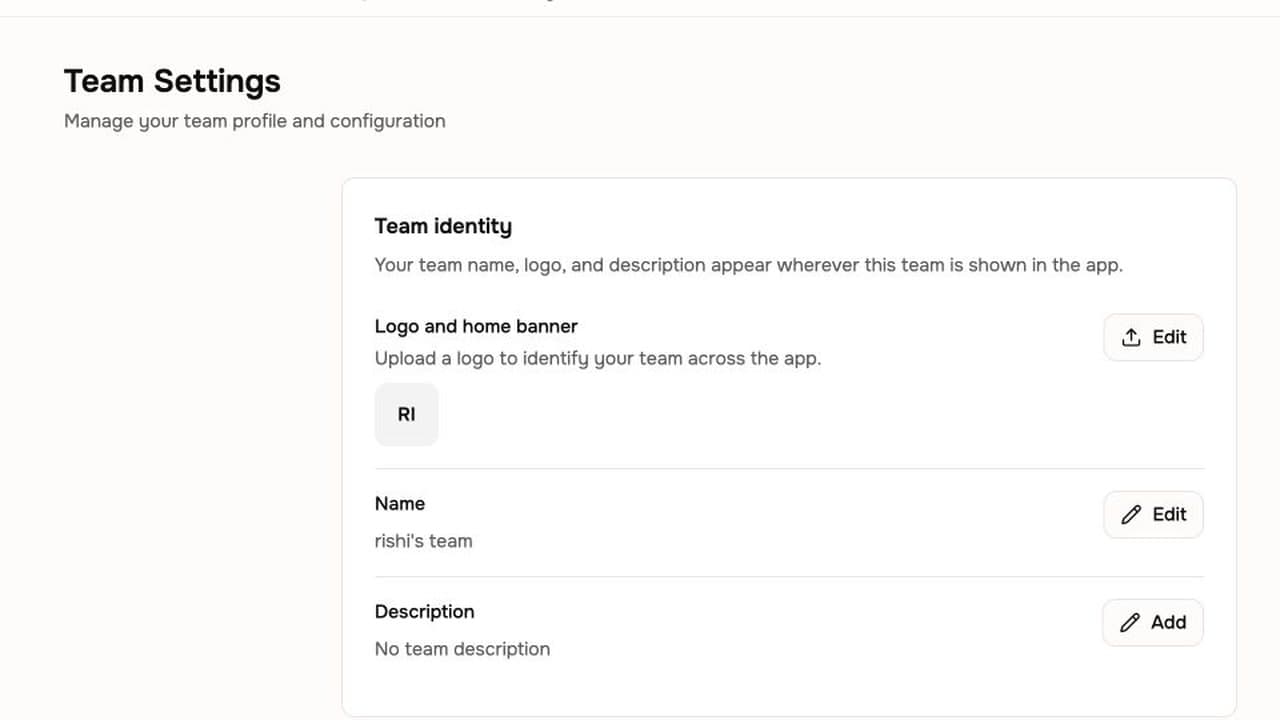
- Work inside shared team workspaces
- Reuse brand kits and generated assets across projects
- Reopen past projects and reuse their generated assets
Trusted by teams at










Team video work gets split across separate places
A team may start a video from a document, recording, or page, then keep the project, brand material, generated assets, and working conversation in different places. Finding the useful project again takes time.
Projects are hard to find again
A useful draft can disappear into a personal chat or an old folder when the team needs to reopen it.
Brand assets drift between projects
Teams copy logos, colors, and files from old folders instead of a shared workspace source.
Useful conversations stay private
A teammate cannot see the work behind a project unless its agentic conversation is shared into the workspace.
ngram keeps the project, team, and assets together.
Move isolated work into a shared workspace
Collaboration brings a team's project, brand kit, generated assets, and shared agentic conversation into the workspace where the team can find and continue the work.
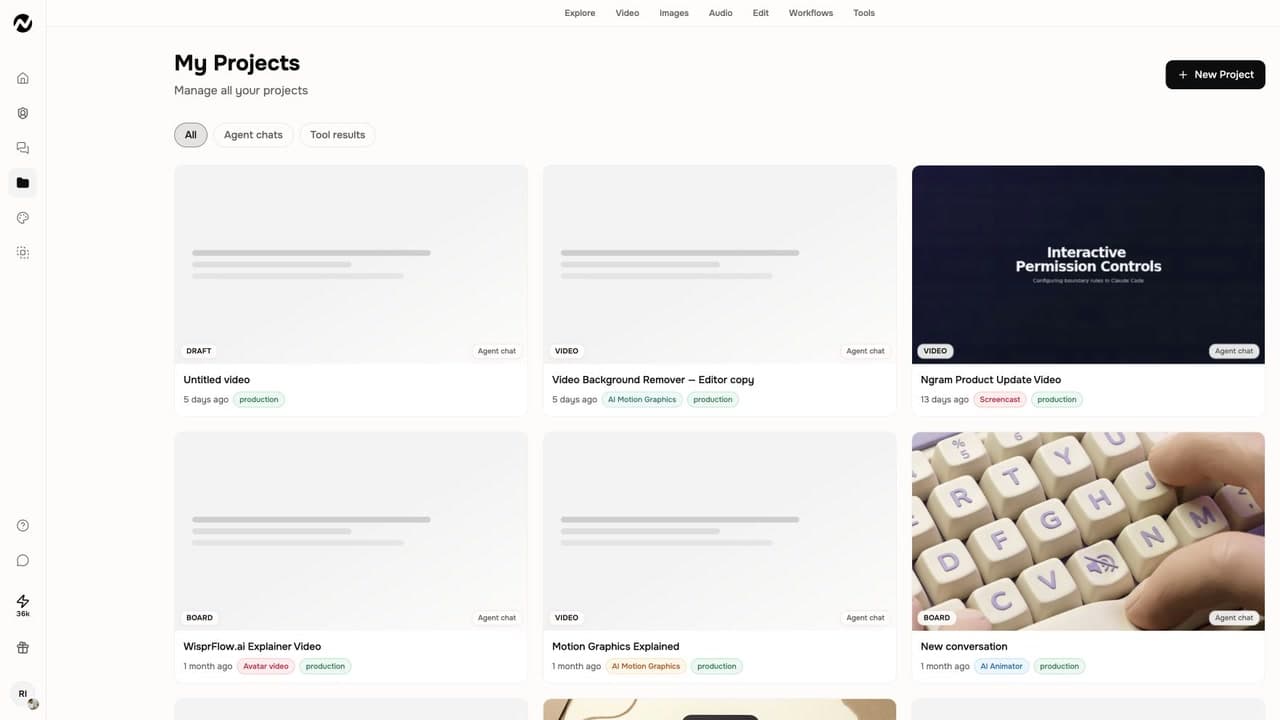
Keep the people and materials behind a project in one workspace.
Shared workspaces
Multiple users work in one workspace, while workspace admins invite teammates and manage roles.
Shared brand and asset libraries
Shared brand kits and asset libraries keep the material used for a video available across the workspace.
Shared conversations and projects
A member can share their own agentic conversation with the team, and the projects dashboard lets users reopen past work.
The workspace keeps work ready for the next video
Team workspaces keep the projects, brand kits, generated assets, and conversations that support a video close enough to reuse when the next message needs to go out.
Admins manage the team workspace
Workspace admins invite teammates and manage roles. The product state does not define individual role permissions.
Projects stay available to reopen
The projects dashboard lists generated work so users can browse, reopen, reuse, or re-edit past videos and their assets.
Conversations can join the workspace
A team member can share their own agentic conversation with the team, giving teammates a view of that work's chat context.
Bring the team into the project
Invite teammates, share the project materials and an agentic conversation, then use the projects dashboard and Versions gallery to continue work or view/download prior renders.
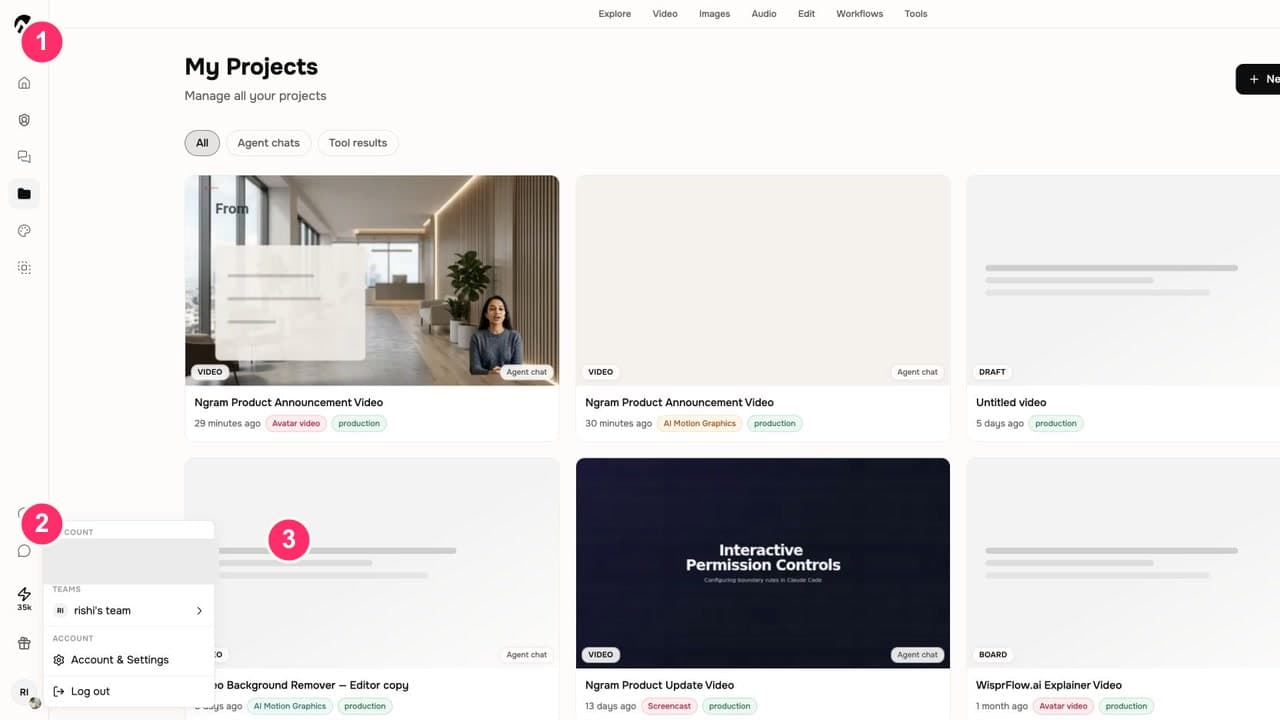
Invite teammates
A workspace admin invites teammates and manages the workspace roles in team settings.
Share the work behind the video
Use the workspace's brand kits and assets, then share your own agentic conversation with the team when it belongs with the project.
Reopen work and view earlier versions
Browse the projects dashboard to reopen or reuse a past project. When a conversation has multiple renders, open an earlier version to view or download it without changing the current session.
Who uses Collaboration
Collaboration helps teams keep the people, projects, brand material, and reusable assets behind a business video in the same workspace.
Product marketing
Keep a launch project's selected brand kit, generated assets, and team conversation together before the next update.
Agencies
Keep client video projects and their workspace assets organized so the team can reopen work when the next deliverable starts.
Customer success
Keep the brand kit, generated assets, and past onboarding projects available while the team creates the next customer video.
Founders
Keep a founder update project and its source assets in the workspace, then reuse the work for the next release.
Where video collaboration fits in the work
Use shared workspaces when an update, client deliverable, or onboarding video needs a team to find the project, reuse its materials, and continue from the same context.
PM Internal Update
Record a quick walkthrough of your sprint board. Get back a polished async video update the Berlin team, your VP, and the new hire all watch on their own clock. An internal update video that respects every time zone.
CS Onboarding Video
Turn a rough screen recording of the setup flow into a polished customer onboarding video new accounts actually finish. Scale from fifty kickoffs a month to five hundred without booking another live call.
PMM Feature Announcement
Drop a screen recording, paste the release notes, or point at the PR — ngram gives you back a feature announcement video with smart zooms on every new interaction, captions, and your brand kit, built for B2B PMMs whose marketing velocity keeps falling behind engineering's.
Agency Client Deliverable Video
A client deliverable video pipeline built for agencies running multiple retainers. Turn raw recordings, briefs, or client URLs into polished explainers, social cuts, and demo walkthroughs before the next status call — no editor backlog, no freelancer coordination.
Internal Communication Video
Drop in a webcam recording, paste a written announcement, or upload the all-hands replay. An internal communication video maker built for distributed teams hands you back short, captioned, brand-matched updates employees finish across every timezone.
Founder Product Update
A founder product update video for every release — recorded on a laptop, polished in fifteen minutes, posted everywhere your customers and backers already pay attention. No video team, no agency invoice, no waiting until next month's email to announce what shipped this week.
Collaboration compared with the usual alternatives
Collaboration is part of the ngram video workflow. The comparison uses workflow categories and does not claim how any named product handles team access.
| Capability | ngram | Manual workflow | Template editor | Point tool |
|---|---|---|---|---|
| Project context | ● Projects, assets, and brand kits in one workspace | × Often split across chats and folders | ~ Template file and account sharing | ~ Depends on the point tool |
| Brand reuse | ● Shared brand kits | × Often copied from old projects | ~ Depends on the template setup | ~ Depends on the point tool |
| Asset reuse | ● Projects dashboard and shared asset library | × Manual folder search | ~ Depends on the editor | ~ Depends on the point tool |
| Team access | ● Admins invite members and manage roles | × Ad hoc coordination | ~ Depends on the editor | ~ Depends on the point tool |
Keep the team context while the video takes shape
Pair Collaboration with the features that supply the shared brand direction, script, and scene visuals for a project the team can return to.
Brand Kit
Set the shared logo, colors, fonts, motion style, voice, and messaging rules a workspace can apply to generated videos.
Script Generation
Turn a prompt, file, URL, screenshot, recording, deck, or raw video into the script and storyboard the workspace can build on.
AI Visuals
Generate scene imagery from project context, then keep the visual direction connected to the project's selected brand kit.
Start a shared project from the source you already have
Turn a document, recording, public page, or release note into a video project, then keep the resulting work and its generated assets available to the team workspace.
Docs to Video
Turn shared product knowledge, process notes, or policy documents into a video project the workspace can reopen later.
Recording to Video
Turn a real product recording into a polished project, then keep its generated assets available for future work.
URL to Video
Use a public product page, landing page, doc, article, case study, help page, or release note as the starting point for a team project.
Release notes to Video
Turn shipped changes into a project the team can return to for the next product update.
Tools that keep team video work moving
Use these focused tools to record, edit, caption, and package work, then keep the next project and its assets organized in the workspace.
Bring source work into the team workspace
Use the live integrations to start a video from an automation, agent, or browser page, then organize the resulting project and assets with the team.

Zapier
When a Zap has the source material for a team video, trigger an ngram render and keep the resulting work in the workspace.

n8n
When an n8n workflow has source material ready, use the ngram node to start a video project the team can continue in the workspace.

MCP Server
When an MCP client needs a video, let the agent call ngram and return a project the team can find alongside its other work.

Chrome Extension
When a teammate has the source page open in Chrome, start a new ngram video from that web context and keep the project in the workspace.
Use an integration when the source work starts outside ngram, then keep the resulting project and its reusable assets in the team workspace.
Explore integrationsQuestions about Collaboration
Still curious?
Create your next video with Collaboration
Keep team video work in one ngram workspace: invite members, share brand material and assets, reopen past projects, and share the conversations behind them.
Team workspaces, shared brand kits, reusable projects