Make every video feel on brand from the first scene
Brand Kit gives a workspace one reusable source for its logo, colors, fonts, motion, image and screenshot styles, voice and tone preferences, CTAs, example assets, and phrase guardrails—then applies that direction when ngram generates a video.
- Set a workspace brand kit with logo, colors, fonts, and visual styles
- Guide generated copy with voice, tone, approved phrases, and blocked phrases
- Choose the right kit for a project in the start wizard before generation
Trusted by teams at


A style guide is hard to carry into every video
A video combines copy, captions, motion, visuals, and a closing message. When the relevant brand choices are scattered across files and briefs, each new project starts with the same translation work.
Visual direction gets rebuilt project by project
Logo use, colors, fonts, motion, and screenshot treatment can be lost between a source brief and a finished scene.
Tone rules live outside the creation flow
A team may know which phrases fit its voice and which do not, but those guardrails are easy to omit from a fresh prompt.
Shared work needs a common starting point
Without workspace-level direction, teammates repeat setup work and outputs can drift even when they begin with similar material.
Brand Kit puts the visual source and phrase guardrails where a new ngram project begins.
Turn a brand source into scene direction
Set up a workspace brand kit manually, or generate a visual direction from a website URL or sample images. ngram uses the selected kit to shape the project’s visual treatment and validates generated content against its phrase guardrails.
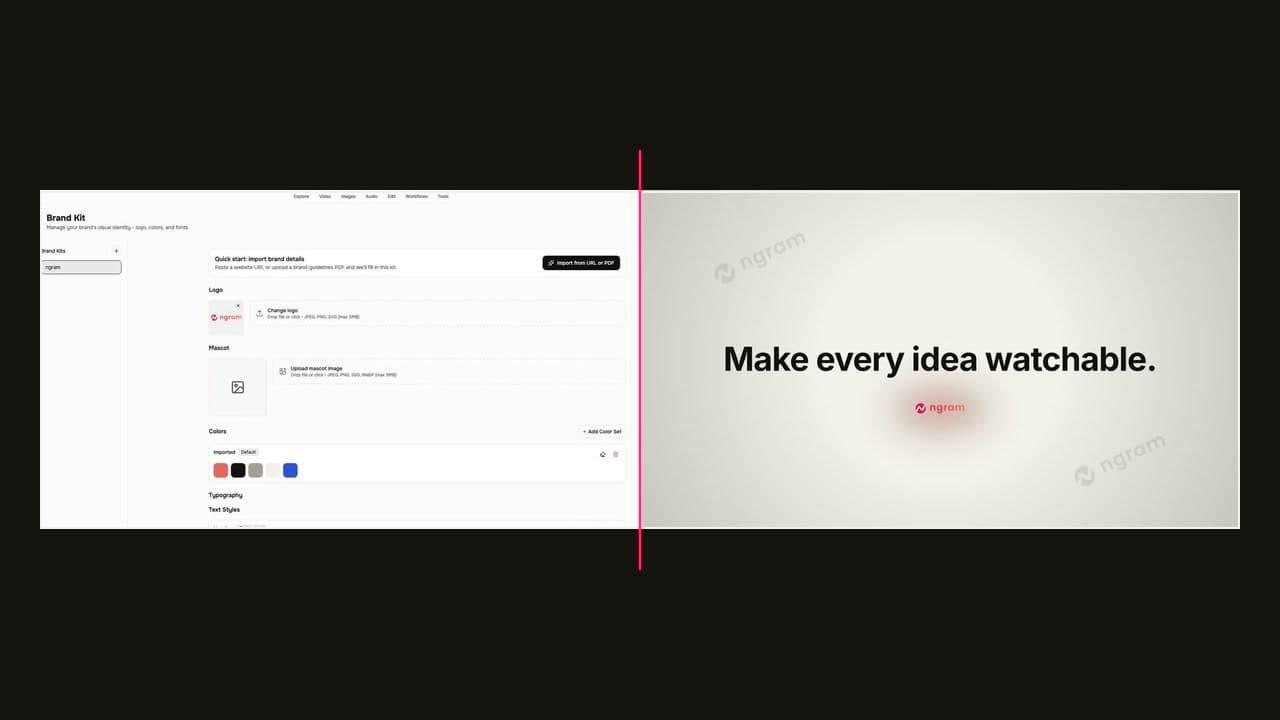
A selected kit gives generation the same visual and language context from the start.
Keep the visual source together
Store logo, colors, fonts, motion style, image style, screenshot style, CTAs, and example assets in the workspace kit.
Give copy a clear boundary
Add voice and tone preferences alongside approved and blocked phrases; the agentic generation flow checks generated content against those phrase lists.
Choose a kit before a project starts
Select the brand kit in the start wizard, then let that chosen direction inform the generated video’s scenes, captions, graphics, and branded intro or outro.
Brand direction that reaches the video workflow
Brand Kit is a workspace setting for the elements that make a video recognizable before a viewer reads the first line.
Visual rules in one workspace source
Keep the logo, colors, fonts, motion style, image style, screenshot style, CTAs, and example assets together instead of restating them in every prompt.
Tone preferences and phrase guardrails
Set the voice and tone direction, then define approved phrases and blocked phrases for generation to validate against.
A faster way to establish visual direction
Use a website URL or a few sample images to generate a starting palette, motion style, and image style, then refine the kit in the workspace.
Reuse one Brand Kit across projects
Select the same Brand Kit when later videos need the same approved identity, visual direction, and phrase guardrails.
Create or select a kit, then render with its direction
The practical workflow is simple: establish the kit, set the voice and phrase guardrails, then choose it for the project before ngram generates the video.
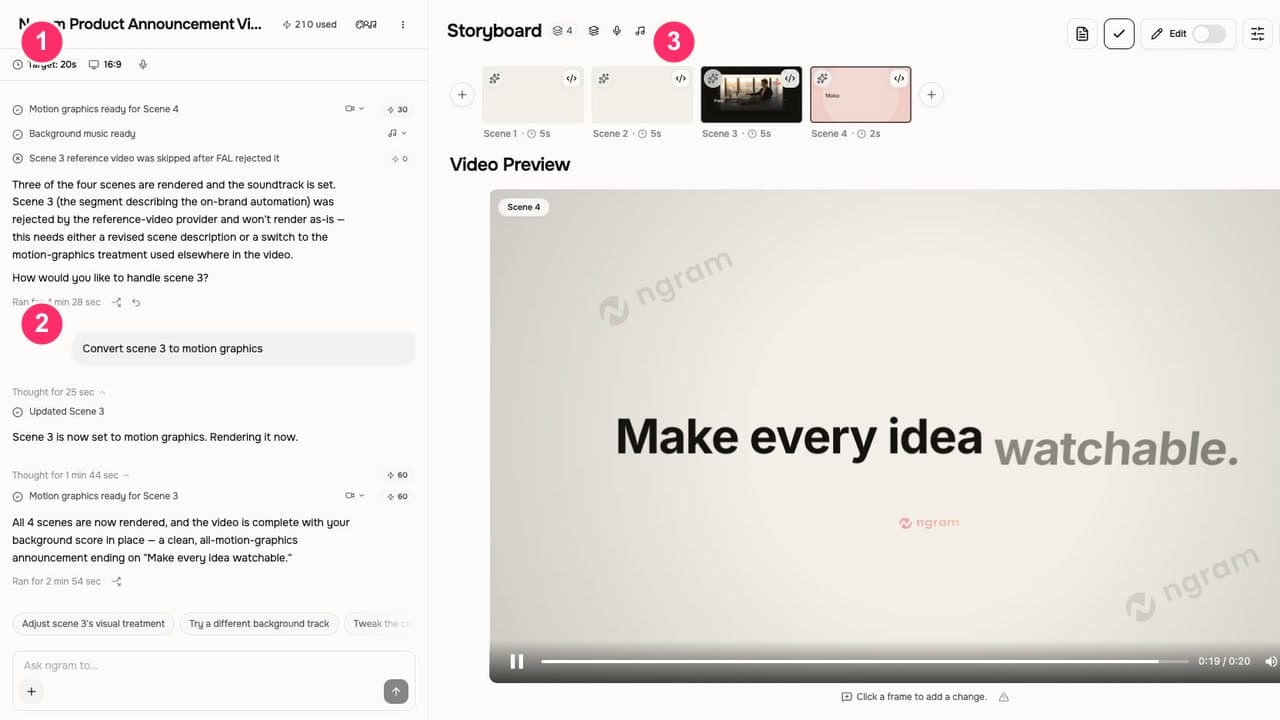
Create or select a brand kit
At /app/brand-kit, set up the workspace source or use the brand style generator with a website URL or sample images. Select the right kit in the start wizard before generation.
Add tone and phrase guardrails
Set voice and tone preferences, approved phrases, blocked phrases, CTAs, and example assets that should guide the new project.
Generate and render the video
ngram applies the selected kit to the generated video; the agentic flow validates generated content against the kit’s approved and blocked phrases.
Where a shared brand kit helps
Use Brand Kit when the source material and audience change, but the video still needs to begin from the same workspace direction.
Product marketing
Apply the chosen brand kit before turning launch inputs into a product-marketing video, so the project starts with its logo, styles, and copy guardrails in context.
Product teams
Use screenshot style, typography, and motion direction as the product demo turns real interface images or a recording into scenes and callouts.
Agencies
Start an agency deliverable with the selected workspace kit rather than rebuilding the visual and phrase direction alongside every client brief.
Marketing teams
Use the same workspace direction when marketing teams turn a campaign source into a video for LinkedIn or another social channel.
Use Brand Kit wherever the message changes but the identity should not
These workflows begin with different source material and audiences. Brand Kit gives each project a selected visual direction and phrase boundary before generation.
Marketing Brand Video
A brand video maker for marketing teams whose quarterly video budget covers three agency projects and nothing else. Drop in product footage, a positioning doc, or a brand-style URL. Get back a polished marketing brand video locked to your brand kit in under an hour.
PMM Product Launch
Stop briefing agencies while your launch window closes. A product launch video maker built for PMMs turns your positioning doc, screen recording, and brand kit into the hero film, the social cuts, and the sales walkthrough — all rendered the same afternoon.
Product Demo Video
Drop in a rough screen recording or paste your product URL. A product demo video maker built for SaaS hands you back a clean walkthrough with smart zooms, captions, and brand polish — no timeline editor in sight.
Agency Client Deliverable Video
A client deliverable video pipeline built for agencies running multiple retainers. Turn raw recordings, briefs, or client URLs into polished explainers, social cuts, and demo walkthroughs before the next status call — no editor backlog, no freelancer coordination.
LinkedIn Video
A LinkedIn video maker built for founders, marketers, and operators who keep meaning to post. Drop in a rough selfie clip or a blog post you already published. Get back a captioned, branded LinkedIn video sized 4:5 for the feed in about fifteen minutes.
PMM Social Content
Stop posting screenshots while competitors post 30-second product clips. A social media video maker built for PMMs spins a webinar recording, a product walkthrough, or a blog URL into platform-ready cuts for LinkedIn, Reels, Shorts, and TikTok in under twenty minutes.
Brand Kit compared with a manual brand handoff
This is a workflow comparison, not a claim about a particular competitor. The distinction is whether brand direction lives in the ngram workspace before generation begins.
| Capability | ngram Brand Kit | Manual brand handoff |
|---|---|---|
| Brand source | ● Workspace kit with visual settings | Files and project briefs |
| Phrase guardrails | ● Approved and blocked phrase lists | Instructions supplied per project |
| Project start | ● Kit selected in the start wizard | Direction assembled for each brief |
| Video generation | ● Selected direction applied during generation | Creator interprets supplied guidance |
Use the kit alongside the features that shape the video
A selected Brand Kit supplies direction; these adjacent features turn source material into the script, visual treatment, and motion a finished business video needs.
Script Generation
Turn a prompt, URL, document, screenshot, or recording into a video script and storyboard while the selected Brand Kit supplies the voice and phrase context.
AI Visuals
Create scene imagery and reference-led visual fills that can follow the image style and visual treatment established in a Brand Kit.
Motion Graphics
Use branded overlays, lower-thirds, callouts, and transitions that build on the motion and typography direction stored in the selected kit.
Bring a real source into a branded video workflow
Use a converter to turn the input your team already maintains into a video project, then select the Brand Kit that should guide its scenes and copy.
Public URL to Video
Turn a product page, landing page, article, doc, or release note into a video project, then select the kit that should shape its output.
Screenshots to Video
Use real product screenshots as the source for a walkthrough, with Brand Kit providing the screenshot treatment, typography, and motion context.
Product docs to Video
Start with API steps, READMEs, or product documentation, then apply the kit’s visual direction and tone to the technical walkthrough.
Image to Video
Animate a JPG, PNG, or WebP into an editable video while the selected kit guides the surrounding visual treatment, captions, and voiceover.
Useful tools around a Brand Kit video
Use these focused tools when a branded project needs a scene image, on-screen callout, captions, or a dedicated brand-video starting point.
AI Image Generator
Generate or refine scene art, product cards, and thumbnails in Image Lab with the brand applied, then carry the asset into a video project.
Add Text to Video
Add product callouts, titles, and lower-thirds while keeping text treatment connected to the same editable ngram project.
Video Caption Generator
Generate and edit captions for demos, tutorials, and campaign cuts, then style the lines for the brand before exporting.
AI Brand Video Maker
Start a branded video from a prompt, approved image, PDF, product page, website, or source URL, then refine it in ngram.
Start a brand-led video job from your workflow
Use the Zapier integration when a source event should start an ngram video job, then choose the appropriate Brand Kit in the project’s start flow before generation.

Use the selected workspace kit as the brand source for the project; this page does not claim that an automation can create, approve, or switch kits.
Explore integrationsQuestions about Brand Kit
Still curious?
Start the next video with Brand Kit already selected
Set the kit once, select it in the start wizard, and let ngram carry that direction into the video generation workflow.
Workspace visual direction, tone preferences, and phrase guardrails.