ngram V2. A video you can steer.
Meet the new video creation experience, now in Beta. Bring your brief, review the script and production plan, then refine the result in the same conversation.
- Review the direction before production starts
- Point to a moment and ask for a specific change
- Choose a version and download the finished MP4
Trusted by teams at












The first draft should start a conversation
A finished video can look polished and still miss the message. You need a chance to correct the story early, then explain exactly what needs another pass.
The wrong story survives into the final cut
A weak opening or inaccurate claim is easier to catch while you can still read the plan.
Feedback loses its place
A note like “change the text” leaves someone guessing which frame and which words you mean.
It is hard to compare the next result
You need to inspect earlier outputs and check the revision against the change you requested.
V2 gives you a reviewable plan and keeps the resulting video and your requests in one conversation.
Decide what the video should say before production.
Read Script and Production details in the proposed plan. Request changes to the direction, then approve the plan when it is ready to become a video.
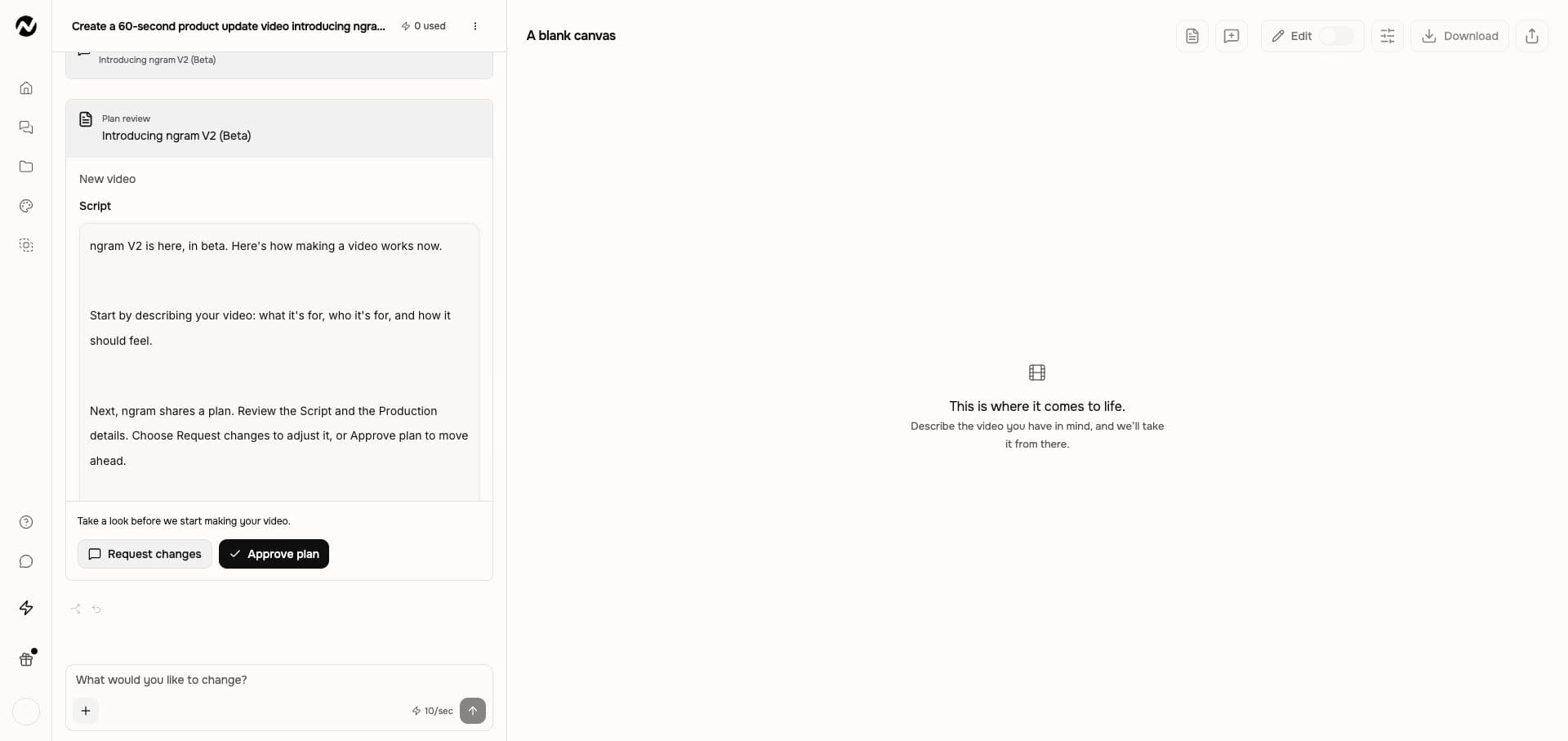
Catch the wrong message while it is still a plan.
Start with the intended viewer
Describe who will watch, the message they should remember, and the action they should take. Add source files when the video needs facts or assets.
Read the proposed direction
Check Script and Production details. Use Request changes to correct the wording or direction before choosing Approve plan.
Keep refining after the preview
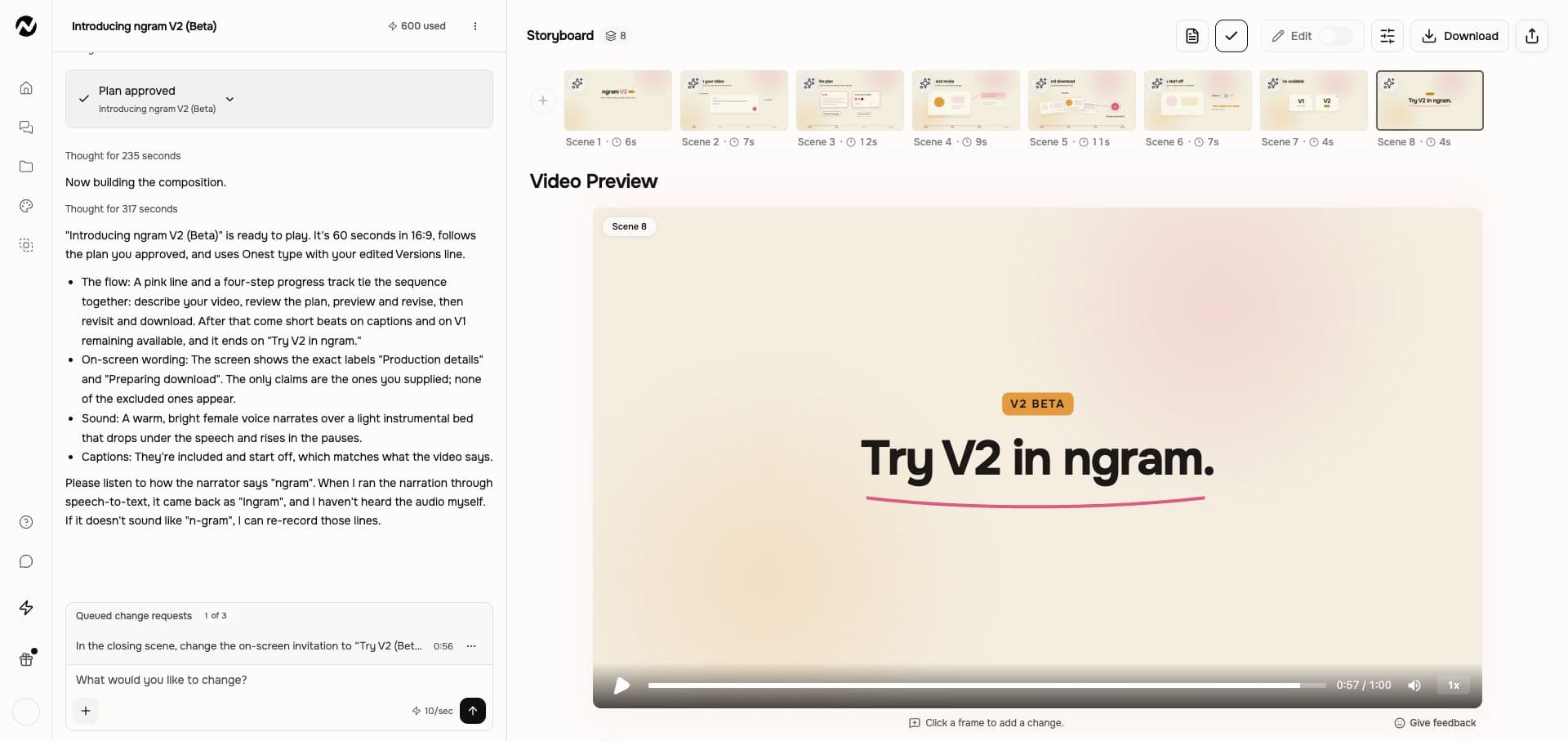
Watch the result, ask for a revision, and review the next output in the same conversation. Make changes lets you point to a moment.
More of the work stays in the conversation
The plan, preview, and change requests share one place. You can return to the brief while deciding whether the next output says what you meant.
Approve the direction before production
The review step gives you a chance to change the proposed script and production details before starting the video.
Watch the result as it becomes available
A playable preview can arrive before the final MP4 is ready. If Download shows Preparing download, let that step finish in the same conversation.
Show ngram the moment you mean
Use Make changes to pin a request, or describe the change in chat. Name what should change and the parts you want to keep.
Compare earlier outputs
Use Versions to view or download an earlier output. Selecting one lets you inspect it; it does not restore the conversation to that point.
Create your first video in V2
Sign in, choose V2 (Beta) on Home, and review the current settings and credit information before starting. Existing V1 conversations stay in V1.
Give ngram the brief
Describe the audience, message, and desired action. Use Add files for your source material, review the composer settings, and choose Create video.
Review and approve the plan
Read Script and Production details. Choose Request changes to revise the direction or Approve plan to begin production.
Watch and request a change
Review the preview. Use chat or Make changes to name a specific revision, then send it and check the next output. Revisions can consume credits.
Download the chosen version
Choose the version you want and Download. Wait for Preparing download if the final MP4 is still being prepared.
Make the message useful to its audience
The same review loop works when you are explaining a new feature, teaching a procedure, or answering a recurring customer question.
Product marketing
Start with approved release facts and choose the one promise the viewer should remember. Review the opening and closing action before production.
Training teams
Bring the procedure and identify where a learner could get stuck. Check the explanation in the plan, then review pacing in the preview.
Customer success
Use approved support material to explain one job. Refine the wording for a first-time user and check that each instruction is understandable.
Choose the job for your next V2 video
Explore briefs for launches, product explanations, onboarding, and training. Choose V2 on Home when you want this plan-and-conversation workflow.
Feature Announcement Video
Paste your release notes, the PRD, or the product URL. Get back a polished feature announcement video with motion graphics, captions, and your brand kit — ready to ship the same sprint the feature does.
Product Demo Video
Drop in a rough screen recording or paste your product URL. A product demo video maker built for SaaS hands you back a clean walkthrough with smart zooms, captions, and brand polish — no timeline editor in sight.
Training Video
Turn your SOPs, screen recordings, and process docs into a corporate training video in under thirty minutes. Smart zooms on every click, step labels on every menu, captions burned in, branded intro applied — ramp new hires faster without booking a video team.
Customer Onboarding Video
Turn help docs or a screen recording of the setup flow into a polished customer onboarding video new accounts actually finish. Reach first-value the same day, not the following week, without booking another live kickoff call.
Explainer Video
Paste your landing page URL, a product doc, or a rough script and get a polished explainer video back inside 30 minutes. An explainer video maker built for SaaS — no animation skills, no agency brief, no six-week production cycle.
Product Launch Video Maker
Turn the feature PRD, the screenshots, or a rough screen recording into a launch-ready video. A product launch video maker built for SaaS hands you back motion graphics, captions, brand polish, and a reviewed edit for each channel you need, without an agency invoice or a missed release window.
Where V2 changes the production workflow
Both approaches need a clear brief and human review. V2 puts the plan and revision requests in the conversation; a manual workflow leaves those production steps to you.
| Capability | ngram V2 (Beta) | Manual production |
|---|---|---|
| Review the story | ● Read the proposed Script and Production details | Write a script and prepare a production plan |
| Make the first cut | ● Approve the plan and let ngram produce the video | Assemble and time the visuals and sound |
| Request a revision | ● Describe the change in chat or pin it with Make changes | Translate review notes into edits in your editor |
| Compare outputs | ● View or download earlier outputs in Versions | Keep and label separate exports for comparison |
Understand the pieces behind a finished video
These feature guides cover ngram more broadly. Follow the V2 documentation for its current controls; dedicated editors and V1 projects have separate workflows.
Shape the message before the visuals
Explore how source material becomes a script, then use V2 plan review to check the words your audience will hear.
Use motion to explain a point
See how animated text and visual emphasis can support the message you describe in a V2 brief.
Choose the editing workflow that fits
Compare ngram editing surfaces. V2 revisions use chat and Make changes; V1 and the separate editor have their own controls.
Start with the information you already have
These guides explain common source-to-video jobs. Review the selected experience when entering Studio: some focused handoffs can open V1.
Brief or script to Video
Use approved wording to explain the message, then review how the V2 plan turns that brief into scenes.
PDF to Video
Start with a document that contains the facts, and identify which sections matter to the intended viewer.
Webpage to Video
Use a public page as context for your video, then check the proposed wording against the source.
Presentation to Video
Explore the presentation workflow when a deck supplies the story. Its available controls depend on the Studio experience.
Prepare a finished file for its destination
These separate tools can work with an exported file. Their controls are distinct from the V2 conversation and do not imply an equivalent V2 control.
Make the delivery file smaller
Compress an exported V2 MP4 when the destination has an upload limit, then check that small text stays readable.
Caption an existing file
Use the separate subtitle workflow for a downloaded file when it needs captions for its audience.
Reuse a moment as a GIF
Turn a useful moment from the exported video into a loop for release notes or a help article.
Work directly on an exported clip
Open an exported MP4 in the separate editor when you need manual controls; that work is separate from the V2 conversation.
Use a webpage as your starting context
The Chrome extension is a separate entry point for webpage briefs. Check the experience shown in Studio; this is not a promise that every integration opens V2.
Integration capabilities and the V2 browser workflow have separate availability. Read the relevant integration guide before choosing a path.
Explore ngram integrationsQuestions about ngram V2
Still curious?
Bring the brief. Help shape the video.
Start in V2 (Beta), review the plan, and keep refining in the conversation.
Choose V2 on Home after signing in.
Plan review · Chat revisions · MP4 download