AI Explainer Video Maker by ngram
AI Explainer Video Maker for products people need to understand

Describe the audience, source material, length, and outcome you want ngram to create.
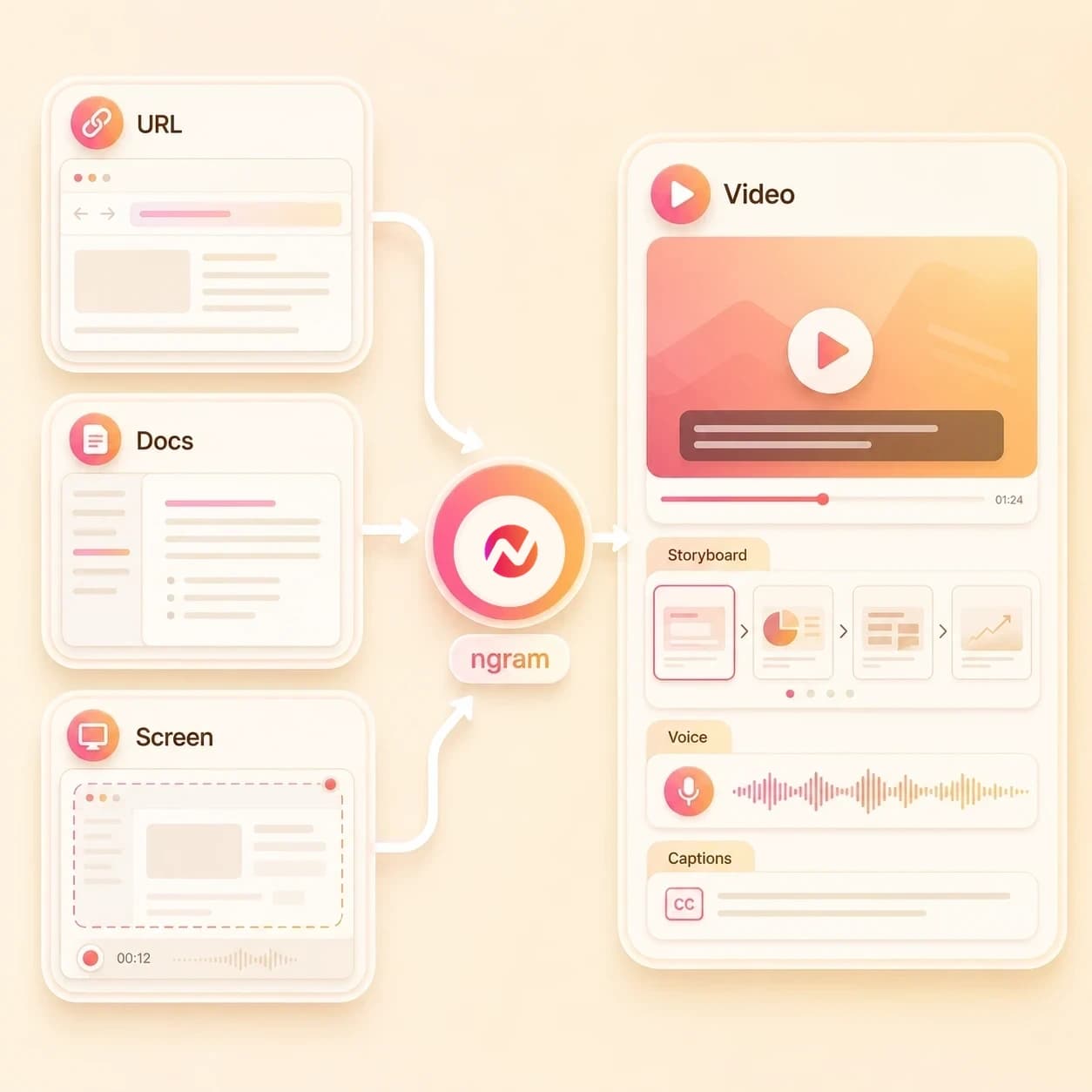
What it does
Start with the product page, brief, or screenshots your team already has. ngram plans the explanation, builds the scenes, and leaves the message editable for each audience.
Trusted by teams at












How it works
How the AI explainer video maker works.
Give ngram the source material and the job the explainer needs to do, then review the plan before the first draft becomes a rendered project.
Add the source context
Describe the product, upload a source file, or paste a product page, docs page, release note, help article, or landing page URL.
Source ready
Review the script and storyboard
ngram turns the source into a hook, scene order, narration, visual direction, timing, product proof points, and CTA before the render starts.
Plan reviewed
Generate the explainer draft
The project gets AI visuals, screen context, motion graphics, AI voiceover, captions, background music, transitions, and branded intro or outro treatment where the story needs it.
Draft generated
Edit and export versions
Revise the script, regenerate a scene, adjust captions or callouts, localize the project, and export widescreen, square, vertical, GIF, image, or deck-ready assets.
Ready to export
What it can do
What the AI explainer video maker builds.
Create an editable explainer project from the material your team already uses to explain the product, feature, workflow, or process.
Script and storyboard from source material
Turn prompts, PDFs, URLs, screenshots, images, and approved source notes into the explainer's script, scene order, timing, visual direction, and CTA.
Learn more about script generationScreen context for product moments
Use screenshots, source notes, and owned workflow context as the proof layer, then add zooms, labels, highlights, and callouts around the workflow viewers need to understand.
Learn more about screen editingAI visuals for supporting scenes
Generate backgrounds, B-roll, scene art, product-adjacent imagery, and visual fills that match the explainer script and brand direction.
Learn more about AI visualsVoiceover from the approved script
Create narration from the explainer script, choose a voice, set pronunciation guidance, and regenerate affected audio when the message changes.
Learn more about AI voiceoverCaptions and readable overlays
Burn in captions by default, style them with the brand kit, and use on-screen text to make definitions, steps, and product terms easier to follow.
Learn more about captionsBrand kit and editable drafts
Apply logos, colors, fonts, motion style, screenshot style, voice, tone, approved phrases, blocked phrases, intros, outros, and CTA treatments.
Learn more about brand kitBuilt for editable explainer projects, not channel operations or business outcomes
When it matters
Explainer video workflows this tool supports.
Use these pages when the same source material needs a clear explainer for a product, feature, audience, training flow, or support context.
AI Explainer Video Maker
Turn product docs, URLs, and screenshots into an AI explainer video with script, storyboard, motion graphics, voiceover, captions, and brand controls.
Open AI video use caseCreate Explainer Video with AI
Use ngram when the brief starts as a paragraph, doc, or rough source note and needs a structured explainer video draft instead of a blank timeline.
Open AI video use caseProduct Explainer Video
Create a product explainer from feature docs, landing pages, screenshots, and walkthrough notes while keeping the story editable after generation.
Open AI video use caseExplainer Video
Build a general explainer around the problem, workflow, product proof, and CTA when the source material needs a concise narrative path.
Open AI video use caseSaaS Product Explainer Video
Turn SaaS product docs, screenshots, or workflow notes into an explainer that shows the feature, the user path, and the reason it matters.
Open AI video use casePMM Explainer
Give product marketing a repeatable path from positioning docs and product captures to a homepage or campaign explainer that stays editable.
Open AI video use caseProduct Overview Video
Create an overview video from a product URL, feature docs, or a rough source note when prospects need the main product story in one asset.
Open AI video use caseTutorial Video
Turn a how-to article, product walkthrough note, or screenshot sequence into a step-by-step explainer with captions, callouts, and scene timing.
Open AI video use caseTraining Video
Convert SOPs, enablement docs, screenshots, and source notes into narrated training explainers that your team can review, edit, and export.
Open AI video use caseProduct stack
The ngram features behind AI explainer videos.
These product features handle planning, source understanding, scene generation, narration, captions, brand control, editing, and export for explainer videos.
Planning
Script Generation
Draft the explainer script and storyboard from prompts, PDFs, URLs, screenshots, images, and source notes before rendering.
Learn more about scriptsScreen context
Screencast Understanding and Editing
Use product screen context to place zooms, click emphasis, labels, and callouts where the explainer needs a clearer workflow moment.
Learn more about screen editingVisuals
AI Visuals
Generate visual scenes, B-roll, backgrounds, and product-adjacent imagery when the explainer needs more than captured screens.
Learn more about AI visualsVoice
AI Voiceover
Create narration from the approved explainer script, pick a voice, preview pronunciation, and regenerate audio when the wording changes.
Learn more about voiceoverCaptions
Captions & Subtitles
Add burned-in captions to the AI explainer video and keep them styled to the same brand kit as the rest of the project.
Learn more about captionsMotion
Motion Graphics
Use title cards, lower thirds, animated callouts, scene transitions, and branded motion to make the explainer easier to scan.
Learn more about motion graphicsBrand
Brand Kit
Apply logo rules, colors, fonts, motion style, screenshot style, voice, tone, approved phrases, blocked phrases, intros, outros, and CTAs.
Learn more about brand kitsEditing
Video Editing
Refine the explainer after generation with agentic chat, visual chat, script editing, scene regeneration, canvas controls, and timeline editing.
Learn more about editingMore tools
Related tools for explainer video work.
Use these tools when the explainer starts from a narrower input, needs a related product video asset, or needs polish after the first draft.
Adjacent creation workflows
Use these related ngram tools when the same source material needs a tutorial, explainer, narrative cut, or walkthrough format.
Animated Explainer AI Video Maker
Build a motion-led explainer from approved source material when the idea needs visual metaphors, callouts, and scene rhythm.
Open toolTutorial AI Video Maker
Create step-by-step product tutorials from docs, URLs, screenshots, and approved instructions with captions and labels.
Open toolHow to AI Video Maker
Convert procedures, help content, screenshots, and URLs into editable how-to videos for support, onboarding, and enablement.
Open toolStorytelling AI Video Maker
Shape product updates, customer proof, launch context, and business briefs into a coherent story-led video draft.
Open toolCreate the explainer
Start with a prompt, script, URL, product demo brief, or SaaS source when the explainer job is already clear.
AI Video Generator
Use the broader generator when one source may become an explainer, demo, launch video, internal update, or customer education asset.
Open toolText to Video
Turn a written explainer script, outline, positioning note, or product summary into an editable video draft.
Open toolURL to Video
Paste a product page, release note, help article, or landing page and let ngram build the explainer around that page context.
Open toolVideo Script Generator
Draft the hook, body, scenes, and CTA before turning the explainer script into a generated video project.
Open toolAI Product Demo Video Maker
Use the demo workflow when the explainer centers on a product screen, feature walkthrough, or buyer-facing software flow.
Open toolAI SaaS Video Maker
Create a SaaS explainer from product pages, docs, screenshots, PDFs, release notes, and URL context.
Open toolPolish and adapt the draft
Use these tools when the explainer needs captured footage, subtitles, overlays, narration, localization, or timeline control.
Screen Recorder
Record a rough walkthrough in the browser, then use the capture as the source layer for the explainer video.
Open toolVideo Editor
Revise the generated explainer with timeline controls, script edits, visual chat, captions, and canvas-level changes.
Open toolAdd Subtitles to Video
Add or update subtitles when an existing explainer needs readable captions for review, support, or campaign use.
Open toolAdd Text to Video
Place definitions, feature labels, lower thirds, and product callouts on top of explainer scenes.
Open toolText to Speech Video
Start from a locked narration script when the explainer's spoken read needs to drive every scene.
Open toolVideo Translator
Localize an explainer with translated script, captions, on-screen text, voiceover, and lip sync when a market needs its own version.
Open toolConvert
Convert source material into an AI explainer video.
Use these converters when the explainer starts from the material your team already has: docs, URLs, product pages, screen recordings, slides, PDFs, screenshots, scripts, and release notes.
Docs to Video
Turn an internal doc, product brief, SOP, or markdown source into a planned explainer with script, storyboard, captions, and editable scenes.
Open converterURL to Video
Paste a product page, landing page, release note, help article, or docs URL and use the page context as explainer source material.
Open converterScreen Recording to Video
Turn a rough product walkthrough into an explainer with trimmed pacing, smoother cursor motion, captions, labels, and product callouts.
Open converterWho it is for
Teams that use AI explainer videos.
These teams already maintain the source material. The AI explainer video maker turns that material into reviewable video assets they can edit and export.
Product Marketing Managers
Turn positioning docs, launch briefs, product pages, and screenshots into explainers for launches, homepage messaging, and sales enablement.
See product marketing workflowsSaaS Companies
Create SaaS product explainers from feature docs, release notes, UI captures, help articles, and product pages without a separate production queue.
See SaaS workflowsGrowth & Marketing Teams
Use landing pages, campaign briefs, and source URLs to create explainer variants for websites, ads, email, and social review.
See growth workflowsStartups
Turn pitch PDFs, product pages, founder notes, screenshots, and launch context into startup explainers that stay editable as the story changes.
See startup workflowsCustomer Success
Create onboarding, feature education, QBR recap, and customer-update explainers from playbooks, product docs, screenshots, and source notes.
See customer success workflowsSupport Teams
Convert help articles, troubleshooting notes, macros, and support screenshots into support explainers customers can replay.
See support workflowsSales Enablement
Build approved explainer videos from product context, battlecards, proposal notes, and demo notes before reps handle outreach.
See sales workflowsEducators & Trainers
Turn lessons, SOPs, policy docs, and source notes into narrated explainers with captions and editable scenes.
See educator workflowsIntegrations
Start explainer work from the tools around ngram.
Use live integrations to pass approved source context into ngram or trigger an explainer draft from an agent or workflow tool. Review, editing, and channel placement stay under your team's control.
Zapier explainer intake
AutomationWhenA form, spreadsheet row, CRM note, or intake request collects an explainer brief with source links and audience notes.
ThenSend the prompt and source context to ngram so the team can review an editable AI explainer video project.
n8n source-to-explainer workflow
Self-hostedWhenA self-hosted workflow collects a product doc, support article, release note, or approved explainer prompt.
ThenCreate the ngram project, check render status, and route the project link back to the review system.
MCP agent handoff
AgentWhenAn AI agent has the product context, source notes, audience, and explainer goal ready for video creation.
ThenCall ngram through MCP to create an editable explainer draft that a human can inspect and revise.
Chrome Extension page capture
BrowserWhenA product page, help article, docs page, release note, or landing page is open in the browser.
ThenCapture the page context and start an explainer video project without rebuilding the brief in another document.
Why ngram
How ngram compares for AI explainer video maker workflows.
Explainer teams usually choose between prompt-only generation, template assembly, raw recording, and an editable project that carries source material through script, storyboard, voice, captions, brand, and export.
| Compare | ngram | Template editor | Screen recorder | Point AI generator |
|---|---|---|---|---|
| Workflow fit | Creates explainer drafts from prompts, PDFs, URLs, screenshots, images, and approved source notes, with dedicated convert tools for recordings and decks. | Works when the team already has the script, scene order, product screenshots, voiceover, and visual structure. | Works when the explainer should closely follow a live product walkthrough or recorded workflow. | Useful for generating one clip, image, voiceover, avatar read, or visual scene for a narrow part of the explainer. |
| How ngram fits | Plans the script and storyboard before rendering, then adds scene visuals, screen context, motion graphics, AI voiceover, captions, music, brand kit, and export formats. | Usually leaves source interpretation, storyboard planning, narration, captions, brand checks, and variant exports to manual work. | Still needs trimming, script structure, captions, callouts, voiceover, brand treatment, and export variants for a finished explainer. | May require separate tools for source ingestion, script planning, storyboarding, captioning, brand control, editing, and export. |
| Best use | Keeps the explainer editable through chat, visual chat, script editing, scene regeneration, canvas controls, timeline editing, translation, and MP4 export. | Better for hands-on layout assembly than for turning product context into a first explainer draft. | Useful source material through related converter workflows when the final asset needs a clearer story than the raw recording. | Less suited when one source needs an editable explainer plus product, training, support, or campaign variants. |
FAQ
AI explainer video maker FAQ
Answers for teams turning product context into explainers.
Turn source material into editable explainer videos
Bring a prompt, PDF, URL, screenshot, image, or approved source note. ngram turns the source into an explainer project with script, storyboard, visuals, voiceover, captions, brand kit styling, and export formats.
Built for product explainers, SaaS explainers, onboarding, support, training, and campaign-ready review drafts.
CTA opens ngram sign-in. The editable project starts after authentication.