How to AI Video Maker by ngram
How to AI Video Maker for customer tutorials that stay useful

Describe the audience, source material, length, and outcome you want ngram to create.
What it does
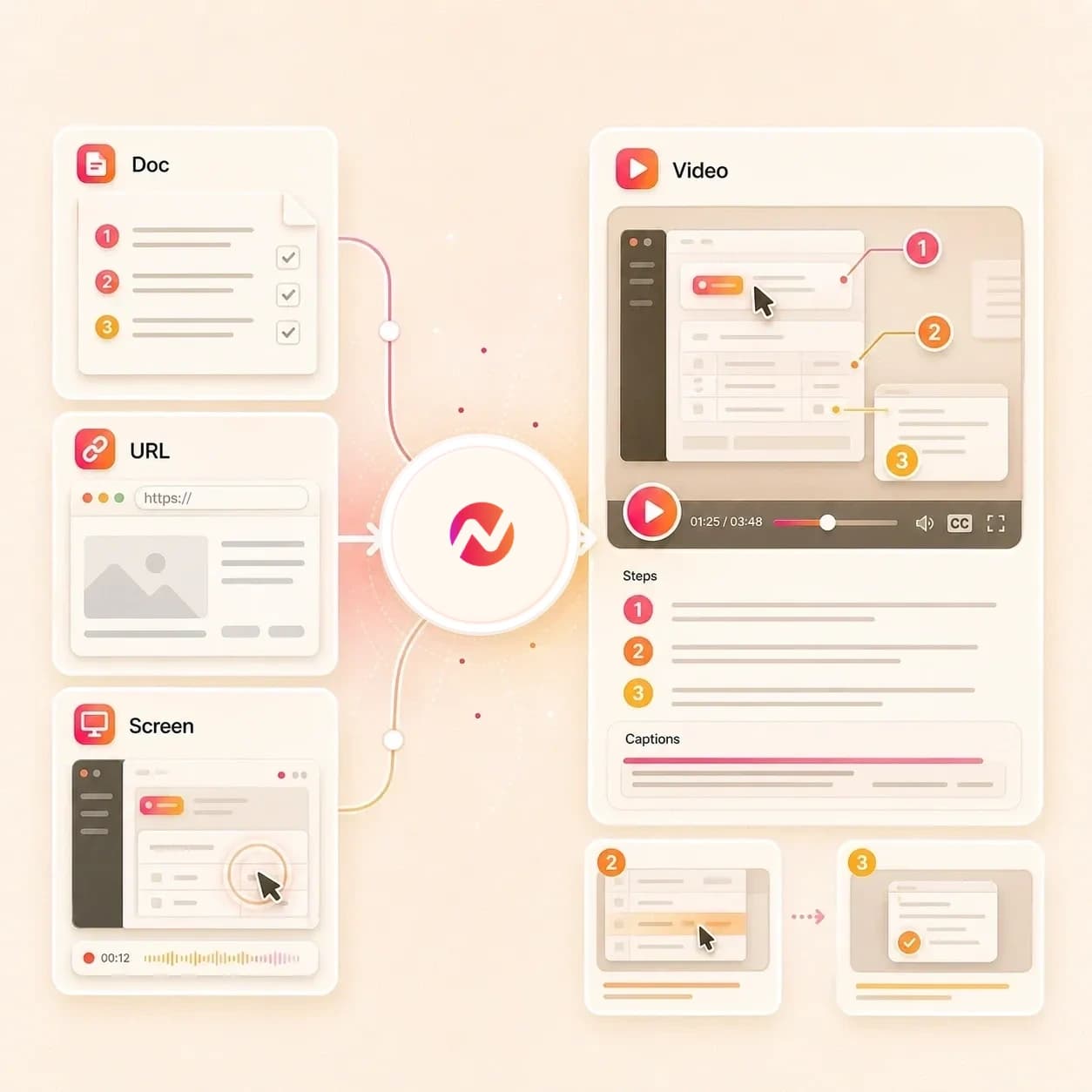
Turn a real procedure, help page, or screenshot sequence into a clear tutorial. Keep each step editable when the product or process changes.
Trusted by teams at












How it works
How the how to AI video maker works.
Give ngram the instructions and proof material. Review the plan, then refine the guide video instead of starting from a blank timeline.
Add the procedure context
Paste the steps, describe the task, upload a PDF, add screenshots, or provide a source URL for the workflow context.
Source ready
Review the guide plan
ngram turns the source into a script, storyboard, scene order, timing, step labels, visual direction, and CTA before the video draft is rendered.
Plan reviewed
Generate the editable draft
The guide can include screen context, product callouts, AI voiceover, captions, motion graphics, background music, branded intros, and scene transitions.
Draft generated
Tighten the steps
Edit the script, change labels, regenerate a scene, adjust captions, translate the copy, or export the guide in the format your team needs.
Ready to export
What it can do
What the how to AI video maker builds.
Create an editable guide video from the source material your team already uses to explain a product flow, support answer, setup task, or internal procedure.
Script and storyboard from instructions
Turn procedures, prompts, PDFs, public URLs, screenshots, images, and source notes into a guide script, scene order, timing, visual direction, and CTA.
Learn more about script generationScreen context for product steps
Use screenshots, source notes, and owned workflow context as visual proof, then add zooms, labels, transitions, and step callouts around the exact workflow.
Learn more about screen editingCaptions that follow the procedure
Generate captions from the guide narration, edit the text, translate caption copy when needed, and burn readable lines into the finished video.
Learn more about captionsStep labels and product callouts
Place labels, highlights, lower thirds, arrows, and callout boxes where viewers need context beyond the spoken explanation.
Learn more about motion graphicsEdits after the first draft
Change the wording, shorten the pacing, regenerate one weak scene, adjust a caption, or use visual chat to edit a specific on-screen element.
Learn more about video editingBrand rules for every guide
Apply logos, colors, fonts, motion style, screenshot style, voice, tone, approved phrases, blocked phrases, intros, outros, and CTA treatments.
Learn more about brand kitBuilt for editable guide videos, not hosting, channel operations, or outcome promises
When it matters
How-to guide workflows this tool supports.
These pages fit the teams turning written instructions, product captures, support answers, and training procedures into guide videos.
Tutorial Video
Turn a written tutorial, product walkthrough note, or screenshot sequence into a guide with clear steps, captions, and editable scenes.
Open AI video use caseHelp Center Video
Convert a help article or support answer into a video guide that follows the article structure and keeps each step easy to revise.
Open AI video use caseProduct Walkthrough Video Creator
Use product screenshots, source URLs, or docs to create walkthrough videos with step labels, callouts, and brand styling.
Open AI video use caseTraining Video
Turn SOPs, policy notes, PDFs, and source notes into narrated training assets that your team can edit before export.
Open AI video use caseCustomer Onboarding Video
Create onboarding guide videos from setup docs, product pages, screenshots, and source notes while keeping the source steps reviewable.
Open AI video use caseSupport Feature Walkthrough Video
Turn a repeated support workflow into a feature guide with captions, callouts, and scene-level edits for product changes.
Open AI video use caseDevRel Tutorial Video
Turn developer docs, API setup steps, code walkthrough notes, and screenshots into technical guide videos with editable narration.
Open AI video use caseAPI Documentation Video
Convert API documentation, quickstarts, and integration notes into a guided video with source-aware scenes and captioned steps.
Open AI video use caseProduct Demo Video
Use a how-to draft when the product demo needs to teach a workflow instead of only introduce a feature.
Open AI video use caseProduct stack
The ngram features behind how-to guide videos.
These product features handle source understanding, scene planning, captions, step labels, brand control, editing, narration, and export.
Planning
Script Generation
Draft the guide script and storyboard from procedures, prompts, PDFs, URLs, screenshots, images, and source notes before rendering.
Learn more about scriptsScreen steps
Screencast Understanding and Editing
Use related screencast workflows to turn raw recordings into guide scenes with transcription, key moments, cursor smoothing, click emphasis, smart zooms, and step labels.
Learn more about screen editingCaptions
Captions & Subtitles
Generate and edit burned-in captions so the how-to video remains usable when viewers watch without sound.
Learn more about captionsCallouts
Motion Graphics
Add labels, highlights, lower thirds, callouts, transitions, and smart zooms around the steps viewers need to see.
Learn more about motion graphicsEditing
Video Editing
Use chat, visual chat, script edits, scene regeneration, canvas controls, and timeline edits to refine the guide after generation.
Learn more about video editingBrand
Brand Kit
Keep guide videos aligned with workspace logos, colors, fonts, motion style, screenshot style, voice, tone, and approved phrases.
Learn more about brand kitNarration
AI Voiceover
Generate narration from the approved guide script, choose a voice, and regenerate affected audio when the procedure copy changes.
Learn more about AI voiceoverMore tools
Related tools for how-to video work.
Use these tools when the guide starts from a narrower source, needs cleaner step explanation, or needs edits after the first draft.
Adjacent creation workflows
Use these related ngram tools when the same source material needs a tutorial, explainer, narrative cut, or walkthrough format.
Tutorial AI Video Maker
Create step-by-step product tutorials from docs, URLs, screenshots, and approved instructions with captions and labels.
Open toolScreencast AI Video Maker
Open the screencast workflow to polish raw screen recordings into clearer walkthroughs with smart zooms, cursor emphasis, captions, and step labels.
Open toolAI Explainer Video Maker
Turn a brief, URL, screenshot, or PDF into an editable explainer video with storyboard, voiceover, captions, and brand context.
Open toolStorytelling AI Video Maker
Shape product updates, customer proof, launch context, and business briefs into a coherent story-led video draft.
Open toolCreate the guide
Start from text, URLs, scripts, PDFs, or a broad AI video brief.
AI Video Generator
Use the broader generator when a guide may become a tutorial, product demo, onboarding video, or internal explainer.
Open toolText to Video
Turn a written procedure, pasted instructions, guide outline, or approved script into an editable video draft.
Open toolURL to Video
Paste a product docs page, help article, release note, or public procedure page and build the guide around that context.
Open toolVideo Script Generator
Draft the hook, procedure order, narration, scene notes, and CTA before turning the guide script into video.
Open toolPPT to Video
Use PPT to Video when a process deck, setup walkthrough, or enablement presentation should become a narrated guide video.
Open toolPolish the steps
Use these tools when the guide needs capture, labels, captions, or timeline control.
Screen Recorder
Record the workflow in the browser, then use the capture as the visual source for the how-to video.
Open toolAdd Text to Video
Add step labels, warnings, definitions, lower thirds, and product callouts to guide scenes.
Open toolAdd Subtitles to Video
Generate timed subtitle lines for an existing guide video and edit the text before burn-in.
Open toolVideo Caption Generator
Create animated caption lines for short guide clips, social cuts, and fast product walkthroughs.
Open toolVideo Editor
Refine the generated guide with script changes, timeline edits, visual chat, captions, and scene-level updates.
Open toolConvert
Convert source material into how-to videos.
Use these converters when the guide starts from documents, product pages, support articles, screenshots, screen recordings, scripts, or procedure files.
Docs to Video
Turn internal docs, setup guides, product notes, or markdown instructions into a storyboarded how-to video with captions and editable scenes.
Open converterScreen Recording to Video
Turn a rough workflow capture into a guide with trimmed pacing, smoother cursor motion, captions, labels, and callouts.
Open converterScreenshots to Video
Use a sequence of UI screenshots as the visual path for a narrated guide with ordered steps and on-screen notes.
Open converterWho it is for
Teams that turn instructions into guide videos.
These teams already maintain the docs, screenshots, source notes, and procedures. The how to AI video maker turns that material into editable video assets.
Support Teams
Turn repeated support answers, help articles, and workflow captures into guide videos customers can replay.
See support workflowsCustomer Success
Create onboarding and feature education videos from playbooks, product docs, screenshots, and source notes.
See customer success workflowsProduct Marketing Managers
Turn launch docs, product pages, release notes, and UI captures into guide-style explainers for buyers and customers.
See product marketing workflowsProduct Managers
Convert feature notes, rollout docs, bug context, and source notes into videos that explain what changed.
See product workflowsSales Enablement
Build product guide clips from approved demo scripts, screenshots, proposal notes, and account-specific workflow context.
See sales workflowsDeveloper Relations
Create technical guide videos from API docs, README files, setup steps, code walkthrough notes, and screenshots.
See DevRel workflowsHR & Internal Comms
Turn SOPs, policy updates, onboarding notes, and internal process docs into reviewable guide videos.
See internal comms workflowsEducators & Trainers
Convert lessons, handouts, PDFs, and procedure notes into narrated video assets with captions and editable scenes.
See educator workflowsIntegrations
Start how-to video work from the tools around ngram.
Use live integrations to pass approved source context into ngram or trigger a guide draft from an agent or workflow tool. Review and delivery stay under your team's control.
Chrome Extension page capture
BrowserWhenA product docs page, help article, release note, setup guide, or procedure page is open in the browser.
ThenCapture the page context and start a how-to video draft without rebuilding the brief in another document.
Zapier guide intake
AutomationWhenA form, spreadsheet row, ticket, or project task collects a how-to request with source links and audience notes.
ThenSend the prompt and source context to ngram so the team can review an editable guide video project.
n8n procedure workflow
Self-hostedWhenA self-hosted workflow receives an approved procedure, help article update, or product docs change.
ThenCreate the ngram project, check render status, and route the project link back to the review system.
MCP agent handoff
AgentWhenAn AI agent has the source notes, audience, task goal, and step order ready for video creation.
ThenCall ngram through MCP to create an editable how-to draft that a human can inspect and revise.
Why ngram
How ngram compares for how to AI video maker workflows.
Guide teams usually choose between template assembly, raw recording, static docs, and an editable video project that carries instructions through script, storyboard, captions, callouts, brand, and export.
| Compare | ngram | Template editor | Screen recorder | Static docs |
|---|---|---|---|---|
| Workflow fit | Creates guide video drafts from prompts, PDFs, public URLs, screenshots, images, scripts, and source notes, with related converter pages for recordings, decks, and raw video. | Works when the team already has the guide script, step order, screenshots, voiceover, and visual structure. | Works when the how-to video should closely follow a live product walkthrough or recorded process. | Works when instructions need to stay searchable, versioned, and easy to update in a document or knowledge base. |
| How ngram fits | Plans the script and storyboard before rendering, then adds screen context, callouts, AI voiceover, captions, music, brand kit styling, and export formats. | Often leaves source interpretation, storyboard planning, narration, captions, callouts, brand checks, and export variants to manual work. | Still needs trimming, caption edits, step labels, callouts, voiceover, brand treatment, and export variants for a finished guide. | Leaves visual demonstration, narration, captions, step timing, and product callouts outside the text page. |
| Best use | Keeps the guide editable through chat, visual chat, script editing, scene regeneration, canvas controls, timeline editing, translation, and MP4 export. | Useful for hands-on layout assembly when the instruction design is already finished. | Useful source material through related converter workflows when the final asset needs a clearer story than the raw capture. | Pairs well with ngram when a written procedure should become a video companion for viewers who need to watch the steps. |
FAQ
How to AI video maker FAQ
Answers for teams turning instructions into guide videos.
Turn procedures into editable guide videos
Bring a prompt, procedure, public URL, screenshot sequence, PDF, image, or script. ngram turns the source into a guide project with storyboard, captions, step labels, voiceover, brand styling, and export formats.
Built for tutorials, help center guides, onboarding, support walkthroughs, product demos, and internal procedures.
CTA opens ngram sign-in. The editable project starts after authentication.