Tutorial AI Video Maker by ngram
Tutorial AI Video Maker for product education you can keep current

Describe the audience, source material, length, and outcome you want ngram to create.
What it does
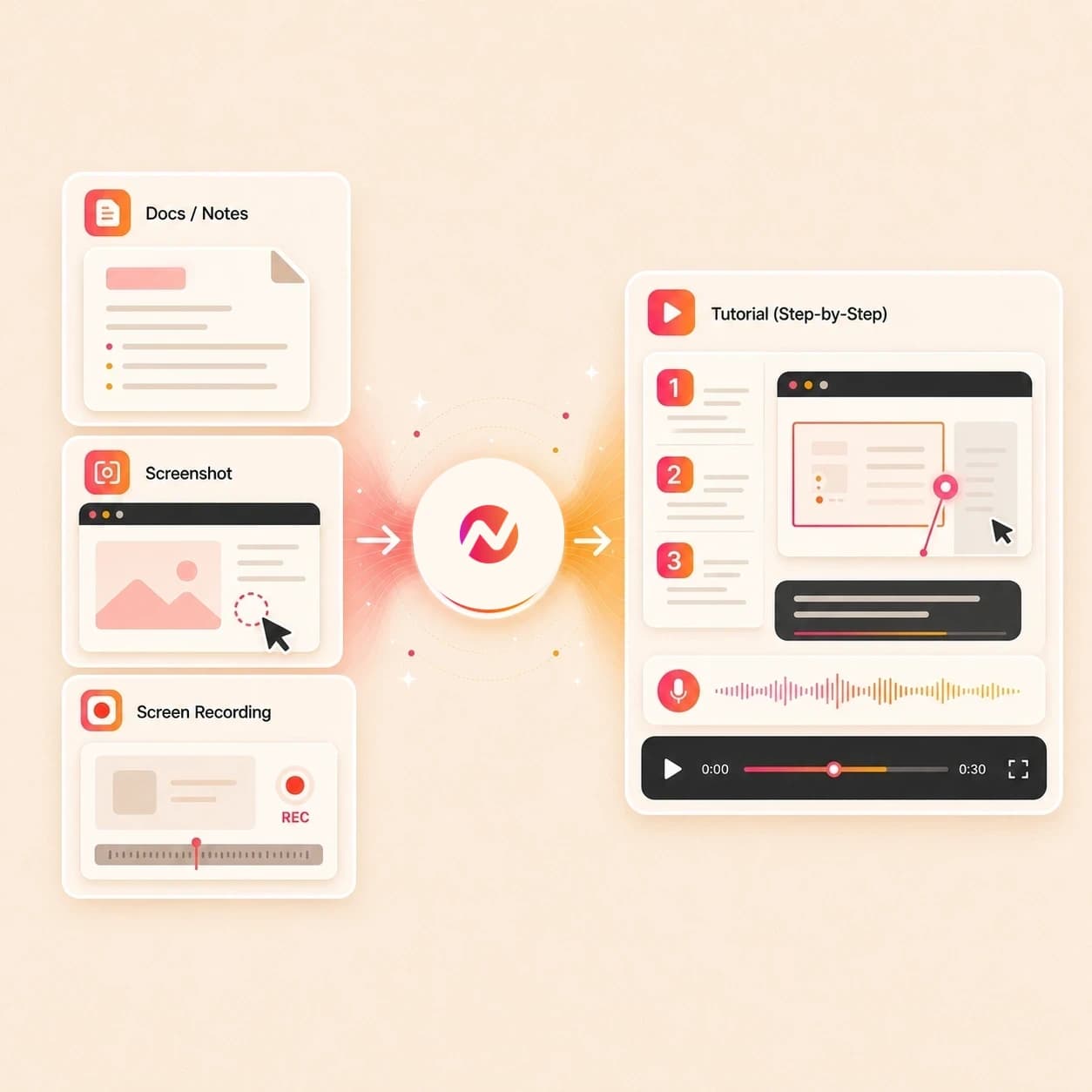
Create a clear tutorial from the real steps, screenshots, and source documentation. Keep each scene editable so support, onboarding, and training videos can change with the product.
Trusted by teams at












How it works
How the tutorial AI video maker works.
Give ngram the tutorial source, approve the plan, then edit the generated walkthrough before export.
Add source material
Paste the tutorial goal, attach a screenshot or PDF, or add a URL for an owned help page, product doc, release note, or setup guide. Use the screencast workflow for recording-first tutorials.
Source ready
Review the script and storyboard
ngram turns the source into a tutorial script, scene plan, visual direction, timing, narration, and step labels before the first draft is rendered.
Storyboard ready
Generate the guided draft
The draft can include UI callouts, smart zooms, product annotations, voiceover, captions, music, brand treatment, and section transitions.
Draft generated
Edit each step
Use chat, the script editor, canvas controls, or the timeline to revise copy, timing, captions, callouts, scenes, voiceover, and export formats.
Ready to refine
What it can do
What ngram builds into each tutorial draft.
The tutorial AI video maker is built for product education work where the source needs structure, narration, labels, and an editable draft.
Script and storyboard from the source
Turn a PDF, URL, screenshot, script, or storyboard into a reviewed tutorial plan with scenes, timing, narration, and CTA.
Learn more about script generationScreen-context polish
Use related screencast workflows when a recording needs smart zooms, cursor smoothing, click emphasis, dead-air trimming, step labels, and section transitions.
Learn more about screencast editingCallouts and step labels
Point at the field, menu, setting, or result the viewer needs to notice, with labels that stay tied to the scene plan.
Learn more about motion graphicsVoiceover from the approved script
Generate narration from the tutorial script, choose a voice, adjust pronunciation, and regenerate affected audio after edits.
Learn more about AI voiceoverCaptions for every step
Burn in captions by default so the tutorial can be reviewed in chat, docs, support replies, or an internal workspace with sound off.
Learn more about captionsBrand kit and reusable style
Apply logo, colors, fonts, screenshot style, motion direction, tone, approved phrases, and blocked phrases across the tutorial.
Learn more about brand kitBuilt for tutorial drafts, product walkthroughs, and docs-based videos
When it matters
Where tutorial AI videos fit.
These existing use-case pages match product tutorials built from PDFs, URLs, screenshots, and step-by-step source material.
Tutorial Video
Create a product tutorial from a help article, setup doc, screenshot, or source URL, then review the step order, labels, captions, and voiceover.
Open AI video use caseProduct Walkthrough Video Creator
Turn a rough product flow into a walkthrough where each click, setting, and result gets clear narration and visual guidance.
Open AI video use caseProduct Demo Video
Use the same tutorial source to create a customer-facing demo with a tighter narrative, branded scenes, captions, and a clear next step.
Open AI video use caseHelp Center Video
Convert a support article or repeated how-to answer into a tutorial video with screen context, callouts, and editable step labels.
Open AI video use caseCustomer Onboarding Video
Build onboarding tutorials from setup guides, docs, and product screenshots so new users can replay the workflow after kickoff.
Open AI video use caseTraining Video
Turn SOPs, internal docs, or recorded walkthroughs into training videos with a reviewed script, captions, and consistent brand treatment.
Open AI video use caseSupport Feature Walkthrough Video
Explain a feature change with a screen-led tutorial that marks the important UI moments and keeps the script editable.
Open AI video use caseDevRel Tutorial Video
Create developer tutorials from docs, API notes, or recorded setup steps with labels for commands, endpoints, and product screens.
Open AI video use caseAPI Documentation Video
Turn API documentation into a guided tutorial draft that explains the endpoint, setup path, and expected result in video form.
Open AI video use caseProduct stack
Product features behind tutorial videos.
These ngram features turn source material into a structured tutorial, then keep the draft open for voice, captions, edits, and export.
Script
Script Generation
Plan the tutorial from PDFs, URLs, screenshots, prompts, or outlines before the video draft is generated.
Learn more about script generationScreencast
Screencast Understanding and Editing
Use related screencast workflows to read a product recording, find the important moments, and shape the capture into a clearer tutorial sequence.
Learn more about screencast editingCallouts
Motion Graphics
Add callouts, step labels, lower thirds, transitions, and smart zooms that explain the product action on screen.
Learn more about motion graphicsVoiceover
AI Voiceover
Turn the approved tutorial script into narration and update the voiceover when the step wording changes.
Learn more about AI voiceoverCaptions
Captions & Subtitles
Generate captions from the narration or source notes so every step remains readable without audio.
Learn more about captionsEditing
Video Editing
Use chat, script edits, canvas controls, and the timeline to change scenes, timing, captions, audio, and overlays.
Learn more about video editingMore tools
Related tools for tutorial workflows.
Use these public tool pages when the tutorial needs capture, narration, captions, text overlays, or a shorter reusable asset.
Adjacent creation workflows
Use these related ngram tools when the same source material needs a tutorial, explainer, narrative cut, or walkthrough format.
How to AI Video Maker
Convert procedures, help content, screenshots, and URLs into editable how-to videos for support, onboarding, and enablement.
Open toolScreencast AI Video Maker
Open the screencast workflow to polish raw screen recordings into clearer walkthroughs with smart zooms, cursor emphasis, captions, and step labels.
Open toolAI Explainer Video Maker
Turn a brief, URL, screenshot, or PDF into an editable explainer video with storyboard, voiceover, captions, and brand context.
Open toolAnimated Explainer AI Video Maker
Build a motion-led explainer from approved source material when the idea needs visual metaphors, callouts, and scene rhythm.
Open toolStart the tutorial source
Capture or generate the first draft
Screen Recorder
Record the product flow that should become a guided tutorial with zooms, captions, and labels.
Open toolText to Video
Turn a written tutorial outline or pasted instructions into an editable video draft.
Open toolAI Demo Video Maker
Create a product walkthrough draft when the tutorial also needs a demo-style sales or onboarding angle.
Open toolExplain each step
Add the layers viewers use to follow the workflow
Add Text to Video
Place step labels, product callouts, chapter titles, and lower thirds on the tutorial timeline.
Open toolVideo Caption Generator
Generate styled captions for the spoken walkthrough and adjust the text before export.
Open toolText to Speech Video
Turn the final tutorial script into narration when the source has no usable voice track.
Open toolAdapt the tutorial
Reuse the same tutorial in other formats
Video Translator
Translate the tutorial script, captions, on-screen text, and voiceover for localized product education.
Open toolVideo to GIF
Turn a short tutorial moment into a looping GIF for docs, release notes, or support replies.
Open toolVideo Cutter
Trim a long tutorial draft into a focused section when one step needs its own clip.
Open toolConvert
Convert tutorial source material into video.
These converter pages match the source material teams already have before a tutorial video is drafted.
Tutorial to Video
Turn a tutorial outline, lesson notes, or how-to page into a storyboarded video draft with narration and captions.
Open converterScreen Recording to Video
Turn a raw product capture into a tutorial with smart zooms, callouts, step labels, captions, and brand styling.
Open converterDocs to Video
Turn an internal doc, SOP, or product note into a tutorial draft with scenes, voiceover, and editable structure.
Open converterWho it is for
Teams that turn instructions into tutorial videos.
These solution pages fit teams that already keep knowledge in docs, help centers, product notes, and enablement notes.
Product Marketing
Create product tutorials from release notes, demo flows, and feature docs, then adapt the same story for launch and enablement.
See product marketing workflowsCustomer Success
Turn setup guides and onboarding notes into tutorials customers can replay after live calls.
See CS workflowsSupport Teams
Convert repeated troubleshooting steps into clear videos with callouts, captions, and reusable source context.
See support workflowsDeveloper Relations
Turn docs, API notes, and setup screenshots into developer tutorials with step labels and editable narration.
See DevRel workflowsProduct Managers
Explain workflow changes from specs, screenshots, and source notes without turning every update into another meeting.
See product workflowsSales Enablement
Create tutorial-style walkthroughs that help reps explain setup, workflow value, and product details after a call.
See sales workflowsHR & Internal Comms
Turn internal process docs and policy steps into narrated tutorial drafts for employees and managers.
See internal comms workflowsIntegrations
Route tutorial work from the systems around your team.
Use live ngram integrations to start, route, or automate tutorial video requests without claiming a publishing or hosting workflow.
Chrome Extension
CaptureWhenYou are on the product doc, help article, or page that should become a tutorial
ThenSend the page context into ngram so the tutorial draft starts with the right source
Zapier
No-codeWhenA ticket, onboarding task, or documentation update asks for a tutorial video
ThenCreate a ngram video task with the source link, requester, and tutorial brief attached
n8n
WorkflowWhenA self-hosted workflow collects docs, screenshots, or support prompts for tutorial production
ThenRoute the source material into ngram and track the generated draft in the same workflow
MCP Server
AgenticWhenAn AI agent is preparing product education from docs, prompts, or walkthrough notes
ThenCall ngram through MCP to create the tutorial video task with the right source context
Why ngram
How ngram compares with other tutorial video paths.
The right tool depends on whether the tutorial needs a quick capture, a document, a storyboard, or an editable production workflow.
| Compare | ngram | Screen recorder | Template video editor | Step documentation tool |
|---|---|---|---|---|
| Workflow fit | Best fit when docs, URLs, scripts, storyboards, and source notes need to become one editable tutorial draft. | Best fit when the main job is recording a walkthrough and sharing the original take. | Best fit when the tutorial can be assembled from a fixed layout, stock scene, or slide-style template. | Best fit when the desired output is a written guide with screenshots and ordered steps. |
| How ngram fits | Keeps script, storyboard, voiceover, captions, callouts, smart zooms, brand, and export work in one project. | Often starts with the screen capture rather than the doc, URL, or storyboard behind the tutorial. | Can work well for simple explainers where the team already has final copy and visuals. | Strong for documenting a process, but the final result is usually a doc-first asset. |
| Best use | Useful when the tutorial must stay editable after the first AI draft. | May need a separate workflow for script cleanup, narration, captions, brand, and alternate formats. | Usually requires manual scene planning when the tutorial depends on product steps and screen context. | ngram is better when that same process needs voiceover, captions, video pacing, and editable scenes. |
FAQ
Common questions about tutorial AI video makers
Still curious?
Turn the doc into a tutorial draft
Bring the product doc, help URL, screenshot sequence, script, or storyboard. ngram plans the tutorial, generates the draft, and keeps every scene editable.
Use ngram when the tutorial needs structure, narration, captions, labels, and a reviewable video project.
PDFs, screenshots, storyboard, edits