AI Product Demo Video Maker by ngram
AI Product Demo Video Maker for SaaS launches and sales

Name the feature, audience, source context, demo goal, tone, and CTA.
What it does
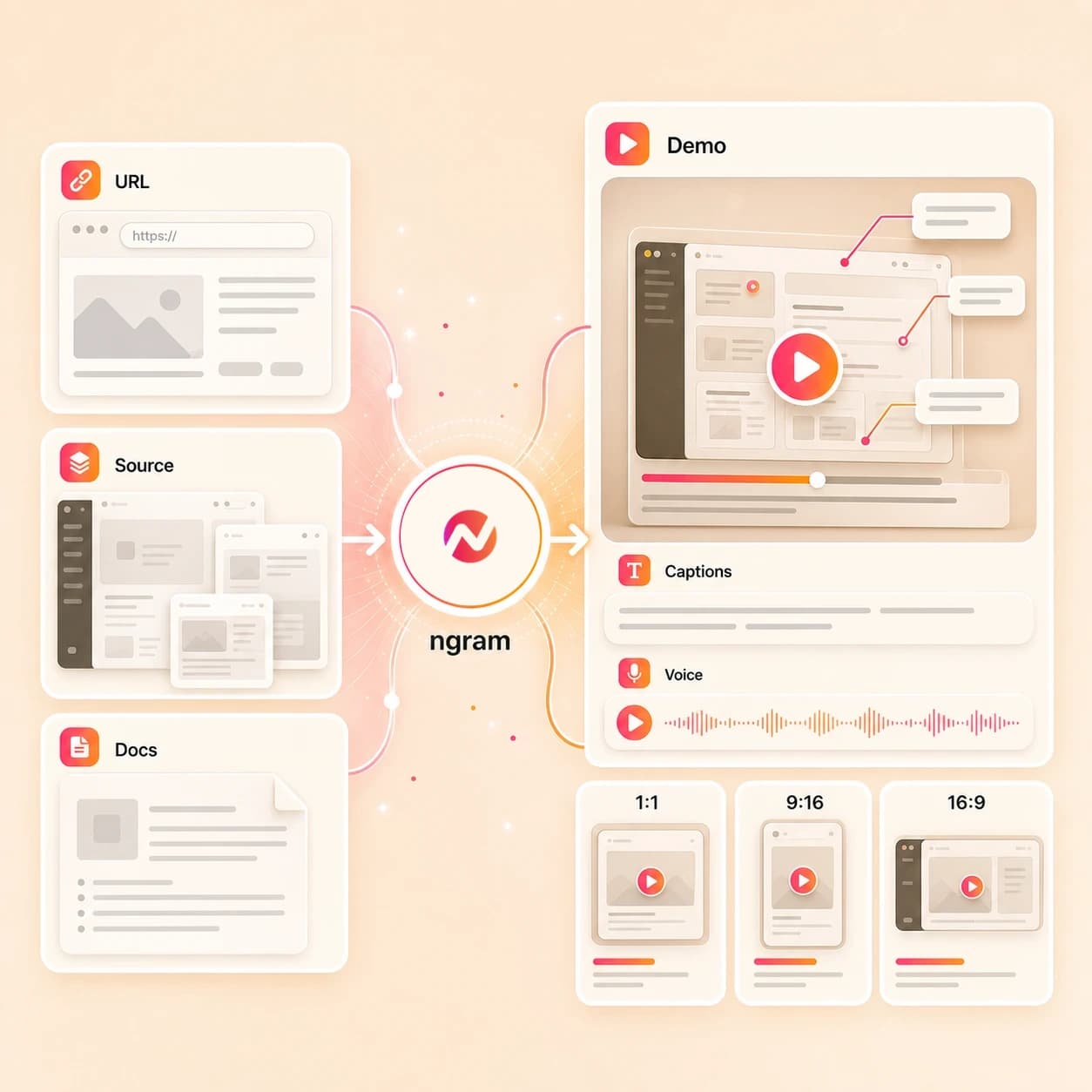
Create product demos from your real interface, screenshots, and approved message. Add callouts and captions, then tailor the same walkthrough for prospects, customers, and new releases.
Trusted by teams at












How it works
From product context to polished demo.
Use ngram as the AI product demo video maker for launches, sales enablement, onboarding, and feature education without rebuilding each demo by hand.
Add the product context
Start from a prompt, screenshot, image, PDF, or product URL. For larger projects, bring in docs, decks, approved recordings, or existing demo footage inside the broader editing workflow.
Context ready
Review the script and storyboard
ngram turns source material into a product narrative with the pain point, feature flow, value moments, proof points, and CTA mapped into editable scenes.
Plan reviewed
Generate branded demo scenes
Create AI visuals, product-aware callouts, screen context, voiceover, captions, motion, and brand styling that explain the workflow clearly.
Draft generated
Edit variants and export
Adjust wording, timing, captions, crops, and aspect ratios for launch pages, sales follow-up, onboarding flows, help centers, and feature clips.
Ready to export
What it can do
Product demos built around the actual feature.
ngram combines planning, generation, editing, and export controls so SaaS teams can create product demo videos without stitching together separate script, design, voice, caption, and resize tools.
Script and storyboard generation
Convert product context into an editable demo arc with intro, problem, workflow, benefit, proof, and CTA scenes.
Explore script generationProduct screen understanding
Use screenshots, PDFs, product URLs, and supported screen context to explain the right UI moments and reduce generic scenes.
Explore screen editingAI visuals for feature stories
Generate supporting visuals, transitions, and product-adjacent scenes that make a feature narrative easier to follow.
Explore AI visualsVoiceover and captions
Add AI voiceover, pronunciation control, captions, and text timing so viewers can follow the demo anywhere.
Explore AI voiceoverBrand kit controls
Keep product demo videos aligned with approved colors, type, logo usage, and repeatable campaign styling.
Explore brand kitsBuilt for product and SaaS feature demo creation
When it matters
Built for SaaS and product teams.
Use one AI product demo video maker across launches, sales enablement, onboarding, feature education, and product marketing.
Product demo videos
Create a polished product demo video that introduces the feature, shows the workflow, and explains the outcome without turning the video into a screen recording dump.
Explore product demosSaaS demo videos
Turn a SaaS workflow into a focused demo for buyers, users, or internal teams with product screenshots, UI callouts, voiceover, captions, and brand styling.
Explore SaaS demosCreate product demo video online
Move from product notes, source links, and visuals to an editable online demo draft, then refine scenes and exports before sharing the approved video.
Create demos onlineProduct walkthrough videos
Explain a workflow step by step with screen context, labels, zooms, captions, and pacing that helps viewers understand what to do next.
Explore walkthroughsSales product demos
Create product demo videos for follow-up, objection handling, persona-specific examples, and sales enablement libraries without promising bookings or revenue outcomes.
Explore sales demosProduct manager demos
Help product teams turn release context, screenshots, docs, and feature notes into clear videos for stakeholders, beta users, and launch readiness.
Explore PM demosProduct marketing enablement
Give product marketing teams reusable demo videos for launches, website sections, webinars, email sequences, and sales decks while keeping the story on brand.
Explore enablementCustomer onboarding videos
Create onboarding demos that show the right setup steps, feature habits, and product context with captions and variants for different customer segments.
Explore onboardingFeature announcement videos
Turn a release note, product page, screenshot, or launch brief into a concise feature demo that explains what changed and why users should care.
Explore feature launchesProduct stack
The product stack behind SaaS demo videos.
ngram helps teams plan, generate, edit, brand, caption, and export product demo videos from the source material they already use to launch and sell software.
Planning
Script Generation
Draft product demo scripts from prompts, release notes, screenshots, PDFs, product pages, docs, and decks.
Explore scriptsScreen
Screen and product context
Use screen-aware editing to turn product flows into clearer walkthroughs with product callouts and smart pacing.
Explore screen contextVisuals
AI Visuals
Create supporting visuals and scene concepts for product moments that need more than a static screenshot.
Explore AI visualsVoice
AI Voiceover
Add natural narration, pronunciation control, and persona-ready voice options to product demo drafts.
Explore voiceoverCaptions
Captions
Generate and edit captions for silent viewing, accessibility, support centers, launch pages, and social cuts.
Explore captionsBrand
Brand Kit
Apply approved colors, logos, type, and styling so demos feel like part of the same launch system.
Explore brand kitsMotion
Motion Graphics
Add labels, transitions, highlights, zooms, and visual hierarchy to make product steps easier to follow.
Explore motionMore tools
Build, polish, and repurpose every product demo.
Pair the AI Product Demo Video Maker with related ngram tools for scripting, source conversion, recording cleanup, subtitles, voiceover, and export variants.
Related demo and launch tools
Connect product demo creation to broader demo, SaaS, sales, and launch video jobs.
AI Demo Video Maker
Use a broader demo workflow when the walkthrough needs sales, onboarding, training, or internal education context.
Open toolAI SaaS Video Maker
Build SaaS demo, onboarding, launch, and support assets from the same product context.
Open toolAI Sales Video Maker
Turn the product demo into a sales leave-behind, proposal recap, or prospect explainer asset.
Open toolAI Product Launch Video Maker
Use demo source material inside a launch announcement, release-note video, or feature rollout asset.
Open toolBuild the demo source
Turn launch and feature materials into the first product demo draft.
AI Video Generator
Create video drafts from prompts when the product story starts as an idea or launch brief.
Open toolURL to Video
Use product pages, launch pages, or help articles as structured context for demo videos.
Open toolPPT to Video
Convert launch decks, enablement decks, and product story slides into video drafts.
Open toolPolish product walkthroughs
Refine screen-led demos with captions, voice, edits, and clearer product moments.
Screen Recorder
Capture a product workflow that can become broader source material for a demo.
Open toolVideo Editor
Trim, adjust, caption, and reshape demo scenes after the first draft is created.
Open toolAdd Subtitles to Video
Add readable captions for silent viewing, accessibility, and sales follow-up clips.
Open toolText to Speech Video
Add voiceover to product demos without recording narration for every variant.
Open toolRepurpose finished demos
Turn one approved demo into formats for launch, onboarding, enablement, and support.
Video Caption Generator
Create captioned versions for landing pages, social clips, help centers, and internal libraries.
Open toolVideo to GIF
Export short product moments as GIFs for docs, changelogs, emails, and support articles.
Open toolVideo Translator
Adapt approved product demos for teams and customers in more than one language.
Open toolConvert
Turn product source material into demo videos.
Use the product context your team already has: screenshots, pages, docs, decks, scripts, release notes, PDFs, and approved recordings as broader editing material.
Product Page to Video
Convert a product page into a structured demo draft with the promise, workflow, and CTA intact.
Open converterScreenshots to Video
Turn product screenshots into narrated demo scenes with callouts, captions, and brand styling.
Open converterScreen Recording to Video
Use approved screen recordings as broader source material for polished product walkthroughs.
Open converterWho it is for
For the teams that explain products every week.
Product demo work usually sits across product, marketing, sales, customer success, and startup teams. ngram keeps the workflow editable for each team.
Product marketing teams
Create launch demos, feature explainers, audience-specific edits, and website videos from the same product brief.
See PMM workflowsProduct marketing demo teams
Build reusable product demo systems for website, sales, webinar, and enablement needs.
See demo workflowsProduct managers
Translate feature work into stakeholder videos, beta walkthroughs, and launch-ready explanations.
See product workflowsSales enablement teams
Create demo videos that help reps explain product value consistently without promising sales outcomes.
See sales workflowsCustomer success teams
Turn onboarding flows and adoption guidance into clear videos customers can revisit.
See success workflowsSaaS teams
Keep product, marketing, sales, and onboarding demo work aligned around the same feature context.
See SaaS workflowsGrowth marketing teams
Repurpose product demos into channel-ready variants for landing pages, email, and campaign experiments.
See growth workflowsStartups
Create credible product demo videos from limited launch assets while keeping copy, visuals, and edits flexible.
See startup workflowsIntegrations
Bring product demo requests into your workflow.
Use integrations to pass approved source context into ngram and keep demo creation connected to existing launch, product, and enablement workflows.
Launch tracker to product demo brief
No-codeWhenA launch tracker row is marked ready with the feature name, audience, source link, and CTA.
ThenSend the approved context into ngram so the product demo draft starts with the right brief.
Self-hosted release workflow to demo request
WorkflowWhenA self-hosted workflow collects approved release notes, screenshots, and product URLs.
ThenCreate a structured product demo request in ngram with source context and audience notes.
Product page capture to demo prompt
CaptureWhenA product page, help article, or feature announcement should become a demo brief.
ThenCapture the page context with the Chrome extension and use it to start the ngram demo workflow.
Agent workflow to video draft
AgentWhenAn AI agent is preparing launch or onboarding assets and needs an editable product demo draft.
ThenUse MCP to pass approved context into ngram and create a product demo project for human review.
Why ngram
How ngram compares with common product demo workflows.
Product demo teams often mix recorders, editors, scripts, voice tools, brand templates, and export steps. ngram gives them one editable AI workflow for the demo itself.
| Compare | ngram | Screen recorder | Template video editor | Manual production workflow |
|---|---|---|---|---|
| Workflow fit | Turns prompts, images, PDFs, URLs, and product context into script, storyboard, and scenes. | Best when the main need is capturing a real product flow exactly as it happens. | Works well when the team already has a fixed visual format and clear copy. | Useful for major launches where the team wants custom creative direction and review cycles. |
| How ngram fits | Adds voiceover, captions, brand kit styling, product callouts, zooms, and visual polish in one workspace. | Still needs separate scripting, editing, captions, voiceover, callouts, and brand polish for a finished demo. | Usually requires manual scene building, screenshot placement, narration, captioning, and resizing. | Slower when every persona, feature update, onboarding cut, and sales follow-up needs a new version. |
| Best use | Keeps product demo variants editable for launch pages, onboarding, sales enablement, and feature updates. | Useful source material for product walkthroughs, but not a complete product demo creation workflow. | Can create quick branded videos, but product context and feature explanation stay mostly manual. | Often spreads script, design, voice, edit, caption, and export work across several tools and handoffs. |
FAQ
AI product demo video maker FAQ
Practical answers for product and SaaS teams.
Make a branded product demo from the materials you already have
Start with a prompt, screenshot, image, PDF, or product URL, then use ngram to plan, generate, edit, caption, voice, brand, and export a product demo for the audience that needs it.