AI Agency Video Maker by ngram
AI Agency Video Maker for client campaigns at scale

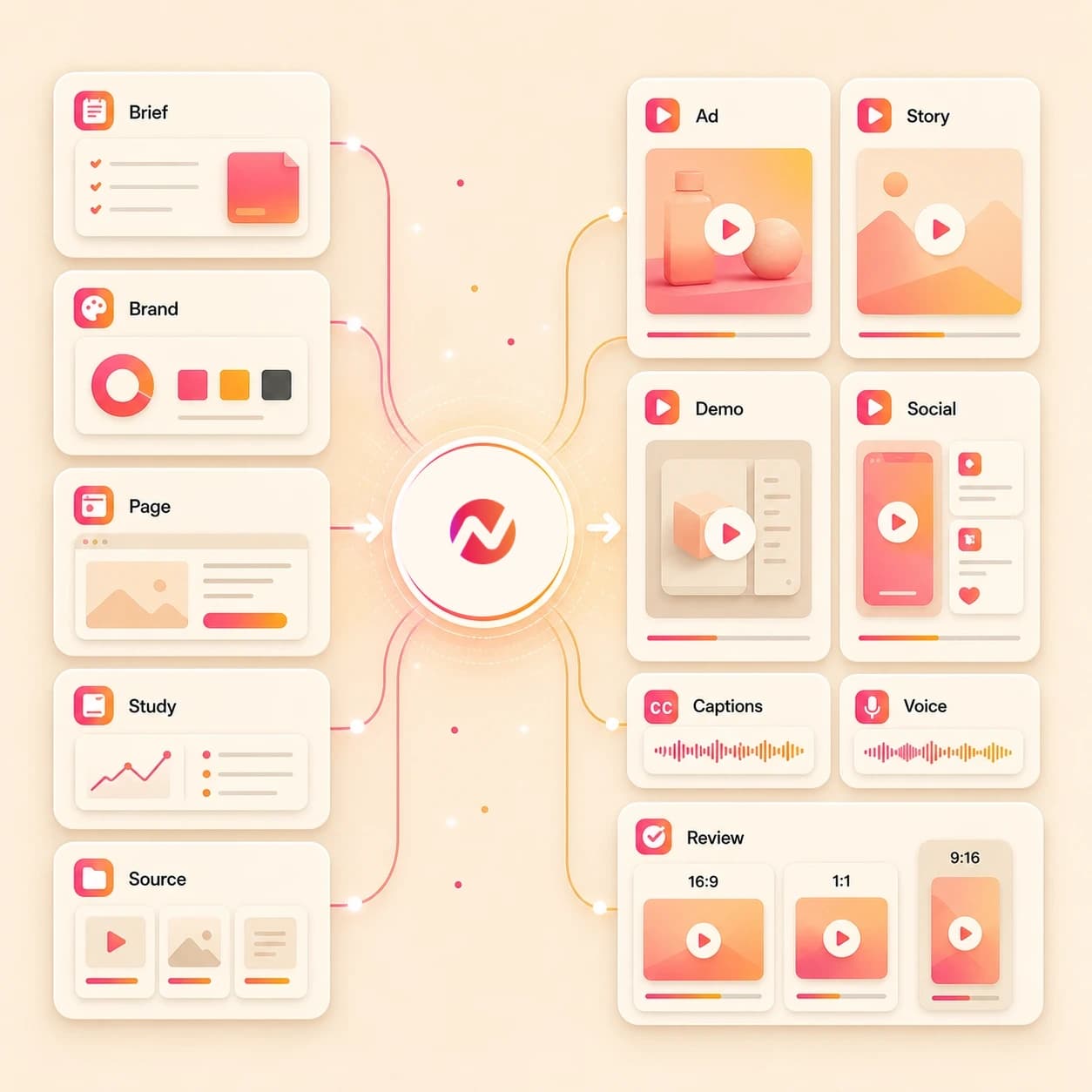
Name the client, audience, deliverable type, source material, tone, review needs, and export formats
What it does
Turn each client brief, product page, case study, or campaign asset into a polished video project. Keep client brands separate, then prepare and review each channel edit on its own.
Trusted by teams at












How it works
How the AI agency video maker works.
Bring approved client context, review the plan, then generate an editable video asset set without turning ngram into a strategy, media buying, or approval system.
Add the client source
Start from a prompt, image, PDF, website, product page, case study, proposal, deck, or URL that contains the message, proof, brand rules, and deliverable goal.
Source ready
Review the script and storyboard
ngram turns the source into a hook, scene order, voiceover script, visual direction, caption plan, CTA, and timing before the first agency video draft.
Storyboard ready
Generate the client draft
The project gets AI visuals, motion graphics, voiceover, captions, music, intro and outro treatment, and active brand kit styling.
Draft generated
Edit and export the package
Use chat, script edits, canvas controls, and the timeline to revise the video, then download the finished MP4.
Ready to hand off
What it can do
What the AI agency video maker builds.
Create client video assets from approved source material. Keep strategy, ad spend, direct publishing, client approvals, and performance reporting in the systems your agency already owns.
Client script and storyboard
Turn a brief, proposal, case study, product page, PDF, or rough prompt into a reviewable script, scene list, CTA, and timing plan.
Learn more about script generationBrand kit per project
Apply the active logo, colors, fonts, motion style, image style, voice, tone, approved phrases, blocked phrases, and CTA rules.
Learn more about brand kitAI visuals from client context
Generate scene imagery, product frames, backgrounds, and supporting visuals from the approved message and uploaded references.
Learn more about AI visualsVoiceover and captions
Create narration from the approved script, burn in captions by default, and keep both editable when client feedback changes the cut.
Learn more about AI voiceoverWorkspace review handoff
Keep projects, source assets, brand kits, and team edits in a shared workspace so account and creative teams can revise the same asset.
Learn more about collaborationBuilt for client video asset creation, not campaign operations
When it matters
Where AI agency video maker workflows fit.
Use these existing workflows when an agency brief needs client videos, ad creative, demos, proposals, case studies, social cuts, or reusable deliverables.
Agency ad creative video
Create client ad creative drafts from approved briefs, images, PDFs, or URLs, then export variants for the team that manages testing and placement.
Open agency creative use caseAgency client deliverable video
Turn scoped client work into a video deliverable package with a script, storyboard, captions, brand treatment, and export files ready for review.
Open deliverable use caseAgency case study video
Convert client proof, quotes, project notes, and result summaries into a branded case study video asset that sales and account teams can reuse.
Open case study use caseAgency pitch video
Use an RFP brief, pitch deck, proposal PDF, or partner recording to create a short pitch video that supports the agency presentation.
Open pitch video use caseAgency social content video
Use one approved source brief as context, then prepare and review each vertical, square, or widescreen client edit separately.
Open social content use caseMarketing ad creative
Draft campaign creative assets for client marketing teams while keeping spend decisions, platform setup, and reporting outside ngram.
Open ad creative use caseProduct demo video
Turn client product pages, screenshots, and screen recordings into demo videos with callouts, captions, voiceover, and brand styling.
Open product demo use casePMM customer story
Shape client testimonials, transcripts, and case study notes into customer story videos with an editable script and reviewable scene plan.
Open customer story use caseSales proposal walkthrough video
Convert client proposals, SOWs, and pricing decks into narrated walkthrough videos that support the account team after the meeting.
Open proposal video use caseProduct stack
Product features that support agency video work.
Use these ngram features to plan, generate, revise, and export agency client video assets from one editable project.
Planning
Script generation for client briefs
Turn approved client material into a script, storyboard, scene plan, and CTA before anyone reviews a rendered draft.
Learn more about script generationBrand control
Brand kit for client consistency
Attach logos, colors, fonts, tone, approved phrases, blocked phrases, intros, outros, and CTA rules to each video project.
Learn more about brand kitVisuals
AI visuals for campaign scenes
Generate scene imagery, product frames, backgrounds, and supporting visuals from the client message and source references.
Learn more about AI visualsAudio
AI voiceover for review cuts
Create narration from the approved script and regenerate audio when the account team revises the client message.
Learn more about AI voiceoverCaptions
Captions for client video packages
Burn captions into every video by default, then keep caption text and style editable as the deliverable changes.
Learn more about captionsTeam workflow
Collaboration for account handoff
Keep source files, generated assets, brand kits, and team edits close to the project instead of scattered across review threads.
Learn more about collaborationEditing
Video editing after the first draft
Use chat, script edits, canvas controls, and the timeline to revise clips, audio, captions, effects, scenes, and pacing.
Learn more about video editingMore tools
Related tools for agency video production.
Move between client video tasks without changing the core workflow of source material, storyboard, editable draft, and export.
Campaign and client assets
Create adjacent video assets from the same client brief or product page.
AI marketing video maker
Use the broader campaign workflow when an agency brief needs landing page, email, sales, and website video cuts.
Open toolAI video ad maker
Draft branded ad creative from a client source brief, then hand off files to the team that manages media and testing.
Open toolAI promo video maker
Turn a client offer, event, feature drop, or announcement into a promotional video asset with editable scenes.
Open toolDemos, pitches, and proof
Build client-facing videos that explain, sell, or document the work.
AI demo video maker
Create client walkthroughs from prompts, screenshots, PDFs, and URLs when the deliverable needs a clear product demo.
Open toolAI pitch video maker
Turn a proposal, pitch deck, RFP response, or account notes into a video that supports the agency presentation.
Open toolAI testimonial video maker
Convert approved quotes, case studies, transcripts, images, PDFs, or URLs into client customer story videos.
Open toolBrand and social packages
Keep reusable client creative aligned across brand story and social formats.
AI brand video maker
Create brand story assets from approved source material when a client needs narrative video, not just one campaign cut.
Open toolAI social media video maker
Turn one approved message into channel-ready variants for manual handoff across the client's social plan.
Open toolVideo script generator
Draft client scripts and storyboards before the full agency video project is ready to render.
Open toolConvert
Source material agencies can turn into video.
Use these converters when the client source is already a proposal, case study, deck, PDF, product page, or website.
Proposal to video for agency pitches
Upload a proposal PDF, SOW, or pricing deck and turn it into a narrated walkthrough video for account follow-up.
Open converterCase study to video for client proof
Convert a client case study into a branded customer story video with the quote, challenge, result, captions, and voiceover.
Open converterDeck to video for campaign packages
Turn pitch decks, strategy decks, launch decks, and client presentation decks into storyboarded video drafts.
Open converterWho it is for
Teams that use agency video workflows.
These existing ngram pages cover the agency, marketing, sales, and SaaS teams most likely to create client video assets.
Agencies and consultants
Use the AI agency video maker across client briefs, product pages, case studies, and brand kits for repeatable deliverables.
See agency workflowsGrowth marketing teams
Create campaign creative assets from client source material, then export files for the testing plan managed outside ngram.
See growth workflowsProduct marketing
Turn client product pages, launch notes, and demo material into videos that explain positioning and product proof.
See product marketing workflowsDemo videos for product marketing
Use client screenshots, product pages, and recordings when the agency deliverable needs a clear demo or walkthrough.
See demo workflowsSales enablement
Create proposal walkthroughs, demo follow-ups, and customer proof videos for the sales teams your agency supports.
See sales workflowsSaaS companies
Support SaaS clients with product demos, launch videos, onboarding assets, and social variants from one source project.
See SaaS workflowsIntegrations
Integrations for agency video handoff.
Use live ngram integrations to trigger video creation from approved client data or pull agency-ready outputs into another workflow.
Zapier client brief to video draft
AutomationWhenA client brief, form submission, CRM record, or project intake item is approved for video production
ThenCreate an ngram video project and route the completed asset status back to the agency workflow
Chrome Extension page capture
Source captureWhenAn account manager is reviewing a client product page, landing page, case study, or public brief in Chrome
ThenSend the page context into ngram so the team can draft a client video asset from the source
MCP agent video requests
Agent workflowWhenAn internal agent has the client prompt, approved source notes, and target deliverable details
ThenCall ngram as a tool to create the video project, check status, and retrieve the generated asset
Why ngram
AI agency video maker compared with other workflows.
Choose ngram when the job is an editable client video asset built from approved source material, brand rules, and a reviewable storyboard.
| Compare | ngram | Template editor | Manual production workflow | Single-purpose generator |
|---|---|---|---|---|
| Workflow fit | Turns prompts, images, PDFs, decks, websites, case studies, and URLs into script, storyboard, visuals, voiceover, captions, brand kit treatment, and exports | Starts from a prebuilt design or timeline and asks the team to fit the client story into that structure | Useful when the client needs live production, custom shoots, strategy workshops, media planning, or deep post-production craft | Can create one piece of the asset, such as a clip, image, script, subtitle file, or voiceover |
| How ngram fits | Keeps client source material, brand rules, captions, voiceover, scenes, and export formats attached to one editable project | Useful when the script, visuals, brand approvals, and export requirements are already settled | Usually depends on separate briefs, edit rounds, asset handoffs, and delivery timelines before the first video file is ready | Useful for filling a known production gap when the full client video structure already exists |
| Best use | Best when the agency needs reusable client video assets without taking over strategy, media buying, direct publishing, or performance reporting | Often leaves URL ingestion, storyboard planning, voiceover, captions, and brand phrase guardrails outside the template | Can sit upstream or downstream of ngram when the agency needs services beyond creating approved video assets | May require separate tools for source ingestion, storyboarding, brand kit, captions, edits, review, and MP4 export |
FAQ
AI agency video maker FAQ.
Client video asset questions
Create client video assets from agency briefs
Bring the brief, PDF, product page, case study, deck, image, or URL. ngram drafts the story, builds the scenes, adds voiceover and captions, applies brand kit styling, and exports the formats your agency needs for handoff.
Built for editable video deliverables, not strategy replacement, media buying, direct publishing, or guaranteed client outcomes.
Your account and creative teams stay in control of the message, review, and handoff.