AI Demo Video Maker by ngram
AI Demo Video Maker for product walkthroughs that sell

Name the audience, workflow, source context, tone, length, and CTA the demo should use
What it does
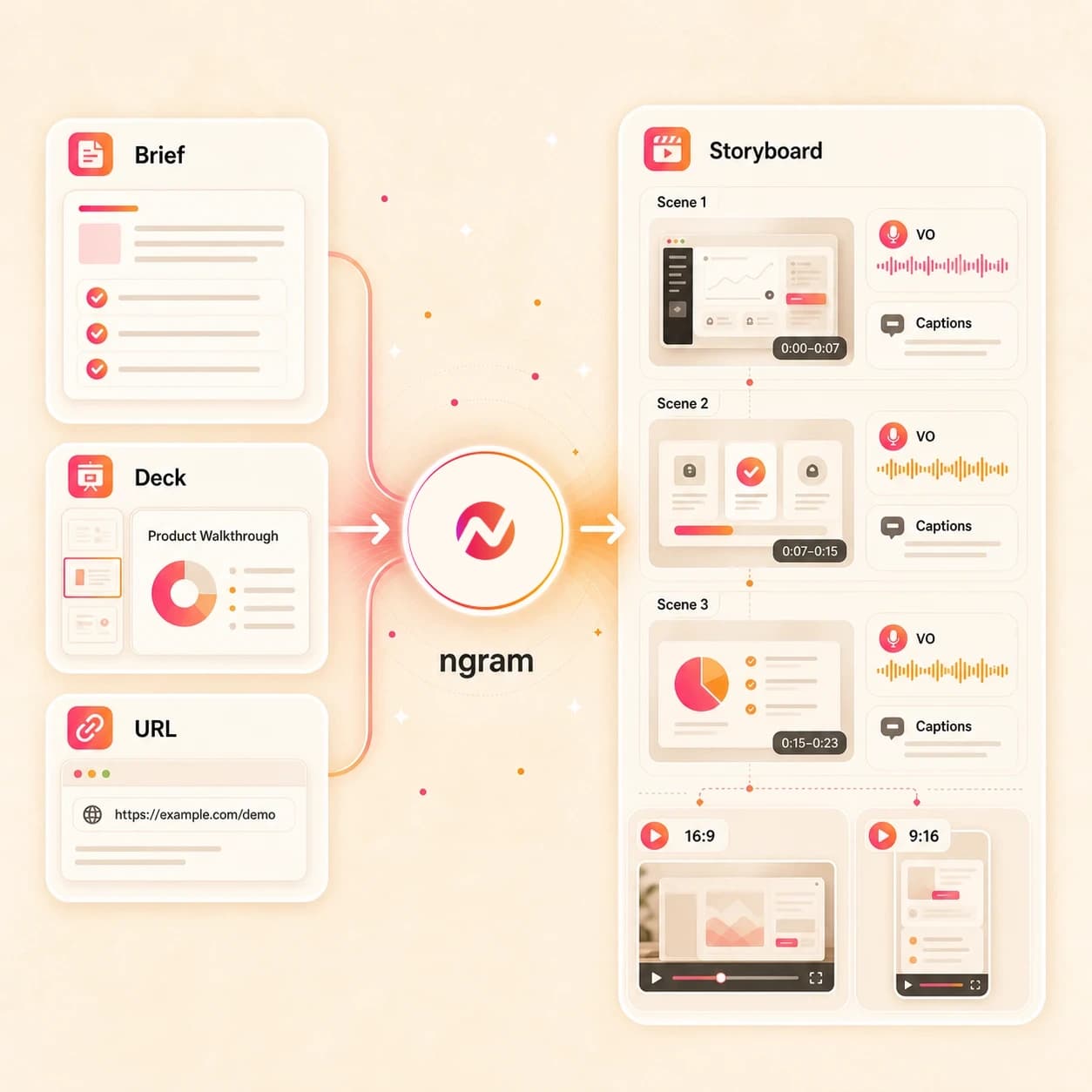
Build a product walkthrough from screenshots, recordings, and approved messaging. ngram adds structure and callouts, then keeps the demo editable for prospects, customers, and new releases.
Trusted by teams at












How it works
How the AI demo video maker works.
Give ngram the demo goal and source material, review the plan, then refine the generated walkthrough without rebuilding it in a timeline.
Add the demo brief
Describe the workflow or attach a supported image or PDF. You can also paste a source URL when the demo context already lives on a product page, help doc, or training page.
Brief ready
Review the script and storyboard
ngram turns the brief into a demo script, scene plan, visual direction, timing, callout notes, and CTA before rendering the first draft.
Plan reviewed
Generate the walkthrough
The project gets AI visuals, product callouts, voiceover, captions, motion graphics, music, brand treatment, and editable scenes tied to the approved plan.
Draft generated
Edit and export the cuts
Use chat, the script editor, canvas controls, or the timeline to revise scenes. Prepare and review each audience or channel edit separately before downloading its MP4.
Ready to share
What it can do
What the AI demo video maker builds.
Create demo videos for several business contexts while keeping source material, message, brand rules, and exports connected in one editable project.
Demo script and storyboard
Turn a prompt, PDF, screenshot, or URL into a clear demo structure with scene timing, narration, CTA, and reviewable callout notes.
Learn more about script generationProduct callouts and step labels
Point viewers to the UI detail, form field, metric, or workflow step they should notice without manually designing every overlay.
Learn more about motion graphicsAI visuals from your source context
Generate backgrounds, supporting frames, and visual fills from the demo script, uploaded references, screenshots, and brand direction.
Learn more about AI visualsVoiceover for guided walkthroughs
Create narration from the approved demo script, choose a voice, and regenerate affected audio after the script changes.
Learn more about AI voiceoverCaptions for silent review
Burn in captions by default so prospects, customers, and teammates can follow the demo in email, chat, docs, or training libraries.
Learn more about captionsBrand kit across every version
Apply logos, colors, fonts, motion style, screenshot style, voice, tone, approved phrases, and blocked phrases to each demo cut.
Learn more about brand kitBuilt for video demos, not sales automation or analytics dashboards
When it matters
Where AI demo videos fit.
Use these existing workflows when the job is broader than a product-only demo and the output needs to explain a workflow clearly.
Product demo videos
Use the AI demo video maker to explain a product workflow from a prompt, screenshots, product page, or PDF, then edit the script and callouts before export.
Open AI video use caseProduct walkthrough videos
Create a step-by-step walkthrough video that shows the path through a product or process with callouts, captions, and narration.
Open AI video use caseSales demo videos
Draft a sales demo video for a buyer context, objection, or follow-up so reps can send a clear walkthrough without waiting on a production queue.
Open AI video use casePMM sales enablement
Turn battlecards, pitch decks, and product notes into enablement demos that help reps explain the right workflow for each deal motion.
Open AI video use caseCustomer onboarding videos
Build onboarding demos from setup guides, help docs, screenshots, and PDFs so new customers can replay the key steps after kickoff.
Open AI video use caseCS feature education videos
Create customer education demos that explain what changed, where to click, and why the workflow matters for adoption.
Open AI video use caseInternal communication videos
Turn internal notes, process pages, or PDFs into demo-style explainers for teams that need the walkthrough without another meeting.
Open AI video use caseTraining videos
Use the AI demo video maker for SOPs, onboarding modules, and role training where learners need guided steps, not a static document.
Open AI video use caseTutorial videos
Convert how-to content into a watchable tutorial demo with a planned script, visible steps, captions, and export formats for the help center.
Open AI video use caseProduct stack
The product stack behind AI demo videos.
These ngram features handle the work between a rough demo idea and an editable walkthrough video.
Planning
Script Generation
Plan the demo before render with a script, storyboard, scene timing, visual direction, callouts, and CTA from the source brief.
Plan the demoVisuals
AI Visuals
Create supporting imagery and visual fills for demo scenes when a screenshot, PDF, or source URL needs more context.
Build scene visualsCallouts
Motion Graphics
Add product callouts, lower-thirds, text overlays, and transitions that make the demo easier to follow.
Add calloutsNarration
AI Voiceover
Generate narration from the demo script, switch voices, and regenerate audio after a script or audience change.
Add voiceoverCaptions
Captions & Subtitles
Style captions with the active brand kit so the demo works in inboxes, docs, chat threads, and training libraries.
Add captionsBrand
Brand Kit
Keep every sales, onboarding, training, and internal walkthrough aligned with approved colors, fonts, voice, and phrases.
Apply brand rulesEditing
Video Editing
Refine the generated demo with chat, script edits, canvas controls, and timeline changes after the first draft is built.
Edit the draftMore tools
Related tools for demo video workflows.
Use these tools when the demo needs a source page, deck, image, script, narration, captions, or final editing pass.
Related demo video tools
Move from a broad demo into product, SaaS, sales, and pitch-specific video workflows.
AI Product Demo Video Maker
Create a tighter product or feature walkthrough when the demo is centered on SaaS UI proof.
Open toolAI Sales Video Maker
Package the demo as a sales follow-up, account explainer, or proposal recap video asset.
Open toolAI SaaS Video Maker
Turn demo source material into SaaS onboarding, support, launch, and customer education videos.
Open toolAI Pitch Video Maker
Use the same demo context inside a pitch video for prospects, partners, or founder presentations.
Open toolStart the demo
Build the source structure before you polish the walkthrough.
AI Video Generator
Use the broader generator when the demo brief may become an explainer, launch cut, social variant, or training asset.
Open toolURL to Video
Paste a product page, help doc, release note, or landing page and turn the source into an editable demo draft.
Open toolPPT to Video
Convert a sales deck, enablement deck, or onboarding deck into a narrated demo video that still supports edits.
Open toolImage to Video
Animate product screenshots, UI stills, and launch images before they become part of a guided demo.
Open toolVideo Script Generator
Draft the talk track for a sales walkthrough, customer lesson, or internal demo before creating the full video.
Open toolPolish the walkthrough
Add the layers that make a demo easier to watch and share.
Add Subtitles to Video
Add readable subtitles to a demo cut so reviewers and customers can follow the workflow with sound off.
Open toolAdd Text to Video
Place product callouts, titles, and lower-thirds on demo scenes when the viewer needs a clear next step.
Open toolVideo Caption Generator
Create styled captions for short demo cuts that will be reviewed in feeds, chat threads, or help content.
Open toolVideo Editor
Open the full editor when the demo needs tighter pacing, scene changes, audio work, or a final export pass.
Open toolAI Voice Generator
Generate a clean narration track for a demo script, then keep the voiceover connected to captions and export.
Open toolConvert
Convert source material into demo videos.
These converters cover the source types that most often feed an AI demo video maker: screenshots, PDFs, pages, decks, docs, and scripts.
Screenshots to video
Turn a sequence of screenshots into a narrated walkthrough with callouts on the UI details that matter for the demo.
Open converterPDF to video
Use a one-pager, setup guide, sales brief, or training PDF as the source for a storyboarded demo video.
Open converterProduct page to video
Paste a product or feature page URL and turn the live copy into a demo video draft with a focused story.
Open converterWho it is for
Teams that use AI demo videos.
The same demo workflow can serve sales, product, customer education, support, training, and internal communication when the source and audience are clear.
Sales enablement
Create sales walkthroughs, proposal explainers, and enablement cuts from decks, notes, and approved talk tracks.
See sales workflowsCustomer success teams
Turn onboarding guides, feature notes, and help content into demos customers can watch after the meeting.
See CS workflowsProduct marketing
Build launch demos, feature explainers, and customer-facing walkthroughs that follow approved positioning.
See PMM workflowsProduct managers
Create internal explainers and stakeholder walkthroughs from PRDs, screenshots, release notes, and product URLs.
See product workflowsCustomer onboarding demos
Create setup walkthroughs, welcome videos, and role-based guides that stay tied to the live onboarding source.
See onboarding demosProduct marketing demos
Ship launch-day demo videos and enablement variants from briefs, specs, positioning decks, and screenshots.
See demo workflowsHR and internal comms
Turn internal policies, training PDFs, and process docs into demo-style explainers for employees.
See internal workflowsSupport teams
Convert help articles and recurring ticket answers into short walkthrough videos that explain the fix clearly.
See support workflowsIntegrations
Automate AI demo video creation.
Use live ngram integrations to start demo video work from briefs, docs, pages, and agent workflows, then route finished files for review.
Zapier demo brief intake
AutomationWhenA form, ticket, spreadsheet row, or internal request contains a demo brief and source URL.
ThenSend the prompt and source context to ngram, then notify the reviewer when the demo video is ready.
Chrome source capture
BrowserWhenA product page, help article, release note, or public training page is open in the browser.
ThenStart a demo video brief from that page context and keep the resulting video editable in ngram.
MCP agent workflow
AgentsWhenAn AI agent is preparing enablement, onboarding, or training material from approved source context.
ThenCall ngram as a tool to create a demo video draft and return the output for human review.
n8n review routing
Self-hostedWhenA self-hosted workflow collects a demo request, source file link, and reviewer name.
ThenCreate the demo video in ngram and route completion status back to the workflow for approval steps.
Why ngram
How ngram compares for AI demo videos.
Different tools can explain a workflow, but they start from different source material and produce different kinds of reviewable output.
| Compare | ngram | Template editor | Screen recorder workflow | Interactive demo tool |
|---|---|---|---|---|
| Workflow fit | Starts from prompts, images, PDFs, and URLs, then drafts a script and storyboard before render. | Works when the team already has a finished script, media assets, and a clear scene plan. | Works well when the demo starts with a recorded walkthrough of a live product flow. | Creates self-guided product tours when viewers need to click through steps themselves. |
| How ngram fits | Adds AI visuals, callouts, voiceover, captions, brand kit, and MP4 export in one project. | Requires more manual layout, narration, captions, and version management for each demo. | Less useful when the source is a PDF, help article, deck, or product page that needs a script first. | Usually optimized for embedded tours rather than narrated video assets for email, training, and sales handoff. |
| Best use | Fits sales walkthroughs, onboarding, customer education, training, and internal explainers. | Better for hands-on design control than prompt-led demo creation from source material. | Often needs separate tools for brand treatment, captions, voiceover, and MP4 export. | Useful alongside video when the team needs both an interactive tour and a shareable demo cut. |
FAQ
AI demo video maker questions.
Answers for demo workflows
Turn your next demo brief into an editable video
Start with the source you already have: a prompt, screenshot, PDF, or URL. ngram plans the demo, generates the first cut, and keeps the script, scenes, callouts, voiceover, captions, brand, and exports editable.
Use the same workflow for sales, onboarding, customer education, training, and internal walkthroughs.
CTA opens ngram sign-in. The project starts after authentication.