AI Pitch Video Maker by ngram
AI Pitch Video Maker for pitches people finish

Name the audience, goal, source material, proof points, tone, length, and CTA.
What it does
Turn your deck and talking points into a clear pitch video that can travel without you. Adapt the same story for investors, prospects, or internal stakeholders while keeping every scene editable.
Trusted by teams at












How it works
How the AI pitch video maker works.
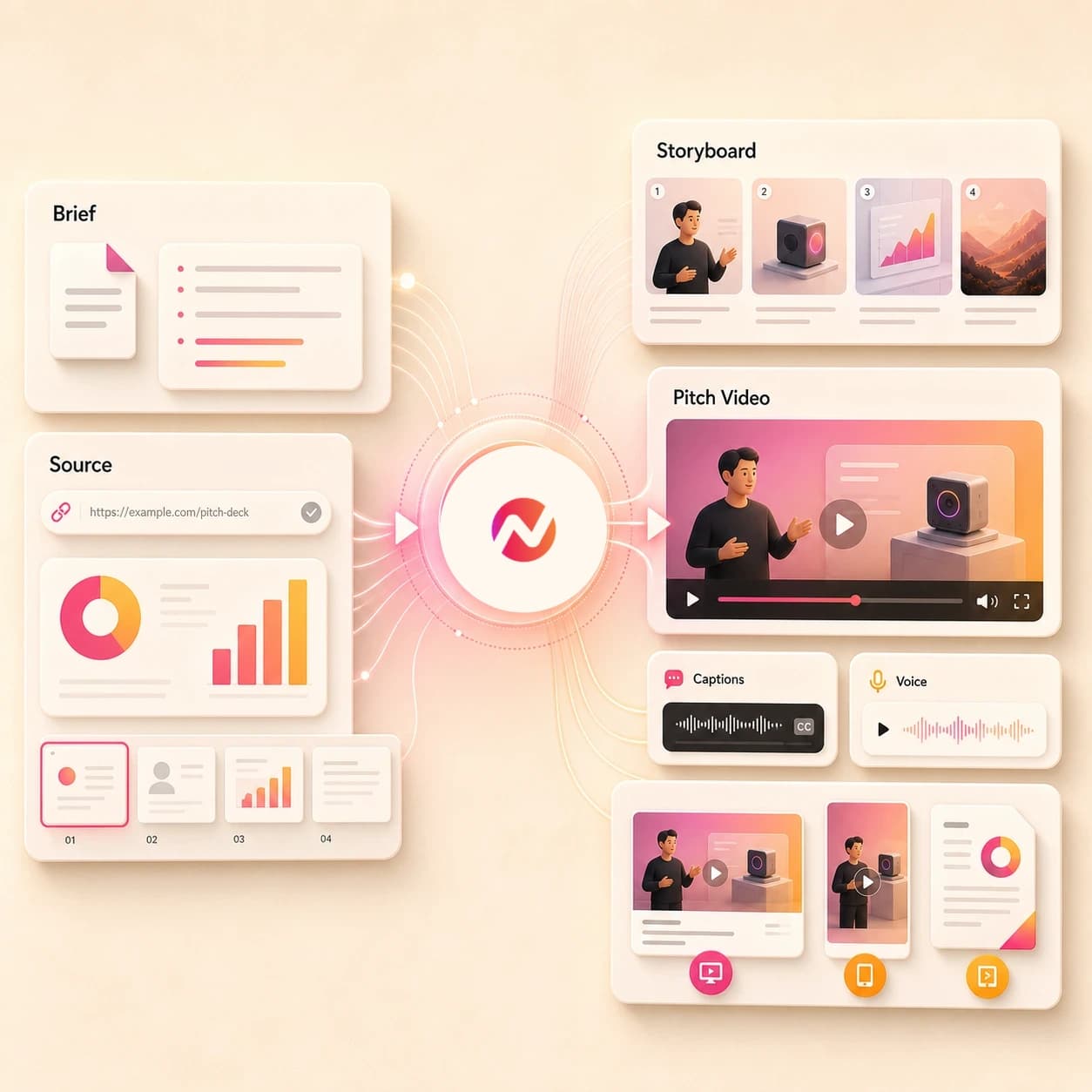
Give ngram the pitch goal and source material, approve the story, then refine the video asset before it goes into a deck, follow-up, data room, or customer presentation.
Add the pitch source
Start with a prompt, image, PDF, doc, pitch deck export, or URL. Include the audience, ask, proof points, objections to avoid, and the presentation context.
Source ready
Review the script and storyboard
ngram turns the source into a pitch arc with scene timing, narration, visual direction, key proof moments, and a CTA before rendering starts.
Story reviewed
Generate the pitch video
The project gets AI visuals, motion graphics, voiceover, captions, music, branded intro and outro treatment, and editable scenes tied to the approved pitch plan.
Draft generated
Edit and export versions
Use chat, the script editor, canvas controls, or the timeline to revise scenes and tighten the ask. Prepare and review each audience or channel edit separately before downloading its MP4.
Ready to share
What it can do
What the AI pitch video maker builds.
Create pitch video assets for investor updates, startup fundraising, sales proposals, agency new business, product marketing, and customer presentations while keeping outcome promises outside the page.
Pitch script and storyboard
Turn a brief, deck, PDF, doc, image, or URL into a reviewable story with problem, proof, offer, ask, scene notes, and timing.
Learn more about scriptsDeck-to-video structure
Convert a PowerPoint or PDF pitch deck into an editable video sequence so each claim, chart, and product moment has narration and pacing.
Convert PPT to VideoAI visuals from pitch context
Generate supporting frames, scene backgrounds, product visuals, and branded fills from the approved pitch story and uploaded references.
Learn more about AI visualsVoiceover for guided presentations
Create narration from the approved pitch script, choose a voice, and regenerate affected audio when the pitch wording changes.
Learn more about voiceoverCaptions for quiet review
Burn in captions by default so investors, prospects, clients, and stakeholders can understand the pitch in email, chat, or a review room.
Learn more about captionsBrand kit across every version
Apply logos, colors, fonts, tone rules, approved phrases, blocked phrases, intros, outros, and CTA cards across each pitch variant.
Learn more about brand kitBuilt for pitch video assets, not fundraising or sales execution
When it matters
Where AI pitch videos fit.
Use these existing workflows when a pitch needs a watchable asset for investors, prospects, clients, product launches, or internal stakeholders.
Investor pitch videos
Turn a pitch deck, traction summary, product page, or founder notes into a concise investor pitch video for async review without promising funding outcomes.
Open investor pitch workflowFounder pitch videos
Create a founder-led pitch video from a deck, product demo, one-pager, or URL so the narrative travels with the file after the meeting ends.
Open founder pitch workflowStartup pitch videos
Use ngram when an early-stage team needs a branded pitch video for a data room, customer intro, partner deck, or launch follow-up.
Open startup pitch workflowAgency pitch videos
Convert an RFP brief, case study deck, service overview, or client strategy page into a pitch video that explains the proposed approach.
Open agency pitch workflowSales proposal walkthroughs
Turn a proposal PDF or deal deck into a narrated walkthrough that explains scope, timeline, value, and next steps for the buyer committee.
Open proposal workflowSales demo follow-ups
Create a pitch-style recap after a demo by combining product context, buyer notes, screenshots, and a direct next step for the champion.
Open follow-up workflowSales demo videos
Build a customer-facing pitch video around the product workflow, proof points, and buying context without claiming meetings or revenue will follow.
Open sales demo workflowPMM sales enablement
Turn battlecards, launch briefs, product notes, and pitch decks into enablement videos that help reps explain the approved story.
Open enablement workflowProduct demo videos
Pair the pitch with a product demo video when the audience needs to see the workflow, not just hear the company or campaign narrative.
Open product demo workflowProduct stack
The product stack behind AI pitch videos.
These ngram features carry a rough pitch source into an editable video presentation without turning the page into a fundraising or sales automation promise.
Planning
Script Generation
Plan the pitch before render with a script, storyboard, scene timing, proof point order, visual direction, and CTA from the source brief.
Plan the pitchVisuals
AI Visuals
Create supporting scene art, product frames, and branded visuals for pitch moments that need more than a static slide.
Create visualsNarration
AI Voiceover
Generate narration from the approved pitch script, select a voice, and update the audio when the story or ask changes.
Add voiceoverCaptions
Captions & Subtitles
Add branded captions so the pitch stays clear when a stakeholder watches without sound or skims the video in a busy review flow.
Caption the pitchBrand
Brand Kit
Keep pitch videos aligned with approved logos, colors, fonts, tone, intro treatment, outro CTA, and blocked phrases.
Apply brand kitEditing
Video Editing
Use chat, script edits, canvas controls, and the timeline to tighten the pitch after the first draft is generated.
Edit the draftMore tools
Related tools for pitch video production.
Use these tools when the pitch source, presentation style, or follow-up asset needs a more specific starting point.
Start from pitch material
Turn decks, scripts, and raw product context into the first pitch video draft.
PPT to Video
Convert a PowerPoint or PDF deck into a narrated video before shaping it into an investor, agency, or sales pitch.
Open toolVideo Script Generator
Draft the pitch script first when the team has notes, a product page, or a rough outline but no approved narration yet.
Open toolText to Speech Video
Use an approved pitch script as the source and generate a narrated video with scenes, captions, and brand styling.
Open toolBuild adjacent pitch assets
Create demo, marketing, promo, and commercial cuts that support the pitch without replacing the pitch page.
AI Demo Video Maker
Create a walkthrough video when the pitch needs a product flow, setup path, or customer workflow explained visually.
Open toolAI Product Demo Video Maker
Turn product screenshots, PDFs, and URLs into a SaaS demo cut that can sit beside a pitch deck or proposal.
Open toolAI Marketing Video Maker
Create campaign and launch videos from the same pitch source when marketing needs a broader customer-facing cut.
Open toolAI Promo Video Maker
Build a shorter promotional pitch for events, offers, launch moments, or partner updates from approved source material.
Open toolAI Commercial Video Maker
Create a polished brand spot when the pitch source needs a more commercial-style asset for website or campaign review.
Open toolConvert
Convert pitch source material into video.
These converters are useful when the pitch starts in a deck, document, PDF, source page, screenshot set, or single prompt.
Deck to Video
Use a slide deck as the source for a narrated pitch video with scene structure, voiceover, captions, and branded export files.
Open converterPPT to Video
Turn a PowerPoint pitch deck into a video presentation that keeps the narration and visual sequence easier to review.
Open converterPDF to Video
Convert an exported deck, proposal, one-pager, or customer brief into a pitch video draft with a planned script and scenes.
Open converterWho it is for
Pitch video workflows by team.
Different teams need pitch videos for different rooms. These existing solution pages map the same asset workflow to each audience.
Founders
Create founder pitch videos from decks, product notes, screenshots, and landing copy while keeping the ask editable before export.
See founder workflowsStartups
Turn early-stage pitch decks, product demos, investor updates, and launch briefs into videos that fit startup review cycles.
See startup workflowsAgencies & Consultants
Use pitch videos for RFP responses, client strategy presentations, case study proof, and new-business follow-up assets.
See agency workflowsSales Enablement
Convert battlecards, proposals, demo recordings, and pitch decks into shareable video assets for sales teams.
See sales workflowsProduct Marketing Managers
Build product narrative videos from launch briefs, segment messaging, proof points, and sales enablement source material.
See PMM workflowsGrowth & Marketing Teams
Adapt a pitch source into campaign, landing page, social, and customer-facing video variants after the core story is approved.
See marketing workflowsIntegrations
Connect pitch video work to the rest of your stack.
Use live integrations for intake, review, and workflow handoff around pitch video creation. Keep outreach, CRM execution, and publishing decisions in the systems that own them.
Zapier pitch intake
AutomationWhenA founder, rep, or client submits an approved pitch brief through a connected form or workspace trigger.
ThenCreate a new ngram pitch video request with the source notes attached for review.
n8n pitch operations
Self-hostedWhenA self-hosted workflow approves a pitch deck or proposal for video conversion.
ThenSend the source package to ngram and monitor render status from n8n.
Chrome Extension source capture
BrowserWhenThe pitch source lives on a landing page, product page, case study, or public brief in the browser.
ThenCapture the page context for ngram so the pitch video starts from the approved source.
MCP agent workflow
AgentWhenAn external AI agent has the pitch brief, asset links, and video instructions ready.
ThenCall ngram through MCP to request the pitch video and check status from the agent workflow.
Why ngram
AI pitch video maker compared with other workflows.
The right choice depends on whether you need a pitch video asset, a presentation deck, a recording tool, or a simple template editor.
| Compare | ngram | Manual deck workflow | Template editor | Point AI generator |
|---|---|---|---|---|
| Workflow fit | Starts from prompts, decks, PDFs, docs, images, screenshots, and URLs | Good when the deck is already approved and a human presenter owns delivery | Useful for fixed layouts and simple pitch video templates | Useful for generating individual visuals or avatar clips |
| How ngram fits | Creates script, storyboard, AI visuals, voiceover, captions, brand kit, and MP4 export | Requires separate recording, editing, captioning, voiceover, and export steps | Usually expects the user to bring the script, scene order, proof points, and CTA | May not plan the pitch narrative, deck context, captions, brand kit, and exports together |
| Best use | Keeps pitch videos editable through chat, script edits, canvas controls, and timeline | Harder to make audience variants without creating another deck and recording pass | Can drift from the source pitch when the story changes late in review | Often needs a separate editor to assemble a complete investor, sales, or client presentation |
FAQ
AI pitch video maker FAQs.
Common questions
Make the pitch video before the next review
Bring the deck, doc, product page, image, PDF, or rough prompt. ngram helps plan the pitch story, generate the editable video, and export the versions your team needs.
Create the video asset and keep final approval in your team's hands.
Creates pitch video assets, not capital raising or sales execution.