AI Testimonial Video Maker by ngram
AI Testimonial Video Maker for customer proof buyers trust

Paste the approved quote, customer context, outcome, allowed attribution, target audience, tone, length, and CTA.
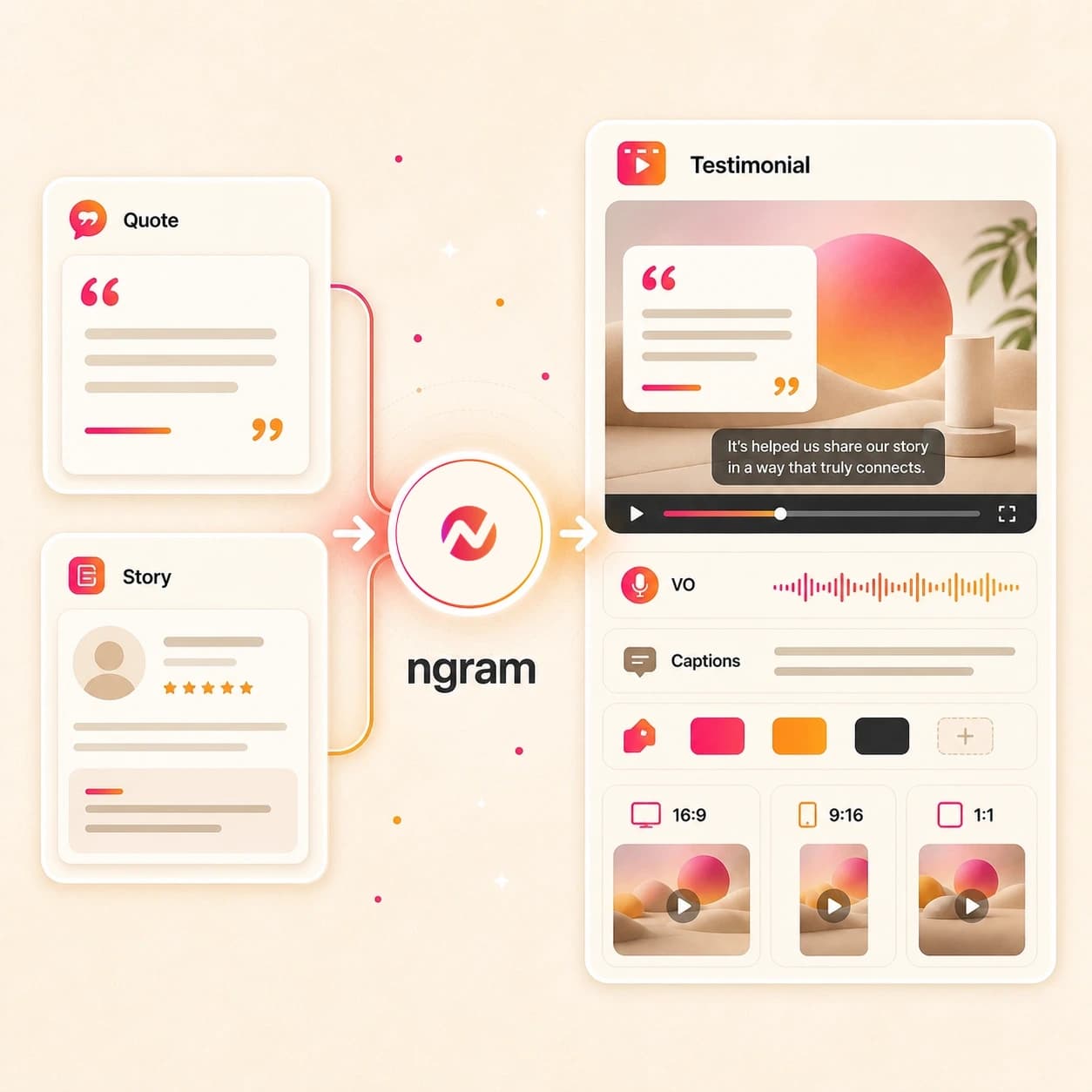
What it does
Create customer proof from approved quotes, case studies, and client assets. Keep every claim grounded in the source, then adapt the story for sales, campaigns, and your website.
Trusted by teams at












How it works
How the AI testimonial video maker works.
Bring approved customer proof, review the plan, then turn the material into an editable video without adding collection or consent tooling.
Add approved customer material
Start with a prompt, quote, case study PDF, customer image, review note, transcript, doc text, or source URL. Include any attribution limits and claims the video must avoid.
Source ready
Review the script and storyboard
ngram turns the source into a customer story structure with scene timing, narration, quote placement, visual direction, proof points, and CTA before the draft renders.
Plan reviewed
Generate the testimonial video
The project gets AI visuals, voiceover, captions, lower thirds, motion graphics, music, brand styling, intro and outro treatment, and editable scenes tied to the approved source.
Draft generated
Edit and export the story
Use chat, script edits, scene regeneration, canvas controls, or the timeline to revise the video and export versions for website, sales, social, or internal review paths.
Ready to review
What it can do
What the AI testimonial video maker builds.
Create customer proof videos from source material your team already has, while keeping customer outreach, consent, legal review, and authenticity checks outside ngram.
Quote-to-story planning
Turn an approved customer quote, case study excerpt, review note, or transcript into a script, storyboard, scene plan, and CTA for review.
Learn more about scriptsCase study and PDF source handling
Use customer-story PDFs, approved images, and pasted doc text as source context so ngram can pull the problem, outcome, quote, and proof points into the video plan.
Learn more about scriptsAI visuals and proof frames
Generate scene art, product context, customer proof frames, and visual fills that support the story without inventing claims outside the provided source.
Learn more about AI visualsVoiceover from the approved script
Generate narration from the reviewed testimonial script, choose a voice, and regenerate audio when the quote order, CTA, or story angle changes.
Learn more about voiceoverCaptioned customer proof
Burn in branded captions by default so the customer story works in website embeds, sales rooms, social feeds, and muted review contexts.
Learn more about captionsBrand kit and message controls
Apply logos, colors, fonts, motion style, tone rules, approved phrases, blocked phrases, intros, outros, and CTA cards to each testimonial video.
Learn more about brand kitBuilt for approved/source material, not testimonial collection or consent management
When it matters
Where AI testimonial videos fit.
Use these existing workflows when approved customer material needs to become a clear video asset for marketing, sales, or customer success.
Customer Testimonial Video
Use the AI testimonial video maker to turn an approved customer quote, interview transcript, image, or case study note into a branded customer proof video.
Open AI video use casePMM Customer Story
Build a customer story video from approved case study material so product marketing can explain the challenge, outcome, and proof point in a watchable format.
Open AI video use caseAgency Case Study Video
Turn client-approved case study copy, results notes, images, and testimonial excerpts into a customer proof video for an agency deliverable.
Open AI video use caseAgency Client Deliverable Video
Create a testimonial-style deliverable from client source material while keeping the customer's quote limits and brand requirements visible in the brief.
Open AI video use caseGrowth Campaign Video
Adapt approved customer proof into campaign video variants that explain the outcome, reinforce the landing page, and stay editable for testing.
Open AI video use caseMarketing Landing Page
Create a customer proof video for a landing page from approved quotes, source URLs, images, PDFs, or case study notes tied to the page message.
Open AI video use casePMM Sales Enablement
Convert customer quotes and case study proof into sales enablement videos reps can review and use alongside approved battlecards, decks, or proposal material.
Open AI video use caseCS QBR Video
Turn QBR notes, outcomes, customer wins, and approved account proof into a recap video that supports the next customer story or renewal conversation.
Open AI video use caseCS Renewal Outreach Video
Use approved renewal notes, ROI summaries, and customer success proof as source material for a customer story video tied to the account's next step.
Open AI video use caseProduct stack
The product stack behind AI testimonial videos.
These ngram features carry approved customer source material into an editable testimonial or customer story video project.
Planning
Script Generation
Plan the testimonial before render with a script, storyboard, scene order, quote placement, visual direction, and CTA from approved source material.
Plan the customer storyVisuals
AI Visuals
Create scene imagery, proof frames, product context, and visual fills that support the customer story without adding unsupported claims.
Build scene visualsNarration
AI Voiceover
Generate narration from the approved testimonial script and regenerate affected audio when the customer story changes.
Add voiceoverCaptions
Captions and Subtitles
Add branded burned-in captions so customer story videos work in muted feeds, sales rooms, landing pages, and internal review.
Caption the storyBrand
Brand Kit
Keep testimonial videos aligned with approved logos, colors, fonts, motion style, tone, intros, outros, and phrase rules.
Apply brand rulesOverlays
Motion Graphics
Add lower thirds, quote cards, product callouts, animated text, and transitions that make the customer proof easier to follow.
Add proof calloutsEditing
Video Editing
Revise the generated customer story through chat, direct script edits, scene regeneration, canvas controls, and timeline adjustments.
Edit the testimonialMore tools
Related tools for testimonial video production.
Use these ngram tools when customer proof starts as text, needs a broader video draft, or requires captioning and edit polish.
Build the customer proof asset
Create the first draft from approved quotes, case studies, source URLs, or a broader AI video brief.
AI Video Generator
Use the broader generator when the approved customer material may become a customer story, explainer, launch cut, or sales proof video.
Open toolAI Marketing Video Maker
Turn approved customer proof into a campaign video when the testimonial needs to support a launch, landing page, email, or social asset.
Open toolAI Sales Video Maker
Create customer proof videos for sales enablement, proposal context, or buyer education while keeping outreach in the sales stack.
Open toolText to Video
Paste an approved quote, review note, transcript excerpt, or customer story outline and turn the text into an editable video draft.
Open toolVideo Script Generator
Draft the testimonial script and storyboard first when the customer source needs tighter quote order, CTA, and scene planning.
Open toolPolish the customer story
Refine captions, overlays, narration, music, and scene timing after the testimonial draft exists.
Video Editor
Open the editor when the testimonial video needs tighter pacing, quote edits, scene changes, audio work, or final export checks.
Open toolAdd Subtitles to Video
Add readable subtitles to a testimonial cut so customers, buyers, and reviewers can follow the story with sound off.
Open toolAdd Text to Video
Place quote callouts, lower thirds, product labels, and customer proof notes on scenes that need a clearer takeaway.
Open toolVideo Caption Generator
Generate animated captions for testimonial clips and style each line to match the active brand kit.
Open toolAdd Music to Video
Add a restrained music bed under a customer story video, balance it below voiceover, and keep the project editable.
Open toolAdapt the approved cut
Use the finished customer story as source for separately prepared channel edits and supporting assets.
AI Social Media Video Maker
Create social variants from the same approved testimonial source with captions, pacing, and aspect ratios tuned for channel review.
Open toolLinkedIn AI Video Maker
Adapt a customer proof video for LinkedIn with business-focused framing, caption style, and export options your team can review.
Open toolYouTube AI Video Maker
Build a longer customer story or short proof cut for YouTube-style review with script, captions, thumbnail work, and export packaging.
Open toolVideo to GIF
Turn an approved customer quote moment or product proof scene into a small loop for docs, sales decks, or email embeds.
Open toolConvert
Start from approved customer proof.
These converters match the source types most likely to feed an AI testimonial video maker.
Testimonial to Video
Paste an approved customer quote or testimonial excerpt and turn it into a storyboarded customer proof video.
Open converterCase Study to Video
Upload or paste a case study and create a customer story video from the challenge, outcome, quote, and proof points.
Open converterReview to Video
Turn approved review text into a customer proof video with script, storyboard, voiceover, captions, and brand styling.
Open converterWho it is for
Teams that use AI testimonial videos.
These existing solution pages match the teams most likely to turn approved customer material into testimonial and customer story videos.
Product Marketing Managers
Turn approved customer quotes, case studies, and interview notes into customer story videos for launch pages, sales proof, and segment narratives.
See PMM workflowsCustomer Success
Use QBR notes, renewal proof, onboarding wins, and customer outcomes as source material for testimonial-style videos that stay tied to the account story.
See CS workflowsGrowth and Marketing Teams
Adapt approved customer proof into landing page videos, campaign cuts, email assets, and social variants without changing the source claim.
See growth workflowsSales Enablement
Create buyer-facing customer proof videos from approved case studies, quotes, and sales context while keeping outreach in the sales system.
See sales workflowsAgencies and Consultants
Build client-approved testimonial and case study videos from source files, URLs, images, and notes while keeping each client brand kit separate.
See agency workflowsFounders
Turn early customer wins, investor proof points, and approved quotes into customer story videos that support launches, fundraising, and sales moments.
See founder workflowsStartups
Create credible customer proof videos from the material already in the team drive: quotes, PDFs, screenshots, notes, and public source pages.
See startup workflowsSaaS Companies
Turn SaaS customer outcomes, product context, adoption notes, and case study material into testimonial videos for website, sales, and lifecycle use.
See SaaS workflowsIntegrations
Connect testimonial video requests to your workflow.
Use live integrations for source capture, intake, status checks, and internal routing around approved customer story material.
Zapier testimonial intake
AutomationWhenAn internal request record contains an approved quote, case study link, customer story brief, or source PDF.
ThenCreate an ngram video draft request with the source context attached and send render status back to the Zap.
n8n source package handoff
Self-hostedWhenA self-hosted workflow prepares an approved quote, transcript excerpt, PDF, or customer story URL for video generation.
ThenSend the source package to ngram and monitor render status from n8n while review tasks stay in your system.
Chrome Extension source capture
BrowserWhenA marketer is viewing a customer story page, case study page, approved quote page, or product context page in Chrome.
ThenSend the page context to ngram so the testimonial video starts from the source already on screen.
MCP agent workflow
AgentWhenAn external AI agent has approved customer material, allowed attribution notes, and video instructions ready.
ThenCall ngram through MCP to request the testimonial video draft and check status before your team reviews it.
Why ngram
AI testimonial video maker compared with other workflows.
The right workflow depends on whether you need a generated customer story, a template assembly tool, a collection system, or manual edit control.
| Compare | ngram | Template editor | Testimonial collection platform | Manual editing workflow |
|---|---|---|---|---|
| Workflow fit | Starts from approved quotes, case studies, review notes, transcripts, images, PDFs, docs, and URLs | Useful when the team already has a finished testimonial script, layout, media assets, and scene order | Useful when the main job is requesting testimonials and organizing customer responses | Strong choice when an editor needs full control over footage, timeline structure, effects, and finishing |
| How ngram fits | Creates script, storyboard, AI visuals, voiceover, captions, brand treatment, edit controls, and exports | Usually depends on the user to decide the customer story structure before editing starts | May still need a separate production step once approved quotes, transcripts, or case studies are ready | Source parsing, script planning, voiceover, captions, and format variants often happen as separate tasks |
| Best use | Keeps testimonial videos editable while leaving collection, consent, release forms, and authenticity checks outside the tool | Better for hands-on layout control than source-aware video drafting from customer material | Complements ngram when collection happens upstream and the approved source material needs a finished video | Better for bespoke production than prompt-led customer story drafts from existing approved material |
FAQ
AI testimonial video maker FAQs.
Answers for customer story and testimonial video workflows.
Turn approved customer proof into a customer story video
Bring the approved quote, case study, review note, transcript, image, PDF, doc text, or URL. ngram plans the story, generates the editable video, and exports the formats your team can review.
Create the testimonial video in ngram and keep customer outreach, consent, and release decisions in the systems your team already uses.
Creates videos from approved/source material, not collection workflows.