AI Marketing Video Maker by ngram
AI Marketing Video Maker for campaigns that need more video

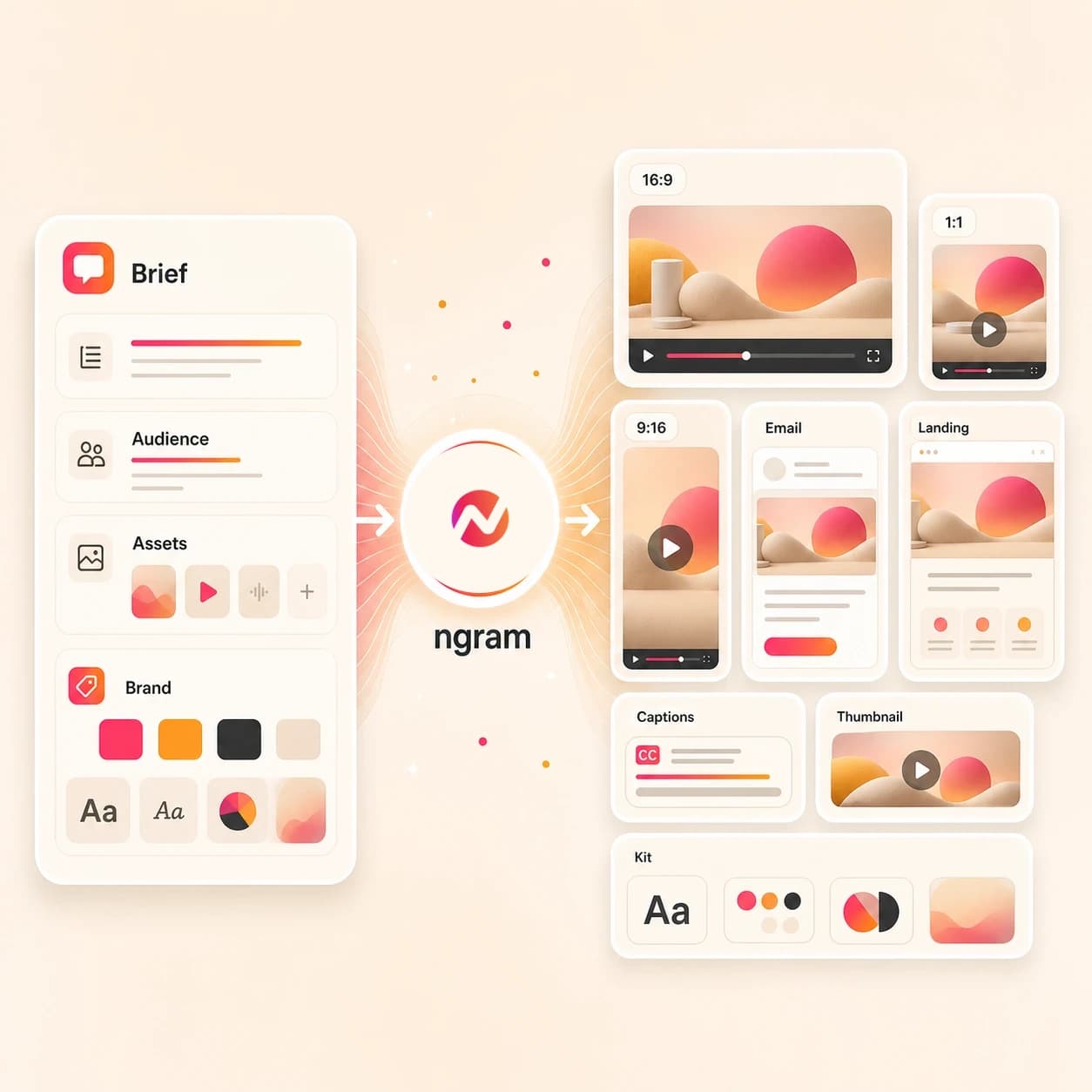
Name the campaign, audience, offer, source message, channel, length, brand tone, and CTA
What it does
Turn one campaign brief into a polished video project, then adapt it for the website, paid creative, and social channels. Keep the message and brand consistent across every version.
Trusted by teams at












How it works
How the AI marketing video maker works.
Give ngram the source message, review the plan, then create editable marketing video cuts from one branded project.
Bring the campaign source
Start with a prompt, image, PDF, or URL that explains the offer, audience, product, proof points, and channel plan.
Source ready
Review the script and storyboard
ngram drafts the hook, structure, CTA, scene plan, visual direction, timing, and variant notes before the first render.
Plan reviewed
Generate the branded draft
The project gets AI visuals, voiceover, captions, motion graphics, music, intro and outro treatment, and brand kit styling.
Draft generated
Edit and export the variants
Use chat, the script editor, timeline, and canvas controls to revise the video, then export the formats your marketing plan needs.
Ready to share
What it can do
What the AI marketing video maker builds.
Create marketing videos for campaign assets while keeping media buying, spend decisions, and performance analysis in your existing marketing stack.
Campaign scripts and storyboards
Turn a brief, product page, image, PDF, or rough idea into a structured hook, body, CTA, scene list, and timing plan.
Learn more about script generationAI visuals from source context
Generate scene imagery, product frames, B-roll, and supporting graphics from the campaign message and uploaded references.
Learn more about AI visualsVoiceover and caption layers
Create narration from the approved script, burn in captions by default, and keep both editable when the marketing cut changes.
Learn more about AI voiceoverBrand rules across every cut
Apply logos, colors, fonts, motion style, image style, tone, approved phrases, blocked phrases, and CTA rules from the active brand kit.
Learn more about brand kitClear social handoff
Publish through live LinkedIn, X, and YouTube integrations when those channels fit. Export files for Instagram, Facebook, TikTok, and other manual-upload channels.
See social video workflowsBuilt for branded marketing video production, not ad account management
When it matters
Where AI marketing videos fit.
Use these existing workflows when one campaign message needs launch, social, sales, email, and website versions.
AI video generator for marketing
Use ngram when a broad marketing campaign needs one source message turned into branded videos for several teams and placements.
Open AI video use caseGrowth campaign videos
Turn campaign briefs, landing pages, and webinar material into marketing video variants that growth teams can review and export fast.
Open campaign video use caseProduct launch videos
Convert launch notes, screenshots, product URLs, and PDFs into branded launch videos with a planned story, captions, and social cuts.
Open launch video use caseMarketing social clips
Create short channel-ready social videos from the same campaign source without rebuilding hooks, captions, and export ratios by hand.
Open social video use caseMarketing ad creative
Draft branded video ad creative from briefs, product pages, images, or PDFs while keeping campaign launch and media buying outside ngram.
Open ad creative use caseMarketing brand videos
Build a campaign brand video that uses the same logo, color, motion, voice, and messaging rules as the rest of the marketing library.
Open brand video use caseMarketing email videos
Create a short video and thumbnail workflow from email copy or campaign messaging so subscribers get a clearer reason to click through.
Open email video use caseMarketing landing page videos
Paste a landing page or campaign URL and turn the page message into a branded hero video, explainer cut, or proof-point reel.
Open landing page video use casePMM sales enablement
Transform campaign positioning, battlecards, demos, and launch briefs into video assets sales teams can use in deal follow-up.
Open sales enablement use caseProduct stack
The product stack behind AI marketing videos.
These ngram features carry the work from source material to an editable campaign video project.
Script Generation
Turn marketing briefs, URLs, PDFs, notes, and images into a hook, script, storyboard, scene plan, and campaign CTA before rendering.
Learn more about script generationAI Visuals
Create campaign scenes and product visuals from the approved script, source references, screenshots, and brand direction.
Learn more about AI visualsAI Voiceover
Generate narration from the approved marketing script, choose a voice, and regenerate audio when the CTA or message changes.
Learn more about AI voiceoverCaptions and subtitles
Add burned-in captions styled by the brand kit so campaign videos still work in muted feeds, sales emails, and landing pages.
Learn more about captionsBrand Kit
Keep every campaign video aligned with the approved logo, colors, fonts, motion style, tone, phrases, and CTA rules.
Learn more about brand kitMotion Graphics
Add lower thirds, product callouts, animated text, smart zooms, and transitions that help the marketing story read quickly.
Learn more about motion graphicsVideo Editing
Revise campaign cuts through chat, script edits, timeline controls, scene regeneration, and canvas-level adjustments after the first draft.
Learn more about video editingMore tools
Related tools for marketing video production.
Use these existing ngram tools when the same campaign needs ad cuts, social variants, script help, editing, captions, or lightweight loops.
Create campaign assets
Start from an idea, brief, source page, or script and create the first marketing video draft.
AI Video Generator
Use the broader AI video generator when the campaign needs a planned business video from text, URLs, docs, images, decks, or recordings.
Open toolAI Video Ad Maker
Draft branded video ad creative from the same campaign message while keeping media buying and spend decisions outside the tool.
Open toolAI Commercial Video Maker
Create a polished promo-style cut when the marketing video needs a brand spot, product story, or campaign opener.
Open toolVideo Script Generator
Draft the marketing video script, storyboard, scene notes, and CTA before your team commits to a render.
Open toolText to Video
Paste campaign copy, launch notes, positioning, or a finished script and turn it into an editable video draft.
Open toolSocial channel edits
Move from one marketing video to channel-specific cuts for the public surfaces your team owns.
AI Social Media Video Maker
Create channel-ready variants from one campaign source, with export paths for manual channels and live handoff for supported ones.
Open toolLinkedIn AI Video Maker
Turn campaign messaging into a business video with captions, post copy, and supported LinkedIn publishing handoff.
Open toolYouTube AI Video Maker
Build the longer marketing explainer, launch video, or Shorts cut with YouTube-ready title, description, and thumbnail work nearby.
Open toolInstagram AI Video Maker
Create square or vertical marketing videos for manual Instagram upload without claiming direct Instagram publishing.
Open toolTikTok AI Video Maker
Draft hook-first vertical videos for TikTok-style campaign cuts, then export files for manual upload.
Open toolTwitter AI Video Maker
Create concise X/Twitter video cuts with captions, format variants, and supported publishing handoff.
Open toolEdit and repurpose
Polish the marketing video after generation or turn an approved cut into smaller supporting assets.
Video Editor
Edit the generated marketing video with timeline controls, script edits, canvas changes, and chat-based revisions.
Open toolAdd Subtitles to Video
Add or refine subtitles for launch, social, sales, email, and website cuts so the message works when sound is off.
Open toolAdd Music to Video
Add background music to a campaign cut, balance it under voiceover, and keep the project editable for final export.
Open toolVideo Caption Generator
Generate animated captions for social and campaign clips, then style the lines to match the active brand kit.
Open toolVideo to GIF
Turn approved product moments into GIF loops for campaign docs, email, support replies, and launch pages.
Open toolConvert
Start from the marketing material you already have.
These converters feed the AI marketing video maker with the most common campaign inputs.
Prompt to Video
Turn a plain-language campaign idea into a storyboarded marketing video draft with brand, voiceover, captions, and exports.
Open converterPDF to Video
Upload a campaign brief, launch PDF, sales one-pager, or brand document and convert the source into a narrated video.
Open converterURL to Video
Paste a product page, landing page, article, release note, or case study URL and use it as the source for a branded video.
Open converterWho it is for
Teams that use AI marketing videos.
These existing solution pages match the teams most likely to turn campaign material into branded video assets.
Product Marketing
Use the AI marketing video maker for launch campaigns, segment narratives, enablement clips, and product story updates from the same source message.
See product marketing workflowsGrowth and Marketing Teams
Turn campaign briefs, landing pages, webinars, and product messages into editable video variants for paid, organic, email, and website surfaces.
See growth workflowsSales Enablement
Convert campaign positioning, demos, PDFs, and pitch decks into sales-ready videos reps can send after launch, demo, or follow-up moments.
See sales workflowsAgencies and Consultants
Create client campaign videos, social rollouts, ad creative drafts, and case-study cuts while keeping each client brand kit separate.
See agency workflowsFounders
Turn founder notes, launch thinking, customer stories, and product updates into marketing videos without starting a production process.
See founder workflowsEcommerce
Use product pages, catalog notes, images, and launch briefs to create product marketing videos for site, email, and social use.
See ecommerce workflowsStartups
Make launch, demo, social, and sales videos from the same small set of assets while the team is still moving quickly.
See startup workflowsContent Creators
Repurpose marketing ideas, long-form content, and campaign notes into branded videos that support the business message.
See creator workflowsIntegrations
Live integrations for marketing video workflows.
Use only supported ngram integrations for automation and publishing. Instagram, Facebook, and TikTok remain export-and-upload workflows.
Create marketing drafts from Zapier
AutomationWhenA form, CRM event, spreadsheet row, or content request includes an approved marketing video brief.
ThenSend the source text or URL to ngram, create a branded draft, and pass status back to the Zap.
Use n8n for self-hosted marketing automations
Self-hostedWhenYour team runs campaign intake, source enrichment, and review tracking inside a self-hosted n8n workflow.
ThenCall ngram from the workflow, watch the video status, and keep the rest of the automation in your stack.
Capture campaign pages from Chrome
BrowserWhenA marketer is reviewing a product page, landing page, blog post, release note, or customer story in Chrome.
ThenSend the page context to ngram and start a marketing video draft from the source already on screen.
WhenThe team approved the marketing campaign video; it is ready for LinkedIn.
ThenDraft the LinkedIn post and schedule one release for the marketing campaign video.
X (Twitter)
BetaWhenReview is complete on the marketing campaign video; X is next.
ThenCompose the X post and publish the marketing campaign video now.
YouTube
BetaWhenThe marketing campaign video is ready for its YouTube post.
ThenCompose the YouTube post, then put the marketing campaign video on a one-off schedule.
Why ngram
How ngram compares for marketing video work.
The AI marketing video maker uses an approved source message as context for an editable branded video, with each channel edit prepared and reviewed separately.
| Compare | ngram | Template editors | Manual video editors | Point AI generators |
|---|---|---|---|---|
| Workflow fit | Starts from prompts, images, PDFs, and URLs | Useful for teams that want to assemble a known template | Strong choice when an editor needs full timeline control | Good for producing a visual, avatar, or short clip |
| How ngram fits | Plans script and storyboard before rendering | Usually depends on the user to write the marketing story first | Source parsing and storyboard planning happen outside the editor | Brand review, captions, and export packaging may need separate tools |
| Best use | Keeps visuals, voiceover, captions, brand kit, edits, and exports in one project | Variants can become separate manual editing tasks | Repeated campaign variants often need extra production time | Less suited to a full campaign video workflow with several placements |
FAQ
AI marketing video maker FAQ
Answers for campaign, launch, social, and sales video workflows.
Turn the next campaign brief into branded video
Start with the marketing material your team already has. ngram turns it into a script, storyboard, editable video draft, and export set for the channels your campaign needs.
Create the asset in ngram, then publish or upload through the channels your team already uses.