AI Commercial Video Maker by ngram
AI Commercial Video Maker for campaign-ready brand spots

Name the product, audience, offer, tone, proof points, length, and call to action for the promo spot
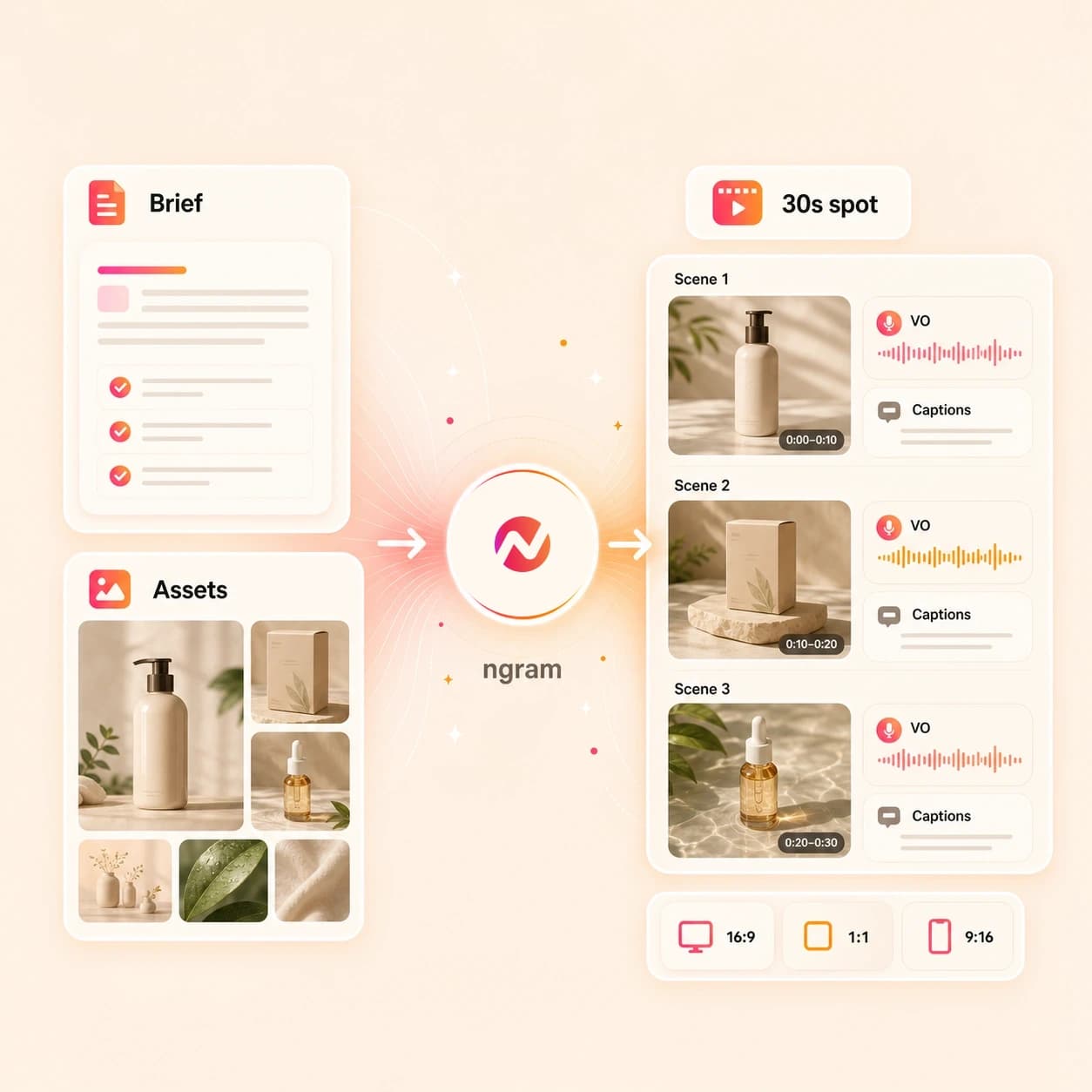
What it does
Create a focused commercial from your product assets and campaign message. Review the script and scenes, then adapt the approved project for different formats and audiences.
Trusted by teams at












How it works
How the AI commercial video maker works.
Give ngram the commercial brief and source context, approve the story, then generate an editable promo spot that stays tied to your brand kit.
Bring the commercial brief
Describe the spot or attach a supported file. You can also paste a product page or landing page URL when the offer, proof points, and CTA already live online.
Brief ready
Review the script and storyboard
ngram turns the brief into a hook, scene order, narration, visual direction, caption plan, and CTA before the first render starts.
Story approved
Generate the commercial draft
The project gets AI visuals, motion graphics, voiceover, background music, captions, intro and outro treatment, and brand kit styling in one editable workspace.
Draft generated
Edit and export the spot
Revise the script, regenerate scenes, tune captions, and adjust the brand treatment, then download the finished MP4. Prepare and review each channel framing separately.
Ready to export
What it can do
What the AI commercial video maker builds.
Create the creative asset itself: the story, scenes, voice, captions, brand system, and exports. ngram does not buy media, place TV spots, or promise campaign performance.
Commercial script and storyboard
Turn the product brief into a reviewable hook, scene list, voiceover script, timing plan, and CTA before the commercial video renders.
Learn more about script generationProduct visuals from source context
Use uploaded images, PDFs, product pages, screenshots, and prompt details to guide commercial scenes, background art, and product frames.
Learn more about AI visualsVoiceover for the spot
Generate narration from the approved script, choose a voice, and keep audio changes connected when the commercial copy changes.
Learn more about AI voiceoverCaptions and on-screen copy
Add burned-in captions, product claims, lower thirds, and CTA cards so the commercial reads clearly when a viewer watches without sound.
Learn more about captionsBrand kit on every scene
Apply logos, colors, fonts, tone rules, approved phrases, blocked phrases, intro treatment, and outro CTA across the whole commercial.
Learn more about brand kitBuilt for polished commercial spots, not ad account operations
When it matters
Where AI commercial video making fits.
Use this workflow when the team needs a polished product or brand narrative before any channel owner decides where the finished file goes.
Marketing brand video
Create a brand-led commercial spot from approved positioning, campaign visuals, and a brand kit, then export a polished asset for web or social review.
Open commercial use caseAd creative video
Build the commercial creative itself: hook, product proof, visuals, captions, and CTA. Keep the page focused on the file, not media buying or ad account setup.
Open commercial use caseMarketing ad creative
Turn a campaign brief or landing page into a polished commercial draft with branded scenes and variant notes for the creative review.
Open commercial use caseGrowth campaign video
Create a campaign spot from the source message, then keep the script, aspect ratios, captions, and brand treatment ready for growth review.
Open commercial use caseProduct launch video maker
Turn launch notes, product screenshots, PDFs, and landing pages into a commercial-style launch spot with a clear hook and branded finish.
Open launch video use caseProduct demo video
Use product pages, screenshots, or recordings to create a short commercial demo that shows the product value before the viewer books time.
Open demo video use caseProduct overview video
Build a broader product commercial from the homepage story, feature proof, visuals, and voiceover so buyers understand the full offer quickly.
Open overview video use caseLanding page video
Convert the page behind a campaign into a branded hero spot that matches the offer, proof points, and CTA already approved on the page.
Open landing page video use casePMM product launch
Give product marketing a commercial-ready launch asset built from positioning docs, release notes, screenshots, and the approved brand kit.
Open PMM launch use caseProduct stack
Product features behind commercial video creation.
These ngram features carry a commercial spot from source brief to approved, branded export without splitting the work across separate tools.
Planning
Script generation for commercial hooks
Draft the hook, proof points, scene plan, narration, and CTA from the prompt, product page, PDF, or image context.
Plan the commercial scriptVisuals
AI visuals for product scenes
Generate supporting scene visuals and product frames that match the commercial storyboard and source material.
Build scene visualsAudio
AI voiceover for narration
Create the spoken track from the commercial script and regenerate affected audio after copy edits.
Add narrationCaptions
Captions for sound-off viewing
Burn in caption lines and CTA copy so the commercial still lands when the viewer starts with audio muted.
Style captionsBrand
Brand kit for commercial consistency
Keep logos, colors, fonts, tone, approved phrases, blocked phrases, intros, and outros consistent across each spot.
Apply brand kitMotion
Motion graphics for product proof
Add animated text, lower thirds, transitions, and product callouts that explain the commercial claim on screen.
Add motion graphicsEditing
Video editing after the first draft
Use chat, script edits, canvas controls, and the timeline to refine the commercial before the final export.
Edit the draftMore tools
Related tools for commercial video workflows.
Use these ngram tools when the commercial needs another starting point, a tighter edit, or a different delivery file after the main spot is approved.
Related commercial video tools
Adapt the same commercial idea into ad, promo, brand, and full marketing video workflows.
AI Video Ad Maker
Turn the commercial story into shorter paid-media-ready creative files without claiming ad buying or campaign launch.
Open toolAI Promo Video Maker
Convert the spot into launch, offer, or announcement videos for owned channels and sales handoff.
Open toolAI Brand Video Maker
Use the same source material to create a broader brand story asset with approved brand direction.
Open toolAI Marketing Video Maker
Build a complete marketing video package around the commercial draft and its supporting source material.
Open toolAI Automotive Video Maker
Turn an owned vehicle or dealership page into an editable inventory, offer, or fleet video draft.
Open toolAI Real Estate Video Maker
Turn an owned property listing, approved photos, and agent notes into an editable real estate video draft.
Open toolStart the spot
Create the first commercial draft from a broad idea, text, image, or URL.
AI Video Generator
Use the broader generator when the commercial is part of a bigger product, launch, training, or explainer video workflow.
Open toolText to Video
Turn approved commercial copy, a script, or a campaign outline into a storyboarded video draft.
Open toolImage to Video
Animate product photos, screenshots, and campaign stills before building them into the commercial spot.
Open toolURL to Video
Use a product page, launch page, or landing page as source context for the commercial narrative.
Open toolAI Social Media Video Maker
Move from the polished commercial spot into social variants after the core story and brand treatment are approved.
Open toolPolish the cut
Refine the spot with edits, text, captions, music, and narration.
Video Editor
Open the commercial draft on the timeline when the team needs clip-level, audio, caption, or scene control.
Open toolAdd Text to Video
Place product claims, promo lines, lower thirds, and CTA cards over the commercial after the base video is ready.
Open toolAdd Subtitles to Video
Generate and burn in subtitle lines for the commercial so the message works before the viewer turns on sound.
Open toolAdd Music to Video
Add a background track that fits the spot's tone and keep it balanced under voiceover.
Open toolAI Voice Generator
Generate a fresh narration track from the commercial script when the spot needs voice before export.
Open toolPrepare exports
Package the finished commercial for review, handoff, embed, or reuse.
Video Converter
Convert the approved commercial into the format required by a site, social upload, review system, or asset library.
Open toolVideo Compressor
Reduce file size for email, Slack, review links, and upload systems while keeping captions and product details readable.
Open toolVideo to GIF
Turn a product moment from the commercial into a looping GIF for docs, landing pages, or launch notes.
Open toolVideo Cutter
Trim the commercial into a shorter teaser, remove a section, or split a longer draft into reviewable cuts.
Open toolConvert
Commercial video source converters.
Start from the material the marketing or product team already has, then bring the resulting draft into the AI commercial video maker workflow.
Product page to commercial video
Read a product page and turn the offer, proof points, images, and CTA into a commercial-style video draft.
Open converterLanding page to commercial video
Use the campaign page as the source for a branded hero spot that matches the approved message.
Open converterImage to commercial video
Turn product photos, screenshots, and campaign stills into moving scenes for the commercial draft.
Open converterWho it is for
Teams that use AI commercial video making.
These teams already own the story, assets, and brand rules. ngram helps turn that context into an editable commercial spot.
Product marketing teams
Turn positioning docs, launch briefs, screenshots, and GTM messages into commercial spots that carry the approved product narrative.
See product marketing workflowsGrowth and marketing teams
Create polished campaign video assets from landing pages and briefs before channel owners adapt the finished files.
See growth workflowsAgencies and consultants
Build client commercial spots from approved briefs and brand assets while keeping review notes and brand kits attached.
See agency workflowsE-commerce teams
Create product promo videos from PDP copy, product images, Shopify pages, and seasonal campaign notes.
See ecommerce workflowsFounders
Turn founder notes, product pages, pitch context, and rough screenshots into commercial-style videos that explain the company clearly.
See founder workflowsStartups
Create launch spots and product promos from the assets an early team already has: decks, docs, screenshots, and raw product pages.
See startup workflowsIntegrations
Automation paths for commercial video creation.
Use live ngram integrations to create, route, and review commercial video drafts. This page avoids direct ad publishing and media buying claims.
Zapier commercial intake
No-codeWhenA product launch form, campaign brief, or approved product page lands in the marketing workflow
ThenTrigger ngram to create a commercial video draft and send the ready link back to the review queue
n8n self-hosted workflow
Self-hostedWhenA self-hosted workflow gathers product data, a script, and brand notes for a commercial draft
ThenCall ngram, handle the video.completed or video.failed event, and move the video into the team's approval system
Chrome Extension page capture
BrowserWhenA marketer is viewing the product page, landing page, or launch note that should become a commercial spot
ThenCapture the page context from the browser and start the ngram draft without copying the brief by hand
MCP agent handoff
AgentsWhenAn AI agent drafts the commercial brief, storyboard notes, or product positioning in another workspace
ThenInvoke ngram with the prompt, source URL, and brand requirements so the video project starts with full context
Why ngram
AI commercial video maker compared with other workflows.
Choose ngram when the job is a polished, editable commercial spot built from source material and brand rules.
| Compare | ngram | Template editor | Manual video editor | Ad operations tool |
|---|---|---|---|---|
| Workflow fit | Turns prompts, images, PDFs, and URLs into a script, storyboard, visuals, voiceover, captions, and exports | Starts from a prebuilt design or timeline and asks the team to adapt the story into that structure | Gives detailed timeline control but expects someone to write the script and build the commercial structure | Helps manage campaigns, placements, or account operations after the creative file exists |
| How ngram fits | Keeps brand kit rules, approved phrases, blocked phrases, intros, outros, and CTA treatment attached to the project | Useful for quick layout assembly when the script, claims, visuals, and brand review are already done | Strong for final craft passes when the team has footage, a storyboard, and editing time | Does not usually create the branded commercial story from prompts, PDFs, images, and product URLs |
| Best use | Best when the commercial spot needs product context, brand narrative, editing, and MP4 output in one workflow | Often leaves product-page ingestion, storyboard planning, voiceover, and brand phrase checks outside the template | Can separate the commercial brief, brand rules, voiceover, captions, and export versions across several tools | Works downstream of ngram exports when the team is ready to handle media buying or channel upload elsewhere |
FAQ
AI Commercial Video Maker FAQs
Practical answers for commercial and promo video workflows.
Turn the commercial brief into a polished brand spot
Bring a prompt, product image, PDF, or URL. ngram plans the story, generates scenes, adds voiceover and captions, applies brand rules, and exports the finished commercial file.
Start with the message first, then refine the commercial in the editor.
Creative production only. Media buying, TV placement, and direct ad publishing are handled outside this page.