TikTok AI Video Maker by ngram
TikTok AI Video Maker for vertical product campaigns

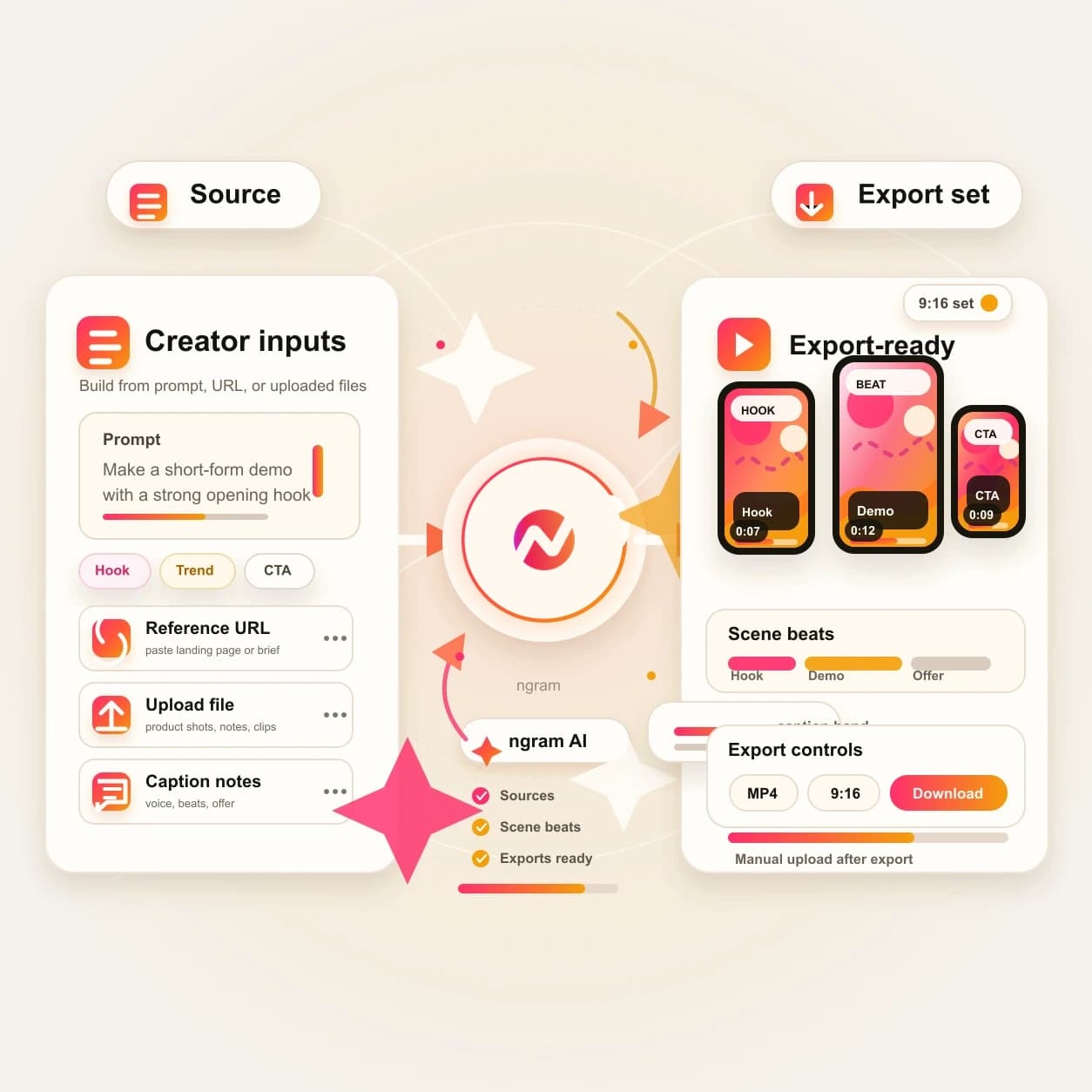
Name the hook, audience, product point, pacing, tone, length, and CTA so ngram can plan the vertical draft
What it does
Build a vertical campaign around a real product story, customer lesson, or launch moment. Try new hooks and cuts while keeping the facts, captions, and brand connected in one editable project.
Trusted by teams at












How it works
How the TikTok AI Video Maker works.
Start with the message and source material, review the hook-first plan, then refine the generated vertical draft before exporting it for manual upload.
Bring the source
Start with a prompt, JPG, PNG, WebP image, PDF, or URL that explains the product, offer, story, or campaign the TikTok-style video should cover.
Source ready
Review the hook and scene plan
ngram drafts the opening hook, script, visual direction, fast-cut scene order, caption approach, timing, and CTA before the video renders.
Plan reviewed
Generate the vertical draft
The project can combine AI visuals, motion graphics, voiceover, captions, music, product callouts, and brand treatment into a TikTok-style first cut.
Draft generated
Edit, export, and upload manually
Revise scenes in chat, edit captions and timing, regenerate weak moments, export a vertical file, then upload it through your normal TikTok workflow.
Ready to upload
What it can do
What the TikTok AI Video Maker builds.
The tool creates editable TikTok-style video projects with fast mobile pacing. It does not claim direct TikTok publishing, auto-posting, or connected account upload.
Hook-first script planning
Turn a brief, source URL, image reference, or PDF into a concise script with an opener, payoff, and CTA before the vertical video renders.
Learn more about script generationVisuals from source context
Generate scene imagery, product frames, B-roll direction, and supporting visuals from the prompt, uploaded reference, or source page.
Learn more about AI visualsFast cuts and motion polish
Add animated hook text, lower thirds, product callouts, transitions, and smart zooms so the video reads quickly in a vertical feed.
Learn more about motion graphicsCaptions for muted viewing
Generate burned-in captions, fix wording and line breaks, and style the caption layer so the message works without sound.
Learn more about captionsBrand kit on every scene
Apply logo, color, font, motion style, voice, tone, approved phrases, blocked phrases, and CTA rules across the draft.
Learn more about brand kitBuilt for hook-first vertical video drafts and manual upload
When it matters
Where TikTok-style video creation fits.
These use cases cover teams turning prompts, images, PDFs, and URLs into short vertical videos without claiming TikTok account publishing.
Marketing Social Clips
Turn campaign notes, product pages, and launch assets into TikTok-style clips with a clear hook, captions, fast cuts, and brand treatment.
Open AI video use caseSocial Media Clips
Create vertical social video variants from a prompt, source URL, or product image, then export the approved file for manual upload.
Open AI video use caseGrowth Social Clips
Generate more hook angles from one source so growth teams can compare openings, caption styles, and CTAs before export.
Open AI video use caseCreator Social Clips
Turn creator prompts, notes, and visual references into vertical drafts with captions, voiceover, and fast mobile pacing.
Open AI video use casePMM Social Content
Convert launch briefs, feature notes, and product screenshots into TikTok-style videos that explain the message quickly.
Open AI video use caseAgency Social Content
Build client social drafts from approved briefs and brand assets, then hand over export-ready files without claiming connected posting.
Open AI video use caseFounder Social Content
Turn founder notes, product opinions, and launch updates into captioned vertical videos that stay editable after the first draft.
Open AI video use caseAd Creative Video
Create short paid-social concepts from a product page, offer brief, or reference image, then refine hooks and captions before export.
Open AI video use caseProduct Launch Video Maker
Turn launch copy, product screenshots, and announcement pages into vertical launch clips with short scripts and branded scenes.
Open AI video use caseProduct stack
The product stack behind TikTok-style videos.
These features cover the planning, visuals, captions, brand controls, and export path used by the TikTok AI Video Maker workflow.
Script Generation
Draft the hook, short script, scene plan, and CTA from a prompt, source URL, image reference, or PDF before generating the video.
Learn more about script generationAI Visuals
Create scene imagery and supporting visuals that match the source material, script, and brand direction for the vertical cut.
Learn more about AI visualsMotion Graphics
Add animated hooks, product callouts, transitions, lower thirds, and smart zooms that make mobile scenes scan quickly.
Learn more about motion graphicsCaptions & Subtitles
Generate burned-in captions, edit wording, style each line, and keep the caption track connected to voiceover and export versions.
Learn more about captionsBrand Kit
Carry logo, color, font, motion style, tone, approved phrases, blocked phrases, and CTA direction through every vertical draft.
Learn more about brand kitMore tools
More tools for TikTok-style video workflows.
Use these tools when the vertical video starts from a narrower source or needs a specific layer of polish before manual upload.
Start from the source you have
Pick the entry point that matches the brief, page, script, or visual asset.
AI Video Generator
Use the broader generator for a full video, then prepare any vertical edit or supporting campaign asset separately from the approved source.
Open toolText to Video
Paste the hook, caption outline, or campaign note when the words are approved and the video needs scenes around them.
Open toolImage to Video
Animate a product image, screenshot, social graphic, or campaign still before placing it inside a vertical cut.
Open toolURL to Video
Turn a product page, launch post, blog article, or landing page into a storyboarded video draft for social distribution.
Open toolPolish the vertical cut
Finish the generated draft with captions, text, sound, timing, and timeline controls.
Video Caption Generator
Generate animated captions for a TikTok-style clip and fix product names before the file is exported.
Open toolAdd Text to Video
Place hook lines, lower thirds, promo labels, product callouts, and CTA cards on top of the vertical video.
Open toolAdd Music to Video
Add background music under voiceover or caption-led cuts so the video feels finished before export.
Open toolVideo Editor
Trim scenes, revise the script, regenerate weak moments, adjust captions, and export the final vertical file.
Open toolRepurpose after the first cut
Use these tools when the same social message needs another format, language, or supporting asset.
Video to GIF
Turn a strong vertical video moment into a short GIF for docs, launch posts, or campaign follow-up assets.
Open toolVideo Translator
Translate script, captions, voiceover, and on-screen text when the vertical cut needs localized versions.
Open toolAI Image Generator
Create thumbnails, product cards, background images, and supporting social graphics for the same campaign.
Open toolVideo Converter
Prepare the final file format when a destination needs a specific video container or compressed output.
Open toolRelated social video makers
Use these channel-specific tools when the same source should become another social cut.
Shorts AI Video Maker
Create generic short-form vertical videos before choosing the final social channel.
Open toolInstagram AI Reels Maker
Create an Instagram-specific Reel draft with captions, hooks, and export-ready framing.
Open toolReels AI Video Maker
Create a generic Reels-style vertical cut before adapting it for a specific platform.
Open toolYouTube AI Shorts Maker
Create a YouTube-specific 9:16 Short with title, description, and channel handoff context.
Open toolConvert
Converters that feed TikTok-style video.
Start from the format that already holds the message, then let ngram plan a short vertical video around it.
Prompt to Video
Write the idea, audience, hook, and channel in plain language, then turn that prompt into a vertical draft.
Open converterImage to Video
Turn product photos, screenshots, and campaign stills into moving scenes with captions, motion, and export options.
Open converterURL to Video
Paste a product page, launch post, blog article, or landing page and let ngram build a social video draft from it.
Open converterWho it is for
Teams that make TikTok-style videos.
These teams already have the source message, visual references, and brand rules. ngram turns that context into editable vertical drafts.
Growth & Marketing Teams
Create TikTok-style video variants from campaign briefs, landing pages, product assets, and test hooks without opening a blank timeline.
See growth workflowsProduct Marketing Managers
Turn launch notes, screenshots, and positioning docs into vertical videos that explain the feature and fit manual upload.
See product marketing workflowsContent Creators
Build more TikTok-style drafts from prompts, outlines, and visual references while keeping captions and timing editable.
See creator workflowsAgencies & Consultants
Turn client briefs and approved assets into vertical videos that can be reviewed, revised, exported, and handed off.
See agency workflowsE-commerce Teams
Convert product pages, PDP images, promo notes, and customer proof into vertical product video drafts for manual upload.
See ecommerce workflowsFounders
Turn a launch thought, product opinion, or rough announcement into a TikTok-style video without coordinating a production queue.
See founder workflowsStartups
Use one source message to create vertical videos for launches, updates, hiring, fundraising, and customer education.
See startup workflowsSmall & Medium Business
Create product, service, announcement, and profile videos from the material already used in day-to-day marketing.
See SMB workflowsIntegrations
Automate source intake for TikTok-style drafts.
Live ngram integrations can send briefs, pages, files, and prompts into the video workflow. TikTok account publishing is not part of this page.
Campaign brief to vertical draft
ZapierWhenA campaign request, product update, or intake form is approved in an upstream app
ThenSend the prompt and source context into ngram so the TikTok AI Video Maker can draft the project
Agent creates a TikTok-style video
MCPWhenAn AI agent has a brief, product link, image reference, or PDF and needs a vertical video draft
ThenInvoke ngram through MCP and return the project or render status for human review
Page capture to social video
ChromeWhenA product page, launch post, blog article, or landing page should become a TikTok-style video
ThenSend the page context into ngram from the browser so the draft starts with the right source copy
Workflow record to vertical draft
n8nWhenA self-hosted workflow marks a social asset request as ready for production
ThenPush the brief, source URL, and asset links into ngram and return the project link to the record
Use these routes when TikTok-style video creation should begin from forms, workflow records, browser context, or agentic systems.
Why ngram
How TikTok-style video maker workflows differ.
Some tools focus on templates, raw clips, or scheduling. ngram is built for source-led vertical drafts that stay editable and export for manual upload.
| Compare | ngram | Raw clip generators | Template editors | Posting tools |
|---|---|---|---|---|
| Workflow fit | Accepts prompts, image files, PDFs, and source URLs as context for a TikTok-style vertical video draft. | Best when the main need is a short visual clip rather than a planned social video with script, captions, and CTA. | Best when the team already knows the exact format and only needs to swap text, colors, and media. | Best when the video already exists and the main job is writing post copy, scheduling, or reporting. |
| How ngram fits | Plans the hook and scene flow before rendering, then adds visuals, motion graphics, voiceover, captions, music, and brand treatment. | May leave source reading, hook writing, caption styling, brand review, and export variants as separate steps. | Usually asks the user to choose the structure before the source has been turned into a hook and storyboard. | Usually does not create the source-led video draft, captions, voiceover, brand treatment, and export file in one workflow. |
| Best use | Exports a vertical file for manual TikTok upload while keeping the project editable for revisions. | Useful for B-roll, but less complete when a product page, PDF, or campaign brief needs to become a channel-ready draft. | Useful for repeatable posts, but slower when each product page, PDF, or image reference needs a new video angle. | Complements a creation workflow, but does not replace making the TikTok-style video itself. |
FAQ
Common questions about the TikTok AI Video Maker
Still curious?
Give ngram the source, get a vertical video draft
Start with a prompt, image, PDF, or URL. ngram plans the hook, generates scenes, adds captions and brand treatment, then exports a file you can upload manually.
Open the TikTok AI Video Maker and finish the draft in ngram.
Prompt, source, hook, captions, export, manual upload