AI Construction Video Maker by ngram
AI Construction Video Maker for project and safety updates

Add the audience, project stage, source facts, photos to reference, safety points to review, tone, and CTA
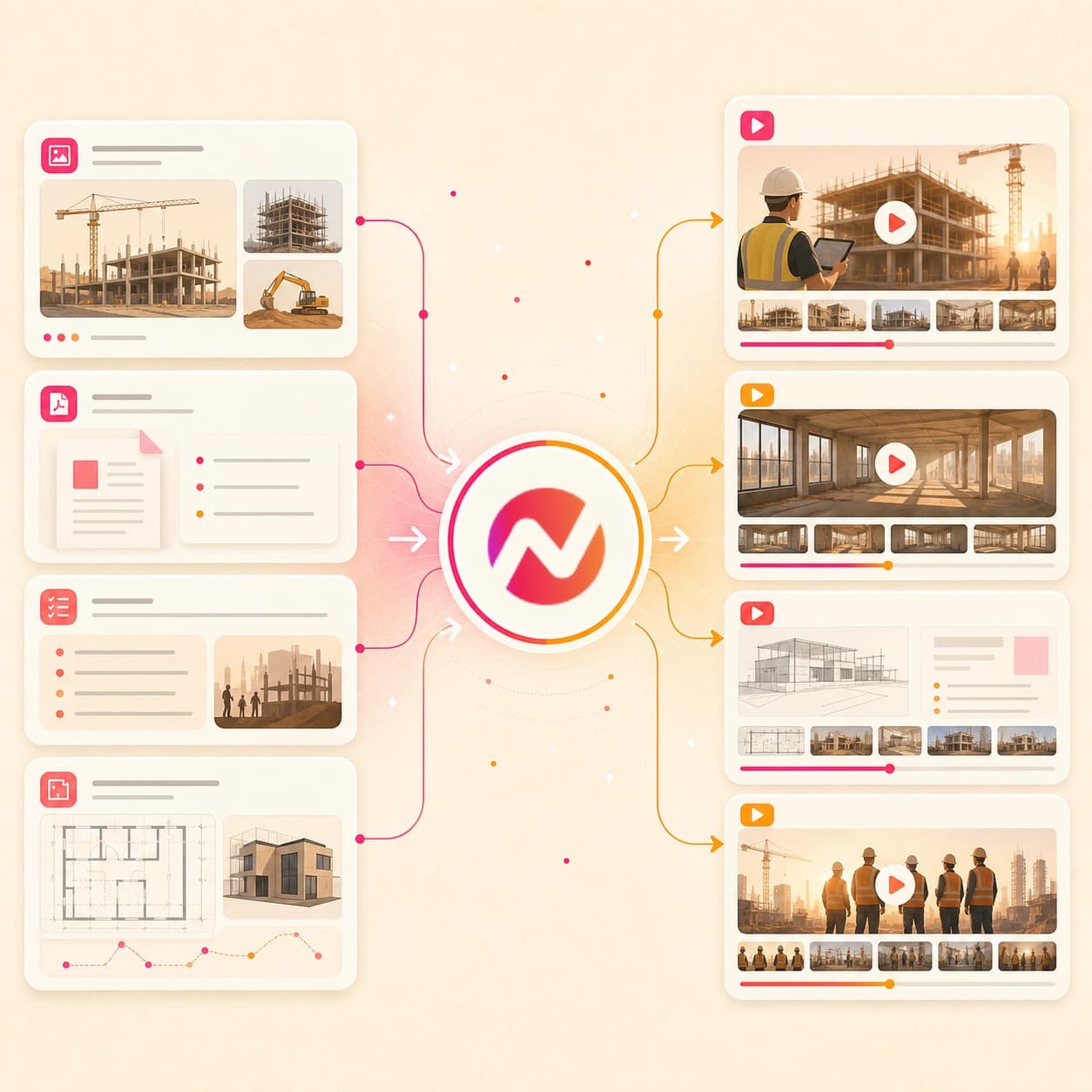
What it does
Turn site photos, progress reports, and approved safety material into videos for clients and crews. Keep project updates consistent without starting a new production cycle each time.
Trusted by teams at












How it works
How the AI construction video maker works.
Bring approved project context, review the plan before render, then refine an editable draft for client updates, bids, safety briefs, recruiting, or internal communication.
Add construction source material
Start with a prompt, owned public URL, project photos, proposal PDF, progress report, safety brief, script, deck, or brand notes. Use the material your team is allowed to share.
Source ready
Review the story plan
ngram turns the source into a hook, scene order, voiceover script, caption plan, visual direction, CTA, and draft timing before the video renders.
Storyboard ready
Generate the construction draft
The project gets scene visuals, motion graphics, voiceover, captions, background music, intro and outro treatment, and the selected brand kit styling.
Draft generated
Edit and export versions
Use chat, script edits, canvas controls, and the timeline to revise facts, swap scenes, tighten pacing, update captions, and export aspect ratios for handoff.
Ready to hand off
What it can do
What the AI construction video maker can create.
ngram focuses on the video asset: source intake, script, storyboard, visuals, brand treatment, voiceover, captions, editing, and export. Keep field approval and safety review in the workflow that already owns them.
Prompt-led project updates
Describe the milestone, audience, jobsite context, approved facts, and next step. ngram turns the brief into a construction video plan you can edit.
Learn more about script generationOwned URL context
Use an owned public project page, service page, bid landing page, or case study as source context for the construction video draft.
Explore URL to videoPhotos and document references
Bring approved site photos, proposal PDFs, progress reports, safety docs, scripts, decks, and brand references into the same video project.
Learn more about AI visualsProposal and progress storyboards
Turn bid notes, scope summaries, project phases, schedule highlights, and client update points into a reviewable sequence before rendering.
Learn more about script generationVoiceover and captions
Generate narration from the approved construction script, burn in captions by default, and revise wording when project facts change.
Learn more about AI voiceoverBuilt for editable construction video drafts
When it matters
Construction video workflows this tool supports.
Use the AI construction video maker when project context needs a clear video draft for updates, bids, briefings, walkthroughs, recruiting, or client communication.
Internal Communication Video
Turn superintendent notes, milestone photos, schedule changes, and owner-approved talking points into a construction update for field and office teams.
Open AI video use caseMeeting Recap Video
Convert a site meeting summary, punch-list recap, or stakeholder note into a short video that explains decisions and next steps.
Open AI video use caseSales Proposal Walkthrough Video
Use the proposal walkthrough pattern to explain scope, schedule, assumptions, and value in a construction bid without another static PDF.
Open AI video use caseProduct Walkthrough Video Creator
Apply the walkthrough structure to project phases, completed areas, building systems, tenant improvements, or handoff details.
Open AI video use caseTraining Video
Turn approved SOPs, toolbox talk notes, safety briefing docs, or onboarding material into a training-style construction video draft.
Open AI video use caseHR Training Video
Create crew orientation, policy, and safety refresher drafts from approved HR or operations source material, with final review kept by your team.
Open AI video use caseHR Culture Content Video
Build recruiting and culture clips from approved jobsite photos, team notes, hiring briefs, and company values without overpromising hiring results.
Open AI video use caseMarketing Social Clips
Adapt a progress video, project milestone, completed phase, or recruiting message into short captioned clips for the marketing handoff.
Open AI video use caseCS QBR Video
Use the recap format for client progress videos, monthly owner updates, or executive summaries built from approved project facts.
Open AI video use caseProduct stack
Product features behind construction video creation.
These ngram features carry the work from approved construction source material to an editable video project with brand, narration, captions, and export controls.
Planning
Script generation for project stories
Turn project notes, proposal text, progress reports, safety brief points, and prompts into a hook, scene plan, voiceover script, and CTA.
Plan the construction scriptVisuals
AI visuals for construction scenes
Create supporting visuals around approved site photos, project context, bid notes, safety points, and brand references.
Build construction visualsBrand
Brand kit for contractor consistency
Apply logos, colors, fonts, motion style, image style, tone, approved phrases, blocked phrases, and CTAs across construction video drafts.
Apply brand kitVoice
AI voiceover for update narration
Generate narration from the approved construction script and revise the audio when project details, safety wording, or CTAs change.
Add voiceoverCaptions
Captions and subtitles
Burn in captions styled to the brand kit so project updates, proposal walkthroughs, recruiting clips, and briefings work without sound.
Add captionsMotion
Motion graphics for project callouts
Add labels, lower-thirds, transitions, arrows, and animated text that make phases, scope, schedule, and handoff details easier to scan.
Add motion graphicsEditing
Video editing after the first draft
Use chat, script edits, canvas controls, and the timeline to revise project facts, swap scenes, tighten pacing, or update the close.
Edit the draftMore tools
Related tools for construction video production.
Move between construction source material, project-specific variants, and final polish while keeping the draft editable in ngram.
Start from construction sources
Use these tools when the construction source material already exists.
URL to Video
Use the broader URL workflow when the source is an owned public project page, service page, case study, or bid landing page.
Open toolText to Video
Paste project notes, proposal copy, a safety brief, recruiting copy, or a finished script when no URL is ready to fetch.
Open toolImage to Video
Animate one approved site photo, render, before-and-after image, or progress still before building the full construction draft.
Open toolPhoto Slideshow AI Video Maker
Plan a project photo sequence from milestone, exterior, interior, detail, and completion images before adding narration and captions.
Open toolPPT to Video
Turn a bid deck, safety deck, owner update, or recruiting presentation into a narrated construction video draft.
Open toolConstruction video variants
Create alternate cuts for training, recruiting, bids, internal updates, and marketing handoff.
AI Training Video Maker
Build training-style drafts from approved SOPs, safety brief notes, onboarding docs, and field procedures.
Open toolAI Recruitment Video Maker
Turn hiring briefs, approved culture notes, crew photos, role pages, and company values into recruiting video drafts.
Open toolAI Pitch Video Maker
Use bid strategy, proposal decks, scope notes, and proof points to create a construction pitch or proposal video.
Open toolAI Internal Comms Video Maker
Create project status, leadership, schedule, or team update videos from approved internal construction notes.
Open toolAI Marketing Video Maker
Use the broader marketing workflow when project milestones, case studies, recruiting stories, or service pages need campaign variants.
Open toolAI Manufacturing Video Maker
Create process, plant, equipment, or technical training videos when the construction story overlaps with industrial operations.
Open toolPolish and handoff
Clean up the construction video after the first draft is ready.
Video Editor
Reorder scenes, tighten the update, revise facts, swap a closing card, or adjust captions inside the editable project.
Open toolAdd Subtitles to Video
Add or revise burned-in subtitles after a construction video changes so project names, safety notes, and CTAs stay readable.
Open toolVideo Compressor
Compress the exported construction video for email, review handoff, or upload workflows while keeping captions legible.
Open toolVideo to GIF
Turn a short progress moment, before-and-after reveal, or walkthrough step into a loop for docs, updates, and internal threads.
Open toolConvert
Construction source material you can turn into video.
Use these converters when the source is already a proposal, PDF, project photo set, website page, report, script, or training document.
Proposal to video for construction bids
Turn a bid proposal, scope summary, schedule note, or client-facing PDF into an editable walkthrough video.
Open converterPDF to video for project documents
Use a safety brief, progress report, one-pager, owner update, or project PDF as source material for the video draft.
Open converterPhotos to video for project progress
Turn approved site photos, milestone galleries, before-and-after sets, or completion images into a paced video with captions and brand.
Open converterWho it is for
Teams that use construction video workflows.
These existing ngram pages cover teams most likely to turn project material into client updates, proposal walkthroughs, training briefs, recruiting clips, and campaign assets.
Small and medium business
Create construction project updates, bid videos, recruiting clips, and safety brief visuals without assigning every edit to one specialist.
See SMB workflowsEnterprise
Support multi-project, multi-region construction video work with shared brand kits, editable projects, and review-ready exports.
See enterprise workflowsAgencies and consultants
Draft construction client videos from briefs, project photos, proposal PDFs, and brand assets while the agency keeps approval outside ngram.
See agency workflowsGrowth marketing teams
Turn project milestones, case studies, hiring messages, and service pages into construction campaign variants for handoff.
See growth workflowsHR and internal comms
Use construction source material for crew updates, recruiting stories, policy explainers, and safety briefing drafts that still need team review.
See HR workflowsSales enablement
Create construction proposal walkthroughs, bid summaries, client recaps, and follow-up videos from approved deal material.
See sales workflowsReal estate
Turn development progress, property improvements, listing context, and project photos into branded visual updates for real estate workflows.
See real estate workflowsFounders
Help construction founders explain new services, project wins, hiring needs, and investor updates from the source material already written.
See founder workflowsIntegrations
Integrations for construction video handoff.
Use live ngram integrations to start construction video drafts from approved project context and route status back to the review workflow your team already uses.
Zapier project request to video draft
AutomationWhenA form, spreadsheet row, or internal request contains an approved project URL, progress summary, proposal note, or safety brief
ThenCreate an ngram video project and return draft status to the review workflow your team already uses
Chrome Extension page capture
Source captureWhenA marketer is reviewing an owned project page, service page, bid landing page, or case study in Chrome
ThenSend the page context into ngram so the team can draft a construction video from the approved source
MCP agent video request
Agent workflowWhenAn internal agent has approved construction copy, source links, brand direction, and target export details
ThenCall ngram as a tool to create the video project, check status, and retrieve the generated asset for review
n8n construction ops workflow
Self-hostedWhenA self-hosted workflow receives approved construction details and needs a video draft without a manual upload step
ThenTrigger ngram, monitor the job, and route the finished asset back to your internal review queue
Why ngram
AI construction video maker compared with other workflows.
Choose ngram when the job is an editable construction video draft built from approved source material, brand rules, and a reviewable storyboard.
| Compare | ngram | Template slideshow editor | Manual video production | Single-purpose generator |
|---|---|---|---|---|
| Workflow fit | Turns prompts, owned URLs, project photos, PDFs, docs, scripts, and brand notes into a script, storyboard, visuals, voiceover, captions, and exports | Starts from a fixed layout and asks the team to fit project context, phase order, and CTA into that structure | Useful when the project needs filming, drone capture, site visits, interviews, or custom post-production | Can create one piece of the asset, such as a clip, image, caption file, voiceover, or slideshow |
| How ngram fits | Keeps project facts, scenes, captions, narration, references, and output formats in one editable video project | Useful when photos, copy, music, captions, and export sizes are already decided | Usually depends on separate briefs, files, revisions, and delivery timelines before the first draft is ready | Useful for filling a known production gap when the construction video structure already exists |
| Best use | Best for project updates, bid walkthroughs, safety brief visuals, recruiting clips, client progress videos, and branded handoff | Often leaves source reading, storyboard planning, voiceover, brand phrase controls, and later script edits outside the template | Can sit upstream or downstream of ngram when the project needs services beyond creating an approved video draft | May require separate tools for source context, storyboard, brand kit, captions, edits, review, and MP4 export |
FAQ
AI construction video maker FAQ.
Construction video questions
Turn approved project context into construction videos
Bring the prompt, owned project URL, site photos, PDF references, script, safety brief, and brand notes. ngram drafts the story, builds the scenes, adds voiceover and captions, applies the brand kit, and exports the formats your construction workflow needs.
Built for editable project updates, bid walkthroughs, safety brief visuals, recruiting clips, client progress videos, and branded handoff. Keep approvals, placement, reporting, and follow-up in your existing systems.
Your team stays responsible for project accuracy, safety review, placement, and follow-up.