AI Manufacturing Video Maker by ngram
AI Manufacturing Video Maker for products, plants, and processes

Name the audience, process, product, source facts, tone, review context, and format the draft should follow
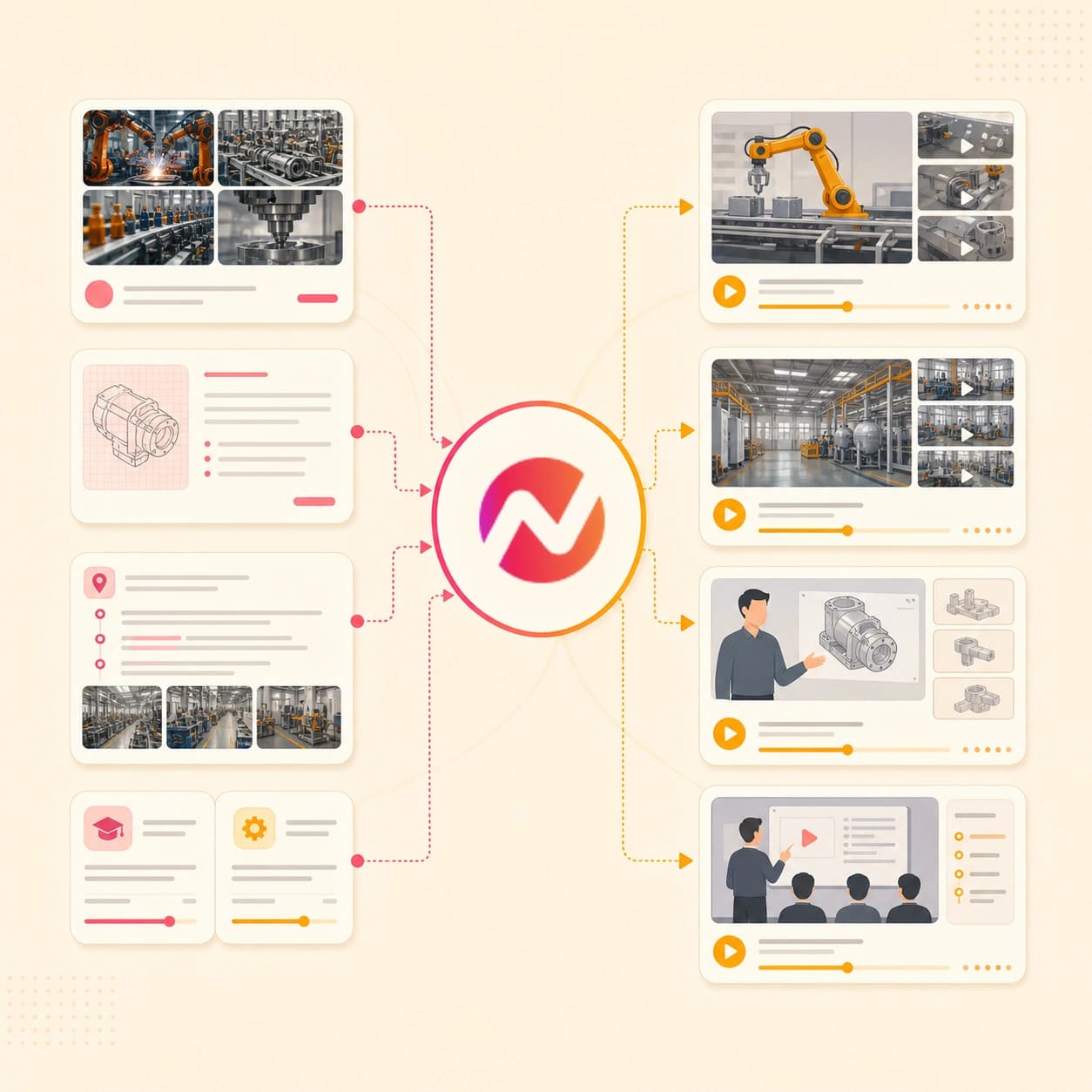
What it does
Create product explainers, process videos, and plant updates from your existing technical material. Adapt the same source for sales, training, and internal communication.
Trusted by teams at












How it works
From manufacturing source to editable video.
Use the AI manufacturing video maker when the source already exists but the video still needs structure, narration, visuals, captions, and export-ready formats.
Add the source material
Paste the brief, script, owned URL, product note, SOP excerpt, or PDF. Add approved process photos when the draft needs plant, machine, or product visuals.
Source ready
Review the script and storyboard
ngram turns the manufacturing source into a scene plan with narration, visual direction, timing, captions, callouts, and a clear CTA before rendering.
Plan reviewed
Generate the video draft
The project can include AI visuals, motion graphics, voiceover, captions, background music, branded intro and outro cards, and product or process callouts.
Draft generated
Edit and export versions
Revise the script, swap source photos, regenerate a scene, adjust captions, localize the copy when needed, and export formats for sales, training, web, or internal review.
Ready to export
What it can do
What this AI manufacturing video maker can create.
Use ngram for manufacturing video assets that need source-backed structure, brand consistency, voiceover, captions, and an editable draft after generation.
Product docs to script and storyboard
Turn product sheets, process notes, SOP excerpts, scripts, PDFs, and approved URLs into a reviewable video plan before the first render.
Learn more about script generationProcess photos and product visuals
Use approved photos as scene references, then generate supporting visuals and motion around the manufacturing steps the script needs to explain.
Learn more about AI visualsVoiceover and captions
Generate narration from the approved manufacturing script, add captions tied to the voiceover, and adjust wording when product names need a cleaner read.
Learn more about AI voiceoverBrand kit for every draft
Apply logos, colors, fonts, motion style, tone, approved phrases, blocked phrases, intro cards, outro cards, and CTA treatment from the active brand kit.
Learn more about brand kitCallouts for process steps
Add arrows, labels, lower thirds, section dividers, and animated overlays when a machine part, material flow, or product feature needs emphasis.
Learn more about motion graphicsBuilt for editable manufacturing video drafts
When it matters
Manufacturing video workflows this tool supports.
These pages match the product, process, training, sales, and internal communication jobs a manufacturing team can start from this AI video maker.
Product Explainer Video
Turn product specs, process context, and approved photos into a manufacturing explainer that shows what the product does and why the workflow matters.
Open AI video use caseProduct Demo Video
Create a product demo video for a machine, component, or manufacturing service using source notes, images, voiceover, captions, and brand callouts.
Open AI video use caseProduct Overview Video
Use the AI manufacturing video maker to turn a product page, catalog text, or PDF into a concise overview for buyers, partners, or internal teams.
Open AI video use caseProduct Walkthrough Video Creator
Break a process, feature set, or equipment workflow into a paced walkthrough with labels, narration, captions, and editable scenes.
Open AI video use caseTraining Video
Convert SOP excerpts, process docs, or training notes into a structured manufacturing training video with reviewable script, voiceover, captions, and export formats.
Open AI video use caseTutorial Video
Create a step-by-step tutorial from product notes or procedure text when operators, customers, or partners need the same explanation in video form.
Open AI video use caseInternal Communication Video
Turn shift notes, facility updates, process changes, or leadership messages into an internal manufacturing video with captions and brand styling.
Open AI video use casePMM Sales Enablement
Give sales and channel teams a manufacturing video draft that explains the product, process, buyer value, and proof points from approved source material.
Open AI video use caseSales Product Demo
Create buyer-facing product demo variants from product pages, docs, photos, and scripts while keeping the page focused on video output, not sales results.
Open AI video use caseProduct stack
The product stack behind manufacturing video drafts.
These ngram features support the path from manufacturing source material to script, storyboard, visuals, narration, review, and export.
Script Generation
Turn manufacturing prompts, process notes, product docs, PDFs, and URLs into the script and scene plan that drive the video draft.
Learn more about script generationAI Visuals
Generate scene imagery and supporting visuals around approved process photos, product shots, and manufacturing storyboards.
Learn more about AI visualsAI Voiceover
Build narration from the manufacturing script, choose a voice, and update the voiceover when product wording changes.
Learn more about AI voiceoverCaptions & Subtitles
Add captions to manufacturing explainers, plant tour drafts, training visuals, and internal updates so the message is readable without sound.
Learn more about captionsBrand Kit
Keep every manufacturing video aligned with logo use, color, type, motion style, tone, approved phrases, blocked phrases, and CTA treatment.
Learn more about brand kitMotion Graphics
Add labels, callouts, lower thirds, transitions, and process overlays that help technical manufacturing steps read clearly on screen.
Learn more about motion graphicsVideo Editing
Refine the manufacturing video with chat, visual chat, script edits, scene regeneration, canvas controls, and timeline edits.
Learn more about video editingMore tools
More tools around manufacturing video creation.
Use these when the manufacturing video starts from a specific source, needs tighter narration, or needs another layer of edit polish before export.
Start from manufacturing source material
Choose the entry point that matches the source your team already has.
AI Video Generator
Start broad when the manufacturing video needs a prompt, script, URL, doc, image, and brand direction in one brief.
Open toolText to Video
Turn approved product copy, process notes, or a manufacturing script into a storyboarded video draft.
Open toolURL to Video
Use an owned product page, process page, help article, or release note as source context for the manufacturing video.
Open toolImage to Video
Animate process photos, product images, or facility stills before adding captions, voiceover, and brand styling.
Open toolPlan and polish the draft
Use these tools when the manufacturing story needs tighter words, captions, callouts, or timeline edits.
Video Script Generator
Draft a manufacturing hook, narration, section order, and CTA before sending the script into the video maker.
Open toolVideo Editor
Adjust clips, captions, voiceover, timing, and scene order after the manufacturing video draft is generated.
Open toolAdd Subtitles to Video
Generate and style subtitles for manufacturing explainers, training visuals, and internal update clips.
Open toolAdd Text to Video
Place titles, labels, part names, process steps, and lower thirds on top of manufacturing scenes.
Open toolAdjacent manufacturing video jobs
Open a narrower maker when the requested video fits a familiar business format.
AI Training Video Maker
Create source-backed training modules from SOP excerpts, manuals, process notes, and PDFs.
Open toolAI Product Demo Video Maker
Create product demo videos when the manufacturing story centers on a feature, component, or equipment workflow.
Open toolAI Technology Video Maker
Use the technology workflow when the manufacturing story needs a product, software, or technical education angle.
Open toolAI Corporate Video Maker
Create company updates, executive messages, SOP explainers, and broader business videos from approved source material.
Open toolAI Internal Comms Video Maker
Turn facility updates, process changes, and leadership notes into internal videos for review and export.
Open toolAI Sales Video Maker
Turn product pages, technical notes, PDFs, and buyer context into sales video assets for reps and partners.
Open toolConvert
Converters that feed manufacturing video drafts.
When the manufacturing source is already a manual, SOP, product catalog, PDF, doc, image, or URL, start with the matching converter and continue in ngram.
Manual to Video
Turn a product manual or procedure source into a manufacturing video draft with script, storyboard, voiceover, captions, and brand controls.
Open converterSOP to Video
Convert a SOP excerpt or procedure text into a narrated manufacturing training video with scene-by-scene review.
Open converterProduct Catalog to Video
Use product catalog copy or PDFs to create a branded manufacturing product video that can be edited before export.
Open converterWho it is for
Teams that use manufacturing video drafts.
Manufacturing videos often move across product marketing, sales, training, support, and enterprise communications. These pages show the closest team workflows.
Product Marketing Managers
Turn product sheets, process notes, launch copy, and approved visuals into manufacturing explainers for buyer education and sales enablement.
See product marketing workflowsSales Enablement
Create product and process videos that reps can use to explain technical value, buyer fit, and next steps from approved source material.
See sales enablement workflowsHR & Internal Comms
Turn facility updates, workforce messages, and process change notes into internal manufacturing videos with captions and brand styling.
See internal comms workflowsEnterprise
Keep manufacturing video drafts tied to shared brand kits, team workspaces, source materials, and reviewable scripts across departments.
See enterprise workflowsCustomer Success
Create customer-facing product education and onboarding videos from product docs, setup notes, process explainers, and approved visuals.
See customer success workflowsSupport Teams
Turn troubleshooting notes, help docs, and product guidance into manufacturing support videos customers can replay.
See support workflowsProduct Managers
Use product requirements, launch notes, and process context to create stakeholder videos that explain what changed and why it matters.
See product manager workflowsEducators & Trainers
Convert lesson notes, SOP excerpts, and product education material into manufacturing training videos with narration and captions.
See training workflowsIntegrations
Connect manufacturing video work to approved workflows.
Use live trigger and capture integrations when a manufacturing brief, product doc, or source page needs to become an ngram video project.
Approved intake to manufacturing draft
ZapierWhenA manufacturing video request, product brief, or training intake form is approved.
ThenSend the prompt, audience, source URL, and file references into ngram so the manufacturing video draft can be planned.
Process doc to reviewable plan
n8nWhenA SOP excerpt, manual update, or process note reaches the video step in a self-hosted workflow.
ThenTrigger ngram with the source details and route the generated script and storyboard for review.
Agent-requested manufacturing video
MCPWhenAn approved AI agent has the manufacturing source context and needs ngram to create a video draft.
ThenInvoke ngram through MCP with the prompt, source facts, audience, and brand direction attached.
Capture source page from the browser
ChromeWhenYou are reviewing an owned product page, process article, help doc, or release note that should become a video.
ThenSend the page context into ngram without rebuilding the manufacturing brief by hand.
Use these surfaces when manufacturing video creation needs to start from agents, automations, or browser-captured source pages.
Why ngram
How manufacturing video workflows differ.
Some teams need a fast draft from source material. Others need a template editor, an avatar-led training clip, or a manual production process. Use the workflow that matches the job.
| Compare | ngram | Template editor | Avatar training platform | Manual production workflow |
|---|---|---|---|---|
| Workflow fit | Starts from prompts, scripts, owned or public URLs, process photos, product docs, and PDFs. | Useful when the team already has approved footage, images, copy, and a fixed video layout. | Useful when the manufacturing video is mainly a presenter reading an approved script. | Useful for high-control footage capture, interviews, and site-specific visual direction. |
| How ngram fits | Plans a script and storyboard before rendering, then adds visuals, voiceover, captions, motion graphics, and brand kit treatment. | Often asks the user to place text, images, captions, and timing by hand. | Works well for repeatable lessons where the talking-head format is the desired output. | Requires coordinating source capture, script review, editing, captions, brand treatment, and exports across people or tools. |
| Best use | Keeps the draft editable through chat, visual chat, script edits, scene regeneration, canvas controls, timeline edits, and MP4 export. | Best fit when production control matters more than generating a source-backed first draft. | Less focused on plant tour structure, process visuals, product callouts, and editable mixed-scene drafts. | Best fit when the deliverable needs a custom shoot rather than a generated draft from existing source material. |
FAQ
Common questions about the AI manufacturing video maker
Still curious?
Turn manufacturing source material into an editable video draft
Start with a prompt, script, owned URL, process photo, product doc, or PDF. ngram plans the story, generates the draft, adds voiceover and captions, applies brand kit, and keeps the project editable.
Use the AI manufacturing video maker for product explainers, plant tour drafts, training visuals, sales enablement, and internal updates.
Prompt, file, URL, voiceover, captions, export