AI Product Launch Video Maker by ngram
AI Product Launch Video Maker for complete release campaigns

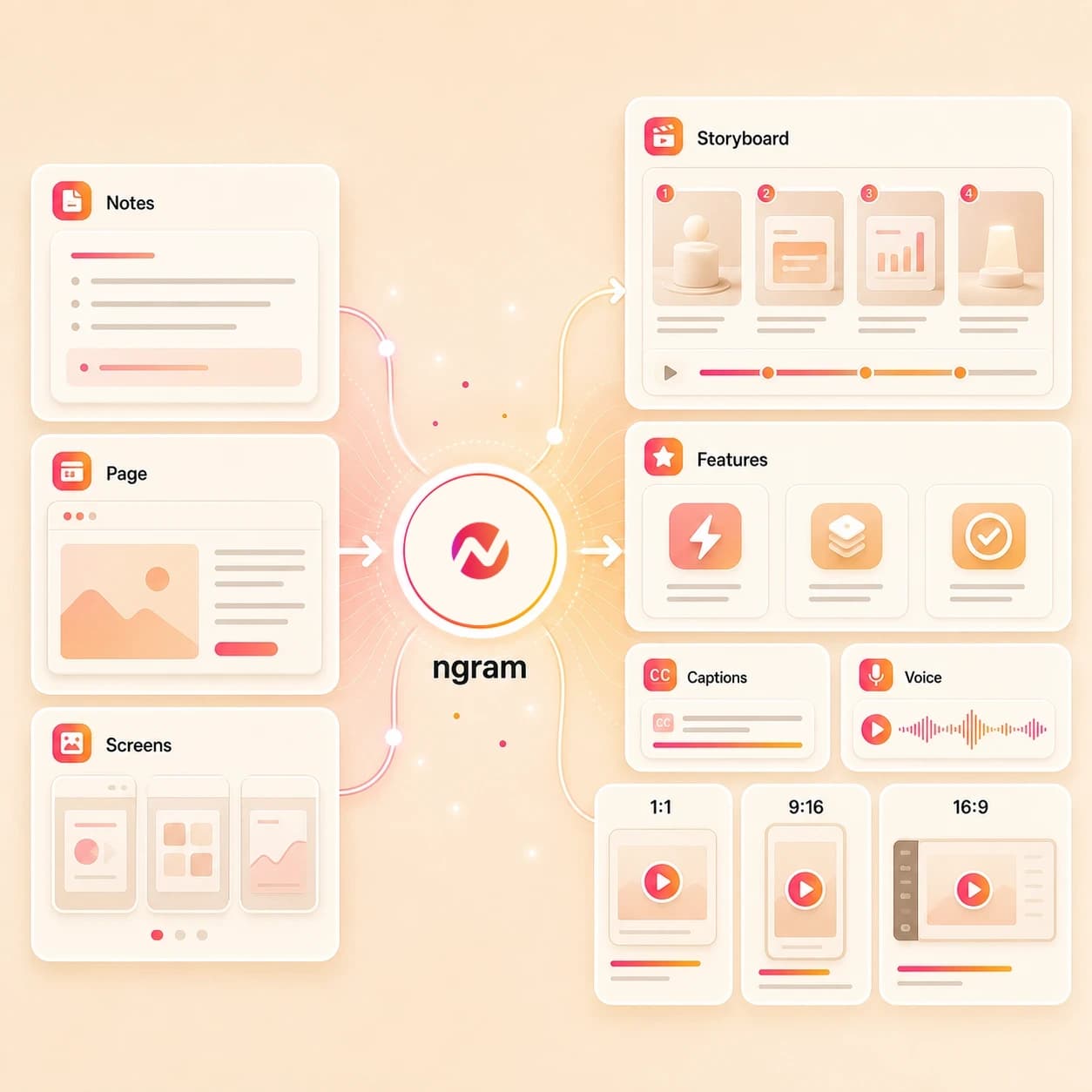
Name the product, release, audience, source material, target formats, launch message, and CTA
What it does
Use one approved product-release brief as context for a launch video, demo cut, and separately prepared channel edits. Review every finished MP4 against the same message and brand kit.
Trusted by teams at












How it works
How the AI product launch video maker works.
Give ngram the launch source, review the story plan, then generate an editable video asset for handoff-ready exports.
Add the launch source
Describe the release, upload a supported image or PDF, or paste the product page, release note, changelog, landing page, help article, or launch URL.
Source ready
Review the script and storyboard
ngram turns the source into a hook, launch narrative, scene order, product callouts, voiceover script, caption plan, CTA, and estimated duration before rendering.
Plan reviewed
Generate the launch draft
The project gets AI visuals, voiceover, captions, motion graphics, music, branded intro and outro treatment, product callouts, and an editable timeline.
Draft generated
Edit and export handoff files
Revise the launch story, regenerate scenes, tune captions, adjust brand styling, then download the finished MP4.
Ready to hand off
What it can do
What the AI product launch video maker builds.
Create launch video assets for release notes, feature announcements, launch campaigns, website and social handoff, and customer education without promising publishing or performance outcomes.
Launch script and storyboard
Turn release notes, a product page, screenshot, PDF, deck, doc, or prompt into a reviewable hook, scene list, narration, timing plan, and CTA.
Learn more about script generationAI visuals from launch context
Generate scene imagery, product frames, backgrounds, and visual fills that match the launch message, source material, and brand direction.
Learn more about AI visualsVoiceover for announcement cuts
Create narration from the approved launch script, choose a voice, and regenerate audio when the launch message changes.
Learn more about AI voiceoverCaptions for sound-off launch assets
Burn captions into each launch cut, adjust line breaks, and keep product names, feature names, and CTAs readable in short formats.
Learn more about captionsBrand kit controls
Apply logos, colors, fonts, motion style, screenshot style, tone, approved phrases, blocked phrases, and launch CTA rules.
Learn more about brand kitMotion graphics and callouts
Add animated title cards, lower thirds, product callouts, feature labels, transitions, branded intros, and outros to clarify the release story.
Learn more about motion graphicsBuilt for product launch creative production, not campaign launch or paid distribution
When it matters
Where AI product launch video maker workflows fit.
Use ngram when one release needs a launch video, announcement cut, campaign asset, website version, social handoff, and customer education follow-up.
Product launch videos
Turn launch notes, screenshots, PRDs, product pages, and campaign context into a planned launch video with captions, callouts, voiceover, and export variants.
Open launch use caseFeature announcement videos
Convert release notes or a feature page into an announcement video that explains what shipped, why it matters, and what viewers should do next.
Open announcement use caseChangelog videos
Use changelog entries as source material when the launch video needs to group several shipped changes into one customer-facing update.
Open changelog use casePMM product launches
Help product marketing turn positioning docs, launch briefs, screenshots, and product recordings into the main launch cut and supporting variants.
Open PMM launch use caseProduct Hunt launch videos
Build a concise maker-friendly launch cut from a landing page, screenshots, and a product story before the team prepares its launch-day handoff.
Open Product Hunt use caseGrowth campaign videos
Turn the launch page, campaign brief, and release promise into video variants growth teams can review before channel owners handle placement.
Open campaign use caseMarketing social clips
Adapt the launch story into short social cuts with captions and aspect ratios while keeping posting decisions outside the video creation workflow.
Open social clips use caseLanding page videos
Paste the launch landing page and turn its promise, proof points, and product visuals into a matching website video asset.
Open landing page use caseCustomer feature education
Create customer education cuts from release notes, help docs, screenshots, or a product walkthrough so users understand what changed after launch.
Open feature education use caseProduct stack
The product stack behind launch video creation.
These ngram features cover the planning, generation, editing, brand control, captions, callouts, and export work behind an AI product launch video maker workflow.
Planning
Script generation for launch narratives
Turn release notes, product pages, and launch briefs into the hook, scene plan, product proof points, CTA, and timing for the launch video.
Plan the launch scriptVisuals
AI visuals for release scenes
Generate launch imagery, product frames, B-roll, and visual fills that match the source context and approved launch message.
Build launch visualsVoice
AI voiceover for launch narration
Create narration from the approved launch script, choose the right voice, and regenerate audio when the product story changes.
Add voiceoverCaptions
Captions for launch-day viewing
Burn captions into website, social, and education cuts so the release message still works when viewers watch without sound.
Style captionsBrand
Brand kit for release consistency
Apply the right logo, colors, fonts, tone, motion style, approved phrases, blocked phrases, and CTA rules across every launch cut.
Set brand rulesMotion
Motion graphics for feature clarity
Add animated title cards, feature labels, product callouts, transitions, and lower thirds that make the launch easier to follow.
Add motionEditing
Video editing after generation
Use chat, visual chat, script edits, scene regeneration, canvas controls, and the timeline to finish the launch cut before export.
Edit the draftMore tools
More tools around AI product launch videos.
Use these tools when the launch starts from a narrower source, needs a related creative format, or needs one more editing pass before handoff.
Start from source material
Create the first launch draft from a prompt, page, image, script, deck, or broader business video request.
AI Video Generator
Use the broader generator when one launch source needs to become announcements, demos, explainers, and customer education cuts.
Open toolText to Video
Paste the launch note, release summary, announcement copy, or rough script and turn it into an editable video draft.
Open toolURL to Video
Paste a product page, release note, changelog, landing page, or help article so ngram can use the page as launch context.
Open toolImage to Video
Animate product stills, UI screenshots, launch graphics, and feature images into motion for the launch cut.
Open toolVideo Script Generator
Draft launch hooks, scene notes, narration, product proof points, and CTA options before sending the story into production.
Open toolPPT to Video
Turn a launch deck, sales deck, or product roadmap deck into a narrated video draft with captions and brand treatment.
Open toolCreate adjacent launch formats
Move the same release story into a more specific creative format while keeping launch operations outside the page promise.
Teaser AI Video Maker
Create a short prelaunch or reveal cut when the product story needs curiosity before the full launch video is ready.
Open toolAI Promo Video Maker
Turn the launch announcement into a promotional campaign asset with script, visuals, voiceover, captions, and export variants.
Open toolAI Marketing Video Maker
Use the broader marketing workflow when the release needs campaign, email, website, social, and sales-ready video versions.
Open toolAI Social Media Video Maker
Adapt the launch story into channel-shaped organic cuts with captions, aspect ratios, and handoff-ready exports.
Open toolAI Product Demo Video Maker
Use the demo maker when the launch video needs deeper product walkthrough scenes, UI callouts, and feature explanation.
Open toolLinkedIn AI Video Maker
Shape the launch message into a LinkedIn-ready business video draft with captions, post context, and professional pacing.
Open toolPolish and reuse the cut
Finish the details that make the launch export easier to read, review, and reuse in follow-up assets.
Video Editor
Trim the launch draft, rewrite scenes, adjust audio, and finish the timeline before export.
Open toolAdd Text to Video
Place product labels, feature callouts, release dates, proof points, and CTA cards on top of the launch video.
Open toolVideo Caption Generator
Generate animated captions so the launch message reads clearly before viewers turn sound on.
Open toolAdd Music to Video
Add a background track selected for the launch tone, then balance it under narration and captions.
Open toolVideo to GIF
Turn one launch moment or product interaction into a looping GIF for docs, changelogs, email previews, or internal updates.
Open toolConvert
Converters that feed product launch videos.
Start with the launch source you already have, then send it through ngram's script, storyboard, generation, editing, and export workflow.
Release Notes to Video
Turn shipped feature notes into a launch video draft with grouped updates, customer benefits, captions, and brand treatment.
Open converterProduct Page to Video
Paste the product page and turn its headline, benefits, images, and proof points into a launch-ready video story.
Open converterPrompt to Video
Turn a rough launch idea into a script, storyboard, and editable branded product launch video project.
Open converterWho it is for
Who uses an AI product launch video maker.
These teams need branded launch video assets for product releases, feature announcements, campaigns, customer education, and sales handoff.
Product marketing teams
Create launch videos from positioning docs, release notes, product pages, screenshots, and decks while keeping the story tied to approved messaging.
See product marketing workflowsProduct managers
Turn shipped feature context, changelog notes, roadmap updates, and product demos into reviewable launch videos for PMM and customer-facing teams.
See product workflowsGrowth and marketing teams
Build campaign-ready launch cuts from landing pages and briefs, then hand off exports for channel owners to place in their existing stack.
See growth workflowsFounders
Convert founder notes, product milestones, release pages, and screenshots into concise launch videos before a team has dedicated production capacity.
See founder workflowsStartups
Create launch videos from the product page, release note, deck, or customer education draft without waiting on a separate production cycle.
See startup workflowsCustomer success teams
Turn release notes and help docs into customer education videos that explain what changed and where customers should go next.
See customer success workflowsSales enablement teams
Create short launch explainers and feature update cuts from product material so sellers can share the new story with prospects and customers.
See sales workflowsAgencies and consultants
Create client launch drafts from briefs, brand guidelines, product pages, and release assets while preserving each client's brand kit.
See agency workflowsIntegrations
Automate launch video intake without automatic publishing.
Use live trigger and agent integrations to start launch video drafts from briefs, pages, rows, and agent workflows while final distribution stays outside this page promise.
Zapier
AutomationWhenA form, CRM note, task, or spreadsheet row asks for a product launch video asset
ThenSend the launch source text or URL into ngram and route render status back to the same workflow
n8n
Self-hostedWhenA self-hosted workflow collects release notes, launch briefs, product pages, or customer education docs
ThenCreate the launch video job, check its status, and route the export for review
Chrome Extension
BrowserWhenA teammate is reviewing a product page, release note, changelog, help article, or launch page in Chrome
ThenCapture the page as launch source context and start the video draft from the browser
MCP Server
AgentsWhenAn AI agent has a release brief and needs a launch video artifact for review
ThenCall ngram through MCP to create the draft, check status, and hand back a review link
Why ngram
How ngram compares for AI product launch video maker workflows.
ngram focuses on the creative asset: source intake, launch script, storyboard, video generation, editing, brand controls, callouts, and export.
| Compare | ngram | Template editor | Manual video editor | Campaign platform |
|---|---|---|---|---|
| Workflow fit | Creates launch drafts from prompts, screenshots, PDFs, release notes, product pages, decks, docs, and URLs | Useful when the team already has copy, layout, images, and a finished launch edit plan | Best for editors who already have footage, audio, and a finished launch structure | Useful for budgets, audiences, approvals, reporting, and placement after the launch video asset exists |
| How ngram fits | Adds script, storyboard, AI visuals, voiceover, captions, callouts, music, brand kit, and MP4 export | Often starts from a visual template rather than release notes, product pages, PDFs, or docs | Requires the team to write the hook, storyboard, voiceover plan, and captions separately | Usually sits downstream from creative production rather than replacing the source-to-video draft |
| Best use | Keeps the project editable in chat, script editor, canvas controls, and timeline before handoff | Launch variants still depend on manual script, scene, caption, and format edits | Strong for fine control, slower for turning raw launch context into first drafts | Typically expects finished files, copy, and settings instead of building the full launch video project |
FAQ
AI product launch video maker FAQ.
Answers for teams creating product launch video assets in ngram.
Turn the release into a launch video
Bring a prompt, release note, product page, screenshot, PDF, deck, doc, or URL. ngram plans the script and storyboard, generates the launch draft, applies the brand kit, and exports handoff-ready formats.
Use ngram for creative production and edits; keep app-store publishing, social posting, ad buying, campaign launch, and performance reporting in the systems your team already uses.
No app-store publishing, automatic social posting, paid distribution, adoption guarantees, sales guarantees, or performance guarantees.