AI Automotive Video Maker by ngram
AI Automotive Video Maker for vehicle marketing

Use an owned public listing page, model page, service explainer, fleet page, or launch page your team is allowed to market
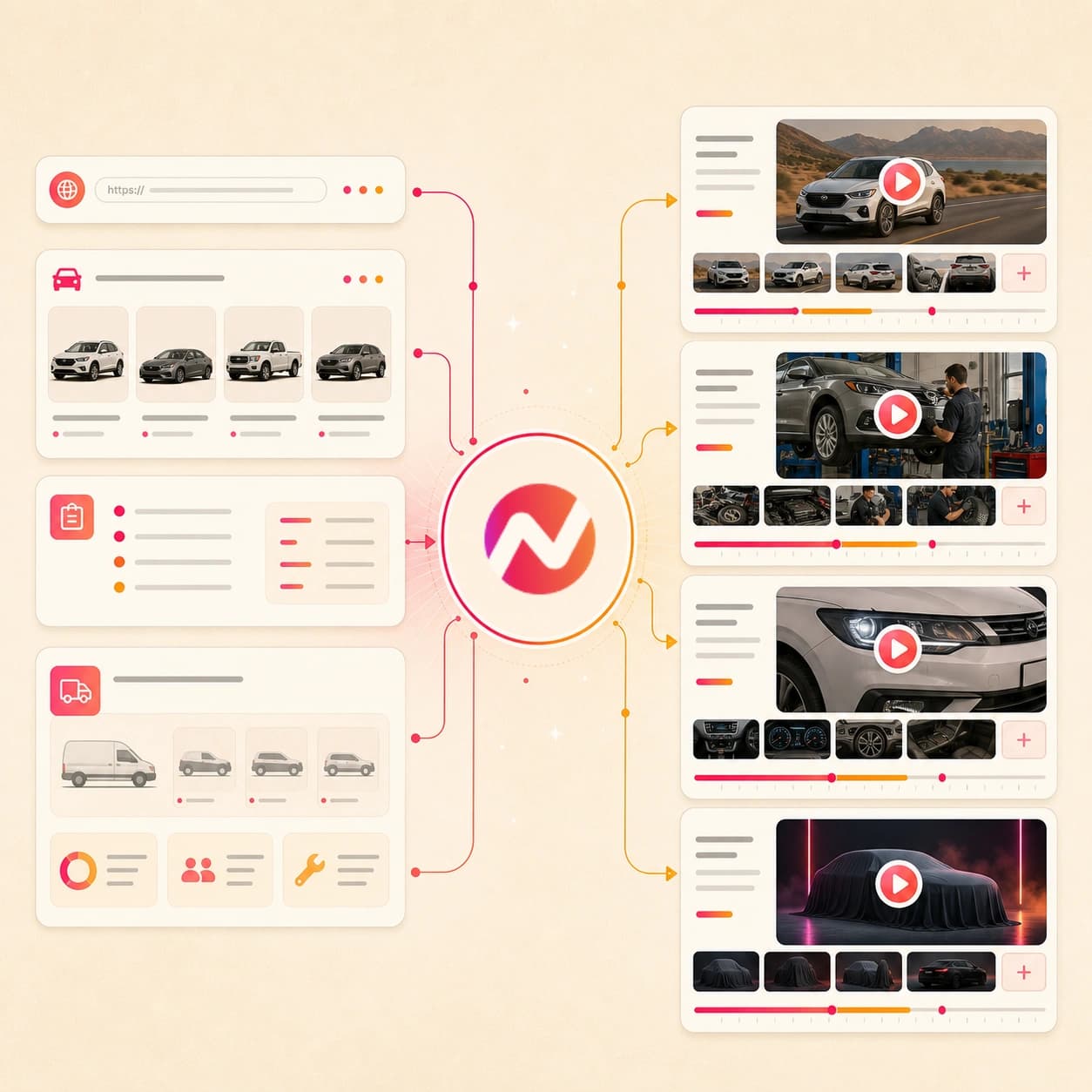
What it does
Turn your vehicle pages, listing photos, and approved specs into videos for inventory marketing and customer follow-up. Keep the same brand treatment across every model and campaign cut.
Trusted by teams at












How it works
How the AI automotive video maker works.
Bring approved vehicle context, review the video plan before render, then export an editable draft for the dealership, fleet, or launch workflow your team already manages.
Add the vehicle source
Paste an owned public vehicle page first. Add a prompt, approved listing copy, vehicle photos, service PDFs, spec sheets, scripts, or brand notes when the URL does not carry the full story.
Source ready
Review the story plan
ngram turns the source into a hook, scene order, feature beats, voiceover script, caption plan, visual direction, CTA, and draft timing before rendering.
Storyboard ready
Generate the automotive draft
The project gets vehicle visuals, motion graphics, voiceover, captions, music, intro and outro treatment, and the active brand kit styling.
Draft generated
Edit and export versions
Use chat, script edits, canvas controls, and the timeline to revise facts, pacing, captions, scenes, crops, and aspect ratios before export.
Ready to hand off
What it can do
What the AI automotive video maker can create.
ngram focuses on the video asset: source intake, script, storyboard, visuals, brand treatment, voiceover, captions, editing, and export. Keep source-of-record updates, placement, and follow-up in the systems that already own them.
Vehicle URL intake
Use an owned public vehicle detail page, model page, service page, fleet page, or campaign URL as source context for the video plan.
Explore URL to videoListing copy to storyboard
Turn trim notes, feature bullets, approved offer language, service steps, and scripts into a reviewable scene plan with a clear CTA.
Learn more about script generationImages and PDF references
Use vehicle photos, walkaround stills, spec sheets, service documents, launch briefs, and brand references as approved source material.
Learn more about AI visualsFeature and service explainers
Create scenes for vehicle features, accessory packages, service steps, maintenance reminders, and fleet buyer talking points from the source you provide.
Learn more about motion graphicsVoiceover and captions
Generate narration from the approved automotive script, burn in captions by default, and keep both editable when vehicle facts or wording change.
Learn more about AI voiceoverBuilt for editable automotive video drafts
When it matters
Automotive video workflows this tool supports.
Use the AI automotive video maker when approved vehicle context needs listing, walkthrough, launch, service, sales, fleet, or social video variants.
Landing page video
Turn a vehicle detail page, dealership landing page, or fleet campaign page into a video that supports the written offer and CTA.
Open AI video use caseProduct demo video
Use the automotive video maker to explain a vehicle, accessory package, or in-car feature with a clearer sequence than a static page.
Open AI video use caseProduct overview video
Create a short model or trim overview that explains who the vehicle is for, which features matter, and what the viewer should do next.
Open AI video use caseProduct walkthrough video creator
Build a guided walkthrough for cabin controls, safety features, charging steps, infotainment, accessories, or fleet setup notes.
Open AI video use caseProduct launch video maker
Turn model launch copy, feature notes, photos, PDFs, and page context into an editable launch video for review and export.
Open AI video use caseMarketing ad creative
Draft automotive ad creative from approved vehicle context, then hand exported files to the team that manages spend, placement, and reporting.
Open AI video use caseMarketing social clips
Adapt a vehicle listing video, service explainer, or launch draft into short captioned clips for the social workflow your team manages.
Open AI video use caseSales product demo
Create a fleet, commercial, or buyer-specific vehicle demo video from approved talking points while keeping outcome tracking outside ngram.
Open AI video use caseSupport feature walkthrough video
Turn service notes, setup steps, or feature guidance into a walkthrough video customers can follow before they contact the dealership.
Open AI video use caseProduct stack
Product features behind automotive video creation.
These ngram features carry the work from owned vehicle source material to an editable video project with brand, narration, captions, and export controls.
Planning
Script generation for vehicle stories
Turn vehicle pages, pasted listing copy, spec sheets, service notes, and prompts into a hook, scene plan, voiceover script, and CTA.
Plan the automotive scriptVisuals
AI visuals for vehicle scenes
Create supporting visuals around approved photos, page context, launch notes, and service references when the video needs more context.
Build vehicle visualsBrand
Brand kit for dealership consistency
Apply logos, colors, fonts, motion style, image style, tone, approved phrases, blocked phrases, and CTAs across automotive video drafts.
Apply brand kitVoice
AI voiceover for listing narration
Generate narration from the approved vehicle script and revise the audio when feature details, service steps, or CTAs change.
Add voiceoverCaptions
Captions and subtitles
Burn in captions styled to the brand kit so vehicle listing videos, walkthroughs, and service explainers work without sound.
Add captionsMotion
Motion graphics for feature callouts
Add labels, lower-thirds, transitions, arrows, and animated text that make automotive features and service steps easier to scan.
Add motion graphicsEditing
Video editing after the first draft
Use chat, script edits, canvas controls, and the timeline to revise vehicle facts, swap scenes, tighten pacing, or update the close.
Edit the draftMore tools
Related tools for automotive video production.
Move between vehicle source material, campaign variants, and final polish while keeping the draft editable in ngram.
Start from vehicle sources
Use these tools when the automotive source material already exists.
URL to Video
Use the broader URL workflow when the source is a public vehicle page, service page, model page, or dealership landing page.
Open toolText to Video
Paste listing copy, feature notes, service steps, fleet talking points, or a finished script when the page is not ready to fetch.
Open toolImage to Video
Animate one approved vehicle photo, trim image, dashboard screenshot, or service visual before building the full video draft.
Open toolPhoto Slideshow AI Video Maker
Plan a vehicle photo sequence from exterior, interior, detail, and service images before adding narration, captions, and brand.
Open toolListing and campaign variants
Create alternate automotive cuts for sales, launch, ads, and marketing handoff.
AI Product Demo Video Maker
Show how a vehicle feature, accessory package, app experience, or fleet package works with a guided demo structure.
Open toolAI Product Launch Video Maker
Turn model launch notes, feature briefs, image references, and page context into an editable automotive launch video.
Open toolAI Marketing Video Maker
Use the broader marketing workflow when the same vehicle message needs website, email, social, and sales variants.
Open toolAI Retail Video Maker
Create retail-style vehicle, service, showroom, and local store videos from owned pages, images, PDFs, and scripts.
Open toolAI Video Ad Maker
Create automotive ad drafts from a campaign brief, source URL, image, or PDF before the media team handles placement.
Open toolPolish and handoff
Clean up the automotive video after the first draft is ready.
Video Editor
Reorder scenes, tighten the hook, update feature wording, swap a closing card, or revise captions inside the editable project.
Open toolAdd Subtitles to Video
Add or revise burned-in subtitles after a vehicle video changes so feature names, service steps, and CTAs stay readable.
Open toolVideo Compressor
Compress the exported automotive video for email, review handoff, or upload workflows while keeping captions legible.
Open toolConvert
Automotive source material you can turn into video.
Use these converters when the source is already a vehicle page, photo set, PDF, script, website, or pasted copy.
Product page to video for vehicle pages
Paste an owned vehicle detail page, model page, service page, or accessory page and turn the approved source into a video draft.
Open converterURL to video for dealership pages
Use a public listing, model, fleet, service, or campaign page as context for an editable automotive video.
Open converterPhotos to video for vehicle galleries
Turn exterior, interior, detail, service, or fleet photos into a paced video with captions, music, and brand styling.
Open converterWho it is for
Teams that use automotive video workflows.
These existing ngram pages cover the teams most likely to turn vehicle material into listing videos, walkthroughs, service explainers, and campaign assets.
E-commerce teams
Treat vehicle detail pages like product pages: turn approved copy, images, PDFs, and URLs into editable video assets for review.
See ecommerce workflowsGrowth marketing teams
Create automotive campaign variants from listing pages, service offers, fleet briefs, and launch notes for testing and handoff.
See growth workflowsProduct marketing managers
Turn model launches, feature notes, accessory stories, and vehicle pages into branded launch and walkthrough videos.
See product marketing workflowsSales enablement
Give sales teams vehicle walkthroughs, fleet buyer explainers, and follow-up videos built from approved source material.
See sales workflowsAgencies and consultants
Produce automotive video drafts for dealership, service, parts, and fleet clients while keeping approvals outside ngram.
See agency workflowsSmall and medium business
Standardize vehicle, service, and location videos across a small team without needing a dedicated video editor for every update.
See SMB workflowsEnterprise
Support multi-location, fleet, and brand-governed automotive video work with shared brand kits and editable projects.
See enterprise workflowsContent creators
Turn automotive explainers, vehicle comparison notes, service education, and walkaround scripts into repeatable video projects.
See creator workflowsIntegrations
Integrations for automotive video handoff.
Use live ngram integrations to start automotive video drafts from approved vehicle context and route status back to your review workflow.
Zapier vehicle request to video draft
AutomationWhenA form, spreadsheet row, CRM note, or project task contains an approved vehicle URL, service script, or campaign brief
ThenCreate an ngram video project and return draft status to the review workflow your team already uses
Chrome Extension page capture
Source captureWhenA marketer is reviewing an owned vehicle page, service page, fleet page, or launch page in Chrome
ThenSend the page context into ngram so the team can draft an automotive video from the source
MCP agent video request
Agent workflowWhenAn internal agent has approved vehicle copy, a source URL, brand direction, and target export details
ThenCall ngram as a tool to create the video project, check status, and retrieve the generated asset for review
n8n automotive ops workflow
Self-hostedWhenA self-hosted workflow receives approved vehicle details and needs a video draft without a manual upload step
ThenTrigger ngram, monitor the job, and route the finished asset back to your internal review queue
Why ngram
AI automotive video maker compared with other workflows.
Choose ngram when the job is an editable automotive video draft built from approved source material, brand rules, and a reviewable storyboard.
| Compare | ngram | Template slideshow editor | Manual automotive production | Single-purpose generator |
|---|---|---|---|---|
| Workflow fit | Turns owned URLs, listing copy, images, PDFs, scripts, and brand notes into a script, storyboard, visuals, voiceover, captions, and exports | Starts from a fixed layout and asks the team to fit the vehicle story, feature order, and CTA into that structure | Useful when the vehicle needs filming, location work, on-camera talent, custom post-production, or on-site creative direction | Can create one piece of the asset, such as a clip, image, caption file, voiceover, or slideshow |
| How ngram fits | Keeps vehicle facts, scenes, captions, narration, references, and output formats in one editable video project | Useful when photos, copy, music, captions, and export sizes are already decided | Usually depends on separate briefs, files, revisions, and delivery timelines before the first video draft is ready | Useful for filling a known production gap when the automotive video structure already exists |
| Best use | Best for listing, walkthrough, service, fleet, and launch drafts from approved source material | Often leaves source-page reading, storyboard planning, voiceover, brand phrase controls, and later script edits outside the template | Can sit upstream or downstream of ngram when the project needs services beyond creating an approved video draft | May require separate tools for source context, storyboard, brand kit, captions, edits, review, and MP4 export |
FAQ
AI automotive video maker FAQ.
Automotive video questions
Turn approved vehicle details into automotive videos
Bring the owned vehicle URL, prompt, photos, PDF references, script, and brand notes. ngram drafts the story, builds the scenes, adds voiceover and captions, applies the brand kit, and exports the formats your automotive workflow needs.
Built for editable dealership, listing, walkthrough, service, fleet, and launch video drafts. Keep approvals, placement, reporting, and follow-up in your existing systems.
Your team stays responsible for vehicle accuracy, legal review, placement, and follow-up.