AI Sales Video Maker by ngram
AI Sales Video Maker for repeatable buyer outreach

Name the buyer, deal context, source material, video goal, tone, length, and CTA.
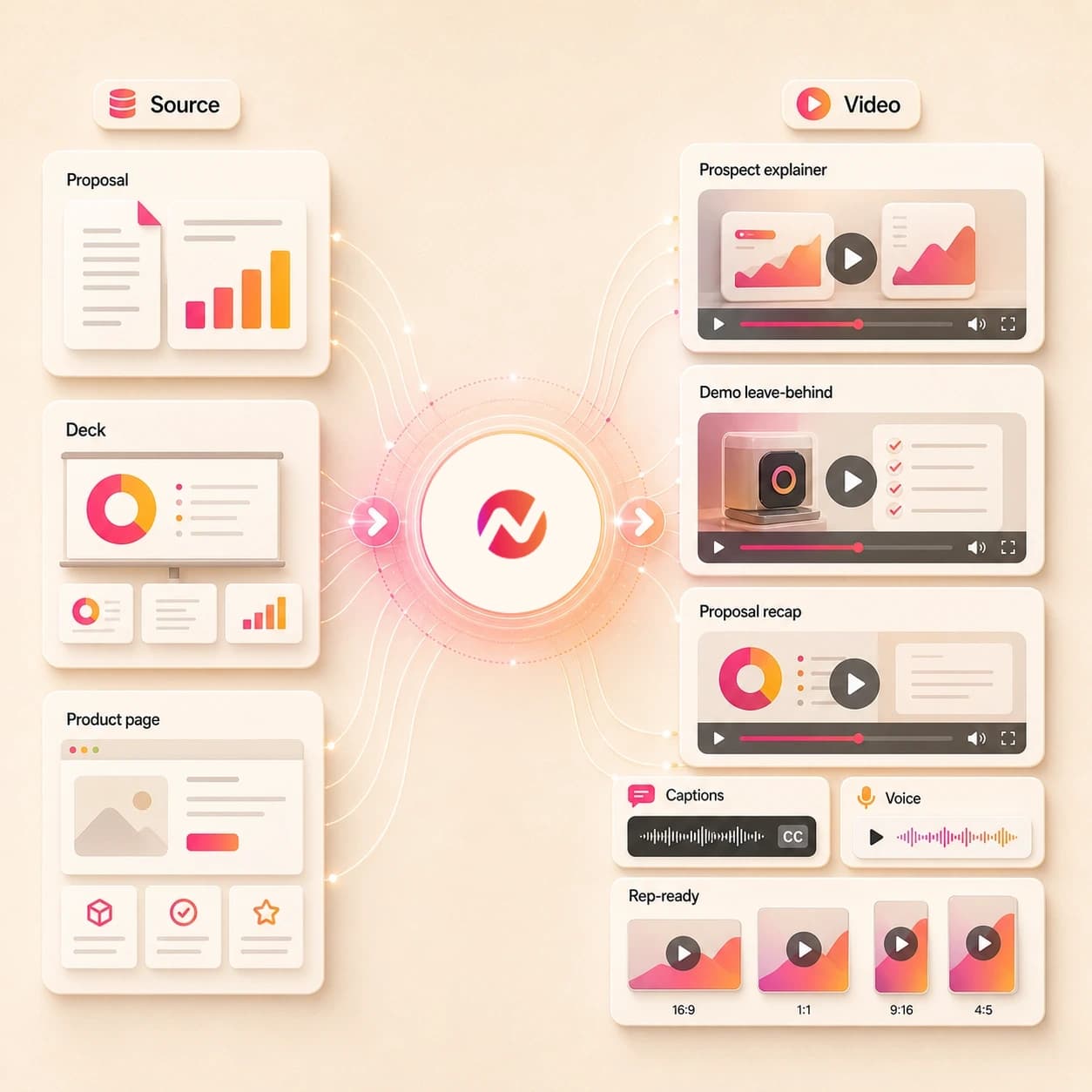
What it does
Create buyer-facing demos and follow-up videos from approved product material. Give reps a strong starting point they can adapt by persona or account without making video from scratch.
Trusted by teams at












How it works
How the AI sales video maker works.
Give ngram the sales context and approved source material, review the plan, then refine the generated video before any rep sends it.
Add the sales context
Start with a prompt, PDF, image, deck export, product page, docs page, or proposal URL. Include the buyer role, deal stage, intended use, and claims the video must avoid.
Context ready
Review the script and storyboard
ngram turns the source into a sales narrative with scene timing, narration, visual direction, proof moments, callouts, and CTA before rendering starts.
Plan reviewed
Generate the sales video asset
The project gets AI visuals, voiceover, captions, motion graphics, brand treatment, intro and outro styling, and editable scenes tied to the approved plan.
Draft generated
Edit and export for handoff
Use chat, script edits, canvas controls, or the timeline to revise the draft, create account or persona versions, and export approved files for the systems your team controls.
Ready for review
What it can do
What the AI sales video maker builds.
Create sales enablement videos, prospect explainers, follow-up videos, demo leave-behinds, proposal videos, account education clips, and rep-ready assets without turning ngram into a sales execution tool.
Sales script and storyboard
Turn a brief, proposal, deck, PDF, product page, doc, image, or URL into a reviewable video story with scenes, talk track, proof points, and CTA.
Learn more about scriptsDeck and proposal source handling
Turn a PowerPoint or PDF sales deck into a narrated video that follows the approved proposal structure and keeps each scene editable.
Convert PPT to VideoAI visuals and product callouts
Generate supporting frames, product visuals, labels, highlights, arrows, and lower thirds that point buyers to the workflow or proposal detail they should notice.
Learn more about motion graphicsVoiceover and captions
Generate narration from the approved sales script and burn in captions by default so buyers can follow the message during async review.
Learn more about voiceoverBrand kit and message controls
Apply logos, colors, fonts, tone rules, approved phrases, blocked phrases, intros, outros, and CTA cards across every sales asset version.
Learn more about brand kitBuilt for sales video assets, not outreach automation or pipeline guarantees
When it matters
Where AI sales videos fit.
Use these workflows when sales source material needs to become a clear video asset for a buyer, rep, or account team.
Sales demo videos
Use the AI sales video maker to turn product context, discovery notes, screenshots, or URLs into a demo video asset a rep can review before sharing.
Open sales demo workflowSales demo follow-ups
Create a demo follow-up video from the call recap, product pages, proposal notes, or selected proof points so the buyer has a focused leave-behind.
Open follow-up workflowSales proposal walkthroughs
Convert a proposal PDF, scope deck, pricing page, or account brief into a narrated walkthrough for stakeholders who need context before review.
Open proposal workflowSales prospecting videos
Build prospect explainer assets from approved account context, product pages, and source notes while keeping outreach and sequence sending in your sales stack.
Open prospecting workflowSales objection handling
Turn an approved objection response, battlecard, pricing note, or proof point into a short video reps can review before using in deal conversations.
Open objection workflowSales product demos
Create a product demo version for a buyer role or account need with source-aware script, callouts, captions, and brand treatment.
Open sales product demo workflowPMM sales enablement
Transform battlecards, pitch decks, launch notes, and product positioning into enablement video assets reps can pull from an approved library.
Open enablement workflowCompetitive comparison videos
Turn competitive notes and approved differentiators into comparison videos that keep the sales story consistent across reps and accounts.
Open comparison workflowProduct demo videos
Use product demo video workflows when the sales asset needs to explain the product clearly for account education, onboarding, or buyer review.
Open product demo workflowProduct stack
The product stack behind AI sales videos.
These ngram features carry sales source material into an editable video asset while keeping outreach, CRM records, and deal execution outside the page.
Planning
Script Generation
Plan sales videos before render with a script, storyboard, proof point order, visual direction, callout notes, and CTA from the source brief.
Plan the sales videoVisuals
AI Visuals
Create scene art, product frames, and supporting visuals for sales explainer moments that need more than a static document.
Create visualsCallouts
Motion Graphics
Add product callouts, proof labels, lower thirds, and transitions that make proposal and demo leave-behinds easier to follow.
Add calloutsNarration
AI Voiceover
Generate narration from the approved sales script, select a voice, and regenerate audio when the buyer version changes.
Add voiceoverCaptions
Captions & Subtitles
Add branded captions so prospects and internal reviewers can understand the video in inboxes, deal rooms, chat, and enablement libraries.
Caption the assetBrand
Brand Kit
Keep every rep-ready video aligned with approved logos, colors, fonts, tone, intros, outros, approved phrases, and blocked phrases.
Apply brand rulesMore tools
Related tools for sales video production.
Use these tools when the sales asset starts from a deck, script, demo, product page, narration, caption pass, or final edit.
Build the sales asset
Create the first video draft from pitches, demos, decks, product context, or a broader AI video brief.
AI Pitch Video Maker
Turn a pitch deck, proposal story, customer presentation, or account brief into a narrated video asset for buyer review.
Open toolAI Demo Video Maker
Create a walkthrough when the sales video needs to show the product workflow, setup path, or customer-facing process.
Open toolAI Product Demo Video Maker
Turn screenshots, PDFs, and product URLs into a SaaS demo cut that can support a sales follow-up or proposal package.
Open toolAI Video Generator
Use the broader generator when the sales source may become an explainer, launch cut, training asset, or customer education video.
Open toolPPT to Video
Convert a sales deck, pitch deck, or enablement deck into a narrated video before tailoring it for a rep or account.
Open toolVideo Script Generator
Draft the talk track first when the team has account notes, a product page, or a rough outline but no approved narration.
Open toolPolish and package
Refine narration, captions, callouts, and edit timing before the asset moves into a sales workflow.
Eye Contact AI
Correct gaze in recorded rep intros, demo recaps, and talking-head follow-ups when the speaker looks away from the camera.
Open toolAI Voice Generator
Generate a clean narration track for a proposal walkthrough, demo leave-behind, or account education script.
Open toolAdd Subtitles to Video
Add readable subtitles to a sales video cut so buyers and reviewers can follow the message with sound off.
Open toolAdd Text to Video
Place product callouts, proof labels, offer notes, and lower thirds on scenes that need a clearer buyer takeaway.
Open toolURL to Video
Paste a product page, case study, or public proposal page when the sales video source already exists online.
Open toolVideo Editor
Open the editor when the sales asset needs tighter pacing, scene revisions, audio work, or a final export pass.
Open toolConvert
Convert sales source material into video.
These converters cover the source types that often feed an AI sales video maker: proposals, decks, product pages, PDFs, docs, URLs, prompts, recordings, and scripts.
Proposal to Video
Turn a proposal, scope document, pricing PDF, or SOW into a narrated sales video with context for each buyer stakeholder.
Open converterDeck to Video
Use a sales deck, pitch deck, or enablement deck as the source for a storyboarded video with narration and brand styling.
Open converterProduct Page to Video
Paste a product or feature page URL and turn the approved page message into a sales explainer or demo leave-behind.
Open converterWho it is for
Sales video workflows by team.
Different teams need sales video assets for different moments in the deal cycle. These existing solution pages map the same creation workflow to each audience.
Sales Enablement
Create rep-ready videos from battlecards, proposals, demo material, objection notes, and account education sources.
See sales workflowsProduct Marketing Managers
Turn launch messaging, competitive positioning, and product proof into sales video assets that stay tied to approved PMM source material.
See PMM workflowsCustomer Success
Use sales video workflows for account education, renewal context, onboarding follow-up, and customer-facing product explanation.
See CS workflowsAgencies & Consultants
Convert client proposals, strategy decks, service explainers, and new-business briefs into video assets for review cycles.
See agency workflowsStartups
Create sales demos, founder-led explainers, pitch follow-ups, and product walkthroughs without waiting on a separate production queue.
See startup workflowsFounders
Turn founder notes, sales decks, rough demos, and product pages into videos that support investor, prospect, and customer conversations.
See founder workflowsGrowth & Marketing Teams
Adapt approved sales messages into campaign, landing page, email, and social video variants after the core asset is reviewed.
See marketing workflowsIntegrations
Connect sales video creation to your workflow.
Use live integrations for intake, source capture, status checks, and review routing around sales video creation. Keep outreach, CRM updates, enrichment, booking, and publishing in the systems that own them.
Zapier sales video intake
AutomationWhenA form, workspace trigger, or approved request captures a sales video brief and source link.
ThenCreate an ngram video request with the prompt and source context attached for human review.
n8n sales ops handoff
Self-hostedWhenA self-hosted workflow approves a proposal, battlecard, or demo source for video conversion.
ThenSend the source package to ngram and monitor render status from n8n for internal approval steps.
Chrome Extension source capture
BrowserWhenA product page, case study, docs page, or public proposal source is open in the browser.
ThenCapture the page context for ngram so the sales video starts from the approved source material.
MCP agent workflow
AgentWhenAn external AI agent has the sales brief, source URLs, and video instructions ready for a draft.
ThenCall ngram through MCP to request the video asset and check status before a human approves the next step.
Why ngram
AI sales video maker compared with other workflows.
The right workflow depends on whether you need a generated sales video asset, a recording tool, a template editor, or a sales engagement system.
| Compare | ngram | Template editor | Screen recorder workflow | Sales engagement platform |
|---|---|---|---|---|
| Workflow fit | Starts from prompts, decks, PDFs, images, product pages, docs, proposals, and URLs | Useful when the team already has a finished script, scene order, media assets, and layout direction | Works when the sales asset starts with a rep or SE recording a product walkthrough | Useful for managing sequences, account tasks, message history, and rep activity after an asset is approved |
| How ngram fits | Creates script, storyboard, AI visuals, callouts, voiceover, captions, brand kit, and MP4 export | Usually requires manual narration, captions, callouts, source adaptation, and version management for each sales asset | Less useful when the source is a proposal, PDF, sales deck, docs page, or product page that needs a script first | Typically expects the video or share link to be ready before it enters the workflow |
| Best use | Keeps sales videos editable for review while leaving outreach, CRM, booking, and pipeline work outside the tool | Better for hands-on design control than prompt-led sales video creation from business source material | Often needs separate tools for brand treatment, AI voiceover, captions, callouts, and format exports | Complements ngram when sales teams need creation in one place and outreach execution in another |
FAQ
AI sales video maker FAQs.
Answers for sales video workflows
Turn the next sales brief into a rep-ready video
Bring the prompt, deck, proposal PDF, product page, image, doc, or URL. ngram plans the sales story, generates the editable video, and exports the versions your team can review.
Create the asset, keep approval in your team's hands, and use your sales stack for the final handoff.
Creates sales video assets, not outreach automation or pipeline guarantees.