AI Startup Video Maker by ngram
AI Startup Video Maker for every stage of the launch

Name the audience, source material, stage, message, tone, target formats, and CTA.
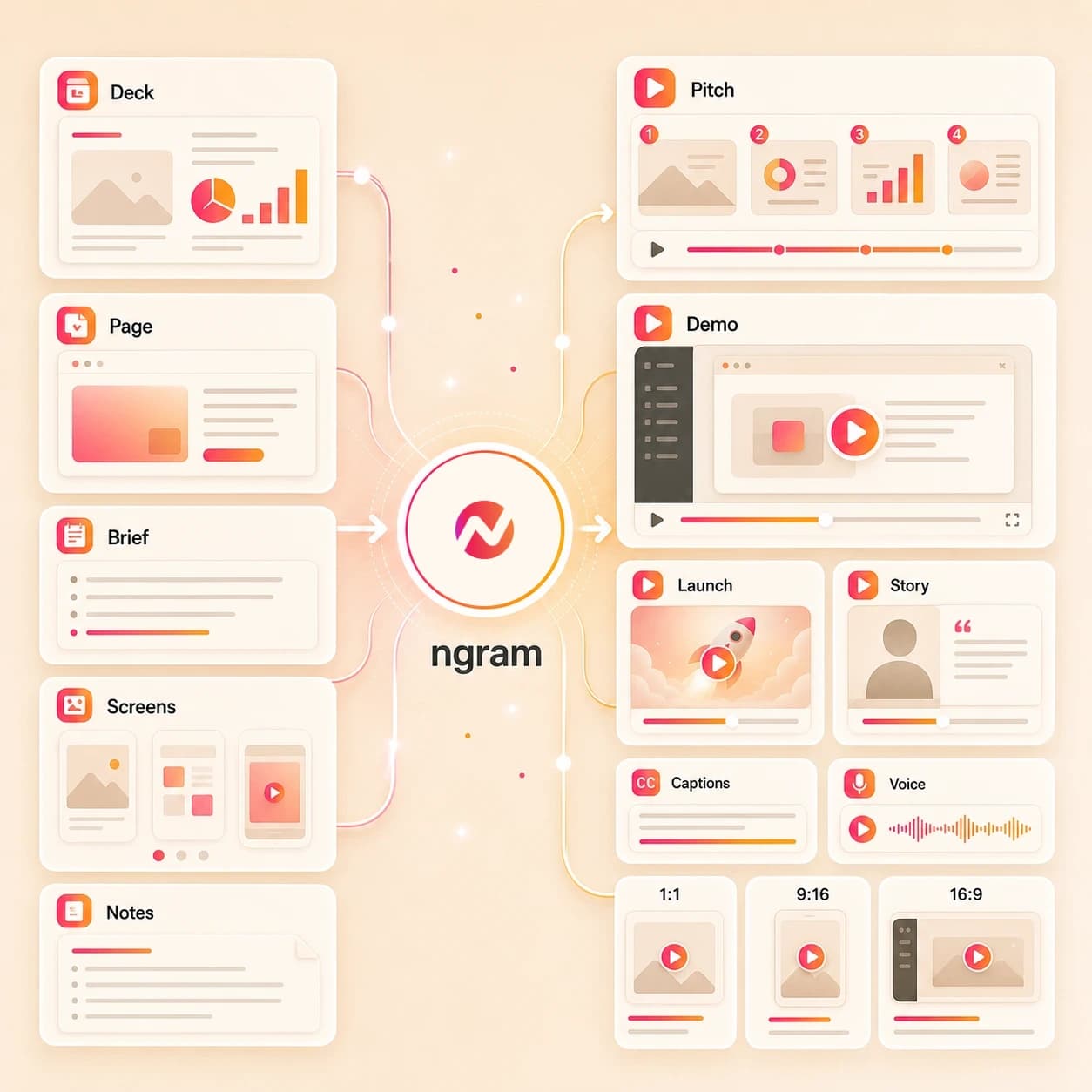
What it does
Turn the assets your startup already has into launch videos, demos, and investor updates. Reuse the same product story as the company moves from launch to growth.
Trusted by teams at












How it works
How the AI startup video maker works.
Give ngram the startup context, review the story plan, then refine an editable video project before export.
Add the startup source
Describe the goal, upload a supported image or PDF, or paste a product page, release note, help article, launch page, or brief URL.
Source ready
Review the script and storyboard
ngram turns the source into a hook, scene order, narration, product proof points, visual direction, and CTA before rendering.
Plan reviewed
Generate the startup video
The draft gets AI visuals, motion graphics, voiceover, captions, music, branded intro and outro treatment, and editable scenes.
Draft generated
Edit and export versions
Revise the story in chat, adjust the script, change scenes on the canvas or timeline, then download the finished MP4.
Ready to hand off
What it can do
What the AI startup video maker builds.
Create startup video assets for pitch, launch, demo, founder story, investor update, product announcement, and customer education workflows while keeping outcome promises outside the page.
Startup script and storyboard
Turn a prompt, pitch deck, product page, PDF, doc, release note, or URL into a reviewable video plan with scenes, timing, narration, and CTA.
Learn more about scriptsDeck and source structure
Use a PowerPoint or PDF startup deck as the scene order for a narrated video, then refine the company story, captions, and pacing in ngram.
Convert PPT to VideoAI visuals from startup context
Generate scene imagery, product frames, backgrounds, and visual fills that match the startup story and uploaded references.
Learn more about AI visualsVoiceover for founder-led cuts
Create narration from the approved script, choose a voice, and regenerate affected audio when the founder story or product message changes.
Learn more about voiceoverCaptions for async review
Burn captions into pitch, launch, demo, and education cuts so viewers can understand the startup video in email, chat, or a review room.
Learn more about captionsBrand kit for every version
Apply logos, colors, fonts, tone rules, approved phrases, blocked phrases, intros, outros, and CTA cards across startup video variants.
Learn more about brand kitBuilt for startup video assets and editable projects, not fundraising or customer acquisition execution
When it matters
Startup videos for each company moment.
Use these workflows when the same startup source needs a pitch cut, launch asset, demo version, founder story, investor update, or customer education video.
Startup explainer videos
Turn a pitch deck, landing page, product notes, or founder brief into a concise explainer that gives early audiences the company story and product context.
Open startup explainer workflowFounder pitch videos
Create a founder-led pitch cut from deck exports, product proof, and narrative notes so the story travels with the file after the live call.
Open founder pitch workflowInvestor pitch videos
Build an investor-facing startup video from a deck, product page, traction notes, or screenshots without promising funding outcomes.
Open investor pitch workflowInvestor update videos
Convert monthly metrics, roadmap notes, screenshots, and founder commentary into a focused investor update video for async review.
Open investor update workflowFounder story videos
Shape the founder story, market insight, product promise, and customer problem into a branded video for the startup's owned channels.
Open founder story workflowFounder product demos
Turn a product page, screenshot set, or rough walkthrough into a demo video that explains the workflow and why the product exists.
Open founder demo workflowProduct launch videos
Use release notes, launch pages, screenshots, or a product brief to create the main startup launch video and supporting export variants.
Open launch video workflowFeature announcement videos
Create a product announcement video from release notes, PRDs, screenshots, or docs so customers and prospects understand what changed.
Open announcement workflowCustomer feature education
Turn help docs, release notes, or walkthrough notes into a customer education video that explains a new startup product workflow.
Open education workflowProduct stack
The product stack behind startup video creation.
These ngram features handle planning, generation, editing, brand control, captions, and export for an AI startup video maker workflow.
Planning
Script generation for startup stories
Turn decks, product pages, release notes, docs, screenshots, and prompts into the hook, script, scene order, and CTA for the startup video.
Plan the startup scriptVisuals
AI visuals for startup scenes
Generate product frames, supporting imagery, backgrounds, and visual fills that match the startup's source material and brand direction.
Build startup visualsVoice
AI voiceover for guided videos
Create narration from the approved startup script, choose a voice, and regenerate affected audio when the message changes.
Add startup narrationCaptions
Captions for pitch and demo review
Add burned-in captions to startup pitch, demo, launch, and education videos so the message works in quiet review contexts.
Style the captionsBrand
Brand kit for startup consistency
Apply logos, colors, fonts, tone rules, approved phrases, blocked phrases, and CTA treatments across each startup video version.
Apply the brand kitMotion
Motion graphics for product proof
Add lower thirds, title cards, callout boxes, product labels, transitions, and branded motion to explain startup product moments.
Add motion graphicsMore tools
Related tools for startup video production.
Move from one startup video asset to the next without rebuilding the source material from scratch.
Pitch, launch, and demo tools
Create adjacent startup assets from the same prompt, deck, product page, or release context.
AI Pitch Video Maker
Turn a pitch deck, product page, or founder notes into a focused pitch video asset for startup and investor contexts.
Open toolAI Product Launch Video Maker
Create launch video assets from release notes, screenshots, product pages, and launch briefs.
Open toolAI Demo Video Maker
Build a walkthrough video from screenshots, product URLs, PDFs, or a prompt when the startup story needs a demo cut.
Open toolAI Product Demo Video Maker
Create a product demo with callouts, captions, voiceover, and export formats for SaaS startup workflows.
Open toolStory and brand tools
Refine the startup message before it becomes a launch, founder story, or education video.
Video Script Generator
Draft a startup video script from notes, a source URL, a PDF, or a deck before rendering the full project.
Open toolAI Brand Video Maker
Create a brand story video when the startup needs a company narrative in addition to launch and demo cuts.
Open toolAI Marketing Video Maker
Turn the same startup context into campaign, website, email, and social video assets for the marketing handoff.
Open toolSource capture tools
Capture or convert source material before generating the startup video project.
Screen Recorder
Record a product walkthrough in the browser, then use it as source material for demo, launch, or education videos.
Open toolPPT to Video
Turn a deck or PDF into narrated video scenes when the startup source is already structured as slides.
Open toolText to Video
Start from a rough founder note, launch brief, or product outline and build the first editable startup video draft.
Open toolConvert
Source-to-video paths for startup teams.
Use these converters when the startup video starts from a prompt, pitch deck, product page, release note, PDF, doc, screenshot, or URL.
Prompt to Video
Describe the startup pitch, launch, demo, founder story, or education asset and let ngram build the first script and storyboard.
Open converterPitch Deck to Video
Turn a startup pitch deck into narrated scenes with captions, motion graphics, brand treatment, and editable project controls.
Open converterProduct Page to Video
Paste a product page so ngram can pull the startup's positioning, screenshots, benefits, and CTA into a video plan.
Open converterWho it is for
Teams that use startup video assets.
Startup video work crosses founders, product marketing, growth, sales, customer success, product, and agency teams.
Founders
Create startup pitch, founder story, product demo, and investor update videos from decks, notes, product pages, and screenshots.
See founder workflowsStartups
Use one AI startup video maker workflow for launch assets, demo cuts, investor updates, and early customer education.
See startup workflowsProduct Marketing
Turn positioning, release notes, product pages, and screenshots into launch videos, product announcements, and demo variants.
See PMM workflowsGrowth Marketing Teams
Adapt a startup launch video into campaign, landing page, and social handoff assets without claiming paid media execution.
See growth workflowsSales Enablement
Create startup demo and pitch follow-up videos that explain the approved story before the sales team handles outreach.
See sales workflowsCustomer Success
Turn feature releases, help docs, screenshots, and product notes into customer education videos for early accounts.
See CS workflowsProduct Managers
Convert PRDs, changelog notes, and screen captures into startup update videos that show what shipped.
See product workflowsAgencies and Consultants
Create startup pitch, launch, demo, and case-story assets for client teams while keeping brand controls in the project.
See agency workflowsIntegrations
Automate startup video requests with live integrations.
Use integrations to start or track startup video projects from workflow tools while keeping channel operations, paid placement, and contact workflows outside the page.
Zapier startup video intake
AutomationWhenA form, spreadsheet row, or launch checklist captures a new startup video request with source links and audience notes.
ThenSend the prompt, URL, or file context to ngram so the team can review an editable startup video project.
n8n founder update workflow
Self-hostedWhenA self-hosted workflow collects investor update notes, product screenshots, or release context for a startup video.
ThenCreate the ngram project, watch render status, and route the finished asset back to the team's review system.
Chrome Extension source capture
BrowserWhenA founder is viewing a product page, launch note, help article, or public brief that should become startup video context.
ThenCapture the page context and start a video project without copying the source into a separate writing doc.
MCP agent video creation
AgentWhenAn AI agent is preparing a startup pitch, product announcement, investor update, or customer education brief.
ThenCall ngram through MCP to create the draft project and check status from the agent workflow.
Why ngram
How ngram compares for AI startup video maker workflows.
ngram focuses on the creative asset: startup source intake, script, storyboard, video generation, editing, brand controls, captions, and export.
| Compare | ngram | Template editor | Manual editing workflow | Point AI generator |
|---|---|---|---|---|
| Workflow fit | Creates startup video drafts from prompts, pitch decks, product pages, screenshots, PDFs, docs, release notes, and URLs | Useful when the team already has copy, layouts, images, and a finished startup video plan | Best when an editor already has footage, audio, brand assets, and a finished story structure | Useful for producing a narrow visual or clip from a prompt when the broader startup story is already planned |
| How ngram fits | Adds script, storyboard, AI visuals, voiceover, captions, motion graphics, brand kit, and MP4 export | Often starts from a visual template instead of a pitch deck, release note, product page, PDF, or doc | Requires the team to write the hook, storyboard, voiceover plan, and captions outside the editor | May not connect deck source, product context, voiceover, captions, brand kit, and export formats in one editable project |
| Best use | Keeps the project editable in chat, script editor, canvas controls, and timeline before handoff | Variants still depend on manual script, scene, caption, voiceover, and format edits | Strong for fine control, slower for turning raw startup context into a first video draft | Typically leaves launch, pitch, demo, and education variants to a separate editing workflow |
FAQ
AI startup video maker FAQs.
Answers for startup video teams.
Create startup videos from the assets you have
Bring a prompt, pitch deck, product page, screenshot, PDF, doc, release note, or URL. ngram turns the source into an editable startup video project with script, storyboard, visuals, voiceover, captions, brand kit, and exports.
Built for video assets and reviewable projects, not investor outcomes or channel operations.
CTA opens ngram login so you can start from the app.