Facebook AI Video Maker by ngram
Facebook AI Video Maker for product campaign cuts

Name the audience, post type, hook, message, offer, and CTA so ngram can plan the draft
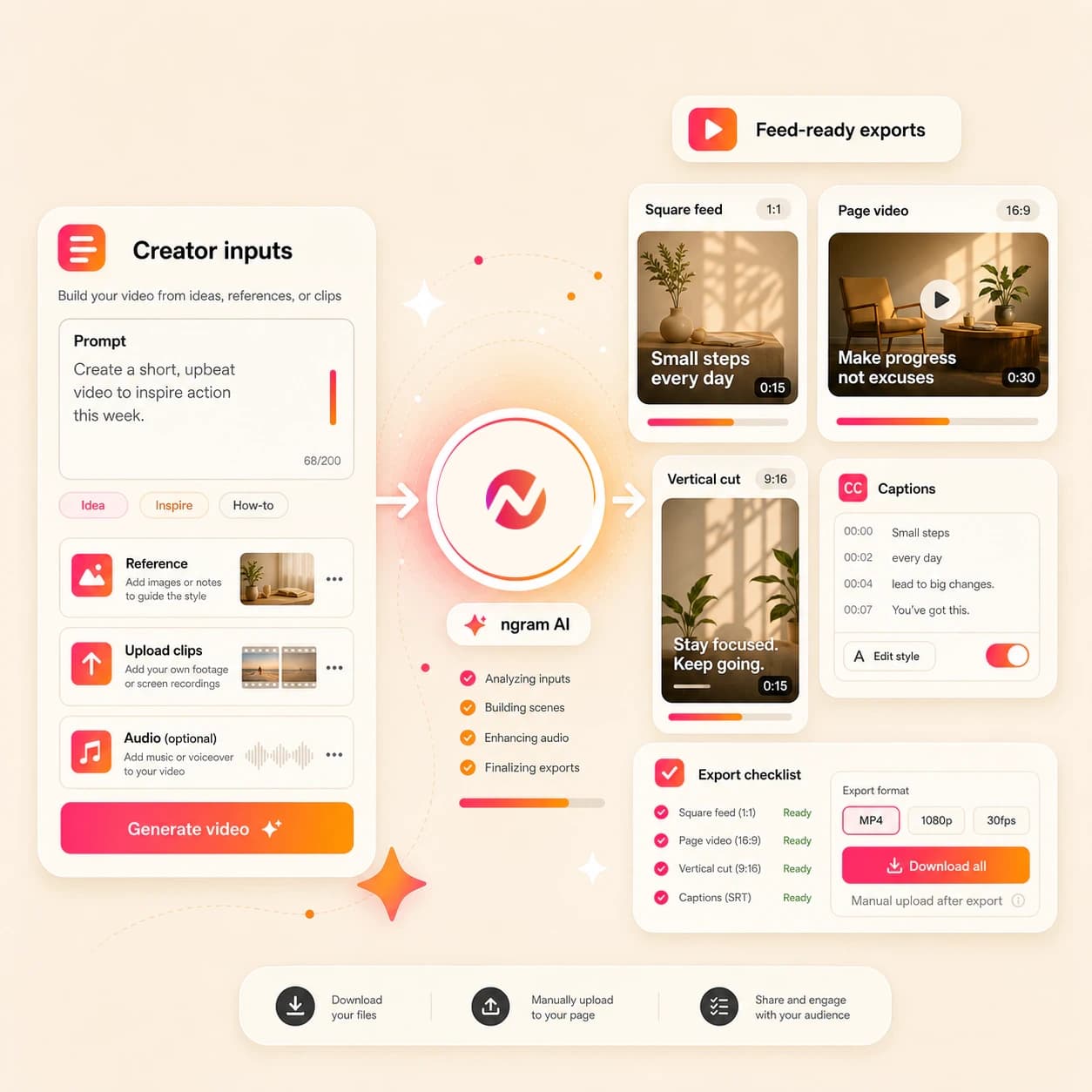
What it does
Create a Facebook campaign video from your product source and approved message. Prepare and review each feed, Page, Group, or ad-style edit separately, then upload its MP4 manually.
Trusted by teams at












How it works
How the Facebook AI Video Maker works.
Start with the message and source material, review the plan, then refine the generated Facebook-ready draft before exporting a file for manual upload.
Bring the Facebook brief
Start with a prompt, product image, campaign graphic, screenshot, PDF, or URL that explains what the Facebook video should say and who it should reach.
Source ready
Review the script and scenes
ngram drafts the hook, script, scene flow, visual direction, timing, caption approach, and CTA before the first video draft is rendered.
Plan reviewed
Generate the draft
The project can combine AI visuals, motion graphics, product callouts, voiceover, captions, music, and brand treatment into a Facebook-ready first cut.
Draft generated
Edit and export
Revise scenes in chat, edit the script, adjust captions, and regenerate weak moments. Prepare and review each framing separately before downloading its MP4 for manual Facebook upload.
Ready to upload
What it can do
What the Facebook AI Video Maker builds.
The tool creates editable video projects for Facebook feed posts, Page updates, Group posts, and ad-style creative without claiming direct publishing or account connection.
Hook and script planning
Turn a brief, product page, PDF, or rough idea into a concise Facebook script with a hook, body, and CTA before the video renders.
Learn more about script generationVisuals from your context
Generate scene imagery, B-roll, and supporting frames from the prompt, uploaded reference, source URL, and active brand direction.
Learn more about AI visualsMotion for feed viewing
Add animated text, lower thirds, product callouts, transitions, and smart zooms so the point reads quickly in a busy Facebook feed.
Learn more about motion graphicsCaptions built into the cut
Generate burned-in captions, edit product names and line breaks, and style the caption layer so the message works when audio is muted.
Learn more about captionsBrand kit on every scene
Apply logos, colors, fonts, motion style, image style, voice, tone, approved phrases, blocked phrases, and CTA rules across the draft.
Learn more about brand kitBuilt for Facebook-ready video drafts
When it matters
Where Facebook video creation fits.
These use cases cover teams turning prompts, images, PDFs, and URLs into Facebook-ready feed, Page, Group, and ad-style video drafts.
Marketing Social Clips
Turn campaign notes, product posts, and launch material into Facebook-ready clips with a clear hook, captions, and brand treatment.
Open AI video use caseSocial Media Clips
Use a prompt, product URL, or screenshot as context for separately prepared square, widescreen, or vertical Facebook edits.
Open AI video use caseGrowth Social Clips
Generate more Facebook video concepts for growth tests, with different hooks, caption styles, and visuals from the same source message.
Open AI video use caseAgency Social Content
Build client Facebook posts, Page updates, and paid-social draft videos from approved briefs and brand assets.
Open AI video use casePMM Social Content
Convert launch briefs, feature notes, and product screenshots into Facebook-ready videos that explain the message without a long edit cycle.
Open AI video use caseFounder Social Content
Turn founder notes, product opinions, and launch updates into Facebook Page videos with captions, visuals, and brand polish for manual upload.
Open AI video use caseAd Creative Video
Create Facebook ad-style concepts from a brief, product page, or reference image, then edit hooks, captions, and aspect ratio before export.
Open AI video use caseProduct Launch Video Maker
Turn launch copy, product screenshots, and announcement pages into Facebook-ready launch videos with short scripts and branded scenes.
Open AI video use caseMarketing Ad Creative
Build Facebook campaign drafts from a paid-social brief, then compare hooks, captions, and formats before manual export and upload.
Open AI video use caseProduct stack
The product stack behind Facebook-ready videos.
These features cover the planning, visuals, captions, brand controls, and export paths used by the Facebook AI Video Maker workflow.
Script Generation
Draft the hook, script, scene plan, and CTA from the prompt, PDF, image reference, or source URL before generating the Facebook video.
Learn more about script generationAI Visuals
Create scene imagery and supporting visuals that match the script, source material, and brand direction for each Facebook cut.
Learn more about AI visualsMotion Graphics
Add animated hooks, product callouts, lower thirds, transitions, and smart zooms that help Facebook viewers read the point fast.
Learn more about motion graphicsCaptions & Subtitles
Generate burned-in captions for Facebook feed and Page videos so the message stays clear when the viewer starts muted.
Learn more about captionsBrand Kit
Keep logos, colors, fonts, motion style, voice, tone, approved phrases, and CTAs consistent across Facebook video variants.
Learn more about brand kitMore tools
Related tools for Facebook video workflows.
Use these tools when the Facebook draft needs a broader video generator, another social-channel variant, caption polish, or source assets.
Create adjacent social videos
Generate related social cuts from the same message when a campaign needs more than a Facebook upload.
AI Video Generator
Start from a broader video brief, source URL, image, or document when the same message needs a full video project before Facebook export.
Open toolInstagram AI Video Maker
Use the approved source material as context for separately prepared square or vertical Instagram drafts.
Open toolTikTok AI Video Maker
Create a hook-first vertical version when the Facebook campaign also needs a faster short-form cut.
Open toolPolish and repurpose the draft
Use these tools after the Facebook video is planned or when a source asset needs a focused pass.
Video Caption Generator
Add or restyle burned-in captions on an existing clip before exporting it for Facebook feed or Page upload.
Open toolAI Image Generator
Create branded stills, scene art, thumbnails, and campaign graphics that can support a Facebook video draft.
Open toolAdd Text to Video
Add headline overlays, offer copy, or CTA text to a Facebook-ready cut when the message needs a stronger visual cue.
Open toolRelated social video makers
Use these channel-specific tools when the same source should become another social cut.
Facebook AI Reels Maker
Create a Facebook Reels-specific vertical draft for manual export and upload.
Open toolAI Social Media Video Maker
Create multi-channel social video variants from one prompt, file, or source URL.
Open toolInstagram AI Video Maker
Create broad Instagram-ready video drafts for feed, profile, Story, and Reels-adjacent use.
Open toolLinkedIn AI Video Maker
Create business-ready LinkedIn videos with supported LinkedIn handoff context.
Open toolConvert
Start from the material your Facebook post already has.
Convert source material into video when the message begins as a prompt, image, PDF, product page, or campaign URL.
Prompt to Video
Turn a rough Facebook post idea into a planned video draft with a hook, storyboard, captions, and export path.
Open converterImage to Video
Animate product images, campaign graphics, or screenshots into a Facebook-ready cut with motion and captions.
Open converterURL to Video
Paste a landing page, release note, blog post, or product page so ngram can turn the source into a Facebook video draft.
Open converterWho it is for
Teams that use Facebook-ready video drafts.
These teams usually need Facebook videos as part of a broader campaign, launch, social calendar, or paid creative workflow.
Growth & Marketing Teams
Create Facebook feed, Page, Group, and ad-style video variants from campaign briefs, URLs, and approved source assets.
See growth workflowsProduct Marketing Managers
Turn launch notes, screenshots, and positioning docs into Facebook-ready announcement videos without waiting on a separate production cycle.
See PMM workflowsAgencies & Consultants
Build client Facebook drafts with each account's brand kit, caption style, and manual export needs kept inside one editable project.
See agency workflowsFounders
Turn product updates, founder notes, and launch angles into Facebook Page videos that can be exported alongside other social cuts.
See founder workflowsSaaS Companies
Convert feature launches, changelogs, and product pages into Facebook-ready videos that keep product updates visible in the feed.
See SaaS workflowsE-commerce Teams
Use product photos, PDP copy, and campaign pages to generate Facebook product videos and ad-style variants for manual upload.
See ecommerce workflowsIntegrations
Automation paths for Facebook video production.
These integrations can start or coordinate ngram video work. The Facebook upload remains a manual export and upload step.
Zapier
No-codeWhenA form, CRM, or campaign request captures a Facebook video brief.
ThenSend the brief to ngram so the team can review the generated draft before manual Facebook upload.
n8n
Self-hostedWhenA self-hosted workflow creates a new Facebook creative request from internal campaign data.
ThenTrigger ngram generation and pass the finished draft status back to your internal review flow.
Chrome Extension
CaptureWhenA product page, release note, or campaign page should become a Facebook video draft.
ThenCapture the page as source context and send it to ngram without copying the page into a separate brief.
MCP Server
AgentWhenAn AI agent is assembling campaign assets and needs a Facebook-ready video draft.
ThenCall ngram as a tool, generate the draft, and return status for human review before export.
Why ngram
How the Facebook AI Video Maker compares.
Use this table to choose the right workflow for Facebook-ready video drafts without overstating publishing or account connection.
| Compare | ngram | Template editors | Ad platform builders | Generic AI clip tools |
|---|---|---|---|---|
| Workflow fit | Starts from a prompt, image, PDF, or URL and drafts the script before rendering. | Good when the team already has the script, assets, and layout direction. | Useful for media planning, campaign structure, and placement settings. | Can be useful for quick experiments or one-off visual clips. |
| How ngram fits | Adds captions, voiceover, motion, brand treatment, and editable scenes in one project. | Usually requires manual resizing and caption checks for each Facebook placement. | Video creation still depends on bringing finished creative into the platform. | May separate script planning, brand controls, captions, and export variants. |
| Best use | Downloads a reviewed MP4 for manual Facebook upload, with each framing prepared separately. | Best for controlled design edits rather than source-to-video generation. | Best after the Facebook-ready asset is approved and exported. | Best when the output does not need a reusable project or multiple Facebook formats. |
FAQ
Facebook AI Video Maker FAQs
Ask ngram to plan your next Facebook-ready video.
Create Facebook-ready video drafts
Start from the prompt, image, PDF, or URL you already have. ngram plans the script, builds the scenes, adds captions and brand treatment, then exports files you can upload manually.
Use one editable project for feed, Page, Group, and ad-style variants.
Manual Facebook upload. No direct publishing claim.