Facebook AI Reels Maker by ngram
Facebook AI Reels Maker for vertical campaign cuts

Name the hook, audience, offer, proof point, length, and CTA for the Facebook Reels draft
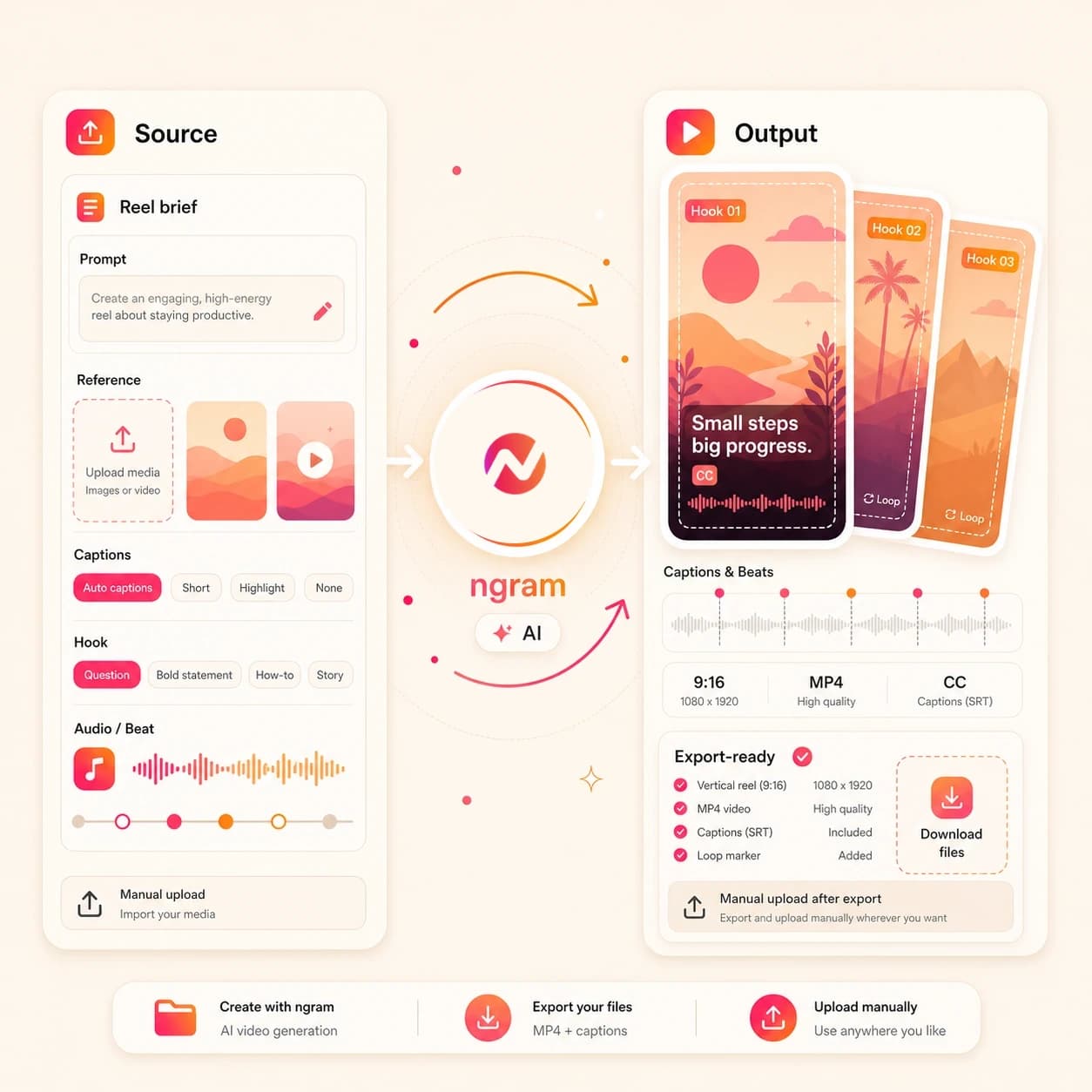
What it does
Create a vertical Facebook Reel from your campaign brief and product assets. Keep the hook, captions, and brand editable, then export the finished file for manual upload.
Trusted by teams at












How it works
How the Facebook AI Reels Maker works.
Start with the message and source context, review the short vertical plan, then export a Facebook Reels-ready file for manual upload.
Add the source context
Type a brief, upload a supported image or PDF, or paste a source page URL. The agent reads the input for audience, offer, visual material, proof points, and CTA.
Source added
Review the Reels plan
ngram drafts the first-frame hook, short script, scene order, caption approach, visual direction, and loop point before the render starts.
Plan reviewed
Generate the vertical draft
The project gets scene visuals, motion graphics, voiceover when needed, branded captions, music, and pacing tuned for a Facebook Reels cut.
Draft generated
Edit and upload manually
Revise scenes in chat or the editor, tighten captions and timing, export the 9:16 MP4, then upload it through the Facebook account your team controls.
Ready to upload
What it can do
What the Facebook AI Reels Maker handles.
This page is tuned for Facebook Reels drafts, with 9:16 framing, quick hooks, captions, loop-aware pacing, and export for manual upload.
9:16 Reels framing
Plan the opening frame, safe text area, scene order, and CTA around the vertical format used for Facebook Reels.
Hook-first pacing
Shape the first second around the problem, offer, product moment, or visual proof point so the draft does not wait to make its point.
Captions for muted viewing
Generate burned-in captions, edit line breaks and product names, and style the caption layer so the Reel reads without sound.
Learn more about captionsLoopable endings
Shape the last beat, transition, and CTA so the short cut can replay cleanly instead of ending with a hard stop.
Brand rules on every scene
Carry logos, colors, fonts, motion style, voice, tone, approved phrases, blocked phrases, and CTA rules into the Reels draft.
Learn more about brand kitBuilt for Facebook Reels draft creation and manual upload
When it matters
Where Facebook Reels drafts fit.
These workflows use short vertical video when one campaign idea needs a hook, captions, brand control, and a file ready for manual upload.
Marketing Social Clips
Turn campaign notes, launch pages, and approved visuals into Facebook Reels drafts with a direct hook and caption-led structure.
Open AI video use caseSocial Media Clips
Create Reels-ready vertical clips from a product URL, screenshot, or prompt, then export the 9:16 file for manual upload.
Open AI video use caseGrowth Social Clips
Generate Facebook Reels hook variants from one source message so growth teams can test angles without rebuilding each draft.
Open AI video use caseAgency Social Content
Package client briefs, brand rules, and source pages into repeatable Reels drafts that account teams can review before handoff.
Open AI video use casePMM Social Content
Turn release notes, product screenshots, and positioning into Facebook Reels that explain one feature or proof point fast.
Open AI video use caseFounder Social Content
Use a founder note, launch idea, or rough product thought to create a captioned Reels draft without opening a blank timeline.
Open AI video use caseMarketing Ad Creative
Draft short vertical creative for Meta campaign testing, with hook, caption, and CTA variants that remain editable before export.
Open AI video use caseGrowth Ad Creative
Create more 9:16 Reels-style ad drafts from one source brief so growth teams can test messages without waiting on a full edit cycle.
Open AI video use caseCreator Social Clips
Turn creator prompts, reference images, and approved URLs into short Reels drafts with editable captions and loop-aware timing.
Open AI video use caseProduct stack
Product features behind the Facebook Reels workflow.
These ngram features support the draft: source-led scripting, generated visuals, captions, brand control, editing, and export.
Script generation for short hooks
Turn the source brief into a compact script with a first-frame hook, proof beat, and CTA before the Reels draft renders.
Learn more about script generationAI visuals for vertical scenes
Generate scene imagery and supporting frames that match the source material, then fit them to a Facebook Reels cut.
Learn more about AI visualsCaptions for feed scanning
Burn in captions that follow the narration, keep key words readable, and support viewers who watch with sound off.
Learn more about captionsBrand kit for approved styling
Apply workspace colors, logos, font choices, tone, approved phrases, and blocked phrases to every Reels draft.
Learn more about brand kitMotion graphics for the scroll
Add animated text, lower thirds, product callouts, and transitions that make the key point clear in a short vertical cut.
Learn more about motion graphicsMore tools
Related tools for Facebook Reels production.
Use these live ngram tools when the source, caption layer, or final edit needs a different entry point.
Create the source draft
Start from a broader prompt, a single visual, or a page URL before shaping the Facebook Reels cut.
AI Video Generator
Use the broader video generator when the idea needs a full storyboard before you decide which channel cut to export.
Open toolImage to Video
Animate a product shot, screenshot, or campaign graphic before turning it into a short 9:16 Reels draft.
Open toolURL to Video
Paste a landing page, product page, or launch note and generate a video plan that can become a Facebook Reel.
Open toolPolish the exported cut
Use these tools when captions, timing, or scene edits need more direct control after the first draft.
Add Subtitles to Video
Add or correct subtitles on a Reels cut when the caption layer needs exact wording before delivery.
Open toolVideo Caption Generator
Create animated social captions and highlight key words for a vertical clip that must read quickly.
Open toolVideo Editor
Use timeline, script, and visual chat edits when the Facebook Reels draft needs tighter timing or scene swaps.
Open toolRelated social video makers
Use these channel-specific tools when the same source should become another social cut.
Facebook AI Video Maker
Create Facebook-ready feed, Page, Group, or ad-style video files for manual upload.
Open toolReels AI Video Maker
Create a generic Reels-style vertical cut before adapting it for a specific platform.
Open toolInstagram AI Reels Maker
Create an Instagram-specific Reel draft with captions, hooks, and export-ready framing.
Open toolShorts AI Video Maker
Create generic short-form vertical videos before choosing the final social channel.
Open toolConvert
Turn source material into a Facebook Reels draft.
These converters map common briefs, pages, and files into video projects you can shape into short 9:16 cuts.
Prompt to Video
Start with a one-line Facebook Reels idea and turn it into a short script, scene plan, captions, and editable video draft.
Open converterProduct Page to Video
Paste a product page and pull the offer, proof points, and visuals into a Reels-ready product story.
Open converterImage to Video
Use a product image, campaign graphic, or screenshot as the visual anchor for a short vertical Facebook Reel.
Open converterWho it is for
Teams that use Facebook Reels drafts.
The tool fits teams that need short vertical video from approved messaging, not a direct Facebook publishing workflow.
Growth and marketing teams
Create Facebook Reels variants from campaign briefs and landing pages so paid and organic tests get more hook options.
See growth workflowsProduct marketing teams
Turn launch notes, screenshots, and proof points into short Reels drafts that explain one product message fast.
See PMM workflowsAgencies and consultants
Package client briefs and brand rules into Reels drafts that can be reviewed, revised, exported, and uploaded by the account owner.
See agency workflowsContent creators
Draft short Facebook Reels from creator prompts, source pages, and reference files while keeping captions and pacing editable.
See creator workflowsFounders
Turn founder updates, launch ideas, and product notes into captioned Reels drafts without building a timeline from scratch.
See founder workflowsE-commerce teams
Turn product images, PDP copy, and offer notes into short vertical drafts for Facebook Reels and Meta creative review.
See ecommerce workflowsIntegrations
Automation options around the Reels brief.
These integrations can start or coordinate ngram work. They do not publish directly to Facebook or connect a Facebook account.
Zapier
No-codeWhenA campaign request form submits a Facebook Reels brief with a source URL and CTA.
ThenSend the approved prompt into ngram so the team can review the Reels draft before export.
n8n
Self-hostedWhenAn internal queue approves a product note or campaign brief for Reels production.
ThenCall ngram from the workflow and track the draft status alongside the rest of the review process.
Chrome Extension
CaptureWhenA marketer reviews a launch page, blog post, or product page in the browser.
ThenSend the page into ngram as source context for a 9:16 Facebook Reels draft.
MCP Server
AgentWhenAn AI agent is planning a launch kit and needs a short Facebook Reels draft from approved notes.
ThenUse ngram tool calls to create the video work and check status inside the agent workflow.
Why ngram
How Facebook Reels creation options compare.
Use this comparison to pick the right workflow for draft planning, editing, captions, and manual upload.
| Compare | ngram | Manual timeline edit | Template social editor | Native Facebook compose flow |
|---|---|---|---|---|
| Workflow fit | Plans 9:16 Facebook Reels drafts from a prompt, image, PDF, or URL. | Useful when every frame needs direct editor control before export. | Fast when the team already has a finished message and only needs layout polish. | Useful for uploading and managing the finished file inside the account your team controls. |
| How ngram fits | Builds script, scenes, captions, brand treatment, and loop-aware timing in one editable project. | Requires separate work for scripting, caption layout, pacing, and aspect-ratio checks. | Often starts from preset designs rather than reading the source page or PDF for story structure. | Assumes the video, captions, and brand treatment are already prepared before upload. |
| Best use | Exports an MP4 for manual upload without claiming connected Facebook publishing. | Can slow down variant testing when each hook needs its own edit pass. | Best for quick formatting, less useful when the Reels hook and script still need work. | Works after export rather than replacing draft planning, editing, or Reels cut creation. |
FAQ
Facebook AI Reels Maker FAQs
Answers for Reels draft creation and export.
Create a Facebook Reel ready for manual upload
Start with a prompt, supported file, or source URL. ngram turns it into a 9:16 draft with a hook, captions, brand treatment, loopable ending, and export-ready MP4.
Keep the Reels draft editable before your team uploads it through Facebook.
No direct Facebook publishing or connected account handoff.