Instagram AI Reels Maker by ngram
Instagram AI Reels Maker for vertical product campaigns

Name the hook, audience, offer, visual style, length, and CTA for the Reels draft
What it does
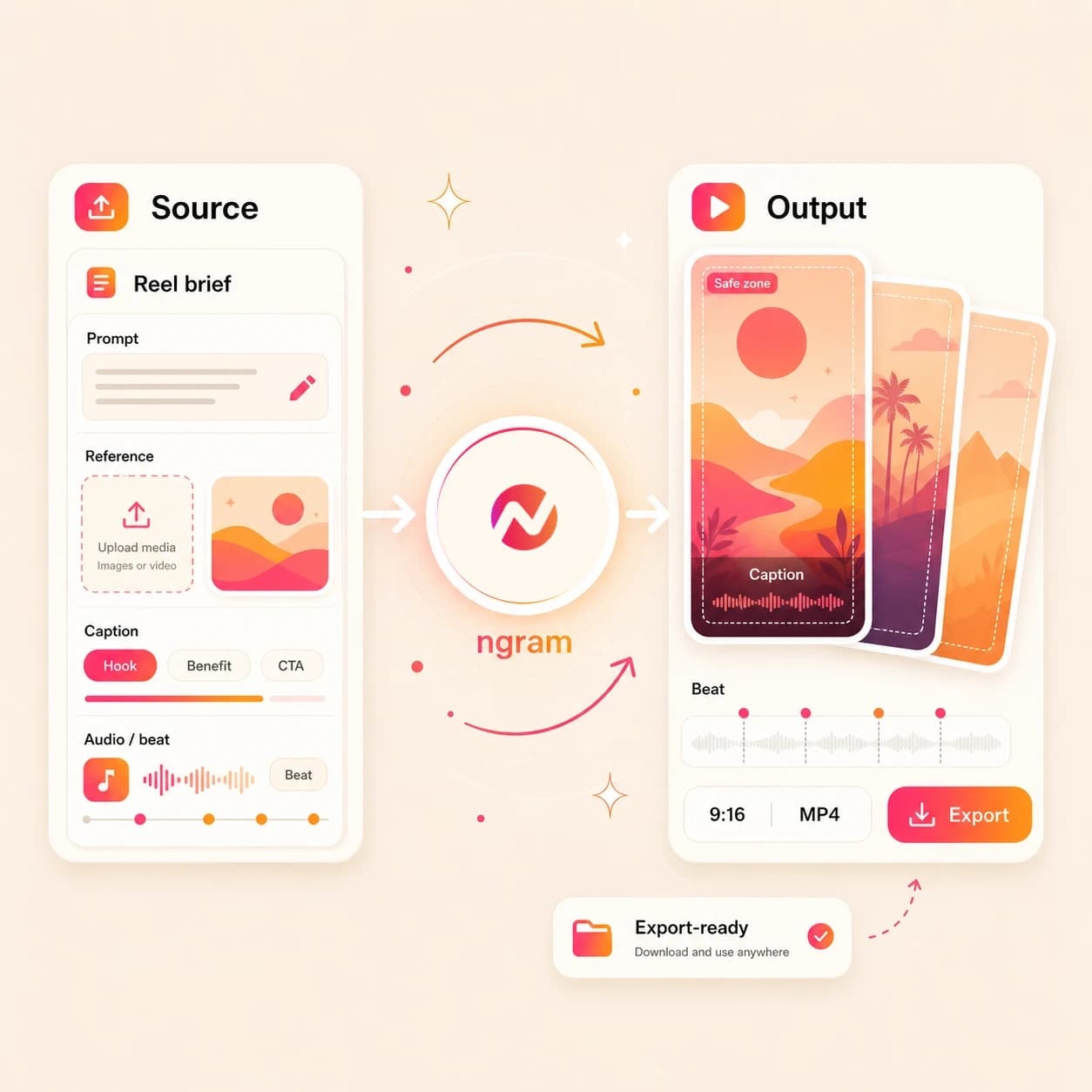
Create a vertical Reel from your product assets and campaign message. Keep the hook, pacing, captions, and brand editable, then export the finished file for manual upload.
Trusted by teams at












How it works
How the Instagram AI Reels Maker works.
Start with the message and source context, review the short vertical plan, then export a Reels-ready file for manual upload.
Add the source context
Type a brief, upload a supported image or PDF, or paste a source page URL. The agent reads the input for audience, offer, proof, visuals, and CTA.
Source added
Review the Reels plan
ngram drafts the first-second hook, short script, scene order, caption approach, visual direction, and loop point before the render starts.
Plan reviewed
Generate the vertical draft
The project gets scene visuals, motion graphics, voiceover when needed, branded captions, music, and pacing tuned for a 9:16 Reels cut.
Draft generated
Edit and upload manually
Revise scenes in chat or the editor, tighten captions and timing, export the 9:16 MP4, then upload it through the Instagram account your team controls.
Ready to upload
What it can do
What the Instagram AI Reels Maker handles.
This page is tuned for Instagram Reels drafts, with 9:16 framing, hook-led structure, captions, loop-aware pacing, and brand-safe export.
9:16 hook planning
Plan the opening frame, first line, scene order, and CTA around the short vertical format used for Instagram Reels.
Captions for muted playback
Generate burned-in captions, edit line breaks and product names, and style the caption layer so the Reel reads without sound.
Learn more about captionsLoop-friendly pacing
Shape the ending, transition, and CTA so the short cut feels deliberate when viewers replay or return to the opening hook.
Source-led script and scenes
Turn a prompt, image reference, PDF brief, or source page into a concise script and scene plan before generation.
Learn more about script generationBrand-safe treatment
Carry logos, colors, fonts, tone, motion style, approved phrases, blocked phrases, and CTA rules into the Reels draft.
Learn more about brand kitBuilt for Instagram Reels draft creation and manual upload
When it matters
Where Instagram Reels drafts fit.
These workflows use short vertical video when one campaign idea needs a hook, captions, brand control, and a file ready for manual channel upload.
Marketing Social Clips
Turn campaign notes, launch pages, and approved visuals into Instagram Reels drafts with a clear hook and caption-led structure.
Open AI video use caseSocial Media Clips
Create Reels-ready vertical clips from a product URL, screenshot, or prompt, then export the 9:16 file for manual upload.
Open AI video use caseGrowth Social Clips
Generate multiple Reels hook variants from one source message so growth teams can test angles without rebuilding each draft.
Open AI video use caseCreator Social Clips
Draft Instagram Reels from creator prompts, reference files, or approved URLs while keeping captions and timing editable.
Open AI video use caseAgency Social Content
Package client briefs, brand rules, and source pages into repeatable Reels drafts that can be reviewed before handoff.
Open AI video use casePMM Social Content
Turn release notes, product screenshots, and positioning into Instagram Reels that explain one feature or proof point fast.
Open AI video use caseFounder Social Content
Use a founder note, launch idea, or rough product thought to create a captioned Reels draft without opening a blank timeline.
Open AI video use caseAd Creative Video
Build Reels-style paid-social concepts from a product page, offer brief, or image reference, then edit hooks before export.
Open AI video use caseProduct Launch Teaser Video
Convert a launch page, screenshot, or PDF brief into a short Reels teaser with captions, motion, and brand treatment.
Open AI video use caseProduct stack
The product stack behind Instagram Reels drafts.
These live ngram features support the path from source material to an editable 9:16 video project.
Script Generation
Draft the hook, script, scene order, and CTA that give an Instagram Reel a tight structure before rendering.
Learn more about script generationAI Visuals
Generate scene imagery, product frames, and visual fills that match the prompt, file, URL, and brand direction.
Learn more about AI visualsCaptions & Subtitles
Burn readable captions into the 9:16 frame, edit wording, and style each line with the active brand kit.
Learn more about captionsMotion Graphics
Add animated hooks, lower thirds, product callouts, smart zooms, and transitions that support short vertical pacing.
Learn more about motion graphicsBrand Kit
Apply logos, colors, fonts, motion style, tone, approved phrases, blocked phrases, and CTA rules to the Reels draft.
Learn more about brand kitVideo Editing
Use chat, script edits, visual chat, scene regeneration, timeline controls, and canvas controls to tighten the draft.
Learn more about video editingMore tools
Related tools for Instagram Reels workflows.
Use these existing tools when the Reels draft starts from a different source or needs another finishing pass.
Choose the right video maker
Pick the tool that matches the channel scope.
AI Video Generator
Use the broad generator when the same source needs separate product-video, explainer, or social edits.
Open toolReels AI Video Maker
Use the generic Reels maker when the vertical draft is not specifically framed around Instagram Reels.
Open toolInstagram AI Video Maker
Use the broader Instagram maker when the output may be feed, profile, square, vertical, or ad-style video.
Open toolShorts AI Video Maker
Use the short-form maker when the cut should work across several vertical video destinations.
Open toolStart from source material
Use a narrower entry point when the input is already decided.
Text to Video
Paste a script, caption outline, or campaign note before shaping the result into an Instagram Reels draft.
Open toolImage to Video
Animate a product still, campaign visual, or screenshot when the Reel starts from one approved image.
Open toolURL to Video
Turn a product page, launch note, help article, or landing page into a video project before the 9:16 cut.
Open toolVideo Script Generator
Draft the hook, beat order, spoken line, and CTA before generating the Instagram Reels video.
Open toolPolish before export
Finish captions, overlays, sound, and timing before manual upload.
Video Caption Generator
Generate social-style captions, fix line breaks, and style text for the 9:16 frame.
Open toolAdd Text to Video
Place the first-frame hook, product label, lower third, promo note, or CTA card on the Reels draft.
Open toolAdd Music to Video
Add background music under narration or caption-led scenes so the export feels finished.
Open toolVideo Editor
Trim scenes, adjust captions, revise the script, regenerate a weak moment, and export the final file.
Open toolRelated social video makers
Use these channel-specific tools when the same source should become another social cut.
Instagram AI Video Maker
Create broad Instagram-ready video drafts for feed, profile, Story, and Reels-adjacent use.
Open toolReels AI Video Maker
Create a generic Reels-style vertical cut before adapting it for a specific platform.
Open toolFacebook AI Reels Maker
Create a Facebook Reels-specific vertical draft for manual export and upload.
Open toolTikTok AI Video Maker
Create TikTok-style vertical videos for manual upload with fast pacing and captions.
Open toolConvert
Converters that feed Instagram Reels drafts.
Start from the format that already holds the message, then shape the converted project as a short 9:16 Reel.
Prompt to Video
Type the Reel idea, audience, hook, and CTA in plain language, then turn that prompt into a storyboarded draft.
Open converterImage to Video
Animate a product photo, campaign still, or screenshot into a Reels-ready video with captions and motion.
Open converterURL to Video
Convert a product page, launch note, article, or help page into a video project that can become a Reel.
Open converterWho it is for
Teams that make Instagram Reels drafts.
These teams already have campaign context, source assets, and brand rules. ngram turns that material into editable Reels drafts.
Growth & Marketing Teams
Create Reels hook variants from campaign briefs, landing pages, and product images when the calendar needs more tests.
See growth workflowsProduct Marketing Managers
Turn release notes, launch pages, and screenshots into Reels drafts that explain one product message at a time.
See product marketing workflowsContent Creators
Draft Instagram Reels from prompts, outlines, and visual references while keeping captions and timing editable.
See creator workflowsAgencies & Consultants
Package client briefs, approved product images, and source URLs into Reels drafts with the review path attached.
See agency workflowsE-commerce Teams
Turn product pages, PDP images, offer notes, and campaign visuals into Reels drafts for product pushes.
See ecommerce workflowsFounders
Turn a launch thought, product note, or rough announcement into a Reels draft without waiting on a production queue.
See founder workflowsStartups
Use product pages, pitch notes, and screenshots to create Instagram Reels drafts for launches and updates.
See startup workflowsSolopreneurs
Turn one prompt or reference file into a vertical marketing clip, then edit the message before manual upload.
See solo workflowsIntegrations
Bring Reels briefs in from live workflows.
Use live ngram integrations to start Reels drafts from approved briefs, source pages, and agentic systems. Instagram upload happens outside this page.
Approved brief to Reels draft
ZapierWhenA campaign request, intake form, or content brief is approved for an Instagram Reels slot
ThenSend the prompt, source URL, audience, and CTA into ngram so the agent drafts the 9:16 video
Page capture to Reels idea
ChromeWhenA product page, release note, article, or help page should become a short Instagram Reel
ThenSend the page context into ngram from the browser and ask for a Reels-ready draft
Agent-created Reels draft
MCPWhenAn AI agent has a Reels brief and needs ngram to create the video project
ThenInvoke ngram through MCP with the prompt, file context, URL, audience, and manual-upload notes
Calendar row to video project
n8nWhenA self-hosted workflow marks a Reels asset request as ready for production
ThenPush the brief, source URL, and asset links into ngram, then return the project link to the record
Use these routes when Reels creation should start from forms, workflow records, browser context, or agent requests.
Why ngram
How Instagram Reels maker workflows differ.
Some workflows start with an existing clip. Others handle the final upload step. ngram focuses on source-led Reels drafts that stay editable before export.
| Compare | ngram | Generic Reels maker | Broad Instagram video maker | Native upload workflow |
|---|---|---|---|---|
| Workflow fit | Turns prompts, supported reference files, and source page URLs into a script, storyboard, scenes, captions, and a 9:16 draft. | Fits teams that need a Reels-style vertical video without focusing on Instagram-specific Reels framing. | Covers feed, profile, square, story-style, ad-style, and vertical social videos in one Instagram-ready workflow. | Handles the upload after the video, caption copy, account settings, and thumbnail choices are already decided. |
| How ngram fits | Keeps source context, brand kit, voiceover, captions, editing, and export connected to the same project. | Often works across several short-video destinations, so the copy and pacing may stay more general. | Useful when the placement has not been decided or the team needs several Instagram formats as separate reviewed edits. | Best when the creative is finished and the remaining job is review inside the social account. |
| Best use | Exports a Reels-ready MP4 for manual Instagram upload while the project stays editable for revisions. | Useful when the output is a broad vertical clip instead of a Reels draft with Instagram upload constraints. | Less focused than this page on Reels hooks, loop-friendly pacing, and a 9:16-first export path. | Complements ngram because ngram creates the editable draft before the file is uploaded manually. |
FAQ
Instagram AI Reels Maker FAQs
Quick answers before you create.
Turn the source into an Instagram Reel draft
Start with a prompt, supported image, PDF, or URL. ngram plans the 9:16 hook, creates the draft, adds captions and brand treatment, and keeps the edit ready for export.
Export the approved file and upload it manually through the Instagram account your team owns.
Prompt, file, URL, 9:16 export