

Descript vs WeVideo is a choice between two different kinds of video editor. Descript starts with recorded speech and lets you cut audio or video by editing the transcript. WeVideo starts with a cloud editor built for classroom projects, team video work, stock-backed creation, screen recording, and interactive video assignments.
The short answer: pick Descript for transcript-first podcast, webinar, course, and screen-recording edits. Pick WeVideo for education, team collaboration, and interactive learning videos. Use ngram if the job starts earlier, with a doc, URL, deck, rough recording, or screenshot set that still needs a script, storyboard, voiceover, captions, brand treatment, and editable video draft.
Pricing and feature facts in this guide come from Descript's pricing page, Descript's video editing page, Descript's AI credit help page, WeVideo's pricing page, WeVideo's product site, WeVideo's interactivity docs, WeVideo release notes, and public comparison pages such as Software Advice's Descript vs WeVideo page. We summarize public review sentiment qualitatively.
Descript vs WeVideo at a glance
The scanner version is simple: Descript is the faster editor when speech drives the cut, WeVideo is the safer pick when the project needs classroom or team workflows, and ngram is the third option when the source material still needs to become a planned business video.
| Dimension | Descript | WeVideo | Where ngram fits |
|---|---|---|---|
| Best starting point | Podcast, webinar, interview, course, talking-head clip, or screen recording | Cloud video project, classroom assignment, training video, stock-backed edit, or interactive lesson | Prompt, PDF, URL, deck, screenshot set, screen recording, raw footage, or product page |
| Main workflow | Edit video and audio by editing text | Edit in a browser-based video suite with collaboration, templates, stock, recording, and interactive layers | Generate the script, storyboard, voiceover, captions, brand treatment, and scenes before render |
| AI strength | Underlord, text-based editing, filler-word cleanup, Studio Sound, clips, generated media, avatars, and AI credits | AI captions, translated subtitles, AI-generated interactions, and interactive-video question tools | Agentic planning, source extraction, scene generation, chat edits, scene regeneration, brand kits, and MP4 export |
| Team fit | Creators, podcasters, customer education, marketing, and business teams editing recorded media | Educators, students, trainers, marketers, and small teams making collaborative or interactive videos | Product marketing, L&D, sales enablement, support, CS, founders, and agencies making business videos from existing material |
| Starting price | Free, Hobbyist $24/mo monthly or $16/mo annual | Free, individual paid plans from $9.99/mo monthly or $4.99/mo annual | Free, Basic $29/mo monthly or $23.20/mo annual |
| Winner | Descript wins transcript editing | WeVideo wins education and interactive video | ngram wins source-to-video business workflows |
Watch how ngram turns source material into a finished video:
Core workflow: transcript editor vs cloud video studio
Descript is built around the transcript. Its own video editing page says uploaded footage is transcribed, then changes to words in the transcript update the video. That matters when the source is speech-heavy. Delete a sentence, tighten a gap, remove filler words, or rearrange a section, and the edit follows the words instead of forcing a non-editor to hunt through a timeline.

That makes Descript a strong fit for podcasts, webinars, customer interviews, founder videos, course recordings, and internal explainers where the spoken track is the structure. Descript also has timeline editing, precision controls, screen recording, AI voices, avatars, generated media, and collaboration, so it is not only a transcript tool. The transcript is still the reason most buyers look at it first.
WeVideo starts from a different center of gravity. The pricing and product pages frame it as a cloud video creation platform with editing tools, screen recording, stock assets, brand management, templates, publishing, and team collaboration. Its education pages add LMS fit, classroom assignments, learner analytics, and student-centered video projects. Its interactivity docs go further, with interactive videos, questions, assignment links, embeds, and AI-generated interactions.

Winner for workflow: Descript for recorded speech, WeVideo for classroom and team video projects. If the hard part is cleaning up a person talking, Descript is faster. If the hard part is assigning, collecting, collaborating on, or making interactive video work for a class or training group, WeVideo is the better fit.
ngram belongs before both workflows. It takes the rough material, such as a prompt, PDF, URL, screenshots, screen recording, raw video, PPTX or PDF deck, or Shopify product URL, and builds the script and storyboard first. That is why ngram is not a replacement for every Descript or WeVideo job. It is the better route when the team does not yet have a finished script or clear scene plan.
AI features and automation
Descript's AI is editor-native. Underlord is the AI co-editor, and Descript's help center labels it beta. It can take typed direction and act inside the video editor. Descript's AI feature set also includes Studio Sound, filler-word removal, Green Screen, Eye Contact, AI speech, avatars, generated video, clips, scripts, captions, and translation. Many of those features draw from AI credits, while uploaded or recorded media draws from media hours.
The strength is speed after capture. A creator can record a long interview, ask Underlord for clips or cleanup, remove filler words, improve audio, and produce social cuts without opening a pro editor. The tradeoff is metering. Descript says unused media minutes and AI credits do not roll over, and Underlord usage can vary because the agent decides which tools to run.
WeVideo's AI is more connected to captions, education, and interactivity. Its 2026 release notes list auto-generated captions for exports, caption translation, and AI interaction generation for interactive videos. The interactivity docs show AI-generated questions with settings for timestamp, question count, Bloom's Taxonomy complexity, interaction type, and educator context. That is a specific teaching and training workflow, not the same thing as a transcript editor.
The tradeoff is that WeVideo's AI does not replace the full planning burden for a business video. It can help with captions and learner interactions, but the user still needs to know the lesson, edit structure, design, and distribution context. That is fine for educators and trainers who already have a lesson plan. It is slower for a product marketer staring at release notes.
Winner for AI automation: Descript for transcript cleanup and recorded-media edits, WeVideo for interactive learning layers, ngram for source-to-finished-video planning. ngram's agent extracts intent, audience, channel, and key messages, writes the script, maps scenes, creates voiceover and captions, applies the brand kit, and supports chat edits, visual edits, script edits, scene regeneration, and timeline edits after the first draft.
Pricing and value in 2026
Descript's paid entry is higher than WeVideo's individual entry, but it includes a more specialized production model. The Hobbyist plan is $24/mo monthly or $16/mo annual with 10 media hours per month, 400 AI credits per month, 1080p watermark-free export, Underlord access, Studio Sound, filler-word removal, and AI speech with custom voice clones. Creator and Business add more media hours, more credits, 4K export, stock, Brand Studio, translation, dubbing, custom avatars, and team features.
WeVideo is cheaper at the low end. Its individual Power plan is $9.99/mo monthly or $4.99/mo annual, with a publish-time limit and 720p resolution. Unlimited is $15.99/mo monthly or $7.99/mo annual. Professional is $39.99/mo monthly or $19.99/mo annual and adds unlimited stock usage, premium templates, and brand management. The separate Creator and Teams plans are framed for full-scale editing and small-team collaboration, with annual prices listed at $20/mo and $52/mo.
ngram starts higher than WeVideo and slightly above Descript's Hobbyist monthly plan. The tradeoff is scope. Basic is $29/mo monthly or $23.20/mo annual with 3,000 credits per month. Premium is $59/mo monthly or $47.20/mo annual with 10,000 credits. Ultimate is $299/mo monthly or $239.20/mo annual with 50,000 credits. Credits cover usage-heavy work such as AI video generation, AI editing, and exports.
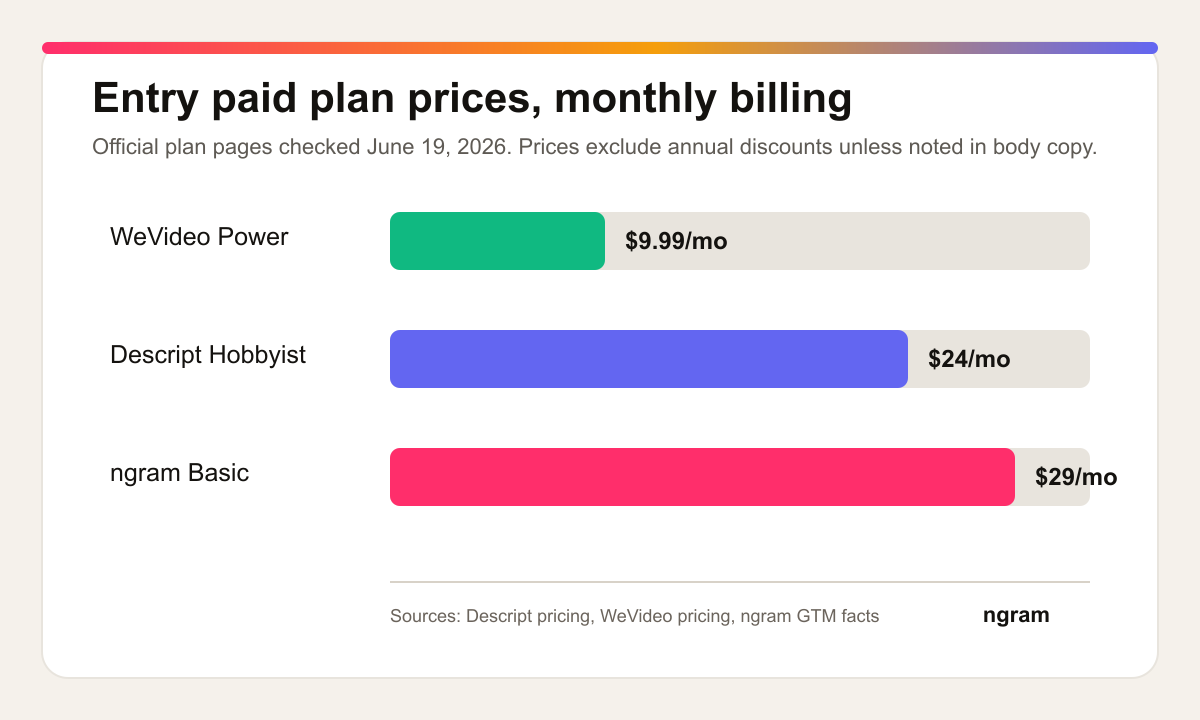
Winner for price: WeVideo. Winner for value depends on the job. WeVideo is the lowest-cost option for lightweight editing and education-friendly video projects. Descript is the better value when hours of speech need quick editing. ngram is the better value when the project would otherwise require a writer, producer, editor, and designer before the first usable draft exists.
Collaboration, education, and governance
Descript collaboration fits media teams. People can share projects, comment, edit together, and work around a transcript that non-editors can understand. Business and Enterprise add stronger brand, legal, security, and team controls. That matters for a podcast network, customer education team, or marketing team editing recurring recorded content.
WeVideo collaboration fits classrooms and multi-user video creation. Its pricing page lists real-time collaboration, shared projects and assets, user permissions, templates, brand management, screen recording, social uploads, and stock media. Its schools page points to LMS compatibility with Canvas, Schoology, and other systems. Its interactivity workflow can assign videos to learners, collect answers, and share links or embed codes.
ngram collaboration is about business-video reuse rather than classroom grading. Team workspaces, team invites, brand kits, shared face and voice libraries, asset galleries, hosted video pages, share links, embeds, and hosted pages and embeds support repeat video creation across launch, training, sales, support, and customer education workflows. The analytics claim is deliberately narrow: ngram provides hosted video pages and embeds; a generally available owner analytics surface is not live.
Winner for collaboration: WeVideo for education and learner workflows, Descript for recorded-media production teams, ngram for branded business video operations. If grading, assignments, or interactive questions are part of the requirement, WeVideo has the clearest advantage. If teams need to keep many business videos on brand from the same source material, ngram is the cleaner third path.
Output quality and editing control
Descript can produce polished talking-head videos, podcasts, course clips, social cuts, captions, and screen recordings. It also gives users timeline controls when text editing is not enough. That combination makes it stronger than WeVideo for speech-led post-production, especially where the editor needs audio cleanup, voice fixes, filler-word removal, or tight captioned clips.
WeVideo can produce clean cloud-edited videos with templates, stock, screen and webcam recording, effects, voiceover, GIF creation, audio export, brand management, and 4K on higher plans. It is easier to justify when the output is part of a class, training program, social project, or collaborative team asset. The interactive layer gives it an output type Descript does not center: video that asks the viewer questions and reports learner activity.
ngram's quality ceiling is different. The product is built to plan the message, generate scenes, apply a brand kit, add motion graphics, polish screen recordings with callouts and smart zooms, generate voiceover and captions, and export in an MP4 export. The user can then edit with chat, visual controls, the script editor, scene regeneration, or the timeline. That puts ngram closer to a production workflow than a pure editor.
Winner: Descript for polished spoken-media edits, WeVideo for interactive and collaborative video assignments, ngram for planned business videos from source material. The buyer should choose the output type first, then the editor.
Where ngram fits between Descript and WeVideo
This is a T2 comparison in ngram's competitor map. Both Descript and WeVideo are real video editors, and ngram covers a meaningful slice of the job, but ngram should not be framed as a full swap for either tool. ngram does not replace Descript for transcript-first podcast editing. ngram does not replace WeVideo for student projects, classroom assignment workflows, or interactive-video authoring.
The honest overlap is finished business video from source material. If you have release notes, a product page, a support article, a training deck, a policy PDF, screenshots, a screen recording, or raw footage that still needs a story, ngram is the better starting point. It turns the source into a script, storyboard, voiceover, captions, brand treatment, editable scenes, and shareable or exportable output.
Use the ngram vs Descript comparison when the question is transcript editor vs source-to-video workflow. Use the ngram vs WeVideo comparison when the question is cloud classroom editor vs finished-video workflow. Use ngram's AI video editing page if the team cares about chat edits, timeline edits, canvas edits, and scene regeneration after the first draft.
That framing keeps the recommendation useful. Descript wins when your footage already exists and speech is the spine. WeVideo wins when collaboration, education, or interactivity is the spine. ngram wins when the message itself still needs to be planned.
Which tool should you choose?
Pick Descript if your source is mostly recorded speech. Podcasts, interviews, webinars, customer education videos, founder clips, courses, and screen recordings benefit from transcript-first editing, Studio Sound, filler-word removal, captions, AI speech, and social clip workflows.
Pick WeVideo if you need a cloud editor for education, student projects, team video creation, templates, stock, screen recording, brand management, social uploads, or interactive learning videos. WeVideo is especially strong when instructors or trainers need assignments, learner responses, LMS fit, or video questions.
Use ngram if your team starts before the edit. Product marketers, L&D teams, sales enablement, customer success, support, founders, and agencies often have a doc, deck, URL, recording, or screenshot set, not a finished script. ngram turns that source into the script, storyboard, voiceover, captions, brand treatment, and editable draft.
Methodology
We checked official Descript and WeVideo pages on June 19, 2026, then cross-checked public comparison pages and review snippets for user language. Official pricing and help docs won whenever third-party pages disagreed. For Descript, we used the pricing page, video editing page, Underlord help page, AI credits help page, Capterra review snippets, and Reddit pricing discussions. For WeVideo, we used the pricing page, product page, schools page, interactivity docs, subtitle translation docs, release notes, Capterra profile snippets, and Software Advice comparison pages.
We judged the tools across six buyer dimensions: starting point, editing workflow, AI automation, pricing, collaboration, and output type. We summarized review sentiment qualitatively and skipped speculative roadmap claims. For ngram claims, we used only the current product state and GTM facts in the repo.
Final verdict
Descript vs WeVideo has no universal winner. Descript is the better choice for transcript-first editing of recorded audio and video. WeVideo is the better choice for cloud video creation, education, team projects, and interactive learning video. ngram is the better third option when the real job is turning source material into a scripted, storyboarded, branded business video.
The buying rule is simple: choose Descript for the transcript, choose WeVideo for the classroom or collaborative cloud editor, and choose ngram for source-to-video.








