

Descript vs FlexClip is a choice between two very different editor habits. Descript starts with a recording and turns speech into the edit surface. FlexClip starts with templates, stock, and a browser canvas. Both can ship finished video, but the first question is whether your footage already exists or whether the video still needs to be assembled from assets and prompts.
The short answer: pick Descript for transcript-first editing of podcasts, webinars, interviews, and talking-head content. Pick FlexClip for fast template videos, stock-backed social clips, classroom projects, and lightweight marketing videos. Use ngram when the real job is a scripted, storyboarded business video from a doc, URL, deck, product page, screenshot set, or screen recording. That ngram recommendation is scoped on purpose. Descript and FlexClip are still stronger at their specialist editing modes.
Pricing and feature facts in this guide come from Descript's pricing page, Descript's product pages, Descript's Underlord page, FlexClip's pricing page, FlexClip's homepage, FlexClip AI, FlexClip's AI video editor page, a G2 comparison page, and public review coverage. We compare workflows, plan limits, and buyer fit instead of reducing the decision to review-site summaries.
Descript vs FlexClip at a glance
Here is the scanner version before the deep dive. ngram sits in the table because many people comparing these two are deciding whether they need a transcript editor, a template editor, or a production workflow that plans the video first.
| Tool | Best for | Starting price | Main distinction |
|---|---|---|---|
| ngram | Business teams turning docs, URLs, decks, screenshots, product pages, and recordings into planned videos | Free plan, paid from $29/mo | Script and storyboard before render |
| Descript | Podcasters, creators, and teams editing recorded speech by editing words | Free plan, Hobbyist from $16/person/mo annual or $24 monthly | Transcript-first video and audio editor |
| FlexClip | Small teams, educators, creators, and marketers making quick template videos in the browser | Free plan, Plus about $11.99/mo annual or $19.99 monthly in USD equivalent | Template and stock-driven online editor |
Watch how ngram turns an idea into a finished video:
Core workflow: transcript editor vs template editor
Descript is strongest when the spoken track is the spine of the project. Its homepage says video editing in Descript is as easy as typing, and the product is built around recording, transcription, text-based edits, screen recording, podcasting, and media generation. Delete a sentence from the transcript and the matching media is cut. That is a natural fit for podcasts, interviews, sales calls, webinars, course lessons, and any video where the voice track already carries the story.

FlexClip is strongest when the job is quick assembly. FlexClip's homepage positions the product as an AI-powered online video editor with 6000+ templates, easy editing tools, and smart AI. The editor gives creators a faster path to social clips, promos, class videos, slideshows, trailers, intros, and lightweight brand assets without opening desktop software.
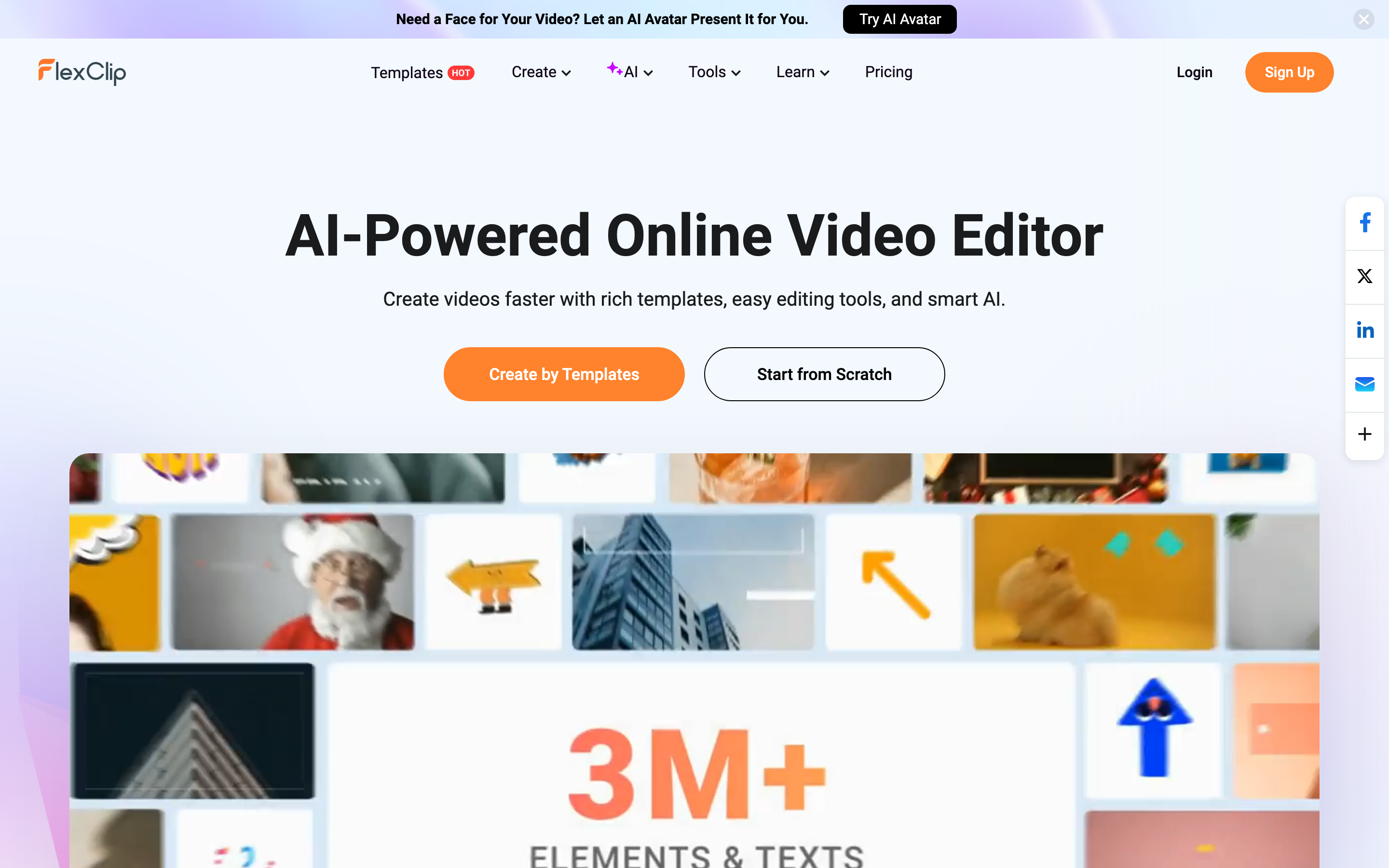
Winner: Descript for speech-led editing, FlexClip for template-led assembly. If you have a long recording and the transcript is the easiest edit surface, Descript wins. If you need a short template video with stock media and fast export, FlexClip wins.
ngram fits before both of those editor modes. Start with a PDF, URL, deck, product page, screenshots, a raw recording, or a text prompt. ngram writes the script, maps the storyboard, plans scenes, adds captions and voiceover, applies the brand kit, and lets you review the plan before rendering. If your team is comparing editors because nobody has time to decide what the video should say, ngram's URL to video workflow is the cleaner starting point.
AI features and generation depth
Descript has pushed deep into AI editing. Underlord is Descript's AI co-editor. Descript says Underlord can read the script, watch the video, make suggestions, handle repeated edits, generate clips, write show notes, fix audio, make avatar-hosted explainers, add zooms, and turn a webinar into a trailer. The pricing page also ties key AI features to plan allowances, including media hours and AI credits.
FlexClip uses AI across creation and editing rather than transcript cleanup. Its AI menu includes video background removal, AI video generation, AI text to video, auto subtitles, long video to shorts, auto edit, product URL to video, PPT to video, text to speech, voice cloning, and AI image tools. Its AI video editor page says users can generate a script or type one, then turn that script into a video with AI images, stock resources, animated subtitles, voiceovers, and music. It also lists URL to video and PPT/PDF to video.
Winner: Descript for AI that edits recorded speech, FlexClip for AI that assembles template and stock-based videos. Descript's AI depth is better for cleaning and reshaping existing recordings. FlexClip is broader for quick generative starts, especially when templates and stock assets carry the visual style.
ngram's AI role is different. ngram is a production workflow rather than an assistant beside a manual editor. The live product plans the message, writes the script, creates the storyboard, generates voiceover, burns in captions, applies brand kits, and can polish screen recordings with cursor smoothing, click emphasis, dead-air trimming, smart zooms, and step labels. For buyers who want a source-to-finished-video workflow, ngram's video editor keeps timeline work, script edits, and chat edits in one project after the first draft is built.
Editing control and learning curve
Descript asks users to think in words first. That lowers friction for people who write or edit podcasts, but it can feel less direct when the edit is mostly visual: timing B-roll, arranging motion graphics, building a template-style social post, or designing an asset where text is only one layer.
FlexClip asks users to think in scenes, templates, stock, and visible elements. That is easier for beginners making a short promo or classroom video. It is less ideal when the primary source is a 45-minute interview, because trimming every false start or tangent visually can take more time than deleting transcript text.
Winner: Descript for long spoken media, FlexClip for beginner-friendly visual assembly. Descript's learning curve pays off when the transcript is the project. FlexClip's lighter editor pays off when speed and templates matter more than deep post-production.
ngram's control model is plan first, then edit. Users can change the script, adjust scenes through visual chat, regenerate one scene, or use the timeline for direct manipulation after the agent creates the draft. That makes ngram a better fit for product marketing, enablement, training, and customer education teams that need the story and visuals to stay connected while the video changes.
Captions, audio, voice, and localization
Descript has a strong audio stack. Its plan pages name Studio Sound, Remove Filler Words, Create Clips, AI Speech with custom voice clones, video regenerate, Brand Studio on Business, and translate and dub video in 30+ languages with proofread on Business. For podcasts and talking-head videos, that audio emphasis matters.
FlexClip covers the common lightweight needs: auto subtitles, text to speech, voice cloning in its AI tool menu, stock audio limits by plan, and template-friendly caption styling. The pricing page also makes plan limits clear: free users get 720p downloads, one stock video per project, one stock audio per project, up to 12 saved projects, and video length up to 10 minutes. Plus removes the FlexClip watermark, raises export quality to 1080p, adds 30GB cloud space, and includes a Brand Kit. Business raises exports to 4K and unlocks unlimited stock video and stock audio per project.
Winner: Descript for spoken audio cleanup and dubbing, FlexClip for quick captions and template-friendly voice tools. FlexClip is enough for many social videos. Descript is the better fit when the whole piece depends on clean speech.
ngram covers captions and narration as part of the generation pipeline. Every video gets captions by default, voiceover can be generated from the script, pronunciation control is live for tricky names, multilingual voiceover is supported, and translated scripts, captions, and on-screen text can be produced for localized variants. Avoid one unsupported claim: ngram does not currently publish a verified fixed language-count matrix, so the safe claim is broad multilingual support, not a specific number of languages.
Pricing and value
Descript's current self-serve paid path starts with Hobbyist at $16 per person per month when billed annually, or $24 monthly. That plan includes 10 media hours per month, 400 AI credits per month, 1080p watermark-free export, Underlord access, Studio Sound, filler-word removal, Create Clips, AI Speech with custom voice clones, and video regenerate. Creator moves to $24 annual or $35 monthly per person, with 30 media hours, 800 AI credits, 4K export, stock media, and top-ups. Business is $50 annual or $65 monthly per person, with 40 media hours, 1500 AI credits, Brand Studio, 30+ language translate and dub with proofread, custom avatars, and priority support.
FlexClip's pricing page rendered localized INR in this browser, but the same page exposes a USD exchange rate. That maps the annual Plus price to about $11.99 per month and the annual Business price to about $19.99 per month. The crossed monthly equivalents map to about $19.99 for Plus and $29.99 for Business. FlexClip is therefore cheaper at the entry paid level, especially for a solo creator who wants watermark removal, templates, 1080p export, and stock limits that are good enough for short clips.
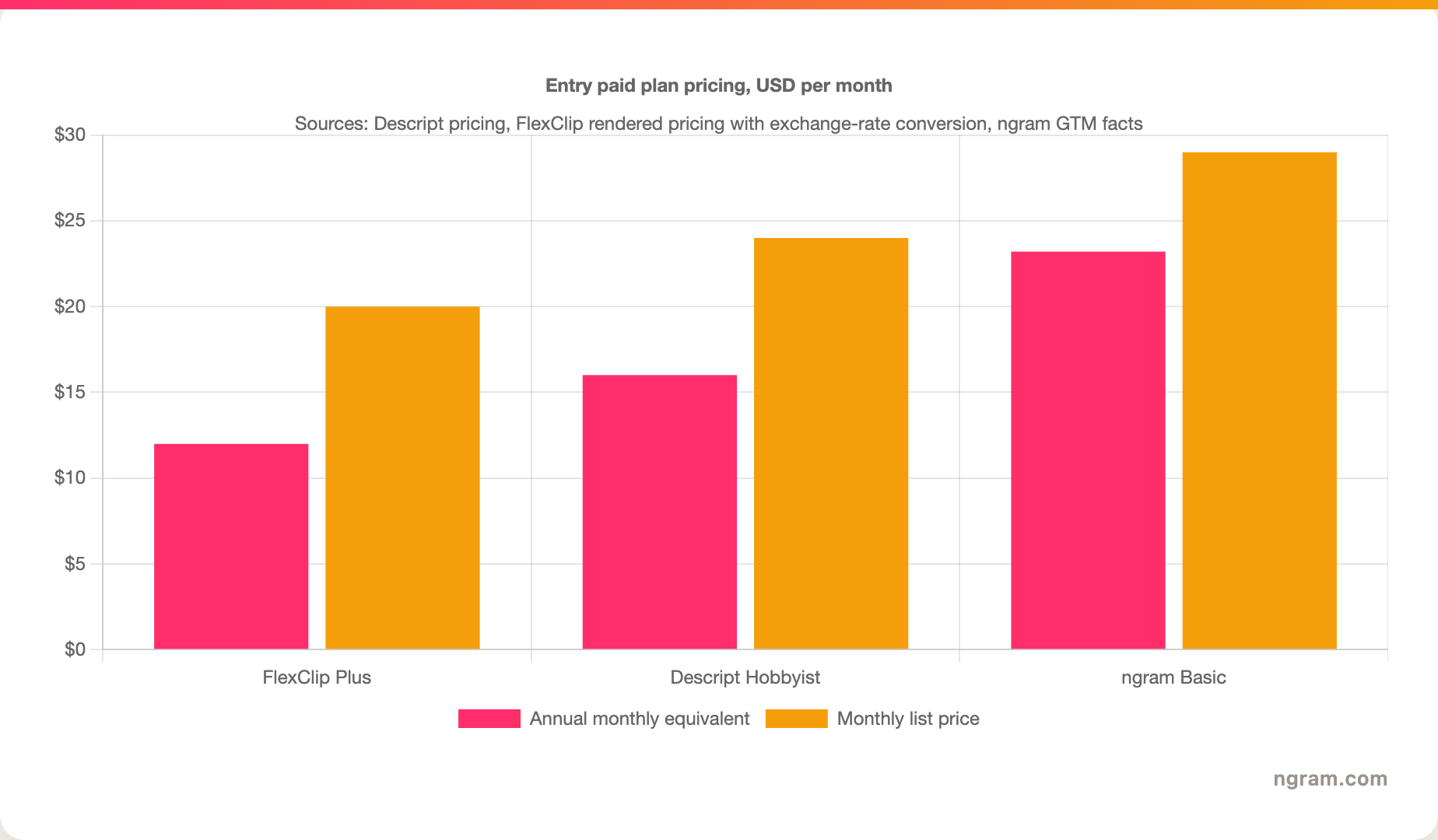
Winner: FlexClip for lowest-cost manual editing, Descript for deeper spoken-media editing, ngram for teams paying to avoid a production bottleneck. ngram's Basic plan starts at $29 per month, with annual pricing at $23.20 per month. The value case is not that ngram is the cheapest editor. The value case is that ngram reduces the planning and production work before editing starts.
Brand, teams, and business workflows
Descript is a better business fit than many creator tools because it has team plans, Brand Studio on Business, collaboration features, and transcript workflows that make review faster for spoken media. A marketing team editing a webinar, interview series, or internal podcast will get more mileage from Descript than from a template-only editor.
FlexClip has a different business strength: speed for non-editors. Brand Kit, custom fonts, saved templates, stock assets, hosting space, and team plan options make it practical for small teams that need regular lightweight videos without a production department. Public reviews often praise the same thing: the tool is easy to start with and has enough templates and assets to make simple videos look polished.
Winner: Descript for teams with recorded media libraries, FlexClip for teams with repeat template needs. The deciding factor is where the work starts. Recorded speech points to Descript. Template assembly points to FlexClip.
ngram is the stronger third option when the business workflow starts from source material instead of footage. Product launches, release-note videos, help article videos, customer education clips, SOP explainers, onboarding videos, and sales enablement updates usually need a script, storyboard, voiceover, captions, brand, and channel variants. That is why ngram vs Descript, ngram vs FlexClip, and ngram's AI video editing feature frame the choice around production workflow, not feature checklists.
Which tool should you pick?
Pick Descript if you record first. Podcasts, interviews, webinars, screen recordings with narration, and talking-head lessons all benefit from transcript editing, Studio Sound, filler-word removal, and Underlord. Descript is the better choice when most editing decisions are decisions about words and speech.
Pick FlexClip if you assemble first. Social promos, school projects, short ads, intros, slideshows, event videos, and lightweight marketing clips all benefit from templates, stock media, easy exports, and a lower entry paid price. FlexClip is the better choice when visual assembly matters more than transcript cleanup.
Pick ngram if the message still needs to become a video. ngram is the better third option when the input is a doc, URL, deck, product page, screenshot set, screen recording, or rough prompt, and your team wants the script and storyboard planned before the edit. Stay with Descript if transcript editing is the core job. Stay with FlexClip if template editing is the core job. Use ngram when the production gap is bigger than the editing gap.
Methodology
We compared Descript, FlexClip, and ngram across the dimensions that decide a real purchase: starting input, editing model, AI features, captions and audio, pricing, brand controls, collaboration, and best-fit workflow. Competitor claims use each tool's current public pages and public comparison/review sources. ngram claims use the local product-state and GTM facts files in this repository. We leave star summaries out because they flatten the workflow differences that matter in this comparison.
FAQ
Is Descript better than FlexClip?
Descript is better than FlexClip for transcript-first editing, podcasts, webinars, interviews, and spoken video. FlexClip is better than Descript for quick template videos, stock-backed social clips, slideshows, intros, and lightweight visual assembly.
Is FlexClip cheaper than Descript?
FlexClip is cheaper at the entry paid level. FlexClip Plus maps to about $11.99 per month on annual billing or $19.99 monthly in USD equivalent. Descript Hobbyist starts at $16 per person per month on annual billing or $24 monthly.
Which tool is better for YouTube videos?
Descript is better for YouTube videos built from spoken recordings, podcasts, tutorials, and long-form edits. FlexClip is better for YouTube intros, quick promo clips, slideshow-style videos, and template-led assets. ngram is better when the YouTube video starts from a doc, URL, product page, deck, or screen recording and needs a planned script first.
Can ngram replace Descript or FlexClip?
ngram can replace both only for the finished-video slice where the input is source material and the output needs a planned, branded business video. ngram is not a drop-in replacement for Descript's transcript-first podcast editing or FlexClip's low-cost template canvas.
What is the overall verdict?
Descript wins for recorded speech. FlexClip wins for fast template assembly. ngram wins when the buyer wants to skip the blank canvas and turn source material into a scripted, storyboarded, narrated video with brand controls and editable scenes.








