

Search for "Camtasia vs ScreenPal" and you find two tools aimed at the same buyer, the trainer or educator making how-to videos, that solve the problem from different ends. Camtasia, made by TechSmith, is a mature desktop app built around a deep, multi-track timeline editor. ScreenPal, formerly Screencast-O-Matic, is a low-cost, cloud-first recorder that bundles editing, video hosting, and interactive quizzes into one subscription. This guide compares Camtasia vs ScreenPal across the things that actually decide the purchase: editing depth, hosting and interactivity, AI tools, ease of use, and pricing. It also shows where a third option, ngram, beats both when your real job is a finished, branded video rather than a captured recording.
Both tools earn their reputations. Camtasia gives you serious editing control; ScreenPal gives you recording, hosting, and quizzes at a price almost no one else matches. The honest answer to "which is better" is "for which job," so we will pick a winner per dimension instead of crowning one overall.
Camtasia vs ScreenPal at a glance
Here is the short version before the deep dive. ngram sits in the table because for many teams comparing these two, the better question is whether you need a recorder and editor at all, or a system that turns your source material into a finished video.
| Tool | Best for | Starting price | Main distinction |
|---|---|---|---|
| ngram | Teams turning prompts, docs, URLs, decks, and recordings into finished branded videos | Free, paid from $29/mo | Plans and builds the whole video, not just the capture |
| Camtasia | Trainers editing detailed tutorials with a full timeline | Free trial, paid from about $39/yr | Deep multi-track desktop editor with quizzes |
| ScreenPal | Educators recording, hosting, and quizzing on a budget | Free, paid from $3/mo annual | Cloud recording plus hosting and interactive quizzes |
Editing depth
This is the cleanest split, and it follows directly from how each tool is built.
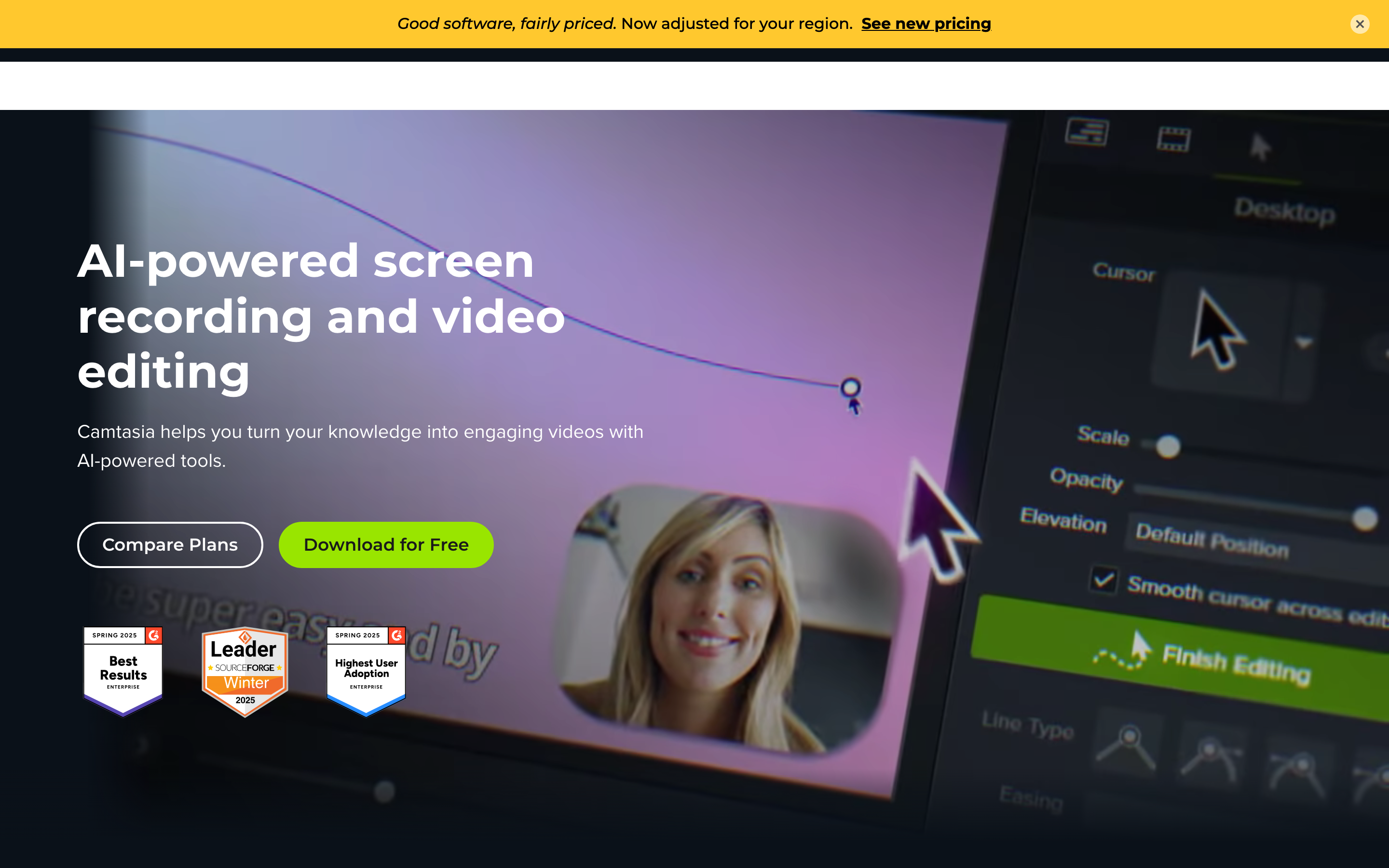
Camtasia is a real editor. After you record, you land on a multi-track timeline with transitions, annotations, behaviors, animations, and a deep library of effects. You can layer callouts over several takes, fine-tune timing, and compose a polished tutorial frame by frame. That depth is the reason trainers and course creators reach for it, and the reason it feels heavier than a simple recorder.
ScreenPal includes a capable editor, with text, shapes, overlays, blur, transitions, and multi-track audio, but reviewers are clear that it stops short of a full multi-track video timeline. If your edit is trim, annotate, caption, and ship, ScreenPal is more than enough. If you need precise compositing, motion graphics, or professional transitions, it will feel limiting compared to Camtasia.
Winner: Camtasia for editing depth. ScreenPal's editor is genuinely good for tutorials, but Camtasia is the tool when the edit itself is the hard part.
Worth noting for both: each still starts from a screen recording you capture and narrate live. Neither plans the video for you or builds scenes from a doc, a URL, or a deck. That gap is where ngram comes in, and we cover it below.
Hosting, sharing, and interactivity
This dimension flips the result, because it is ScreenPal's home turf.
ScreenPal hosts your videos. You record, edit, and publish to hosted channels with privacy controls, and you can drop interactive quizzes, polls, and call-to-action buttons directly inside the video. Viewers answer questions while watching, and on higher tiers you get reporting and LMS embedding. For an educator who wants the video and the assessment in one place, this is a genuine differentiator that most recorders do not match.
Camtasia can embed interactive quizzes in the video timeline too, which is a real strength for L&D. But Camtasia is fundamentally a desktop editor, not a hosting platform: you export the finished file and host it wherever your LMS or website lives. The quizzes travel with the video, but the channel, analytics dashboard, and privacy controls that ScreenPal builds in are not part of Camtasia's job.
Winner: ScreenPal for built-in hosting and interactive video. Camtasia matches it on in-video quizzes but leaves hosting and channel management to you.
ngram approaches this differently. It hosts finished videos on watch pages with an embeddable, white-label player, but it is honest that it has no generally available owner analytics surface or scene-level watch-time or quiz analytics. If graded quizzes and drop-off reporting are the core need, ScreenPal is built for that today.
AI tools and localization
Both tools have added AI, and the lines here are closer than buyers expect.
Camtasia layers AI onto higher tiers: voiceover generation, audio cleanup, AI avatars, and translated captions. These sit on top of the editor rather than reshaping the workflow, but they are useful for trainers who want a synthetic narrator or quick caption translation without leaving the app.
ScreenPal concentrates its AI in the top Solo Max tier and Team plans: AI captions and transcription, text-to-speech narration, a video generator, and video translation into a large set of languages. For a budget-conscious educator who wants captions and translation without buying a separate tool, ScreenPal packs a lot into one inexpensive plan.
Winner: roughly even, with a tilt to Camtasia for AI avatars and to ScreenPal for affordable translation and text-to-speech. Both treat AI as add-ons to a record-and-edit core.
ngram is built the other way around. Its agentic chat plans the script, storyboard, scenes, captions, and call to action before anything renders, then handles AI voiceover, multilingual narration, and translation of script, captions, and on-screen text as part of one flow rather than as bolt-ons.
Pricing and value
The two tools price in completely different shapes, and the gap is large.
Camtasia is sold as an annual license, geo-priced so the exact figure varies by region. In USD terms for 2026, a Starter tier sits around $39 a year for watermark-free capture, Essentials around $180 a year for full editing and transcription, Create around $249 a year for AI voiceover and audio cleanup, and Pro around $599 a year for AI avatars, translated captions, collaboration, and premium assets.
ScreenPal is dramatically cheaper at the entry level. The free plan records up to 15 minutes and hosts up to 10 videos. Solo Deluxe is about $3 a month billed annually (or $4 monthly) and removes the watermark, unlocks unlimited recording, and opens the full editor with captions. Solo Premier is around $6 a month, and Solo Max is around $10 a month annually for the full AI toolkit, with Team Business near $8 per creator a month. A long-running caution from older users is that prices have climbed steeply from the Screencast-O-Matic days.
Here is how the entry-level paid plans compare on monthly and annual billing:
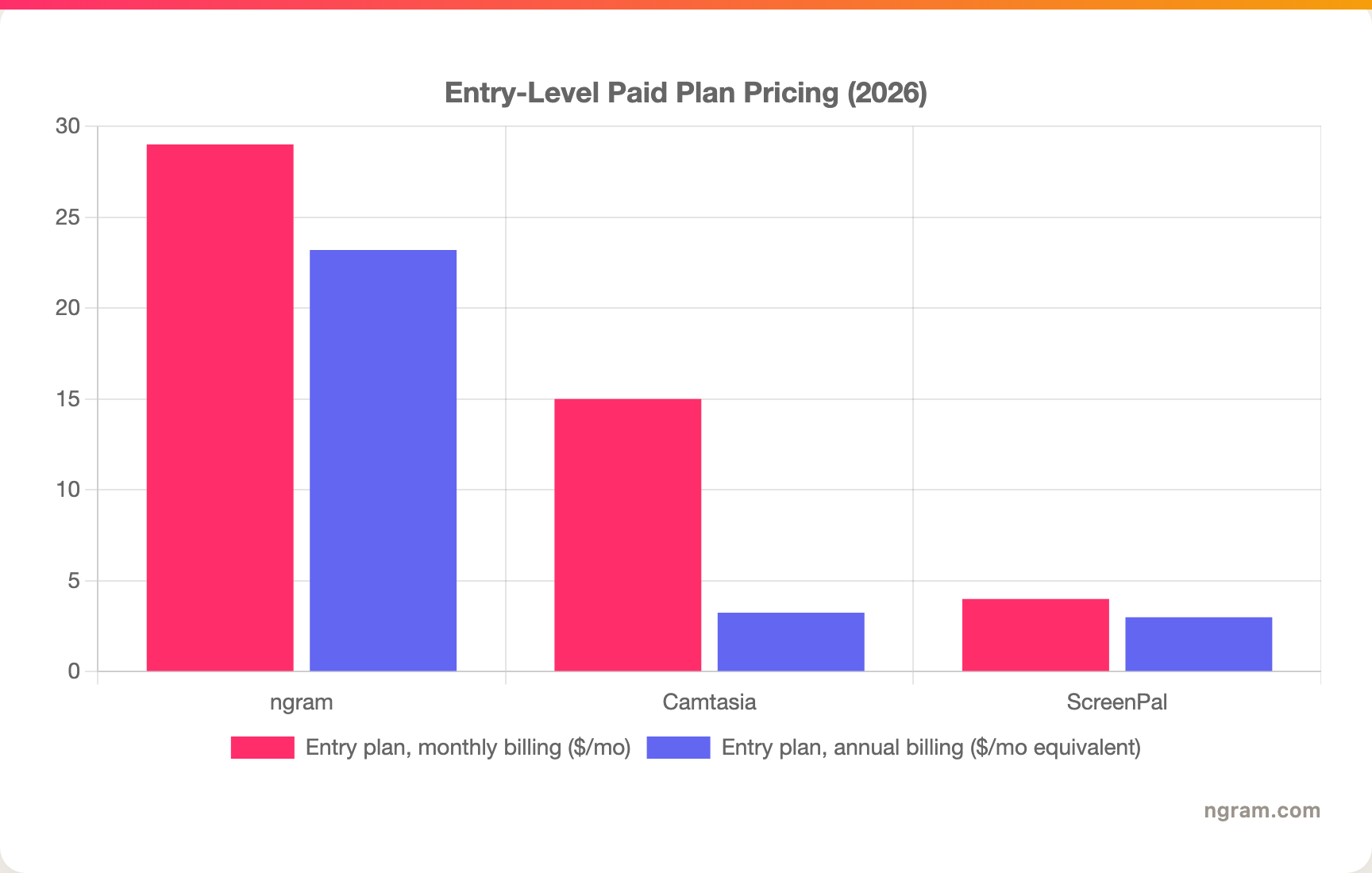
A note on that chart: Camtasia is billed annually only, so its monthly figure is the Essentials annual price divided across twelve months, and its entry Starter tier is cheaper but limited to watermark removal. ScreenPal's Solo Deluxe is the cheapest capable plan of the three. Match the unit and the feature set to your actual use before you decide.
Winner: ScreenPal for raw affordability, Camtasia for deep editing per dollar at the high end, ngram for the most generous monthly credit volume on an entry plan. ngram's Basic plan is $29 a month, or $23.20 billed annually, and includes 3,000 credits a month across video, editing, and exports.
1. ngram, the better third option for most teams
Watch how ngram turns an idea into a finished video:
ngram does the same core job Camtasia and ScreenPal do well, polishing a screen recording into a clean video, and then keeps going where they stop. Instead of recording live and editing afterward, you can give ngram a prompt, a PDF, a URL, a deck, screenshots, a screen recording, or raw footage, and its agentic chat plans the script, storyboard, scenes, captions, and call to action for you to review before anything renders.
That plan-first workflow is the difference. For the customer-education, training, product, and marketing teams who make up most "Camtasia vs ScreenPal" searches, the real job is rarely "a captured recording." It is a product walkthrough, an onboarding course, a help-center clip, or a feature announcement that needs the recording plus voiceover, callouts, B-roll, branded intros, and MP4 export, all on brand. ngram applies cursor smoothing, click emphasis, dead-air trimming, and smart zooms to a raw capture, then adds the production layer Camtasia makes you build by hand and that ScreenPal does not reach.
What makes ngram different
- Source-aware inputs - Start from a prompt, PDF, URL, screenshot, screen recording, raw video, deck, or Shopify product, not just a live capture.
- Plan before render - Review the script and storyboard in chat, fix direction early, then generate. No re-recording a 20-minute take.
- Recording polish plus everything else - Cursor smoothing, click emphasis, dead-air trim, and zooms, then add avatars, AI voiceover, captions, callouts, motion graphics, and B-roll in the same video.
- Brand kits - Logos, colors, fonts, approved and blocked phrases applied automatically to every video.
- Localization built in - Translate script, captions, and on-screen text, generate multilingual voiceover, and re-lip-sync talking heads per language.
- MP4 export - Finished videos export as MP4; separate media tools can derive GIF, WebM, PNG, or JPG from supplied media, plus hosted watch pages and an embeddable player.
Where ngram is honest about its limits
ngram provides hosted video pages and embeds but does not yet offer scene-level watch-time, graded quiz scoring, or drop-off analytics, so if in-video quizzes with reporting are central, ScreenPal is built for that today. ngram also runs in the browser rather than as a native desktop editor, so power users who want offline desktop control may prefer Camtasia. And its public security certifications are not published yet, so a compliance-bound buyer with a strict SOC 2 or ISO requirement should confirm before standardizing on it.
Who ngram is best for
ngram fits product marketing, growth, sales, customer success, support, and training teams that turn business material into polished video repeatedly. For current plans and credits, check ngram pricing rather than stale screenshots, and for the direct head-to-heads see the ngram vs Camtasia comparison and the ngram vs ScreenPal comparison.
Ready to try ngram? Create your first video from a prompt, doc, URL, deck, screenshot, or recording. Start free
2. Camtasia
Camtasia by TechSmith is best for trainers, educators, and customer-education teams who want one cross-platform app to record and deeply edit detailed tutorials. Public details were checked against the TechSmith Camtasia pricing and product pages for this 2026 comparison.
Key features
- Deep timeline editor - Multi-track editing with transitions, annotations, behaviors, and animations.
- Cross-platform - Runs on both Windows and Mac.
- Interactive quizzes - Embed multiple-choice, true or false, and short-answer questions directly in the video.
- AI add-ons - Voiceover generation, audio cleanup, AI avatars, and translated captions on higher tiers.
- Premium assets - Access to a large library of templates, music, and stock on the Pro tier.
What users say
Users praise Camtasia as one of the most approachable full editors for tutorials and training, far gentler than Premiere or DaVinci. The recurring cautions are weight, with higher RAM and CPU use during editing, and cost, since the annual license is the priciest of the three at the top tier. Trainers who value editing control over a low monthly bill tend to stay with it.
Best for
Choose Camtasia when deep editing control and interactive quizzes matter more than a low monthly price, on Windows or Mac.
3. ScreenPal

ScreenPal, formerly Screencast-O-Matic, is best for educators and budget-conscious teams who want recording, hosting, captions, and quizzes in one inexpensive platform. Public details were checked against the ScreenPal plans and product pages for this 2026 comparison.
Key features
- Cloud recording and hosting - Record screen and webcam, then publish to hosted channels with privacy controls.
- Interactive video - Quizzes, polls, and call-to-action buttons inside the video, with reporting and LMS embedding on higher tiers.
- Capable editor - Text, shapes, overlays, blur, transitions, and multi-track audio, though without a full multi-track video timeline.
- AI toolkit - Captions, transcription, text-to-speech, a video generator, and video translation on the Max tier.
- Low entry price - One of the cheapest capable recorders with real editing tools included.
What users say
Reviewers consistently praise ScreenPal for ease of use and value, calling it one of the cheapest tools that pairs recording with hosting and in-video quizzes. The common cautions are the lighter editing ceiling without a full video timeline, a dashboard that looks dated next to newer tools, and steep price increases that long-time Screencast-O-Matic users have noticed.
Best for
Choose ScreenPal when you want recording, hosting, captions, and interactive quizzes in one low-cost subscription, especially for education.
How we compared these tools
This is not a star rating. It is a decision-weighting model for buyers choosing between two tutorial tools, with ngram included as the third option many of them actually need.
| Criteria | Weight | What we looked at |
|---|---|---|
| Editing and features | 30% | Timeline depth, AI tools, quizzes, and hosting |
| Output and breadth | 30% | Source support, interactivity, sharing, and localization |
| Ease of use | 20% | Time to a first finished video and learning curve |
| Value | 15% | Public pricing, license model, watermarks, and tier clarity |
| Platform and support | 5% | Operating systems, collaboration, and resources |
We reviewed official vendor pricing and product pages, current SERP patterns, and 2026 review-site and Reddit sentiment, and we did not use numerical star ratings because they flatten the real decision: the best tool depends on whether you need deep editing, cheap hosting with quizzes, or a full source-to-video workflow.
Common questions
Is Camtasia better than ScreenPal?
Neither is better outright. Camtasia wins for deep multi-track editing and AI avatars, while ScreenPal wins for built-in hosting, interactive quizzes, and a far lower price. Match the tool to the job, and consider ngram if your real need is a finished video built from source material rather than a captured recording you edit by hand.
Is ScreenPal cheaper than Camtasia?
Yes, by a wide margin at entry level. ScreenPal's Solo Deluxe is about $3 a month billed annually with unlimited recording and the full editor, while Camtasia's entry Starter license is about $39 a year and full editing starts near $180 a year. ScreenPal is the budget pick; Camtasia charges for editing depth.
What is the best Camtasia and ScreenPal alternative?
For teams that need more than a recorder, ngram is the strongest alternative because it plans and builds full videos from prompts, docs, URLs, decks, screenshots, and recordings, then adds recording polish, voiceover, captions, and branding. Camtasia and ScreenPal remain the specialist picks for deep manual editing and cheap hosting with quizzes.
Which is better for interactive training videos, Camtasia or ScreenPal?
ScreenPal is the stronger pick when you need hosting plus graded quizzes and LMS reporting in one place, while Camtasia is better when the quizzes sit inside a heavily edited tutorial you host elsewhere. ngram fits when the training content starts from SOPs, PDFs, decks, or recordings and needs storyboard planning plus branded export.
Which one should you pick?
The Camtasia vs ScreenPal decision is really about whether the hard part is the edit or the hosting. If you produce detailed tutorials and need deep multi-track editing, AI avatars, and frame-level control, pick Camtasia. If you want recording, hosting, captions, and interactive quizzes in one cheap subscription, especially for education, pick ScreenPal. If your actual job is turning real business material, a doc, a URL, a deck, or a rough recording, into a finished, branded video where the capture is one part among voiceover, callouts, and B-roll, ngram beats both. The mistake is treating every screen tool as interchangeable. In 2026, workflow fit matters more than the category label.
---
Try ngram free, your first video in under 5 minutes. Turn a prompt, doc, URL, deck, or screen recording into a polished, on-brand video without rebuilding it from a blank timeline. Start free








