

Search for "Camtasia vs Trupeer" and you are usually choosing between two very different ways to make screen-recording videos. Camtasia is the mature desktop editor: record your screen, webcam, and audio, then edit on a timeline with annotations, transitions, captions, quizzes, and newer AI tools. Trupeer is the newer AI-first workflow: record a raw process once, then turn that capture into a polished video, a written guide, and translated knowledge content.
Both tools deserve a real look. Camtasia gives editors and trainers control. Trupeer gives product, support, and enablement teams speed when the deliverable is a repeatable how-to. ngram belongs in the same buying conversation because it can take a prompt, URL, deck, screenshot, screen recording, or raw footage and plan the script, storyboard, scenes, captions, voiceover, callouts, and final video before you render.
Camtasia vs Trupeer at a glance
| Tool | Best for | Starting price | Main distinction |
|---|---|---|---|
| ngram | Teams turning prompts, docs, URLs, decks, screenshots, and recordings into finished branded videos | Free, paid from $29/mo | Plans and builds the whole video, not just the capture |
| Camtasia | Trainers, educators, and L&D teams that want deep desktop editing control | $39/year Starter, full editor plans from $179.88/year | Cross-platform recorder and timeline editor with quizzes, captions, AI voiceover, and advanced editing |
| Trupeer | Product, support, and enablement teams making video plus step-by-step guides from one recording | $0 trial, Pro from $49/mo or $40/mo billed annually | AI turns one raw recording into a polished video, written guide, and multilingual knowledge asset |
Core output: edited video control versus automated video plus docs
Camtasia is strongest when the video itself is the product. You can capture the screen, webcam, and microphone, then refine the finished piece on a multitrack timeline. TechSmith lists cursor effects, path editing, animations, transitions, quizzes, SCORM export, transcription, captions, and studio-style audio effects in the paid editor plans. If your L&D video needs a precise quiz checkpoint, a manual callout, and a carefully timed zoom, Camtasia gives you the controls.
Trupeer starts from a different promise. Its site positions the product as a workflow knowledge layer that creates polished videos, guides, and agent-ready knowledge from raw screen capture. That makes Trupeer better when the same recording needs to become a video, a step-by-step article, and translated knowledge for a team. The tradeoff is that the AI workflow decides more of the structure for you.
Winner: Camtasia for hand-edited video precision, Trupeer for video plus written documentation from one capture.
ngram sits between those poles and goes wider. If your source is only a screen recording, ngram can polish it with smart zooms, cursor smoothing, click emphasis, dead-air trimming, product callouts, captions, and section transitions. If the source is a release note, deck, URL, screenshot set, or rough prompt, ngram can plan the whole video before render, which neither Camtasia nor Trupeer is built around as the default workflow.
Workflow: desktop timeline versus AI capture automation
Camtasia feels familiar to anyone who has edited tutorial videos before. Record, drag the capture into the editor, trim mistakes, add callouts, adjust audio, apply captions, and export. That workflow is slower than an AI auto-editor, but it is predictable. It also runs on Windows and Mac, which matters for mixed training teams.
Trupeer is faster for repeatable process capture. Record a product workflow, then let Trupeer generate the script, synthetic voiceover, zooms, captions, screenshots, and guide. Its pricing page says Pro includes 20 AI video minutes, unlimited AI guides, unlimited video exports, and recordings up to 12 minutes. Scale raises that to 100 AI video minutes and 15-minute recordings, with team workspace and branding controls.
Winner: Trupeer for fast capture-to-guide production, Camtasia for editors who want to control every cut.
ngram wins when the workflow starts before recording. You can bring a product page URL, a PDF, a deck, screenshots, a raw screen recording, or a rough video, then review the script and storyboard before the render. That matters for product launches, customer education, sales enablement, and internal training where the recording is one ingredient, not the entire brief.
Pricing and value: annual desktop license versus AI minute limits
Camtasia pricing is simple if you think annually. TechSmith lists Starter at $39 per year, Essentials at $179.88 per year, Create at $249 per year, and Pro at $599 per year for individuals. The free Camtasia Editor lets you use the editor, but exported videos carry a watermark until you upgrade to a paid Essentials, Create, Pro, or Business plan. The value is strongest for people who will use the editor every week.
Trupeer pricing is monthly or annual. Its public pricing page lists a limited $0 trial, Pro at $49 per month or $40 per month billed annually, Scale at $249 per month or $199 per month billed annually, and Enterprise by quote. Pro includes 20 AI video minutes, unlimited AI guides, unlimited exports, and 12-minute recordings. Scale adds 100 AI video minutes, a three-editor team workspace, custom voices, custom backgrounds, branded share pages, and CTA links.
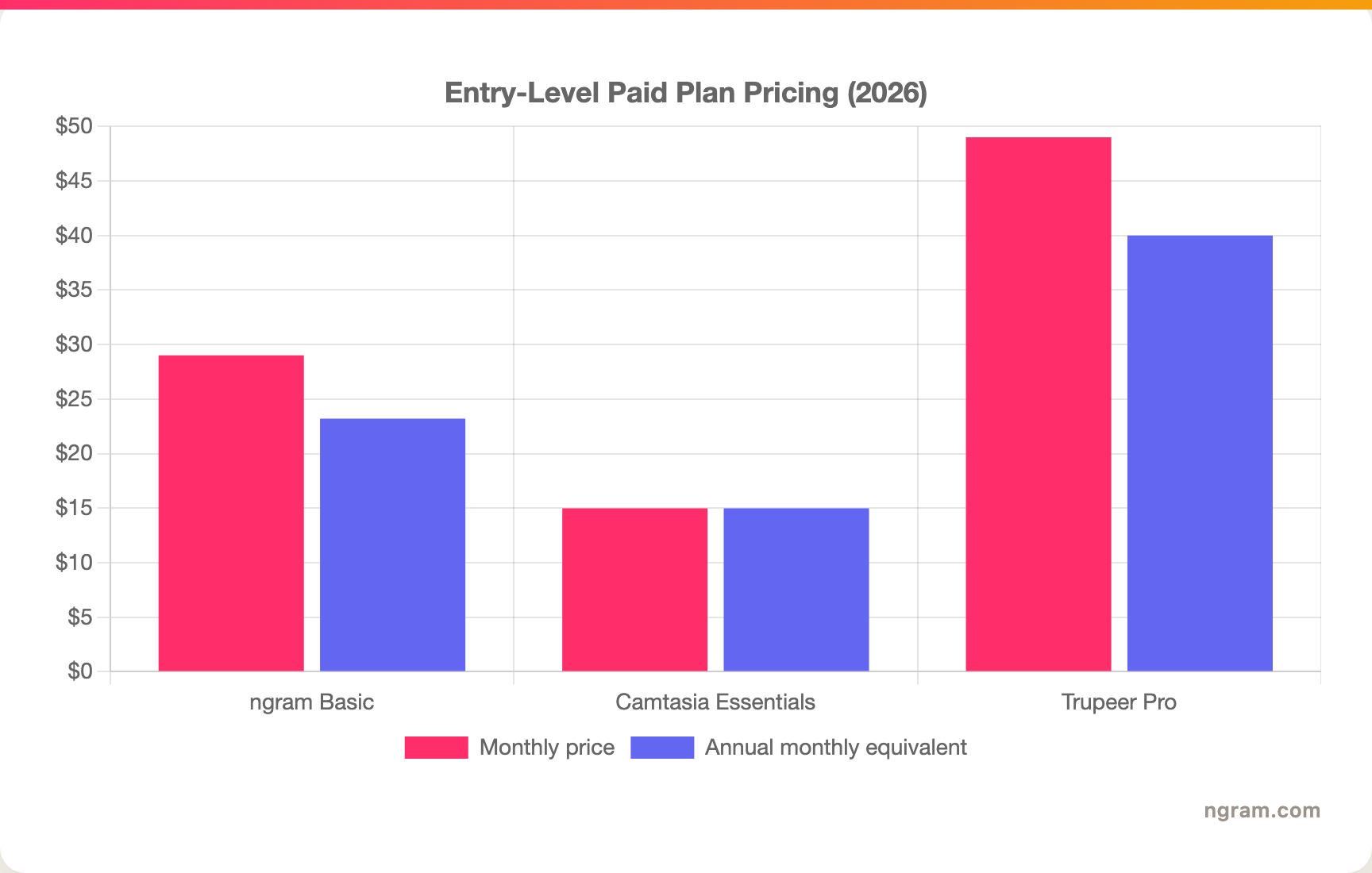
A note on that chart: Camtasia Essentials is billed annually, so the monthly number is its annual price divided by twelve. Camtasia Starter is cheaper, but it is positioned for advanced capture rather than the full video-editing tier most buyers mean when they compare Camtasia to AI screen-video tools. Trupeer lists both monthly and annual prices. ngram Basic is monthly, with a 20 percent annual discount.
Winner: Camtasia for low annual cost if you want manual editing, Trupeer for teams that value guide generation enough to pay by AI minutes, ngram for the most flexible video-generation entry plan.
AI features, localization, and knowledge workflow
Camtasia has added a meaningful AI layer, but it still feels like a video editor first. TechSmith says Camtasia Create includes AI-generated scripts from a prompt, audio cleanup, and access to more than 200 voices and styles. The support page also notes that Create does not include stock avatars, audio dubbing, or script translation, which sit higher in the lineup.
Trupeer is more AI-native. It generates videos and written guides from a recording, offers AI avatars and translation on its free trial feature list, and promotes video and docs in 120+ languages on its homepage. On enterprise pages, Trupeer also claims SOC 2, ISO 27001, GDPR, SSO, SCIM, admin controls, and custom domain hosting for larger teams. Those are real wins for enterprise knowledge operations.
Winner: Trupeer for video plus documentation automation and enterprise knowledge workflows, Camtasia for mature editing controls with AI add-ons.
ngram is the stronger pick when AI needs to plan the narrative, not only clean up a capture. It can generate scripts and storyboards, add AI voiceover, captions, product callouts, branded intros and outros, background music, motion graphics, avatars, talking-head lip sync, generated B-roll, and multilingual voiceover. It can also localize scripts, captions, on-screen text, and avatar or talking-head lip sync. We should be clear about limits: ngram has hosted video pages and embeds but no generally available owner analytics surface or scene-level watch-time analytics, and its public security certifications are not published.
1. ngram
Watch how ngram turns an idea into a finished video:
ngram is the best third option when your team needs the finished video, not only a recording tool or a documentation generator. You can start with a prompt, PDF, URL, screenshot, screen recording, raw footage, or PPTX/PDF deck. ngram extracts the useful material, plans the script and storyboard, maps scenes, adds captions and CTA, then lets you review before rendering.
That plan-first workflow is the difference in a Camtasia vs Trupeer decision. Camtasia asks you to record and edit. Trupeer asks you to record and let AI create video plus docs. ngram can start from the broader business material around the recording: the product page, release notes, training SOP, support article, sales deck, or raw walkthrough. The result is a branded video with voiceover, callouts, motion, captions, and export formats for the channel.
What makes ngram different
- Starts from text prompts, PDFs, URLs, screenshots, screen recordings, raw video, decks, and Shopify product URLs.
- Plans the script, storyboard, scenes, captions, and CTA before render, so teams review direction early.
- Adds screen-recording polish: cursor smoothing, click emphasis, dead-air trim, smart zooms, callouts, and section transitions.
- Supports avatars, custom faces, talking-head lip sync, generated presenters, UGC-style clips, still-image motion, AI images, and short AI video B-roll.
- Applies brand kits with logo, colors, fonts, tone controls, approved phrases, blocked phrases, branded intros, and branded outros.
- Exports Finished videos export as MP4; separate media tools can derive GIF, WebM, PNG, or JPG from supplied media, with hosted watch pages and an embeddable player.
Where ngram is honest about its limits
- ngram produces finished videos and supporting assets, not written help-center articles as the primary output.
- ngram provides hosted video pages and embeds, but not scene-level watch time, drop-off, or completion analytics.
- ngram does not publish SOC 2, ISO, or GDPR certification claims, so compliance-bound teams should verify requirements before buying.
- Public API v1 uses self-service bearer API keys; webhook subscriptions expose `video.completed` and `video.failed`.
Who ngram is best for
Choose ngram when your real job is a launch video, product demo, customer onboarding clip, training video, sales enablement asset, or internal update built from messy source material. If you want to hand-edit every pixel, Camtasia remains the deeper desktop editor. If the deliverable must be a written guide and knowledge base first, Trupeer is the specialist.
Ready to try the third path? Start with ngram pricing, or compare ngram vs Camtasia and ngram vs Trupeer before you decide.
2. Camtasia
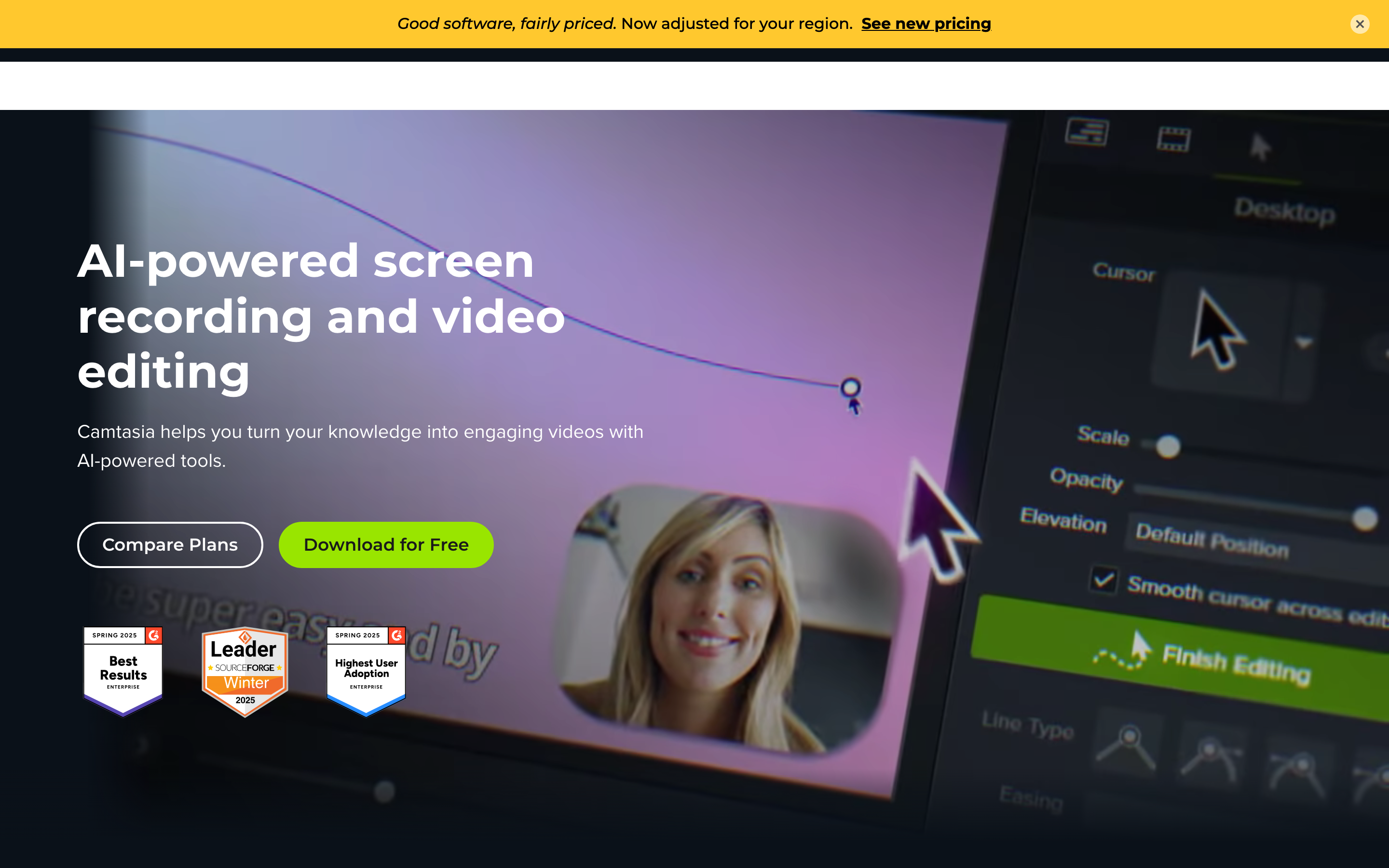
Camtasia by TechSmith is best for trainers, educators, L&D teams, and software marketers who want a cross-platform app for recording and editing detailed tutorials. Public details were checked against TechSmith's Camtasia product, pricing, and support pages for this 2026 comparison.
Key features
- Screen, webcam, audio, window, region, panoramic, and step capture.
- Multitrack editing with cursor effects, path editing, animations, transitions, annotations, quizzes, and SCORM export.
- Transcription, automatic filler-word removal, caption generation, and text-based video editing on paid editor plans.
- AI scripts, voiceover generation, audio cleanup, and more than 200 voice styles in higher tiers.
- Snagit, Audiate, assets, and Screencast bundled into parts of the Camtasia Suite lineup.
What users say
Camtasia users tend to praise the control. It is approachable for a desktop editor, especially compared with pro video suites, and it is trusted for polished training and how-to videos. The common caution is speed: a great Camtasia video still takes manual editing time, and larger projects can feel heavy compared with browser-first AI tools.
Best for
Choose Camtasia when you need detailed editing control, quizzes, SCORM-friendly training, and a Windows or Mac app your content team can learn once and use for years.
3. Trupeer
Trupeer is best for product, support, customer success, and enablement teams that want to record a workflow once and get multiple outputs back. Its strongest pitch is not only video. It is video plus guide plus translated knowledge from the same capture.
Key features
- Turns raw screen recordings into polished videos with smart zooms, animations, captions, and synthetic voiceover.
- Generates step-by-step written guides from the same recording, with screenshot editing and guide export on Pro.
- Supports video and guide translation, with public pages promoting 120+ languages for videos and docs.
- Includes AI avatars, AI video generation, AI guide generation, exports, share pages, intros, outros, and branding controls across the paid lineup.
- Adds enterprise controls such as SSO, SCIM, custom seats, admin dashboard, custom domains, and security certifications on enterprise pages.
What users say
Trupeer's appeal is speed. Teams that create repeatable product walkthroughs, SOPs, and enablement content do not want to edit every frame or write every guide by hand. The caution is pricing and limits: Pro starts at $49 per month or $40 per month billed annually, and the plan includes 20 AI video minutes with 12-minute recording limits, so high-volume teams need to model usage before standardizing.
Best for
Choose Trupeer when one raw recording needs to become a polished video, written guide, translated asset, and knowledge-base input for a product or operations team.
How we compared these tools
| Criteria | Weight | What we looked at |
|---|---|---|
| AI capabilities | 30% | Script, voiceover, captions, avatars, translation, guide generation, and video automation |
| Features | 30% | Recording, editing, documentation, branding, exports, team controls, and workflow coverage |
| Ease of use | 20% | How fast a team gets from source material to a usable business video |
| Value | 15% | Entry price, billing model, usage limits, and whether the plan fits the core workflow |
| Support and trust | 5% | Enterprise controls, published support posture, and buyer confidence signals |
We used current public product pages, pricing pages, support docs, the competitor CSV facts in this repo, and existing ngram product-state files. We did not use numerical review ratings. When a public claim was unclear, we either softened it or left it out.
Common questions
Is Camtasia better than Trupeer?
Camtasia is better when you need manual editing control, desktop reliability, quizzes, SCORM export, and a polished training video you can tune in detail. Trupeer is better when you need one recording to become a polished video and a written guide quickly. ngram is better when the source includes more than a recording and the final deliverable is a branded business video.
Is Trupeer cheaper than Camtasia?
No, not for most individual buyers. Camtasia Essentials is $179.88 per year, while Trupeer Pro is $49 per month or $40 per month billed annually. Trupeer can still be worth it if guide generation, translation, and AI automation replace enough manual production time.
What is the best Camtasia and Trupeer alternative?
ngram is the best Camtasia and Trupeer alternative for teams that want a finished video from prompts, docs, URLs, decks, screenshots, recordings, or raw footage. It plans the script and storyboard, then adds voiceover, captions, callouts, brand controls, and screen-recording polish. Camtasia and Trupeer remain better when your priority is desktop editing or written documentation.
Which tool is better for training videos?
Camtasia is the safer pick for formal training modules that need quizzes, SCORM export, and manual timeline control. Trupeer is stronger for fast SOP videos and process guides from one recording. ngram is strongest when training content starts from a policy doc, deck, support article, or rough recording and needs to become a branded narrated video.
Which one should you pick?
The Camtasia vs Trupeer choice comes down to how much control you want after recording. Pick Camtasia if you are a trainer, educator, or L&D producer who wants a dependable Windows or Mac editor with quizzes, captions, precise cuts, and annual pricing. Pick Trupeer if you are a product or support team that values video plus written guide automation more than frame-level editing. Use ngram if your actual job is turning business source material into a finished, on-brand video where the recording is only one input.
---
Skip the recorder-first workflow: Start on ngram when your next product demo, training video, or customer walkthrough needs a script, storyboard, voiceover, callouts, captions, and brand polish from the same workspace.








