

CapCut vs WeVideo looks like a simple video editor comparison until you ask where the footage starts and who reviews the finished video. CapCut is built around social-native editing: clips, templates, captions, effects, audio cleanup, mobile workflows, and AI tools that move fast. WeVideo is built around cloud video creation for schools, teams, and training programs, with collaboration, screen recording, stock assets, and interactive learning tools.
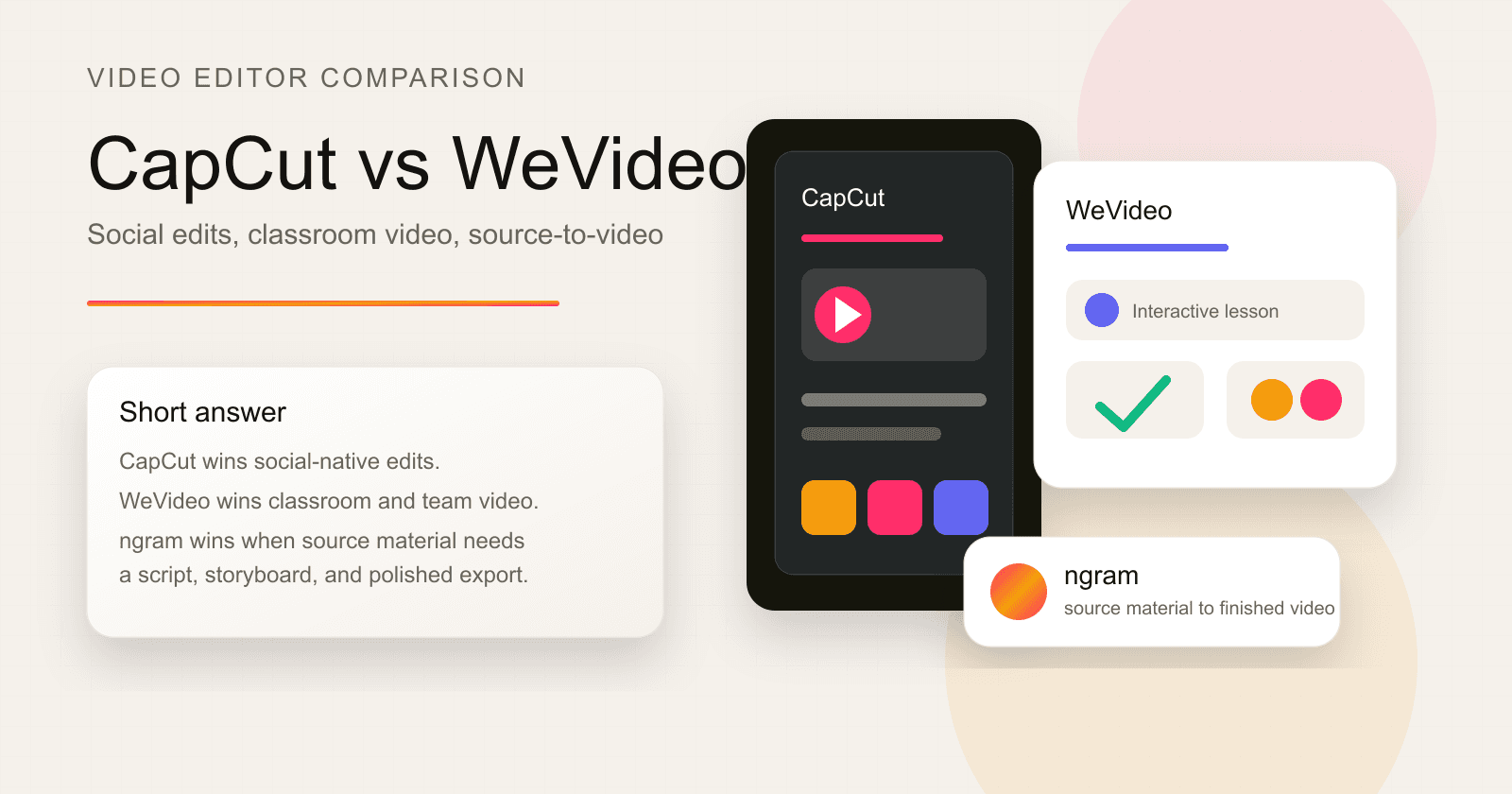
The short answer: pick CapCut for short-form social clips and creator editing. Pick WeVideo for classroom, team, and cloud-based editing workflows. Use ngram when the real job starts before the timeline, with a prompt, PDF, URL, deck, screen recording, screenshot set, or raw video that needs a script, storyboard, voiceover, captions, brand treatment, and export-ready scenes.
This guide was checked on 2026-06-19. Pricing and feature claims come from CapCut's Standard vs Pro guide, CapCut's online video editor page, CapCut's AI video generator page, WeVideo's product page, WeVideo's pricing page, WeVideo's education page, WeVideo's interactivity docs, and qualitative public forum posts. We do not use numerical review ratings.
CapCut vs WeVideo at a glance
Use this table as the scanner version. CapCut is stronger when speed, trends, and creator polish matter. WeVideo is stronger when a school, trainer, or small team needs projects, seats, assignments, or interactive video. ngram fits a different slice: turning source material into a planned business video before anyone starts hand-editing clips.
| Dimension | CapCut | WeVideo | Where ngram fits |
|---|---|---|---|
| Core job | Short-form video editing across mobile, desktop, and web | Cloud video creation, screen recording, collaboration, and interactive video | Source-to-video creation for business videos |
| Best fit | TikTok, Reels, Shorts, creator ads, fast edits, captions, effects, and template-led clips | K-12, higher education, corporate training, team projects, and cloud editing | Product demos, launch videos, support tutorials, onboarding, sales enablement, and explainers |
| Starting point | Imported clips, mobile footage, templates, stock assets, AI prompts, captions, and effects | Browser projects, screen recordings, stock assets, assignments, classes, shared team projects, and hosted learning videos | Prompts, PDFs, URLs, screenshots, screen recordings, raw videos, and decks |
| Collaboration | Cloud storage, team features, and project sharing on paid paths | Real-time collaboration, shared projects, team seats, classes, assignments, and permission controls | Team workspaces, shared brand kits, asset libraries, and reviewable video drafts |
| AI focus | AI video generator, auto captions, text-to-speech, background removal, noise reduction, motion tracking, and templates | AI interaction generation, subtitles, voiceover, audio tools, screen recording, and cloud editing | Script generation, storyboard generation, scene planning, voiceover, captions, product callouts, screen-recording polish, and brand styling |
| Pricing signal checked 2026-06-19 | Pro listed at $19.99/mo or $179.99/yr, team plan around $24.99/mo, with regional and platform variation | Creator listed at $20/mo annual, Teams at $52/mo annual, Power at $4.99/mo annual, Professional at $19.99/mo annual, Business at $36.99/mo annual, education plans separate | Basic at $29/mo, Premium at $59/mo, Ultimate at $299/mo, with credits and annual discounts |
Watch how ngram turns an idea into a finished video:
Quick verdict
Pick CapCut if the work is mostly social video. CapCut's online editor page names social media reels, promo videos, slideshows, TikTok videos, YouTube videos, Instagram videos, auto-generated subtitles, text-to-speech, background removal, cloud storage, cloud collaboration, and custom export. That is a strong fit for creators, social media managers, and small marketing teams making fast, visual clips.
Pick WeVideo if the workflow needs cloud editing, classrooms, team seats, real-time collaboration, screen recording, interactive questions, or learner analytics. WeVideo's current product page is blunt about the shift: create, engage, collaborate, and turn passive viewers into active participants. Its pricing and support pages list 4K on many paid individual and business plans, real-time collaboration for team paths, and education features such as classes, assignments, analytics, and Google Classroom integration.
Use ngram if the blank page is the problem. ngram starts from business source material and generates the script, storyboard, scene plan, captions, voiceover, motion graphics, product callouts, branded intro and outro, and MP4 exports. That does not replace CapCut's creator effects or WeVideo's classroom interactivity. It is stronger than both for that specific workflow when a product page, support doc, release note, deck, or rough recording needs to become a polished business video.
CapCut: better for social-native editing

CapCut's biggest advantage is speed in the creator workflow. The online video editor page points to AI subtitles, text-to-speech, transcribe video, background removal, filters, effects, text overlays, music, sound effects, cloud storage, cloud collaboration, and custom export. The same page also frames the use cases around TikTok, YouTube, Instagram, promo videos, slideshows, intros, and outros.
That makes CapCut feel natural for a solo creator or social team. The page expects you to upload clips, drag media onto a timeline, trim, crop, split, mirror, add audio, add text, apply stickers, use effects, generate captions, and export to a social channel. It is close to the work many creators already do every day.
CapCut's paid story is less tidy because pricing changes by region, platform, taxes, and promotions. The official Standard vs Pro guide lists CapCut Pro at $19.99 per month or $179.99 per year for individual users, with a team plan starting around $24.99 per month. The same guide says prices can vary by region, mobile versus desktop versus web, taxes, and promotions, so treat any single CapCut price as a snapshot.
The tradeoff is that CapCut still starts inside the edit. If you already know the clip, caption style, beat, and output format, CapCut is fast. If you need the message planned from a product URL, a launch doc, a deck, or a support recording, CapCut leaves that upstream work to you.
Winner: social editing: CapCut wins for creator clips, social formats, and visual effects. WeVideo is stronger for cloud and learning workflows. ngram is strongest only when source material needs to become a polished business video.
WeVideo: better for cloud editing, education, and interactive video

WeVideo is not trying to be a TikTok-first editor. Its homepage leads with learning, collaboration, and active viewing. The product page names create and collaborate, engage and share, assess and analyze, and organize and manage. It also says WeVideo's products are used by two-thirds of the Top 100 U.S. school districts, which explains why the product feels more like an education and team platform than a creator app.
The core editing product still matters. WeVideo's pricing page lists publish time, cloud storage, 4K Ultra HD on many paid plans, screen recording, voiceover, GIF creation, audio-only export, greenscreen, motion titles, stock media, brand management, direct social upload, templates, and collaboration. The business team path gives teams project sharing, asset sharing, and real-time collaboration.
The education product is where WeVideo separates from CapCut. WeVideo's support article says education licenses can include classes, assignments, analytics, Google Docs integration, G Suite and O365 integration, Google Classroom integration, and a secure walled garden. Its interactivity docs list multiple choice, check all, open response, and fill-in-the-blank interactions, plus AI options to generate or modify compatible questions.
The tradeoff is that WeVideo is still an editor and learning platform. A teacher can build an assignment. A trainer can add questions. A team can collaborate on a project. But if your starting point is a messy product update and you need the script, storyboard, voiceover, scene plan, and brand treatment created before editing, WeVideo is not as direct as ngram.
Winner: cloud and education: WeVideo wins for collaboration, classroom workflows, and interactive video. CapCut wins for social-native editing. ngram wins only for source-to-business-video production.
Workflow fit chart
The key difference is not only feature count. It is the job each product assumes you are doing.
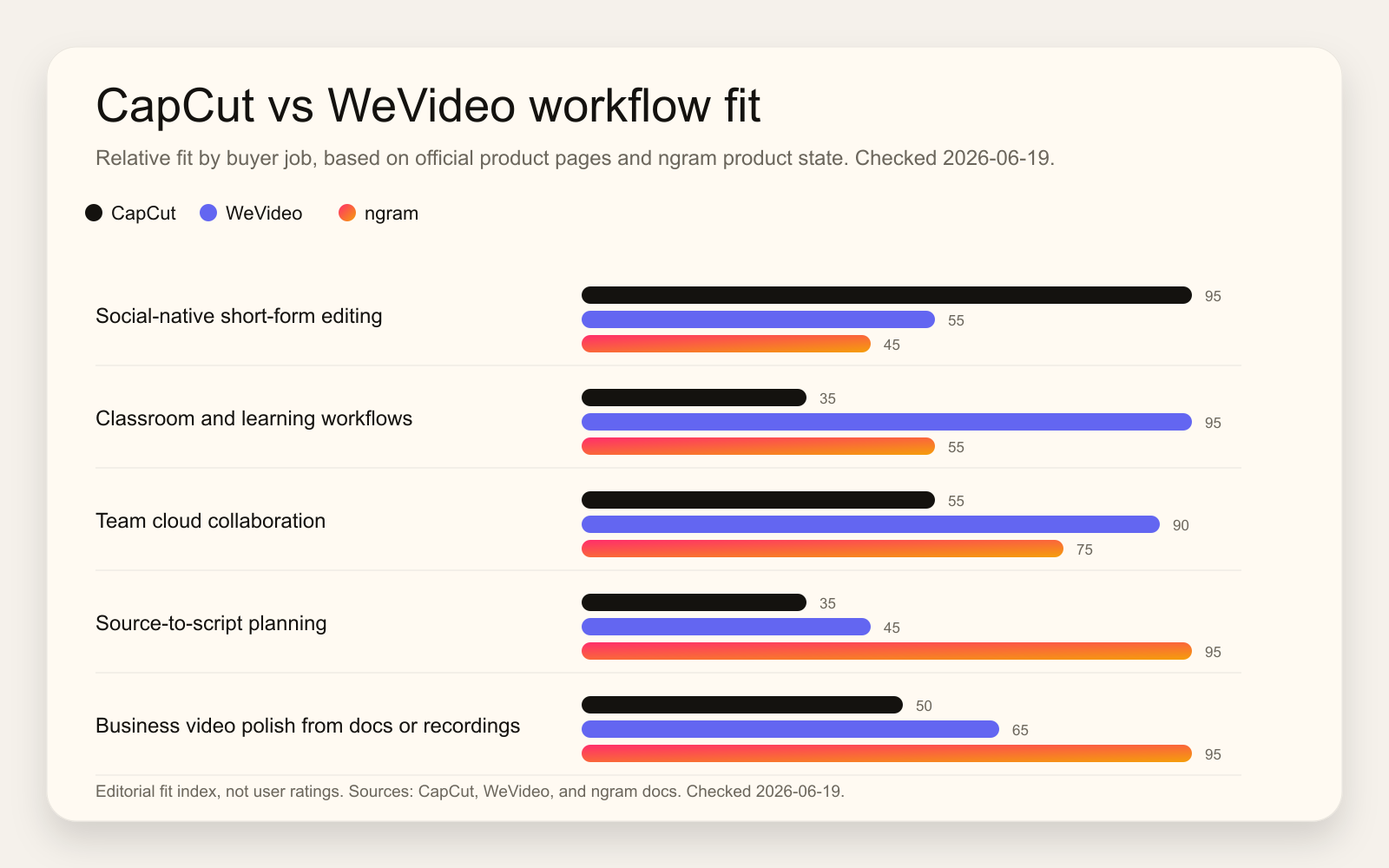
CapCut assumes a creator or social marketer who wants to cut, caption, style, and publish fast. WeVideo assumes a learner, teacher, trainer, or team that needs a cloud workspace and interactive learning controls. ngram assumes a business team with source material that still needs to become a story.
That distinction matters for buyers comparing CapCut vs WeVideo. A product marketer with a deck and a screen recording does not only need a timeline. A customer education lead with a help article does not only need effects. A sales enablement manager with a competitive memo does not only need subtitles. Those jobs need message structure first, which is where ngram becomes the better third option.
Winner: workflow fit: CapCut wins close-to-the-clip social work. WeVideo wins collaborative learning and cloud video projects. ngram wins when the first draft needs script, storyboard, voiceover, captions, and brand from source material.
Pricing and plan fit
CapCut is usually the cheaper starting point for individual creator editing, but the official page warns that rates vary by region and purchase channel. The claim-safe CapCut number from its own page is Pro at $19.99 per month or $179.99 per year, with team pricing around $24.99 per month. CapCut's value is strongest when those paid tools replace several small creator apps for captions, background removal, effects, templates, stock, and AI editing.
WeVideo has more plan lanes. For individuals and small businesses, its pricing page lists Creator at $20 per month billed annually and Teams at $52 per month billed annually. Lower individual tiers include Power at $4.99 per month billed annually, Unlimited at $7.99 per month billed annually, Professional at $19.99 per month billed annually, and Business at $36.99 per month billed annually. Education pricing is separate, including Single Teacher at $89 per year, Instructor at $384 per year, and Classroom starting at $374 per year.
ngram sits higher than a basic social editor, with Basic at $29 per month, Premium at $59 per month, and Ultimate at $299 per month. The price makes sense when you are buying output and workflow instead of timeline controls alone. ngram credits cover usage-heavy actions such as AI video generation and AI editing, with unlimited exports on every plan. If you only need a quick clip with trend effects, CapCut is usually a better spend. If you need classroom interactivity, WeVideo is usually a better spend. If you need repeatable business videos from source material, ngram is the cleaner budget conversation.
Winner: pricing: CapCut wins if its local checkout price fits a creator workflow. WeVideo wins when collaboration or education features justify the plan. ngram wins when planning and assembly labor are the expensive part.
AI features and automation
CapCut has the broader creator-facing AI toolkit. Its official pages name AI video generation, avatars, AI templates, one-click text-to-video, auto captions, text-to-speech, background removal, noise reduction, motion tracking, AI music, AI image generation, and enhancement tools. That is useful when the editor knows what they want and wants to remove manual steps inside the edit.
WeVideo uses AI in a more learning-centered way. Its interactivity docs describe AI-generated interactions and AI enhancement options for multiple choice, check all, fill-in-the-blank, and open-response questions. Its product pages also point to AI, screen recording, subtitles, voiceover, and editing tools. The center of gravity is not viral clip production. It is creating, assigning, tracking, and improving video learning.
ngram uses AI earlier in the process. The user can provide a text prompt, PDF, URL, screenshot, screen recording, raw video, deck, or Shopify product URL. ngram generates the script, storyboard, visual direction, CTA, captions, voiceover, motion graphics, product callouts, screen-recording polish, background music, intros, outros, and MP4 exports. You still review and edit, but the first draft starts with a plan instead of a blank timeline.
Winner: AI features: CapCut wins for social editing shortcuts. WeVideo wins for AI inside cloud-editing and learning workflows. ngram wins for source analysis and business-video planning before editing begins.
Collaboration and governance
CapCut has collaboration and cloud features, especially on paid paths, but the product culture is still creator-first. It is best when a small team wants shared assets, faster social edits, and access to the same Pro toolkit across devices.
WeVideo is stronger when collaboration is part of the product requirement. Team plans include project and asset sharing. Education plans add classes, assignments, analytics, classroom dashboards, Google Classroom integration, LMS-related workflows, and secure spaces for learners. That makes WeVideo a better pick for schools, districts, instructors, and training teams that need video to live inside a learning workflow.
ngram's collaboration is different. It gives teams shared workspaces, team members, shared brand kits, a gallery, hosted video pages, embeddable players, and chat-based editing; it has no generally available owner analytics surface. It is not an LMS and it does not replace WeVideo assignments or interactive questions. It is built for teams that need on-brand business video output from the same source material, across launches, training, demos, support, and sales enablement.
Winner: governance: WeVideo wins for classroom and team video management. CapCut wins for creator teams close to social footage. ngram wins for repeatable branded business-video production from existing material.
Where ngram fits before either editor
If you are comparing CapCut and WeVideo because you need a manual editor, stay with the head-to-head above. If you are comparing them because your team needs a finished business video, also read ngram vs CapCut, ngram vs WeVideo, and the AI video generator page.
The boundary is simple. CapCut wins when you are close to the clip and want social-native polish. WeVideo wins when the project needs cloud collaboration, school workflows, and interactive learning. ngram is strongest when the raw material still needs to be turned into a message: source ingestion, script, storyboard, voiceover, captions, visual plan, brand kit, product callouts, and export variants.
That is why the ngram recommendation is scoped, not blanket. ngram does not replace CapCut's creator effects. ngram does not replace WeVideo's classroom assignments or interactive question types. ngram is the better path when the buyer wants a polished business video without building the message by hand first.
Methodology
We compared CapCut and WeVideo across the dimensions buyers actually weigh: starting point, core output, editing depth, AI features, collaboration, education fit, pricing, export path, and where ngram is a real alternative. Official product and pricing pages were treated as the source of truth for feature and pricing claims. Public forum posts were used only for qualitative workflow language, not for numerical scoring.
The chart uses an editorial fit index, not user ratings. The index reflects how directly each product addresses a buyer job based on official source material and ngram's claimable product state. CapCut scores high for social-native editing. WeVideo scores high for learning and cloud collaboration. ngram scores high for source-to-script planning and business video polish.
FAQ
Is CapCut better than WeVideo?
CapCut is better than WeVideo for short-form social editing, mobile-first creator workflows, fast captions, effects, templates, and AI editing inside a clip workflow. WeVideo is better when the project needs cloud collaboration, screen recording, classroom features, interactive questions, assignments, learner analytics, or team project management.
Is WeVideo better than CapCut for schools?
WeVideo is better than CapCut for schools when educators need classes, assignments, learner analytics, Google Classroom integration, secure spaces, and interactive question types. CapCut can work for student-created social-style videos, but WeVideo is built more directly for teaching and learning workflows.
Which is cheaper, CapCut or WeVideo?
CapCut can be cheaper for individual creator editing, but CapCut pricing varies by region, platform, taxes, and promotions. CapCut's official guide lists Pro at $19.99 per month or $179.99 per year. WeVideo has several annual plan lanes, including Power at $4.99 per month, Professional at $19.99 per month, Business at $36.99 per month, and separate education plans.
Where does ngram fit if I am comparing CapCut and WeVideo?
ngram fits when the project starts with source material rather than edited clips. If a team has a prompt, PDF, URL, deck, support article, screen recording, raw video, or screenshots and needs a polished business video, ngram handles the script, storyboard, voiceover, captions, brand styling, scene plan, product callouts, and exports.
Should I use CapCut, WeVideo, or ngram for business videos?
Use CapCut for social clips and creator-style edits. Use WeVideo for cloud editing, team projects, school video assignments, and interactive learning. Use ngram for product demos, launch videos, support tutorials, onboarding videos, sales enablement, and explainers made from business source material.








