

Search for "Clipchamp vs Descript" and the surface-level answer looks obvious: both are video editors, both add AI tools, and both can export a finished video. The real split is where each product expects you to start. Clipchamp starts with clips, templates, a timeline, and the Microsoft account you may already use. Descript starts with speech, a transcript, and the idea that editing words should edit the recording.
That starting point matters more than a feature checklist. Clipchamp is easier when the job is a simple browser or Windows edit, especially for social posts, quick internal videos, screen recordings, school projects, and lightweight marketing clips. Descript is stronger when the footage is mostly people talking: podcasts, interviews, webinars, founder videos, courses, demos with narration, or recordings where the transcript is the fastest way to cut.
ngram belongs in this comparison as the third path for business teams. If your source is a product page, support article, release note, deck, PDF, screenshot set, screen recording, or rough prompt, ngram's video editor can plan the script and storyboard before rendering the draft. That is a different job from Clipchamp's timeline editing or Descript's transcript editing, so this guide keeps ngram's role narrow and honest.
For this guide, we checked Clipchamp pricing, Clipchamp's video editor page, Microsoft's Clipchamp paid plan notes, Microsoft 365 plan pricing, Descript pricing, Descript's product page, Descript's Underlord help page, and Descript's media minutes and AI credits guide on 2026-06-19. We also reviewed current comparison pages from G2, SelectHub, Techjockey, ClipFM, Wavel, and Submagic to understand what the search results already cover. We do not use numerical review scores in the verdict.
Clipchamp vs Descript at a glance
| Tool | Best for | Entry paid path | Main distinction |
|---|---|---|---|
| Clipchamp | Simple timeline edits, screen or webcam recordings, social clips, and Microsoft 365 users | $0 tier, premium personal features through Microsoft 365 Personal or Family | Browser and Windows editor with templates, stock, brand kit, captions, audio cleanup, and 4K on premium access |
| Descript | Spoken media, podcasts, webinars, interviews, narrated lessons, and transcript-first video edits | $0 plan, Hobbyist from $24/mo monthly or $16/mo annual | Edit video by editing text, then use Underlord, Studio Sound, filler removal, captions, translation, avatars, and generative media |
| ngram | Business videos made from docs, URLs, decks, screenshots, recordings, and rough prompts | $0 starter tier, Basic from $29/mo or $23.20/mo annual | Plans the message, script, storyboard, visuals, captions, voiceover, brand treatment, and MP4 export before the edit |
Watch how ngram turns source material into a finished video:
Quick verdict
Pick Clipchamp if you need the fastest path from clips to a clean timeline edit. Clipchamp is the more natural choice when a Microsoft account is already part of the workflow, when premium access arrives through Microsoft 365, or when the edit is mostly trimming, resizing, recording screen and webcam, adding titles, applying templates, and exporting without a heavy production process.
Pick Descript if the recording is built around speech. Descript's transcript model is the purchase reason: record or import media, get a transcript, cut words, remove filler, clean audio, generate clips, add captions, and collaborate around text. That is hard to beat for podcasts, interviews, customer calls, founder updates, training recordings, webinars, and narrated demos.
Use ngram if the video does not exist yet or the source needs a stronger message before editing starts. ngram is not a Microsoft 365 timeline editor and it is not a podcast-first transcript editor. It is stronger when a team needs a scripted, storyboarded, on-brand business video from source material, with the option to keep editing in chat, the script editor, the timeline, or visual chat.
Workflow: timeline, transcript, or source-to-video
Clipchamp starts from clips and a timeline
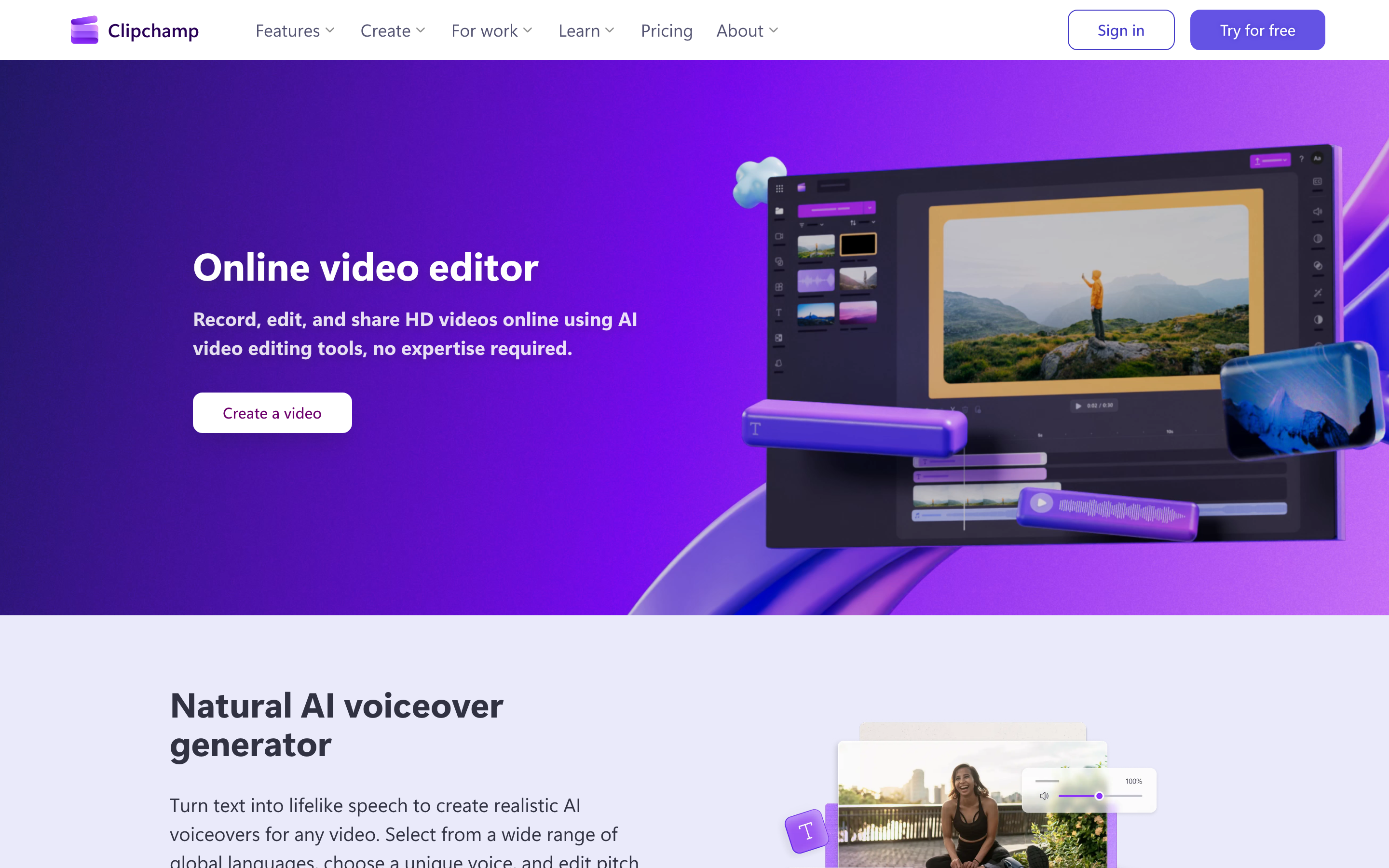
Clipchamp's own pages frame the product as a browser-based and Windows video editor with recording tools, video templates, and AI editing features in one place. The editor page lists screen and webcam recording, brand kit tools, audio enhancement, noise suppression, subtitles, text, transitions, and common timeline actions such as trim, crop, resize, and rotate.
That makes Clipchamp useful for lightweight video production. You bring media into the editor, arrange the timeline, add text or captions, clean the audio, and export. The product is approachable because it does not ask a casual editor to understand a professional post-production stack. It is also convenient for Microsoft-heavy users because premium personal features are tied to Microsoft 365 Personal or Family, and Clipchamp for work appears inside many Microsoft 365 business and education plans.
The tradeoff is planning depth. Clipchamp can record and edit, but it is not built around writing the narrative for a business message, building a storyboard from a source URL, or adapting the same idea into several audience-specific cuts. If your task starts with a pile of source material and no script, Clipchamp leaves more of the strategy to you.
Descript starts from a transcript

Descript's core advantage is text-based editing. Its product page says users can record in Descript or import a recording, get an instant transcript, and edit video by editing text. In practice, that means deleting a sentence, moving a section, or cleaning up filler can map back to the underlying media.
Descript has added a broad AI layer around that transcript model. The public product page lists Green Screen, Eye Contact, Studio Sound, filler-word removal, translation, transcription, captions, avatars, and generated video. Underlord, Descript's AI editing assistant, can act inside projects and consumes AI credits on current plans. The pricing page also ties paid plans to media hours, AI credits, export resolution, stock media, translation, avatars, and collaboration features.
The tradeoff is that Descript still shines most after you have recorded or uploaded media. It can generate media and assist with edits, but the product's center is recorded speech. If the buyer needs a transcript-first editor, Descript wins. If the buyer needs a full business video planned from docs, URLs, decks, or screenshots before any footage exists, ngram is the cleaner fit.
AI features and editing depth
Clipchamp's AI features sit inside a familiar editor. Official Clipchamp pages mention AI video editing tools, AI audio editing tools, text-to-speech voiceover, auto captions, noise suppression, background removal, and common edit actions. Those features make simple edits faster, especially when the user already knows what the video should say and only needs help getting clips into shape.
Descript's AI features sit closer to the editorial process. Studio Sound improves voice audio, filler removal tightens speech, Eye Contact adjusts a speaker's gaze, captions and translation support publishing, and Underlord can take typed instructions inside a project. Descript also exposes a usage model around media minutes and AI credits, so repeated AI-heavy workflows need more budget attention than the product tour suggests.
ngram's AI is upstream of both. The agent reads the source, extracts audience and intent, writes the script, builds the storyboard, plans scenes, generates voiceover and captions, applies brand direction, and supports edits through chat, visual chat, script editing, scene regeneration, and a timeline. That is why ngram vs Clipchamp and ngram vs Descript are not the same comparison. Against Clipchamp, ngram wins when source material needs a narrative. Against Descript, ngram wins when the user has not recorded the spoken asset yet.
Winner: Clipchamp for beginner-friendly AI assists inside a timeline. Descript for AI tools tied to speech and transcript edits. ngram for source-to-finished-video work where the script, storyboard, captions, visuals, and brand need to exist before the final edit.
Pricing and limits in 2026
Clipchamp's personal pricing is unusual because premium features are bundled into Microsoft 365 Personal and Family rather than sold as a standalone personal Clipchamp plan. Clipchamp's pricing page says premium access adds 4K UHD exports, premium stock assets, and the brand kit tool. Microsoft 365 pricing listed Personal at $9.99/mo or $99.99/year when checked on 2026-06-19, so the annual monthly equivalent is about $8.33. For work and school accounts, Microsoft support says the Standard plan is included in many Microsoft 365 and Office 365 licenses, while Premium can be purchased as an add-on or standalone work subscription depending on the organization.
Descript publishes clearer creator plan anchors, but the usage model is more complex. The pricing page listed Hobbyist at $24/mo monthly or $16/mo annual, Creator at $35/mo monthly or $24/mo annual, and Business at $65/mo monthly or $50/mo annual when checked on 2026-06-19. Hobbyist includes 10 media hours and 400 AI credits per month. Creator includes 30 media hours plus bonus hours and 800 AI credits plus bonus credits. Business includes 40 media hours plus bonus hours and 1,500 AI credits plus bonus credits. Descript's help center says unused monthly media minutes and AI credits do not roll over, while purchased top-ups roll over for up to one year.
ngram uses credits instead of media minutes. Basic is $29/mo, or $23.20/mo billed annually, with 3,000 credits per month. Premium is $59/mo with 10,000 credits per month, and Ultimate is $299/mo with 50,000 credits per month. Credits cover usage-heavy actions such as AI video generation and AI editing; exports are unlimited and cost no credits. The point is not that ngram is the cheapest editor. The point is that ngram prices the source-to-video production job, not a simple clip editor or transcript cleaner.
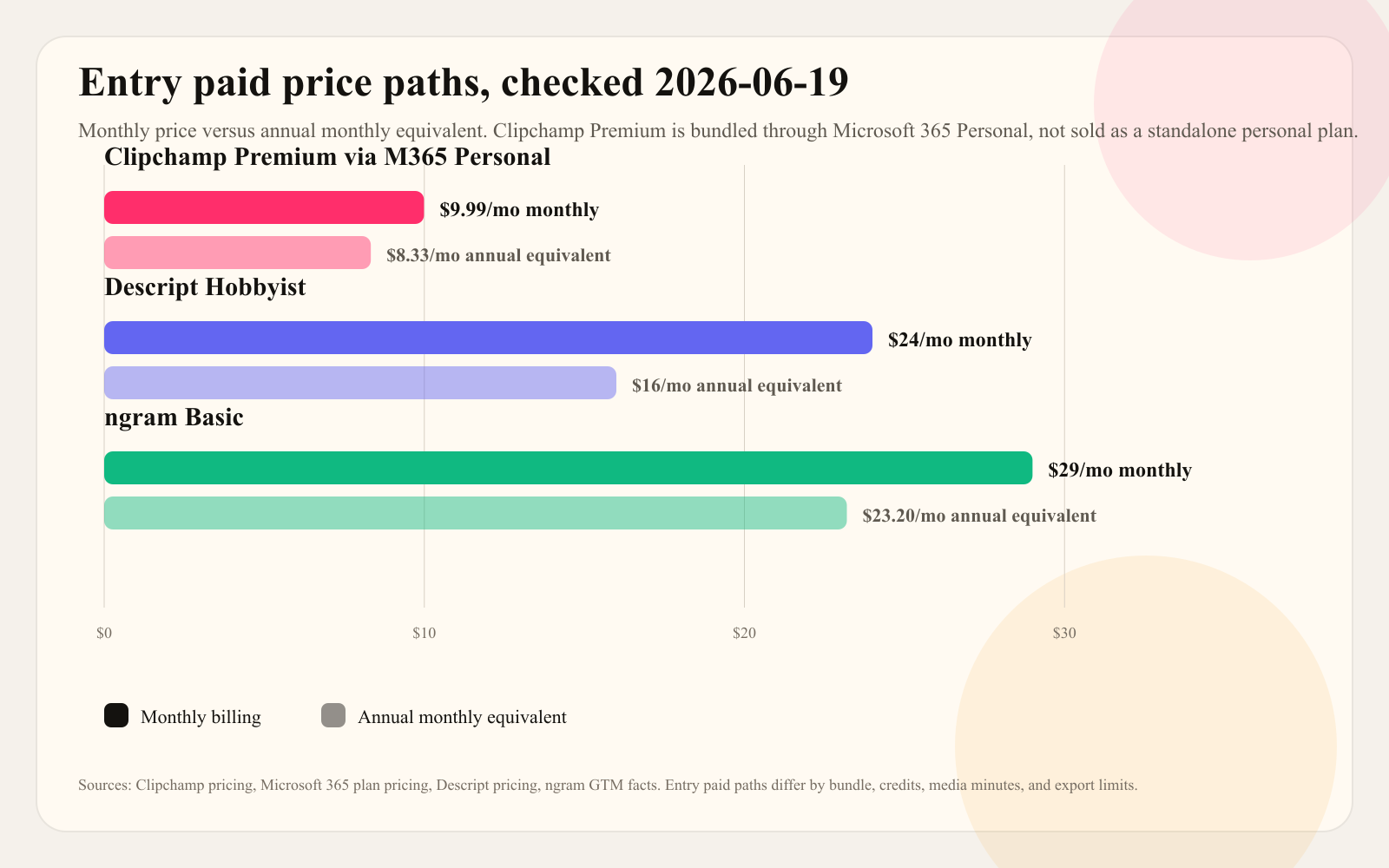
Do not read this chart as a ranking. Clipchamp looks cheapest if you already value Microsoft 365. Descript costs more at entry, but it includes transcript editing, media hours, and AI credits built for recorded speech. ngram costs more than the Microsoft 365 monthly equivalent because the job includes planning, script, storyboard, voiceover, captions, brand treatment, generated scenes, and exports.
Winner: Clipchamp on entry paid cost for Microsoft 365 users. Descript on value for transcript-first spoken media. ngram on saved production time when the team would otherwise brief, script, storyboard, record, edit, caption, brand, and export in separate steps.
Collaboration, ecosystem, and platform fit
Clipchamp fits teams that already live in Microsoft accounts and Microsoft 365. Personal users get the web editor and Windows app. Work and school users can access Clipchamp through qualifying Microsoft 365 or Office 365 licenses. The advantage is procurement and familiarity: a team may already have the subscription and identity layer. The limitation is that Clipchamp is still a lightweight editor, so complex review, production planning, and source-to-video workflows may move outside the tool.
Descript fits teams built around content production. A podcaster, YouTube team, course creator, or webinar team can keep recording, transcription, script cleanup, clips, captions, and audio repair in one place. Descript's pricing also scales around seats, media hours, AI credits, Brand Studio, translation, dubbing, avatars, and priority support. That makes the product a better fit when spoken content is a repeatable operating motion.
ngram fits business teams where the input changes by department. Product marketing may start with release notes and screenshots. Customer success may start with a rough walkthrough. Support may start with a help article. Sales enablement may start with a deck or persona-specific demo request. ngram reads those sources, plans the message, applies the brand kit, and exports channel-specific cuts prepared separately from the same project.
Winner: Clipchamp for Microsoft ecosystem convenience. Descript for teams that live in recordings and transcripts. ngram for cross-functional business video where source material, brand rules, audience, and channel matter as much as the edit.
Output quality and learning curve
Clipchamp's quality ceiling is good enough for simple social, school, internal, and lightweight marketing videos. It is approachable because the editor looks like a normal timeline, the templates reduce blank-canvas work, and the premium bundle adds 4K export, brand kit, and premium stock assets for Microsoft 365 Personal and Family subscribers. The ceiling shows up when the video needs a stronger story, custom motion system, source-aware writing, or a reviewable plan before assets are assembled.
Descript's quality ceiling is higher for spoken video. If a speaker rambles, Descript can make transcript cleanup feel faster than cutting waveforms. Studio Sound, filler removal, captions, clips, and Underlord all match that use case. The learning curve appears when the user expects a traditional visual editor, needs predictable AI credit usage, or wants broader business-video planning rather than post-recording cleanup.
ngram's learning curve is different. The user writes what the video is for, uploads or points at source material, reviews the script and storyboard, then asks for changes in plain language or edits in the timeline. That makes ngram better for teams that know the business message but do not want to become video producers.
Winner: Clipchamp for low-friction entry. Descript for speech-heavy editing depth. ngram for teams that want the first draft to arrive with structure, captions, voiceover, brand, and channel variants already considered.
Where ngram fits, and where it does not
ngram is the better third option when the buyer is comparing Clipchamp and Descript because both still expect the user to steer a lot of production. Clipchamp expects a clip-first timeline. Descript expects recorded media or at least a spoken asset. ngram can start earlier, with a prompt, PDF, URL, screenshot set, deck, screen recording, raw video, or Shopify product page, then create a planned video draft.
That does not make ngram a full replacement for both products. Stay with Clipchamp if you mainly need a $0 Microsoft-friendly editor for small projects, simple exports, classroom work, or casual social edits. Stay with Descript if you produce podcasts, interviews, webinars, or long spoken recordings where transcript editing is the central job. Use ngram when the work is a product demo, launch video, training video, support explainer, customer update, or sales enablement clip that starts as source material and needs the message built first.
If you want the ngram path, start with the AI video generator or the video editor, then bring in the same source material you would otherwise turn into a manual edit.
Methodology and source notes
We evaluated Clipchamp, Descript, and ngram across six dimensions: starting workflow, AI feature depth, pricing model, source-material support, business-video fit, and output workflow. The pair passed the eligibility gate because both Clipchamp and Descript are live T2 tools in the same video-editor category in the repo's competitor CSV.
Competitor facts come from official product, pricing, and help pages checked on 2026-06-19. Search-result analysis showed that most ranking pages already provide feature tables, pros and cons, pricing snippets, and review-site comparisons. The main gaps were current Microsoft 365 premium-plan nuance, Descript's media-minute and AI-credit model, and a practical third path for teams whose real bottleneck is planning a business video from source material.
ngram claims come from the repo's product-state and GTM facts files. We used only live claimable capabilities: source ingestion from prompts, PDFs, URLs, screenshots, screen recordings, raw video, decks, and Shopify product URLs; script and storyboard generation; captions; AI voiceover; brand kits; screen-recording polish; timeline editing; visual chat; MP4 export; hosted video pages; embeds; and credit-based pricing. We did not claim scene-level analytics or a native mobile app; ngram's Public API v1 uses self-service bearer API credentials.
FAQ
Is Clipchamp better than Descript?
Clipchamp is better than Descript for simple timeline editing, screen or webcam recording, Microsoft 365 convenience, templates, and low-cost personal editing. Descript is better for spoken media where the transcript should drive cuts, captions, audio cleanup, clips, and review.
Is Descript better than Clipchamp?
Descript is better than Clipchamp for podcasts, interviews, webinars, founder videos, lessons, and narrated demos because text-based editing maps language edits back to the recording. Clipchamp is better when the user wants a straightforward browser or Windows timeline editor without a transcript-first workflow.
Which tool is cheaper, Clipchamp or Descript?
Clipchamp has the cheaper entry paid path for many personal users because premium personal features are bundled into Microsoft 365 Personal or Family. Descript's Hobbyist plan cost $24/mo monthly or $16/mo annual when checked on 2026-06-19, but it includes media hours, AI credits, transcript editing, and Descript-specific AI tools.
When should a team use ngram instead of Clipchamp or Descript?
Use ngram when the team starts with source material rather than a finished recording. Product pages, release notes, PDFs, decks, support articles, screenshots, and screen recordings can become scripted, storyboarded, branded videos with voiceover, captions, and MP4 exports inside ngram.
Final verdict
Clipchamp vs Descript is not a winner-takes-all comparison. Clipchamp wins when the job is simple, visual, timeline-based, and close to the Microsoft ecosystem. Descript wins when the job is speech-heavy, transcript-first, and tied to recurring content production.
ngram wins the source-to-video slice. If the hard part is turning source material into a clear business video, pick ngram first. If the asset already exists and only needs a simple edit, pick Clipchamp. If the asset is a spoken recording and the transcript is the fastest edit surface, pick Descript.








