Adobe Express vs CapCut looks like a simple video editor comparison until you ask what the video is for. A creator making TikTok drafts needs a different tool than a marketer making on-brand launch clips, and both are different from a product team turning a deck or screen recording into a narrated customer update.
Adobe Express is the cleaner choice for branded creative. Adobe's own pricing page positions Express around templates, Adobe Stock assets, Firefly credits, brand kits, scheduling, one-click resize, and quick video tools like drag-and-drop creation, 4K export on paid plans, captions, resize, and clip maker. CapCut is the faster choice for creator editing. CapCut's official Standard vs Pro guide describes cutting, trimming, filters, transitions, stickers, captions, premium effects, advanced AI tools, cloud storage, and a mobile, desktop, and web workflow.
ngram belongs in the comparison because many teams who search for Adobe Express vs CapCut do not only need a better editor. They need a finished business video from source material. If that is the job, read the direct pages for ngram vs Adobe Express and ngram vs CapCut after this head-to-head.
Adobe Express vs CapCut at a glance
| Dimension | Adobe Express | CapCut | Where ngram fits |
|---|---|---|---|
| Best fit | Brand-forward social posts, quick designed assets, thumbnails, simple video edits, and campaign variants. | Short-form creator videos, social edits, effects-heavy clips, captions, templates, and mobile-first production. | Business videos made from prompts, URLs, PDFs, decks, screenshots, screen recordings, or raw video. |
| Workflow | Start from a design, template, stock asset, or uploaded video, then adjust scenes and layers in the Express editor. | Start from clips, templates, mobile footage, or AI tools, then edit on a creator-style timeline. | Start with source material and intent, review the script and storyboard, then render and revise by chat or editor controls. |
| Video depth | Good for quick trims, overlays, resizing, captions, transitions, stock, and brand-safe creative. | Stronger for hands-on clip editing, effects, captions, background removal, motion tracking, AI tools, and social trends. | Stronger when the team wants message planning, voiceover, captions, brand treatment, and MP4 export in one generated draft. |
| Brand and team fit | Brand kits, Adobe Fonts, Adobe Stock, social scheduling, Creative Cloud ties, Teams and Enterprise options. | Creator assets, Pro effects, shared projects, cloud storage, and team options, with pricing and availability varying by region. | Brand kits, approved phrases, blocked phrases, shared workspaces, team members, hosted watch pages, and Zapier for workflow triggers. |
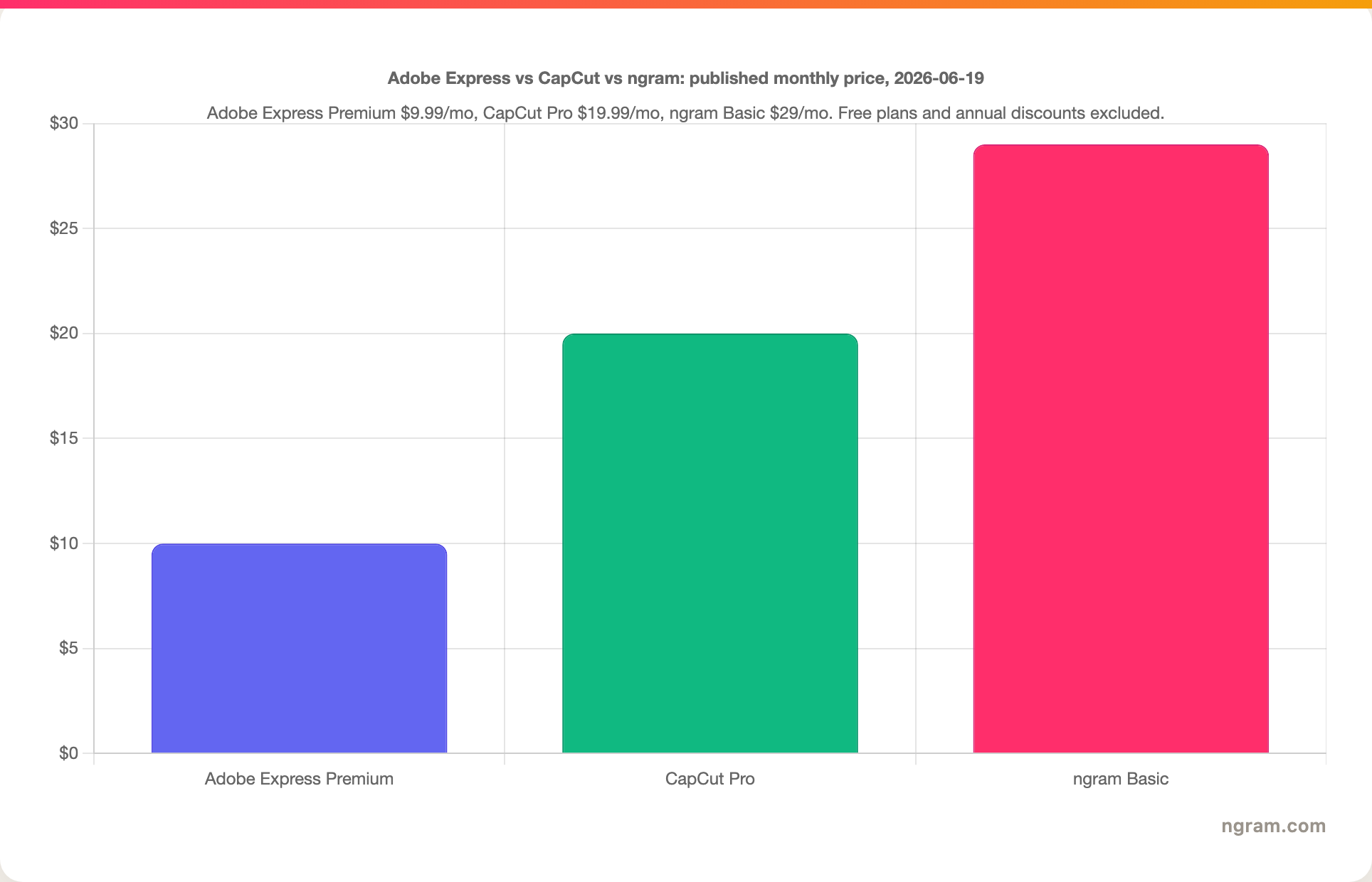
| Pricing snapshot on 2026-06-19 | Free plan, Premium listed at $9.99 per month, Firefly Pro at $19.99 per month. | Free baseline, Standard from $9.99 per month and Pro listed at $19.99 per month or $179.99 per year in CapCut's guide, with regional variation. | Free plan, Basic at $29 per month, Premium at $59 per month, Ultimate at $299 per month, with annual discounts and credits. |
| Pick it when | Design consistency and fast branded creative matter more than creator effects. | Short-form social velocity and timeline control matter more than brand governance. | The output needs to be a planned, narrated business video instead of a manually assembled clip. |
Quick verdict
Pick Adobe Express if your team already lives in Adobe tools, needs brand-safe templates, and publishes a steady stream of social graphics, thumbnails, short clips, and campaign assets. Adobe Express is strongest when design quality and brand consistency matter more than a deep creator timeline.
Pick CapCut if the work is mostly TikTok, Reels, Shorts, creator ads, or effects-heavy edits. CapCut gives creators more video-specific controls, especially on mobile, and its Pro tier groups many advanced AI, template, stock, and storage features together.
Use ngram if the question under the question is, "How do we turn this source material into a finished business video?" ngram is not a static design suite or a trend editor. It is better when the input is a product URL, release notes, a deck, screenshots, a support article, or a screen recording, and the output needs script, storyboard, voiceover, captions, brand treatment, and export options.
Adobe Express: design-first video creation
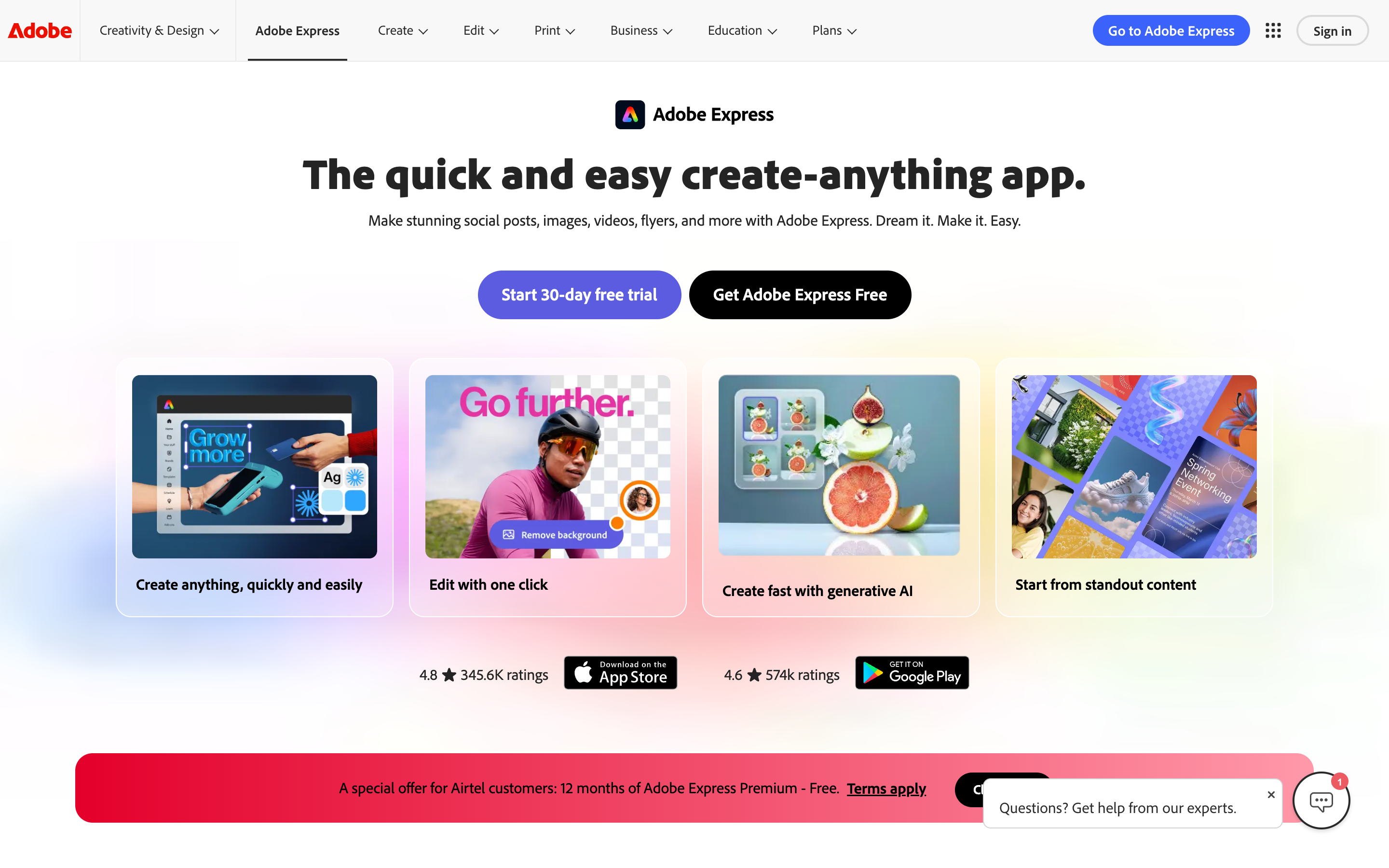
Adobe Express is best understood as a create-anything workspace with video inside it. The official Adobe Express pricing page lists 100,000+ templates on Free, 519,000+ templates on Premium, Adobe Stock assets, Adobe Fonts, 250 monthly generative credits on Premium, 100GB storage, brand kits, content scheduling, one-click resize, and extra tools such as Remove Video Background. That is the product's real appeal: a marketer can make a Reel cover, a flyer, a short promo clip, and a resized campaign variant without leaving the same design environment.
For video specifically, Adobe's Create videos in Adobe Express guide describes a scene-based workflow. You upload a video, add media, add Adobe Stock content, add text and graphics, add audio, trim scenes, reorder scenes, adjust speed or volume, switch into All layers view on desktop, and download the final video. That is enough for many lightweight marketing projects.
The tradeoff is that Adobe Express asks you to build the message yourself. Adobe Express can give you templates, stock, layers, captions, scheduling, and brand controls, but the user still decides the structure, writes the narration, sequences the argument, and turns a rough source into a finished story. For design-led teams, that is fine. For product marketing, customer education, sales enablement, and internal training teams, the missing planning step becomes the bottleneck.
CapCut: creator-first video editing

CapCut is the stronger editor when the job is short-form velocity. CapCut's official Standard vs Pro guide describes basic editing tools like cutting, trimming, merging, splitting, filters, transitions, text, stickers, captions, audio edits, and voice effects. The same guide describes Pro features such as advanced AI tools, background remover, motion tracking, noise reduction, AI video, AI music, AI image generation, premium templates, exclusive effects, premium stock resources, larger cloud storage, and collaboration features.
That makes CapCut a natural fit for social teams and creators who live in clips. The tool is fast, familiar to people making TikToks and Reels, and more video-native than Adobe Express. If you are cutting together a creator ad, adding punchy captions, trying templates, swapping effects, and exporting variants quickly, CapCut usually feels closer to the work.
CapCut has a different tradeoff. Its strength is the edit, not the business message. CapCut can move fast once the user knows what the clip should say and show, but it does not replace a script, storyboard, source-aware brief, or approval checkpoint. Teams that need a launch explainer, product walkthrough, training module, or sales demo still need to plan the video before they start pushing clips around.
Workflow: template canvas vs creator timeline
The first purchase question is not "Which tool has more features?" It is "Where does the project start?"
Adobe Express starts from a brand or asset canvas. The official docs show a user uploading content, adding media and Adobe Stock, arranging scenes, adding text and graphics, and downloading the finished asset. That works well when the team already knows the message and needs a polished, on-brand creative asset.
CapCut starts from a creator editing flow. The official guide focuses on cutting, transitions, effects, captions, templates, audio, Pro assets, AI tools, and storage. That works well when the user has clips and wants a social-ready edit with more video-native control.
ngram starts from source material and intent. In the live product state, users can start from a prompt, PDF, URL, screenshot, screen recording, raw video, deck, or Shopify product URL. ngram generates the script and storyboard first, then builds the video with captions, AI voiceover, motion graphics, product callouts, smart zooms, music, transitions, brand kits, and MP4 export. That is a different job than Adobe Express or CapCut, and it is the reason ngram is a strong third option for the business-video slice.
Editing depth and control
CapCut wins on hands-on video editing depth. Its free baseline covers basic edits, effects, stickers, captions, audio, and transitions, while Pro adds advanced AI tools, premium assets, cloud storage, and collaboration. For a creator who wants to control the clip directly, CapCut is the better fit.
Adobe Express wins on design control around the video. Adobe Fonts, Adobe Stock, brand kits, templates, Resize, social scheduling, and Creative Cloud connections make it useful when the video is one asset in a broader campaign. The editor is easier to hand to a marketer who cares more about brand-safe output than frame-by-frame clip craft.
ngram wins only when the edit needs to start earlier than either editor. If the user needs to turn a 20-slide deck, a product recording, a support article, or release notes into a coherent video, ngram's script and storyboard step matters more than a deeper timeline. Users can still edit afterward with chat, visual chat, script edits, scene regeneration, canvas controls, and the timeline editor.
AI features and automation
Adobe Express and CapCut both have AI, but the AI sits in different places. Adobe Express connects AI to the design system: Firefly credits, image generation, short AI video generation in Firefly plans, background removal, captions, resizing, Enhance Speech, and brand-safe creative tools. CapCut connects AI to editing speed: auto captions, background remover, motion tracking, noise reduction, AI video, AI music, image generation, and enhancement tools.
The practical difference is the output. Adobe Express AI makes the asset easier to design. CapCut AI makes the clip easier to edit. ngram AI makes the video easier to plan and produce from source material. That distinction matters because many business videos fail before editing starts. The hard part is deciding what to say, which screenshots to show, where to add callouts, how long the video should be, and how the message should change for LinkedIn, a sales follow-up, or a help center article.
Brand, teams, and governance
Adobe Express is the safest pick of the two for brand-first creative operations. Adobe's pricing page lists brand management, Adobe Fonts, Adobe Stock, content scheduling, Creative Cloud integrations, Teams, and Enterprise options. For small marketing teams, those pieces are often enough to keep a campaign visually consistent.
CapCut is more creator-native. Its official pages emphasize templates, effects, stock resources, cloud storage, and collaboration in Pro, but the product center is still the edit. That is useful for a social lead or creator team, less useful for a company that needs approved phrases, blocked phrases, reusable intros and outros, consistent screenshot treatment, and shared workspaces across many video types.
ngram's brand fit is narrower but deeper for business video. The live product includes brand kits with logo, colors, fonts, motion style, screenshot style, voice and tone preferences, approved phrases, blocked phrases, CTAs, and example assets. It also supports team workspaces, shared asset libraries, hosted video pages, embeds, and a public Zapier integration. For teams that need recurring business videos, that governance layer is the point.
Pricing and value
Adobe Express and CapCut are close at the entry paid level. As of 2026-06-19, Adobe lists Free at $0, Express Premium at $9.99 per month, and Firefly Pro at $19.99 per month. Premium includes 250 monthly generative credits, all premium templates, 200M+ Adobe Stock assets, 30,000+ fonts, extra editing tools, 100GB storage, and brand kits.
CapCut pricing needs more caution because the public guide says prices vary by region, platform, taxes, and promotions. The current official guide lists Standard from $9.99 per month, CapCut Pro at $19.99 per month or $179.99 per year for individual users, plus a team plan starting around $24.99 per month. CapCut also published a 2026 pricing-change notice explaining that the old Pro price is no longer offered to new subscribers and that Pro now includes 1,200 AI points, 1TB cloud storage, and more marketing-focused features.
ngram costs more than either consumer editor because the pricing model covers generation-heavy business video workflows. The claimable GTM facts list Free at $0, Basic at $29 per month, Premium at $59 per month, Ultimate at $299 per month, and custom Enterprise. The product is credit-based, with video generation, AI edits, and exports drawing from shared credits. If you only need quick social edits, ngram is too much. If you need recurring source-to-video production, the comparison changes.
Where ngram fits if both feel too manual
Watch how ngram turns an idea into a finished video:
ngram is the better pick when the deliverable is a business video, not a designed asset or creator clip. The strongest overlap is finished narrated video from source material: a product URL, release notes, a PDF, a deck, screenshots, a screen recording, or raw footage.
The live product writes a script, maps a storyboard, plans scenes, creates captions, generates AI voiceover, applies brand kits, adds motion graphics and product callouts, polishes screen recordings, and exports finished videos as MP4; prepare channel-specific cuts separately. Users can revise through agentic chat, visual chat, the script editor, scene regeneration, canvas controls, or the timeline editor. For a closer look at the product flow, use the AI video generator page.
The honest boundary is important. ngram does not replace Adobe Express for static design, quick flyers, social thumbnails, broad PDF/image work, or Adobe Stock-heavy template editing. ngram also does not replace CapCut for trend edits, creator effects, or phone-first clip cutting. ngram wins when a team wants the first cut to be planned, narrated, on-brand, and reviewable before the timeline work begins.
Use-case winners
For brand campaign assets, Adobe Express is the better first stop. It keeps video close to the rest of the campaign: social posts, thumbnails, flyers, PDFs, presentations, stock assets, fonts, resizing, and scheduling. That matters when one message needs many designed surfaces.
For short-form social clips, CapCut is the better first stop. Its mobile heritage, templates, effects, captions, and creator timeline make it easier to produce the style of video that belongs on TikTok, Reels, Shorts, and creator ads.
For product demos, customer education, sales enablement, launch explainers, and internal updates, ngram is the better first stop when the team has source material and needs a finished video. The Brand Kit page is the relevant ngram link if brand consistency is the reason Adobe Express looks attractive.
Methodology
This comparison uses current public information available on 2026-06-19. Adobe claims come from Adobe Express pricing, Adobe Express video editing docs, and Adobe's own Adobe Express vs CapCut page. CapCut claims come from CapCut's Standard vs Pro guide and CapCut's 2026 pricing-change note. ngram claims come from the local product-state and GTM facts files in this repository. Numerical review scores were not used. User-language checks came from the live SERP and Reddit threads, but the recommendations above rely on sourced product and pricing facts.
FAQ
Is Adobe Express better than CapCut?
Adobe Express is better than CapCut for brand-forward creative work, campaign assets, templates, stock, social scheduling, and quick videos that sit beside graphics or presentations. CapCut is better for hands-on short-form editing, creator effects, captions, and mobile-first social videos.
Is CapCut better than Adobe Express for business videos?
CapCut is better than Adobe Express for editing clips, but that does not make CapCut better for every business video. A business launch, product walkthrough, training video, or sales demo usually needs a script, storyboard, source handling, brand rules, review, and export planning. That is where ngram is the stronger third option.
Which tool is cheaper, Adobe Express or CapCut?
At the entry paid level, Adobe Express Premium and CapCut Standard are both listed from $9.99 per month in the checked public references. CapCut Pro is listed at $19.99 per month, while CapCut notes that prices can vary by region, platform, taxes, and promotions.
Can Adobe Express replace CapCut?
Adobe Express can replace CapCut for quick branded videos, resized social content, templates, thumbnails, and campaign creative. Adobe Express is not a full replacement for CapCut when the user wants creator effects, mobile editing speed, multi-layer clip work, or TikTok-style editing controls.
Can CapCut replace Adobe Express?
CapCut can replace Adobe Express for many social video edits. CapCut is weaker as a broad design workspace because Adobe Express includes Adobe Fonts, Adobe Stock, brand kits, presentations, PDFs, resizing, scheduling, and Creative Cloud connections.
When should I use ngram instead of Adobe Express or CapCut?
Use ngram when the source is a prompt, URL, PDF, deck, screenshot, screen recording, or raw video and the deliverable needs a planned business video. ngram is strongest when the team needs script, storyboard, captions, voiceover, brand treatment, review controls, and MP4 export before publication.
Final verdict
Adobe Express wins for brand-first creative. CapCut wins for creator-first editing. ngram wins for source-to-finished-business-video workflows.
That is the clean split. Use Adobe Express when the asset needs to match a campaign. Use CapCut when the clip needs to move fast on social. Use ngram when the message starts in source material and needs to become a narrated, on-brand video a team can review and ship.