

Search for "Jogg AI vs MakeUGC" and you find two tools that promise creator-style video ads without a creator: pick an avatar or actor, feed a script or a product link, get a short ad in minutes. Both are real AI video ad tools, both target e-commerce and DTC marketers, and both lean hard on avatar realism. The difference shows up in how the output looks, how many avatars and languages you get, how scenes get assembled, and how the bill is metered. This guide compares Jogg AI vs MakeUGC across the things that actually decide the purchase: ad output, avatars and languages, editing and scenes, pricing, and workflow. It also shows where a third option, ngram, beats both when your real job is more than a single avatar reading a script.
Neither tool is a weak pick. Jogg AI leans into avatar variety, speed, broad language reach, and URL-to-video. MakeUGC leans into a focused AI-actor library, product-in-hand scenes, and a simple ad studio. The honest answer to "which is better" is "for which ad," so we pick a winner per dimension instead of crowning one overall.
Jogg AI vs MakeUGC at a glance
Here is the short version before the deep dive. ngram sits in the table because for many teams comparing these two, the better question is whether you need a dedicated ad generator or a video tool that also builds demos, explainers, and launch content from the same product page.
| Tool | Best for | Starting price | Main distinction |
|---|---|---|---|
| ngram | Teams turning product URLs, prompts, PDFs, decks, and recordings into finished branded videos | Free, paid from $29/mo | Plans the whole video, not just an ad clip |
| Jogg AI | Avatar product videos and ads across many languages | Free, paid from $15/mo | 450+ avatars and very broad language coverage |
| MakeUGC | Focused AI-actor UGC ads with product-in-hand scenes | $1 trial, paid from $49/mo | AI-actor library and product-in-hand clips |
Ad output and UGC realism
This is the first thing ad buyers test, and the two tools aim at slightly different looks.
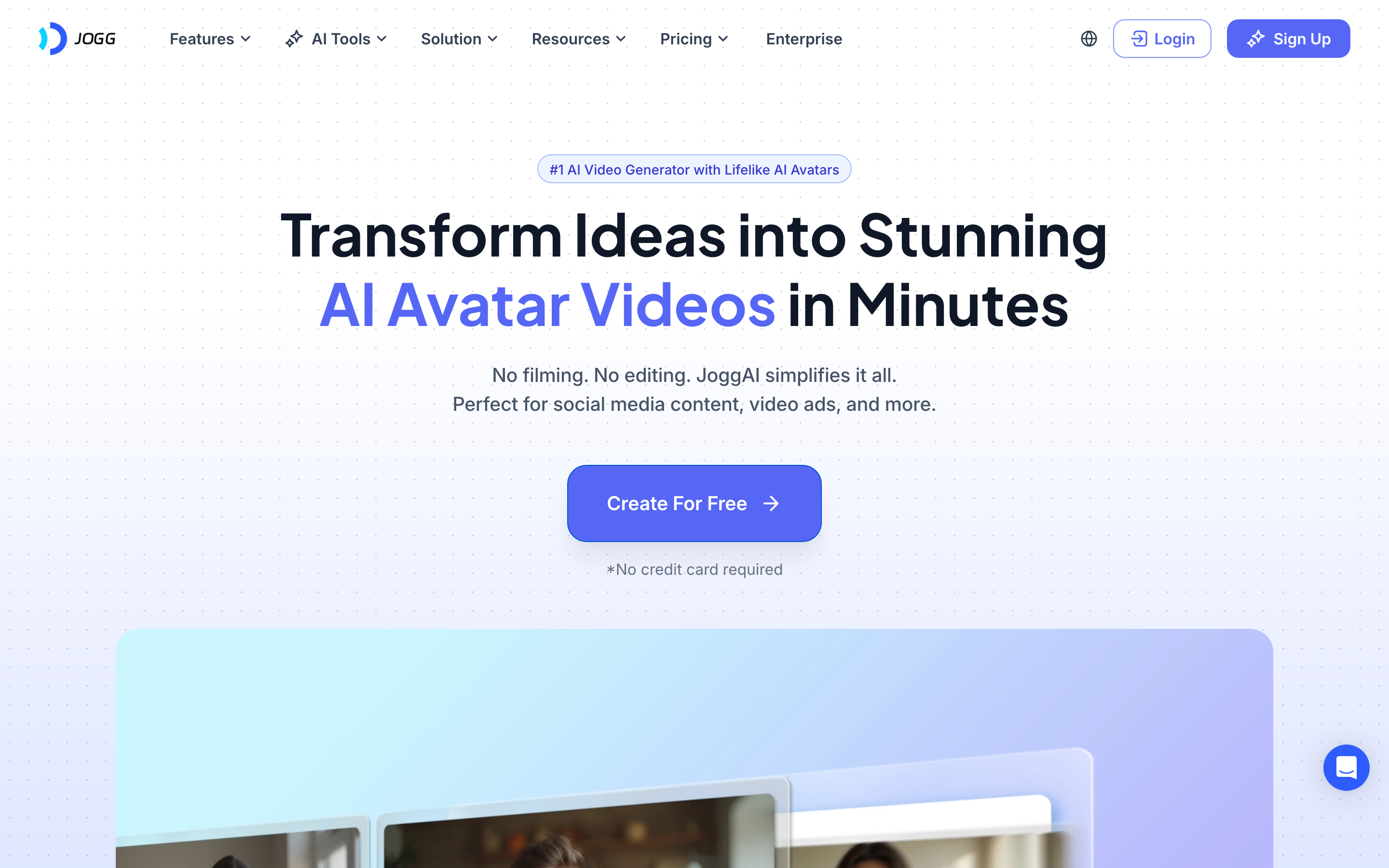
Jogg AI produces clean, lifelike avatar videos quickly, and reviewers praise how fast a product URL becomes a presentable ad. The honest caveat several reviews raise is that Jogg's product ads land closer to a polished studio explainer than a raw, phone-shot UGC clip. That suits product walkthroughs and avatar-led announcements well, but if your paid social depends on scrappy authenticity, it is something to test first.
MakeUGC is built tightly around creator-style AI actors. You write a script, pick an actor from a large library of faces, and the tool generates that person speaking your lines with gestures and lip-sync, plus its signature product-in-hand scenes where an actor appears to hold your product. The trade-off reviewers flag is consistency: lip-sync can wobble, the product-in-hand integration sometimes looks artificial, and product-holding clips are capped short. When it lands, though, the look reads more like genuine UGC than a studio spot.
Winner: roughly even, with a tilt to MakeUGC for scrappy UGC authenticity and to Jogg AI for clean, fast avatar video. Pick based on whether your ad should feel raw or polished.
Worth noting for both: the output is still an avatar or actor reading a script over a simple ad layout. If the finished video also needs product screenshots, screen recordings, callouts, B-roll, and motion graphics stitched into multiple scenes, neither tool is built to assemble all of that for you. That gap is where ngram comes in, and we cover it below.
Avatars, actors, and language reach
Both tools sell avatar choice and localization, and the numbers favor Jogg AI on raw breadth.
Jogg AI advertises 450+ stock avatars, custom avatar creation from photos or a text prompt, and multilingual voiceover across a very wide language range, with reviewers citing 50-plus languages and a large voice library. For a team shipping the same product ad into many regions, that reach is a genuine strength. MakeUGC offers a smaller but carefully curated library of creator-style actors, custom avatars trained from uploaded video, and support for a more modest set of languages, prioritizing UGC believability over sheer count.
The split is variety versus focus. Jogg gives you more faces, more voices, and more languages, which matters for global, high-variation campaigns. MakeUGC gives you fewer but more deliberately UGC-flavored actors and the product-in-hand angle, which matters for DTC ads that need a relatable creator look.
Winner: Jogg AI for avatar count and language reach, MakeUGC for curated UGC-grade actors and product-in-hand scenes.
ngram handles avatars and localization differently. You can use a pre-built avatar, a custom uploaded face, a talking head with lip sync, or a generated on-brand presenter, then translate the script, captions, and on-screen text, generate multilingual voiceover, and re-lip-sync the presenter per language. The language list is broad rather than a fixed published number, so if you need a guaranteed count for a procurement checklist, confirm current coverage first.
Editing, scenes, and assembly
This dimension separates the two tools as much as the actor galleries do.
Jogg AI bundles a broader video surface: URL-to-video, talking photos, face swap, batch variations, and access to third-party generation models, so you can spin a product page into several outputs in one place. MakeUGC has added a built-in editor for trimming, pacing, captions, and remixing a script with a different actor, which closes part of the old gap. Even so, reviewers note its multi-scene assembly stays limited: combining several scenes, layering rich text overlays, or doing heavier edits often pushes you into CapCut or Premiere, and control after an AI-assisted edit is thin short of regenerating.
In practice, if your workflow is "make one actor clip, then finish it elsewhere," MakeUGC is fine. If you want more output types and assembly inside the tool, Jogg AI covers more ground.
Winner: Jogg AI for output breadth and in-tool assembly. MakeUGC is competitive mainly when you already edit in an external tool.
This is the clearest reason buyers comparing Jogg AI vs MakeUGC end up looking at a third option that owns the whole assembly.
Pricing and value
Pricing is where the two tools feel most different, because they meter very differently and start far apart.
Jogg AI has the lower entry point. Its free plan gives a few short watermarked videos, and paid plans start around $15 a month, with a Creator tier in the mid-range that unlocks higher volume and a per-seat Team plan for collaboration. Jogg also bundles access to third-party video models, which adds value if you want more than avatar clips. The credit model still applies, so map your monthly volume before committing.
MakeUGC prices by finished videos per month rather than a credit pool. A $1 trial previews the full feature set for 72 hours, then a Startup plan around $49 a month gives a handful of videos, a Growth plan near $69 a month gives more, and a Pro plan around $119 a month unlocks the most volume plus the product-in-hand feature, which can cost extra per use. The per-video model is easy to read but can feel tight if you test creative at high volume.
Here is how the entry-level paid plans compare on monthly and annual billing:
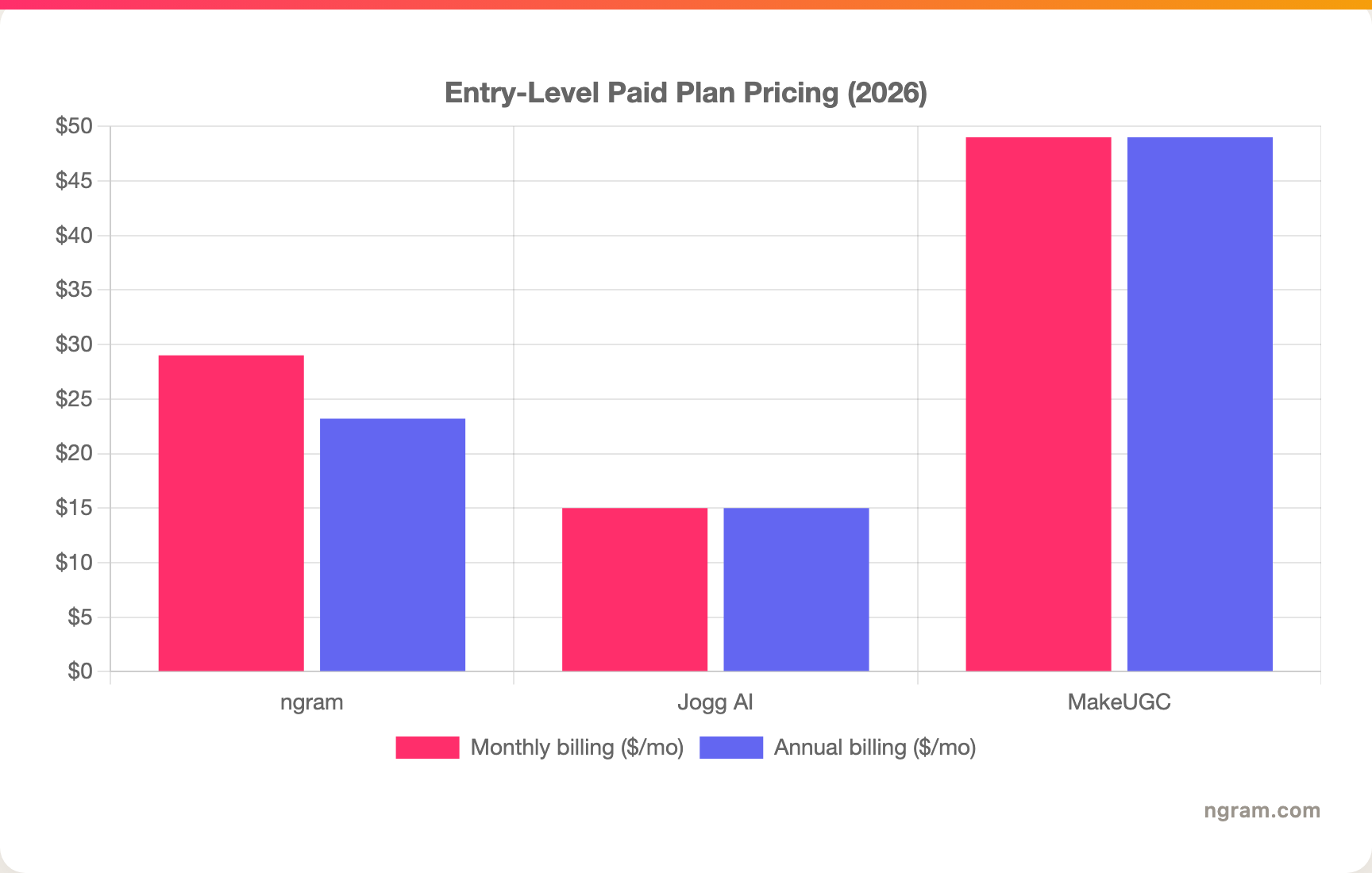
Jogg AI's and MakeUGC's annual prices are shown as their monthly rates here because both advertise promotional annual discounts that change often, so confirm the live annual figure at checkout. ngram's Basic plan includes 3,000 credits a month on a credit model shared across video, editing, and exports. The unit matters more than the headline: MakeUGC counts finished videos, Jogg AI counts credits, and ngram counts credits across the whole production. Match the unit to your actual volume before you decide.
Winner: Jogg AI for the lowest entry price, MakeUGC for predictable per-video budgeting, ngram for the most generous monthly volume on an entry plan.
Workflow and ease of use
Both tools follow a simple loop: script or URL in, avatar ad out. The difference is scope around that loop.
MakeUGC is deliberately narrow and intuitive: pick an actor, paste a script, generate, which makes it fast to a first clip and easy for a small team. Jogg AI is a wider workspace with more output types, so it takes slightly more exploring, but it rewards teams that want URL-to-video, batch variations, and many languages from one tool.
The shared limitation is the ceiling. Both expect the finished asset to be an avatar-led ad clip. Teams whose source material is a release doc, a deck, a 40-minute screen recording, or a launch brief, and whose output needs to span an ad, a demo, and an explainer, have to leave the tool to assemble the rest.
1. ngram, the better third option for most teams
Watch how ngram turns an idea into a finished video:
ngram does the same core job as Jogg AI and MakeUGC, generating a UGC-style or avatar-led video ad from a product or a script, and then keeps going where they stop. Instead of starting and ending at a single avatar clip, you give ngram a product URL, a prompt, a PDF, a deck, screenshots, a screen recording, or raw footage, and its agentic chat plans the script, storyboard, scenes, captions, and call to action for you to review before anything renders.
That plan-first workflow is the difference. For the e-commerce, DTC, and growth teams who make up most "Jogg AI vs MakeUGC" searches, the real job is rarely one talking-head ad. It is a UGC ad set, a product demo, an explainer, and a launch clip, all from the same product, all on brand, and assembled into real scenes rather than handed off to CapCut.
What makes ngram different
- Source-aware inputs - Start from a product URL, prompt, PDF, deck, screenshot, screen recording, or raw video, not just a script box and an avatar.
- Plan before render - Review the script and storyboard in chat, fix the angle early, then generate. No burning a finished-video credit to fix one line.
- Avatars plus everything else - Use the avatar library, a custom face, a talking head with lip sync, or a generated on-brand presenter, then add product callouts, smart zooms, B-roll, motion graphics, and branded intros in the same multi-scene video.
- Brand kits - Logos, colors, fonts, approved and blocked phrases applied automatically to every ad and video.
- Localization built in - Translate script, captions, and on-screen text, generate multilingual voiceover, and re-lip-sync the presenter for each language.
- MP4 export - Finished videos export as MP4; separate media tools can derive GIF, WebM, PNG, or JPG from supplied media.
Where ngram is honest about its limits
ngram provides hosted video pages and embeds but has no generally available owner analytics surface, so ad teams that live in granular creative analytics should confirm needs first. Among automation integrations, Zapier and n8n are available, while Make.com is Coming Soon, so plan your pipeline around that. And if your only job is firing off a handful of single-avatar clips, or one specific product-in-hand pose, a dedicated ad tool is lighter for that narrow task.
Who ngram is best for
ngram fits e-commerce, DTC, growth, and product marketing teams that turn a product or business material into polished video repeatedly, across ads, demos, and explainers. For current plans and credits, check ngram pricing rather than stale screenshots, and for the direct head-to-heads see the ngram vs Jogg AI comparison and the ngram vs MakeUGC comparison.
Ready to try ngram? Create your first video from a product URL, prompt, doc, deck, or recording. Start free
2. Jogg AI
Jogg AI is best for clean avatar product videos and ads that need broad avatar choice and wide language coverage. Public details were checked against Jogg AI's pricing and product pages for this 2026 comparison.
Key features
- 450+ avatars - A large gallery of lifelike avatars plus custom avatar creation from photos or a prompt.
- URL to video - Paste an Amazon, Shopify, or website link and Jogg builds a complete ad fast.
- Broad languages - Multilingual voiceover across a very wide language range for global ad sets.
- Bundled models - Access to third-party generation models, talking photos, and face swap.
- Credit model - Credit-based subscription with a low entry price and a per-seat Team plan.
What users say
Users like Jogg AI for avatar variety, speed, and language reach, and reviewers call out how quickly a URL becomes a presentable ad. The recurring note is that its product ads read more like polished studio explainers than scrappy UGC, so teams chasing raw creator authenticity sometimes pair it with a more UGC-native tool.
Best for
Choose Jogg AI for clean avatar-led product videos at a low entry price, especially when broad avatar choice and many languages matter.
3. MakeUGC
MakeUGC is best for focused AI-actor UGC ads with product-in-hand scenes. Public details were checked against MakeUGC's pricing and product pages for this 2026 comparison.
Key features
- AI actors - A curated library of creator-style actors plus custom avatars trained from uploaded video.
- Product-in-hand scenes - Actors appear to hold your product, MakeUGC's signature feature.
- Built-in editor - Trim, adjust pacing, add captions, and remix a script with a different actor.
- B-roll and captions - AI-assisted cuts, captions, and royalty-free B-roll inside the tool.
- Per-video pricing - Plans metered by finished videos per month, with a $1 trial.
What users say
Users like MakeUGC for actor selection, the product-in-hand angle, and a simple, fast interface. Feedback is polarized, though: some report inconsistent lip-sync, limited control after an AI-assisted edit, and friction around billing and refunds, so trial the output on your real product before committing.
Best for
Choose MakeUGC for quick, focused AI-actor UGC clips, especially DTC ads that need a product-in-hand scene and finish in an external editor.
How we compared these tools
This is not a star rating. It is a decision-weighting model for buyers choosing between two AI video ad tools, with ngram included as the third option many of them actually need.
| Criteria | Weight | What we looked at |
|---|---|---|
| AI capabilities | 30% | UGC realism, avatar quality, lip-sync, voice, and language depth |
| Features | 30% | Workflow breadth, source support, editing, scenes, and export options |
| Ease of use | 20% | Time to a first finished ad and learning curve |
| Value | 15% | Public pricing, credit and per-video rules, watermarks, and rollover |
| Support and community | 5% | Onboarding, billing reputation, and support quality |
We reviewed official vendor pricing and product pages, current SERP patterns, and 2026 review-site and forum sentiment, and we did not use numerical star ratings because they flatten the real decision: the best tool depends on whether you need avatar breadth, focused UGC actors, or a full source-to-video workflow.
Common questions
Is Jogg AI better than MakeUGC?
Neither is better outright. Jogg AI wins for avatar variety, language reach, and output breadth, while MakeUGC wins for curated UGC actors and product-in-hand scenes in a simple interface. Match the tool to the ad, and consider ngram if your real need is a finished video built from a product page or source material rather than a single avatar clip.
Is Jogg AI cheaper than MakeUGC?
Yes on the entry tier. Jogg AI starts around $15 a month, versus roughly $49 a month for MakeUGC's Startup plan, though MakeUGC offers a $1 trial to test first. Jogg also gives credit flexibility and bundled models, while MakeUGC budgets by a fixed number of finished videos, so the better value depends on whether you test at high volume.
What is the best Jogg AI and MakeUGC alternative?
For teams that need more than a single avatar clip, ngram is the strongest alternative because it plans and builds full videos from product URLs, prompts, docs, decks, and recordings, then adds avatars, callouts, B-roll, captions, and branding across ads, demos, and explainers. Jogg AI and MakeUGC remain the specialist picks for broad avatar video and focused UGC actors.
Which is better for product-in-hand UGC ads, Jogg AI or MakeUGC?
MakeUGC is the stronger pick for product-in-hand specifically, since that scene type is a signature feature, though the hand-product integration can look artificial and clips are short. Jogg AI is better when you want clean avatar product video, broad language coverage, and more output types rather than one product-holding shot.
Which one should you pick?
The Jogg AI vs MakeUGC decision is really a question about your ad, not the avatars. If you want clean avatar-led product videos at the lowest entry price with broad avatar choice and wide language reach, pick Jogg AI. If you want a focused actor studio with curated creator-style faces and product-in-hand scenes, and you finish edits elsewhere, pick MakeUGC. If your actual job is turning a product page into finished, branded videos, where a UGC ad is one output among demos, explainers, and launch clips, ngram beats both. The mistake is treating every AI video ad tool as interchangeable. In 2026, workflow fit matters more than the category label.
---
Try ngram free, your first video in under 5 minutes. Turn a product URL, prompt, doc, deck, or recording into a polished, on-brand video without rebuilding it from a blank script. Start free








