

You can start with the same raw screen recording and end up with two very different buying decisions. That is the real Clueso vs Tella question in 2026: do you need a documentation-heavy AI production system, or a fast recorder and editor that makes human-recorded videos look polished?
Clueso deserves credit for turning a rough workflow capture into a product video and a step-by-step article. Tella deserves credit for making screen, camera, and mixed recordings feel clean without asking every teammate to learn a pro editor. ngram sits beside both as the stronger third option when the job is not only recording, but turning a doc, deck, URL, screenshot, or screen recording into a planned, branded business video.
Clueso vs Tella at a glance
| Tool | Best for | Starting price | Main distinction |
|---|---|---|---|
| ngram | Teams that want an AI-planned video from a prompt, PDF, URL, deck, screenshot, raw video, or screen recording | Free, then $29/mo Basic | Agentic script, storyboard, branded scenes, screen-recording polish, voiceover, captions, localization, and MP4 export |
| Clueso | Product, support, L&D, and customer education teams that want video plus written documentation from one recording | 7-day free plan, then $120/mo Starter billed yearly | Turns raw screen recordings into polished videos and auto-generated step-by-step articles |
| Tella | Founders, sales teams, creators, and technical teams recording screen or webcam videos themselves | Free, then $13/mo Pro | Cross-platform recorder with text editing, layouts, auto zooms, instant sharing, and analytics |
Core output: documentation system vs polished recorder
Clueso wins when the output needs to become both a narrated product video and a written guide. Its own pricing and product pages position the product around screen recordings that become polished videos, SOPs, how-to articles, captions, voiceovers, branded templates, and translation. That makes Clueso a strong fit for customer education, L&D, and support teams that keep the same workflows documented across help centers and internal training.
Tella wins when the output is a cleaner version of something a person records. Tella records screen, camera, microphone, and system audio, then lets you edit with text, layouts, audio enhancement, filler-word removal, zooms, blur, captions, links, embeds, and exports. The workflow feels closer to a modern recorder than a documentation engine.
Winner: Clueso for video plus docs. Tella for polished human-recorded video.
Where ngram fits: ngram competes directly when the deliverable is a finished business video. It can ingest a screen recording, but it can also start from a PDF, deck, URL, screenshot, raw video, or prompt, then plan the script, storyboard, scenes, captions, voiceover, CTA, and branded treatment before render. If your team needs a video first and docs second, ngram is the broader production system.
Workflow: AI rewrites the recording vs you shape the recording
Clueso is more automated after capture. You record or upload a workflow, then Clueso rewrites the script, swaps rough narration for AI voiceover, adds zooms, captions, effects, templates, and produces a written article. That is valuable when a team wants a repeatable production line and does not want every PM or support lead to polish their own take.
Tella gives the creator more hands-on control. You can record clips, use an invisible recorder, read from a teleprompter, edit through the transcript, change layouts, add subtitles, blur sensitive details, and generate zoom effects. Tella's workflow is attractive when the speaker matters, the webcam matters, or the recording itself is the source of personality.
Winner: Clueso for automated production from rough captures. Tella for creators who want recording control.
Where ngram fits: ngram starts even earlier than both. The user can ask for a customer-facing launch video, upload the source material, review a storyboard, then edit by chat, visual chat, script editor, scene regeneration, or full timeline. That matters when you do not want to record the whole story perfectly before the tool can help.
Pricing and value: Clueso is a team investment, Tella is easier to start
Clueso's public pricing page lists a 7-day free plan, then Starter at $120 per month billed yearly for 2 users, 6 hours of video exports per year, 360 article exports per year, watermark-free exports, in-app chat support, and up to 2K export. Growth is listed at $200 per month billed yearly with 4 users, 12 hours of video exports per year, 720 article exports per year, and up to 4K export.
Tella's pricing page lists Pro at $13 per month, Premium at $19 per month, and Enterprise with custom pricing. Pro includes the core recorder, webcam, microphone, system audio, teleprompter, up to 4K recording, 6-hour clip length, transcription, and native macOS, Windows, and Chrome apps. Premium is the better fit when public sharing, branding, custom domain, or audience-facing video controls matter.
ngram sits between them on entry price. ngram has a Free plan with 600 one-time credits, then Basic at $29 per month with 3,000 monthly credits, Premium at $59 per month with 10,000 monthly credits, and Ultimate at $299 per month with 50,000 monthly credits and team access. Basic credits refresh monthly with no rollover, while Premium and Ultimate credits roll over one billing cycle, so high-volume teams should model output length and edits before choosing a plan.
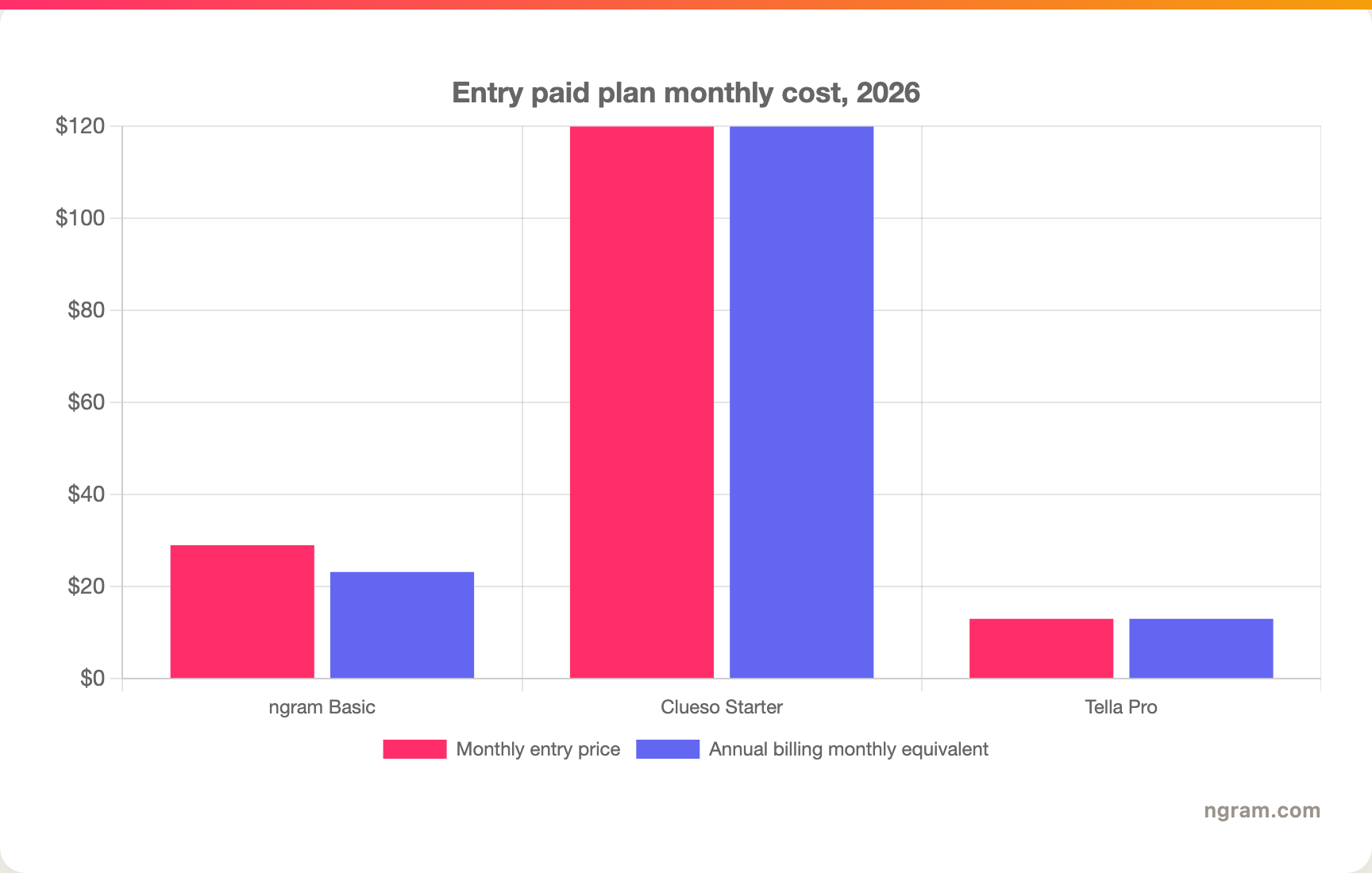
Winner: Tella for low-cost individual entry. Clueso for teams that will use both video exports and article exports. ngram for teams that want source-to-video production beyond a recorder.
Where ngram fits: the price comparison is not one-to-one because ngram is credit-based. The useful test is output volume. If you need many short branded explainers from docs, decks, URLs, and recordings, ngram's Basic or Plus tiers can be easier to justify than paying for a recorder plus a separate AI video workflow.
Sharing, hosting, and analytics
Tella has the clearer share-and-measure story for lightweight video messaging. Its feature page lists instant sharing, embeds, downloads, presentations, and analytics that track who watched, how long they watched, and where viewers dropped off. That makes Tella a practical choice for sales videos, async walkthroughs, and audience-facing updates where link performance matters.
Clueso is stronger when the video sits inside a broader enablement or knowledge workflow. It supports sharing links, embeds, exported videos, and generated articles. It is also the tool in this pair with public SOC 2 Type II and ISO 27001 claims on its site, which matters for larger companies evaluating vendor risk.
Winner: Tella for viewer analytics and lightweight sharing. Clueso for training and documentation distribution with stronger public security proof.
Where ngram fits: ngram has hosted watch pages, an embeddable player, share links, and MP4 export, but no generally available owner analytics surface. ngram does not claim scene-level analytics, watch-time analytics, SOC 2, ISO, or GDPR certification today. If detailed engagement analytics or published compliance certifications are the deciding factor, Tella or Clueso may win that part of the evaluation.
1. ngram
Watch how ngram turns an idea into a finished video:
ngram is the strongest third option when the buyer is asking a broader question than "which screen recorder should we use?" It turns prompts, PDFs, URLs, screenshots, screen recordings, raw videos, decks, and Shopify product URLs into planned business videos. The agent writes the script, builds the storyboard, selects scenes, adds captions and voiceover, applies brand, and gives the user a review point before render.
That makes ngram different from both Clueso and Tella. Clueso starts from the recording and produces video plus documentation. Tella starts from the recording and gives the creator a better editor. ngram can start from the message itself, then create the video with screen-recording polish, callouts, smart zooms, motion graphics, AI voiceover, multilingual variants, brand kits, and MP4 export.
What makes ngram different
- Starts from more sources: prompt, PDF, URL, screenshot, screen recording, raw video, PPTX/PDF deck, and Shopify product URL.
- Plans before render with script, storyboard, scene direction, captions, and CTA.
- Polishes screen recordings with cursor smoothing, click emphasis, dead-air trim, smart zooms, product callouts, captions, transitions, and branded backgrounds.
- Supports avatars, custom faces, talking head lip sync, Eye Contact AI, UGC Animator, Photomotion, AI images, and short AI video clips for b-roll.
- Exports Finished videos export as MP4; separate media tools can derive GIF, WebM, PNG, or JPG from supplied media.
Where ngram is honest about its limits
- ngram provides hosted video pages and embeds; a generally available owner analytics surface is not live.
- ngram does not publish SOC 2, ISO, GDPR, or similar certification claims in the current GTM facts file.
- Public API v1 uses self-service bearer API keys; webhook subscriptions expose `video.completed` and `video.failed`.
- Zapier and n8n are available; Make.com is Coming Soon.
Who ngram is best for
Use ngram if your team needs a finished product demo, launch video, training explainer, sales enablement clip, customer education video, or localized walkthrough from the material you already have. It is especially useful when the input is not only a screen recording, or when brand, story, voiceover, captions, localization, and variants matter as much as capture.
Try ngram when the recording is only one input. Start from a prompt, doc, deck, URL, screenshot, or screen recording, then turn the message into a branded video your team can edit in plain language.
For a direct one-to-one view, compare ngram vs Clueso and ngram vs Tella. You can also model the credit tiers on ngram pricing.
2. Clueso
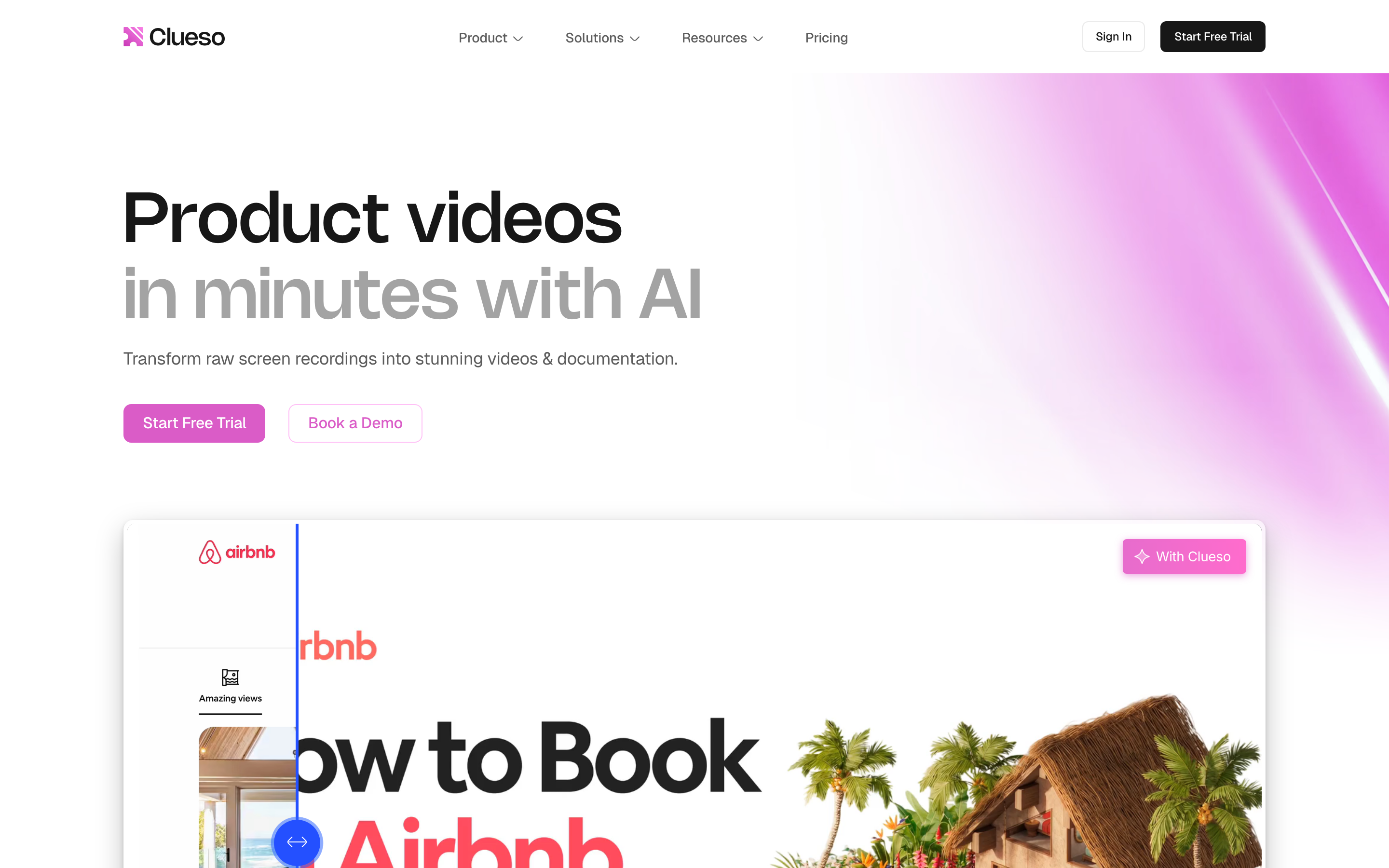
Clueso is built for teams that turn workflows into repeatable learning assets. The product turns a screen recording into a polished video and a step-by-step article, then gives teams AI voiceovers, captions, zooms, templates, translation, article exports, and branded output.
Key features
- AI script rewrite for rough narration and missed points.
- AI voiceovers and caption generation for polished tutorial audio.
- Smart zooms, visual effects, music, intros, outros, and branded templates.
- Auto-generated SOPs, how-to articles, screenshots, and GIFs from recordings.
- Translation, glossary controls, and multilingual output for global enablement teams.
What users say
Public Clueso pages and third-party comparisons frame the same pattern: teams like Clueso when production speed and repeatability matter more than hand-editing every frame. The praise clusters around product videos, training content, customer education, and documentation from one capture. The tradeoff is price and scope. Starter is a meaningful team spend, and teams that only need quick async recordings may not use the article-generation side enough to justify it.
Best for
Pick Clueso if your team owns tutorials, SOPs, help center content, or customer education and needs video plus documentation from the same source recording.
3. Tella
Tella is built for people who want to record themselves, their screen, or both, then make the result look good quickly. It is available across web, Chrome, macOS, and Windows, and its product story centers on recording control, text-based editing, layouts, auto zooms, audio cleanup, subtitles, instant sharing, and exports.
Key features
- Screen, camera, microphone, and system audio recording.
- Web app, Chrome extension, native macOS recorder, and native Windows recorder.
- Text editing, dynamic layouts, multi-clip recording, transitions, and backgrounds.
- Studio Voice audio enhancement, filler-word removal, automatic zoom effects, blur, captions, and annotations.
- Share links, embeds, downloads, presentations, and analytics on paid plans.
What users say
Tella gets the strongest qualitative praise from creators, founders, sales teams, educators, and product people who want attractive videos without a complex editor. The practical appeal is that videos look designed, even when the input is a simple screen or camera recording. The limit is that Tella still expects you to record the substance yourself. If the team wants AI to plan the message or create a finished video from a doc or deck, Tella is not the whole workflow.
Best for
Pick Tella if you need a polished recorder for demos, tutorials, async updates, course clips, sales videos, or creator-style screen and camera content.
How we compared these tools
| Criteria | Weight | What we looked at |
|---|---|---|
| AI capabilities | 30 | Script generation, automated editing, voiceover, captions, zooms, localization, and source-to-video range |
| Features | 30 | Recording, editing, documentation, sharing, hosting, exports, branding, and collaboration |
| Ease | 20 | How much work the user does before and after recording |
| Value | 15 | Entry price, scaling model, included limits, and fit for the buyer's real workflow |
| Support | 5 | Public support, security, enterprise fit, and implementation confidence |
We used each company's public site and pricing pages, the verified competitor CSV, existing ngram product-state and GTM facts, and qualitative public sentiment. We did not use numerical review ratings because ratings compress too many different use cases into one score.
Common questions
Is Clueso better than Tella?
Clueso is better than Tella for teams that need a polished tutorial video and a written SOP from one screen recording. Tella is better for people who want to record screen or camera videos themselves, edit fast, and share or embed the result.
Is Tella cheaper than Clueso?
Yes. Tella's paid Pro plan starts at $13 per month, while Clueso Starter starts at $120 per month billed yearly. The pricing reflects different products: Tella is a recorder and editor, while Clueso packages video creation with documentation output.
What is the best Clueso and Tella alternative?
ngram is the best alternative when your goal is a finished business video rather than only a recording. ngram can start from a prompt, PDF, URL, screenshot, raw video, deck, or screen recording, then produce a script, storyboard, branded scenes, voiceover, captions, and export-ready video.
Which tool is best for product demo videos?
Use Tella when a real person needs to record a screen and camera walkthrough. Use Clueso when the demo should also become a help article or SOP. Use ngram when the demo needs planning, brand treatment, voiceover, source-aware storytelling, localization, and multiple output formats.
Which one should you pick?
Pick Clueso if your team owns customer education, product documentation, L&D, or support enablement and needs videos plus written guides from one recording. Clueso is the higher-cost choice, but it earns that cost when the article output and translation workflow are used regularly.
Pick Tella if you need a low-friction recorder for screen, webcam, or mixed videos. It is the easier choice for founders, sellers, creators, and technical teams that want attractive videos, text editing, zooms, layouts, instant sharing, and analytics without a big production system.
Use ngram if the recording is only part of the job. If your team starts with docs, decks, URLs, screenshots, raw footage, or prompts and needs a polished branded video with storyboard, voiceover, captions, callouts, localization, and editable scenes, ngram is the stronger production workflow.
---
Skip the recorder-first workflow when the real job is a finished video. Start with ngram, bring the source material you already have, and turn it into an on-brand business video you can refine before export.








