
Search for "Camtasia vs Tella" and you find two screen recorders that sit at opposite ends of the same spectrum. Camtasia, made by TechSmith, is a mature desktop app built around a deep, multi-track timeline editor for detailed tutorials. Tella is a browser-first recorder built to make a demo look polished in minutes, with automatic zooms, preset backgrounds and layouts, and a share link generated the moment you finish. This guide compares Camtasia vs Tella across the things that actually decide the purchase: workflow and editing, output and sharing, ease of use, and pricing. It also shows where a third option, ngram, beats both when your real job is a finished, branded video built from your source material.
Both tools are good at what they aim for. Camtasia gives you control and depth; Tella gives you speed and an instantly shareable result. The honest answer to "which is better" is "for which job," so we will pick a winner per dimension instead of crowning one overall.
Camtasia vs Tella at a glance
Here is the short version before the deep dive. ngram sits in the table because for many teams comparing these two, the better question is whether you need a recorder at all, or a system that turns your source material into a finished video.
| Tool | Best for | Starting price | Main distinction |
|---|---|---|---|
| ngram | Teams turning prompts, docs, URLs, decks, and recordings into finished branded videos | Free, paid from $29/mo | Plans and builds the whole video, not just the capture |
| Camtasia | Trainers editing detailed tutorials with a full timeline | Free trial, paid from about $39/yr | Deep multi-track desktop editor with quizzes |
| Tella | Founders and teams sharing quick, good-looking demos | Free trial, paid from $13/mo (Pro) | Browser recorder with auto-zoom and instant share links |
Workflow and editing
This is the clearest split, and it follows directly from how each tool is built.
Camtasia is a real editor that runs on your desktop. After you record, you land on a multi-track timeline with transitions, annotations, behaviors, animations, and embedded quizzes. You can layer callouts over several takes, control timing frame by frame, and compose a long, polished tutorial. That depth is the point, and it is the reason Camtasia feels heavier than a quick recorder, with reviewers noting higher RAM and CPU use during editing and exporting.
Tella deliberately strips the timeline away. It records screen and webcam in the browser, then edits in a clip-based interface with preset layouts, backgrounds, and one-click polish: automatic zooms, AI filler-word removal, and audio enhancement. You can trim and rearrange clips, but you cannot do pixel-level zooms, color grading, motion design, or multi-track audio layering. For a founder recording a product demo, that simplicity is a feature; for a video editor building a detailed course, it is a ceiling.
Winner: Camtasia for editing depth, Tella for speed to a polished result. Pick based on whether the edit is the hard part or something you want to skip.
Worth noting for both: each still starts from a screen recording you capture and narrate live. Neither plans the video for you or builds scenes from a doc, a URL, or a deck. That gap is where ngram comes in, and we cover it below.
Output, sharing, and analytics
This dimension tilts toward Tella, because sharing is built into its core.
Tella hosts your video and generates a share link the moment you finish, with embeds and viewer engagement analytics on its higher tier. Both tools export up to 4K at 60fps, though Tella's Pro plan caps each export at around five minutes while Premium removes the length cap and adds a custom domain, brand colors, and the analytics. For someone who records a demo and wants to drop a link into Slack or an email immediately, this record-and-share loop is genuinely fast.
Camtasia produces a finished file you export and host wherever you like, which suits trainers shipping into an LMS or a website. It does not host the video or report on who watched it; that is simply not its job. The trade-off is that you manage hosting and distribution yourself, while Tella hands you a link and a basic engagement view.
Winner: Tella for built-in hosting, share links, and engagement analytics, Camtasia for full control over a finished export file. One is built to share fast, the other to edit deeply.
ngram approaches this differently. It hosts finished videos on watch pages with an embeddable, white-label player, but it is honest that it has no generally available owner analytics surface or scene-level watch-time or drop-off analytics. If detailed viewer analytics are central, Tella's Premium reporting is more developed today.
Ease of use and platform
Where and how you work matters here, and the two tools are built for different comfort levels.
Tella is browser-first and positioned for "regular people, not video nerds." You are recording within a minute, the interface is intentionally minimal, and the preset layouts do the styling for you. The cautions reviewers raise are the trade-offs of a browser app: occasional lag, weaker offline support, and no built-in screenshot or GIF capture. A desktop app is also available for those who want it.
Camtasia runs on both Windows and Mac and is far gentler than Adobe Premiere or DaVinci Resolve, but it still asks more of you than Tella. There is a timeline to learn, more options to navigate, and a heavier app to run. For mixed teams that need a desktop tool on any operating system, the cross-platform reach is a real advantage.
Winner: Tella for the fastest, simplest start, Camtasia for cross-platform desktop power. A founder who hates editing leans Tella; a trainer who needs control leans Camtasia.
Neither tool removes the underlying loop, though: you record live, you narrate live, and a fluffed take means recording again. ngram changes that by letting you plan and edit in chat before anything renders.
Pricing and value
The two tools price in different shapes, and the headline annual numbers land closer than you might expect.
Camtasia is sold as an annual license, geo-priced so the exact figure varies by region. In USD terms for 2026, a Starter tier sits around $39 a year for watermark-free capture, Essentials around $180 a year for full editing and transcription, Create around $249 a year for AI voiceover and audio cleanup, and Pro around $599 a year for AI avatars, translated captions, and premium assets.
Tella is a per-seat subscription. Pro is $13 a month, with unlimited recording, 4K export capped near five minutes per clip, and Slack integration, and annual billing lowers the effective monthly rate, so check Tella's pricing page for the current annual figure. Premium is $19 a month, removing the export length cap and adding brand colors, a custom domain, and video analytics. A common caution is that the per-seat subscription adds up over time, especially for the Premium tier.
Here is how the entry-level paid plans compare on monthly and annual billing:
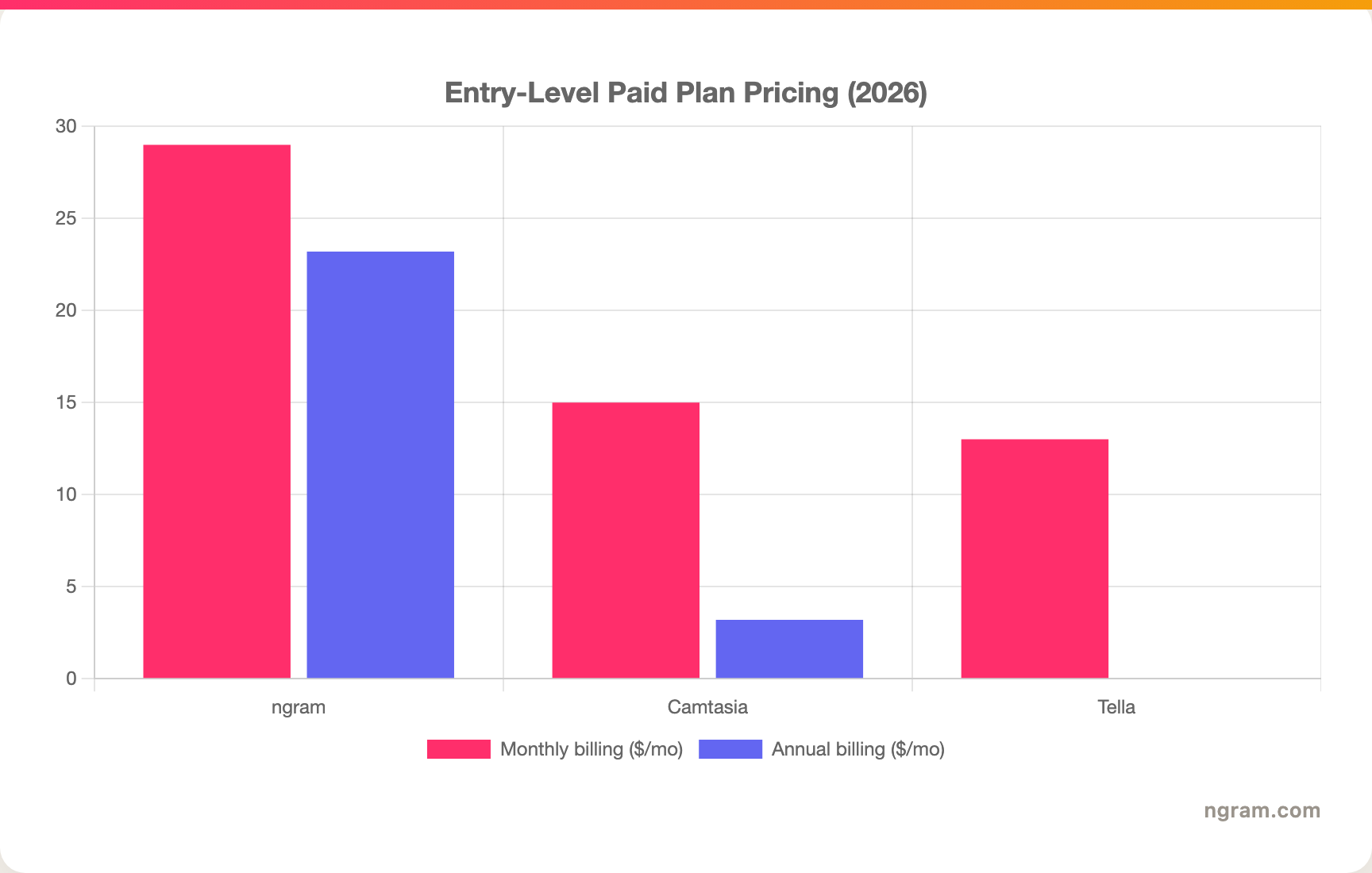
A note on that chart: Camtasia is billed annually only, so its monthly figure is the Essentials annual price divided across twelve months, and its entry Starter tier is cheaper but limited to watermark removal. Tella's Pro is the plan shown at its monthly rate, and includes hosting in the price; its annual rate is lower, so check Tella's pricing page for the current figure. Match the unit and the feature set to your actual use before you decide.
Winner: Tella for the lowest annual entry with hosting included, Camtasia for editing depth per dollar at the high end, ngram for the most generous monthly credit volume on an entry plan. ngram's Basic plan is $29 a month, or $23.20 billed annually, and includes 3,000 credits a month across video, editing, and exports.
1. ngram, the better third option for most teams
Watch how ngram turns an idea into a finished video:
ngram does the same core job Camtasia and Tella do well, polishing a screen recording into a clean, shareable video, and then keeps going where they stop. Instead of recording live and editing afterward, you can give ngram a prompt, a PDF, a URL, a deck, screenshots, a screen recording, or raw footage, and its agentic chat plans the script, storyboard, scenes, captions, and call to action for you to review before anything renders.
That plan-first workflow is the difference. For the product, sales, marketing, and customer-education teams who make up most "Camtasia vs Tella" searches, the real job is rarely "a captured recording." It is a product demo, an onboarding walkthrough, a feature announcement, or a help-center clip that needs the recording plus voiceover, callouts, B-roll, branded intros, and MP4 export, all on brand. ngram applies the same cursor smoothing, click emphasis, dead-air trimming, and smart zooms Tella is known for, then adds the production layer Camtasia makes you build by hand.
What makes ngram different
- Source-aware inputs - Start from a prompt, PDF, URL, screenshot, screen recording, raw video, deck, or Shopify product, not just a live capture.
- Plan before render - Review the script and storyboard in chat, fix direction early, then generate. No re-recording a 20-minute take.
- Recording polish plus everything else - Cursor smoothing, click emphasis, dead-air trim, and zooms, then add avatars, AI voiceover, captions, callouts, motion graphics, and B-roll in the same video.
- Brand kits - Logos, colors, fonts, approved and blocked phrases applied automatically to every video.
- Localization built in - Translate script, captions, and on-screen text, generate multilingual voiceover, and re-lip-sync talking heads per language.
- MP4 export - Finished videos export as MP4; separate media tools can derive GIF, WebM, PNG, or JPG from supplied media, plus hosted watch pages and an embeddable player.
Where ngram is honest about its limits
ngram provides hosted video pages and embeds but has no generally available owner analytics surface, so if detailed engagement reporting is central, Tella's Premium analytics are more developed today. ngram also runs in the browser rather than as a native desktop editor, so power users who want offline desktop control may prefer Camtasia. And its public security certifications are not published yet, so a compliance-bound buyer with a strict SOC 2 or ISO requirement should confirm before standardizing on it.
Who ngram is best for
ngram fits product marketing, growth, sales, customer success, support, and training teams that turn business material into polished video repeatedly. For current plans and credits, check ngram pricing rather than stale screenshots, and for the direct head-to-heads see the ngram vs Camtasia comparison and the ngram vs Tella comparison.
Ready to try ngram? Create your first video from a prompt, doc, URL, deck, screenshot, or recording. Start free
2. Camtasia
Camtasia by TechSmith is best for trainers, educators, and customer-education teams who want one cross-platform app to record and deeply edit detailed tutorials. Public details were checked against the TechSmith Camtasia pricing and product pages for this 2026 comparison.
Key features
- Deep timeline editor - Multi-track editing with transitions, annotations, behaviors, and animations.
- Cross-platform - Runs on both Windows and Mac.
- Interactive quizzes - Embed multiple-choice, true or false, and short-answer questions directly in the video.
- AI add-ons - Voiceover generation, audio cleanup, AI avatars, and translated captions on higher tiers.
- Premium assets - Access to a large library of templates, music, and stock on the Pro tier.
What users say
Users praise Camtasia as one of the most approachable full editors for tutorials and training, far gentler than Premiere or DaVinci. The recurring cautions are weight, with higher RAM and CPU use during editing, and the lack of built-in hosting, since you export and distribute the file yourself. Trainers who value editing control over a fast share loop tend to stay with it.
Best for
Choose Camtasia when deep editing control and interactive quizzes matter more than instant sharing, on Windows or Mac.
3. Tella
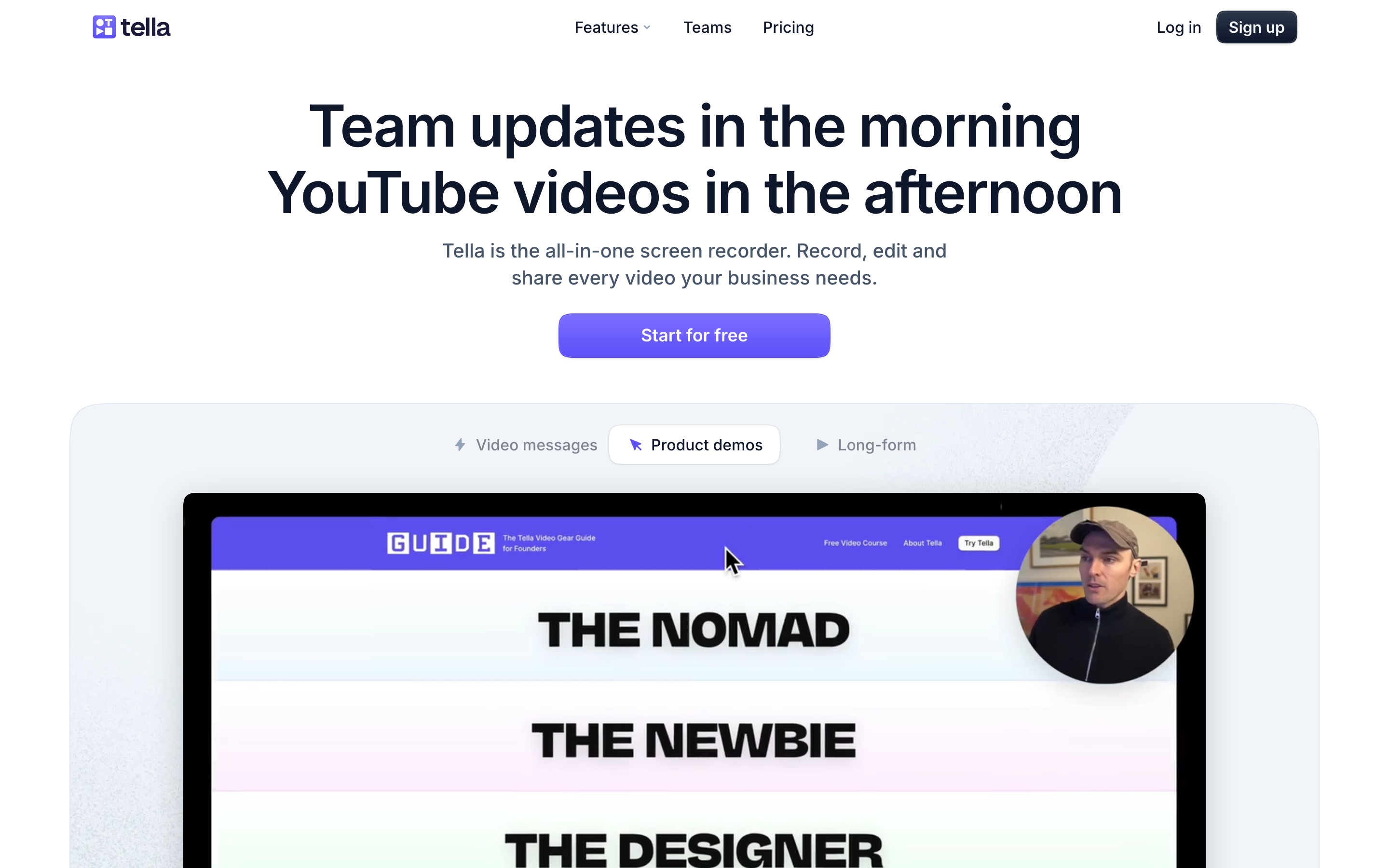
Tella is best for founders, creators, and teams who want good-looking demos and async videos they can record and share fast, without learning a timeline. Public details were checked against the Tella pricing and product pages for this 2026 comparison.
Key features
- Browser recording - Capture screen, webcam, or both directly in the browser, with a desktop app available.
- Automatic polish - Auto-zoom, preset layouts, backgrounds, AI filler-word removal, and audio enhancement.
- Instant share links - Hosted video with a generated link, embeds, and engagement analytics on the higher tier.
- 4K export - Up to 4K at 60fps, with the export length cap removed on Premium.
- Brand customization - Logo, brand colors, and a custom domain on Premium.
What users say
Reviewers love Tella for how quickly it turns a recording into something that looks professional, and for the record-and-share-a-link workflow that founders and sales teams favor. The common cautions are the clip-based editor's limits for long or advanced edits, the browser-first quirks like occasional lag, and a per-seat subscription that adds up at the Premium tier.
Best for
Choose Tella when you want quick, stylish demos and async videos with an instant share link, especially as a founder or small team.
How we compared these tools
This is not a star rating. It is a decision-weighting model for buyers choosing between two screen recorders, with ngram included as the third option many of them actually need.
| Criteria | Weight | What we looked at |
|---|---|---|
| Editing and features | 30% | Timeline depth, automatic polish, and AI tools |
| Output and breadth | 30% | Source support, hosting, sharing, analytics, and export |
| Ease of use | 20% | Time to a first finished video and learning curve |
| Value | 15% | Public pricing, license model, watermarks, and hosting |
| Platform and support | 5% | Operating systems, collaboration, and resources |
We reviewed official vendor pricing and product pages, current SERP patterns, and 2026 review-site and Reddit sentiment, and we did not use numerical star ratings because they flatten the real decision: the best tool depends on whether you need deep editing, fast shareable demos, or a full source-to-video workflow.
Common questions
Is Camtasia better than Tella?
Neither is better outright. Camtasia wins for deep multi-track editing, quizzes, and cross-platform desktop control, while Tella wins for fast, good-looking demos with instant share links and built-in hosting. Match the tool to the job, and consider ngram if your real need is a finished video built from source material rather than a captured recording you edit by hand.
Is Tella cheaper than Camtasia?
At entry level, Tella's Pro plan is $13 a month with hosting included, and annual billing lowers that further, which puts it in the same neighborhood as Camtasia's Essentials at around $180 a year. The costs land near each other, but Tella bundles hosting while Camtasia gives you a deeper editor; the cheaper choice depends on whether you value the share link or the timeline.
What is the best Camtasia and Tella alternative?
For teams that need more than a recorder, ngram is the strongest alternative because it plans and builds full videos from prompts, docs, URLs, decks, screenshots, and recordings, then adds recording polish, voiceover, captions, and branding. Camtasia and Tella remain the specialist picks for deep manual editing and fast, stylish demos.
Which is better for product demos, Camtasia or Tella?
Tella is the faster pick for a quick, polished demo you record and share as a link, while Camtasia is better when the demo is a long, heavily edited tutorial you host yourself. ngram fits when the demo should be planned from a product URL, a deck, or a recording and shipped on brand in an MP4 export.
Which one should you pick?
The Camtasia vs Tella decision is really about whether you want to edit deeply or share fast. If you produce detailed tutorials and need deep multi-track editing, quizzes, and cross-platform desktop control, pick Camtasia. If you are a founder or small team who wants a good-looking demo recorded and shared as a link in minutes, pick Tella. If your actual job is turning real business material, a doc, a URL, a deck, or a rough recording, into a finished, branded video where the capture is one part among voiceover, callouts, and B-roll, ngram beats both. The mistake is treating every screen tool as interchangeable. In 2026, workflow fit matters more than the category label.
---
Try ngram free, your first video in under 5 minutes. Turn a prompt, doc, URL, deck, or screen recording into a polished, on-brand video without rebuilding it from a blank timeline. Start free








