

A quick screen recording can answer a Slack thread in two minutes. A product tutorial, sales walkthrough, or customer education video has a higher bar. That is the split behind most Loom vs ScreenPal searches in 2026: Loom is built for fast async video messages, while ScreenPal is built for screen capture, editing, hosting, quizzes, and lower-cost training workflows.
ScreenPal is the product formerly known as Screencast-O-Matic. The rebrand is live, and the platform now positions itself as screen recording, editing, hosting, interactive video, AI captions, translation, and developer recording tools under the ScreenPal name.
Both tools are legitimate picks, but they solve different moments. Loom wins when the job is speed: record, share a link, move on. ScreenPal wins when the job needs more capture control, hosted lessons, quizzes, polls, or a cheaper paid entry point. ngram belongs in the comparison because many teams start with a recording but need the final asset to look like a planned business video, with a script, storyboard, voiceover, captions, callouts, brand kit, and exports for multiple channels.
Loom vs ScreenPal at a glance
Here is the scanner version before the deeper breakdown. ngram is included because it covers the polished-video slice that often sits after the recording step.
| Tool | Best fit | Starting paid price | Main tradeoff |
|---|---|---|---|
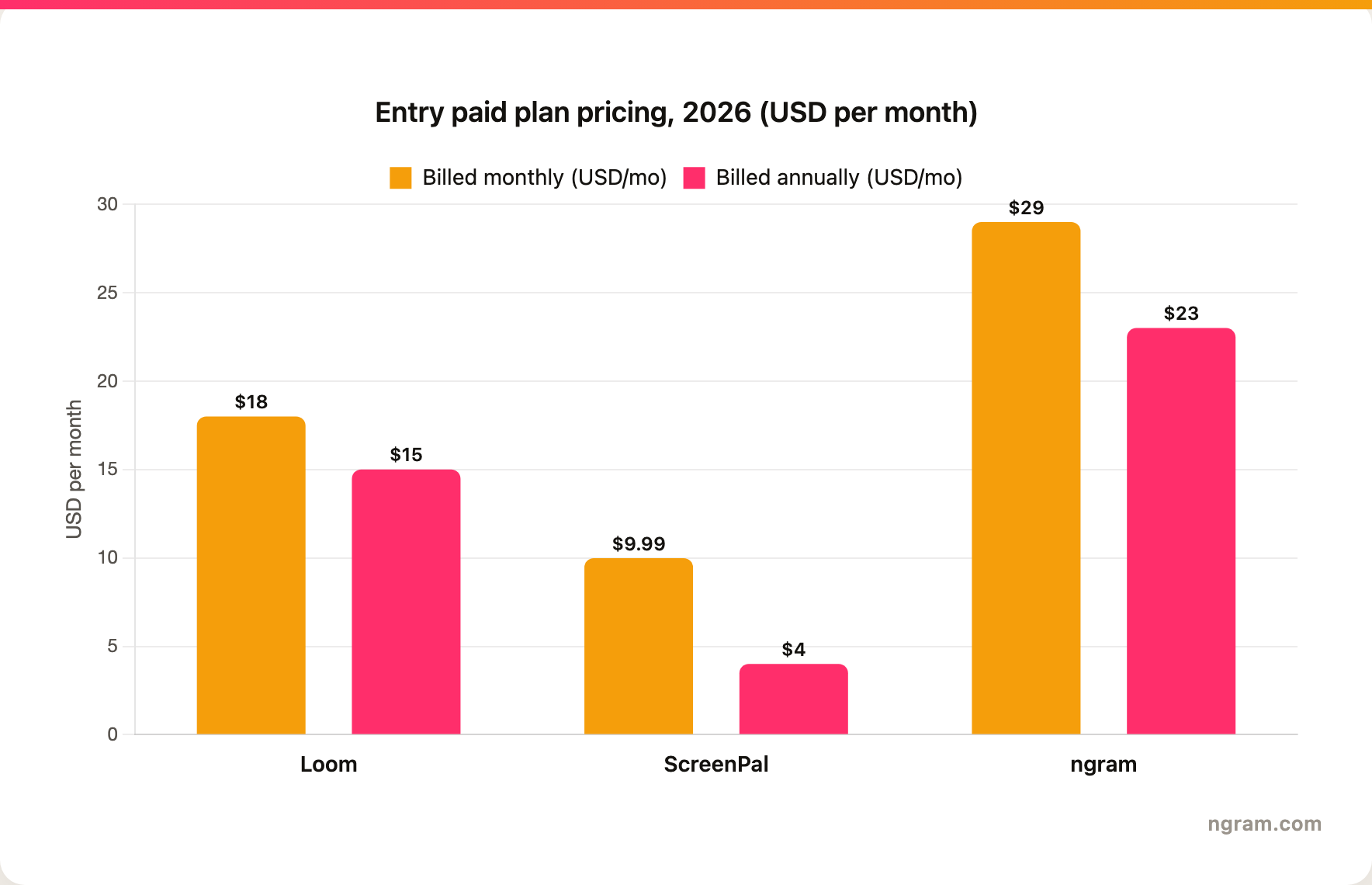
| Loom | Async team updates, quick bug reports, design reviews, and short internal walkthroughs | Business from $18/user/mo monthly ($15 annual), Business + AI from $24/user/mo | Fast sharing beats deep editing, but customer-facing polish often needs another workflow |
| ScreenPal | Educators, trainers, support teams, and creators who need recording, editing, hosting, quizzes, and polls | Solo Deluxe from $9.99/mo monthly ($4 annual) | More toolkit depth, but the workflow stays closer to manual recording and editing |
| ngram | Teams turning recordings, docs, decks, URLs, prompts, screenshots, or raw footage into polished business videos | Basic from $29/mo monthly ($23 annual) | Not the fastest record-and-send messenger, but stronger when the output needs script, brand, voiceover, and formats |
Core job: async message or complete recording suite
Loom is best understood as async video messaging. The public Atlassian Loom page frames Loom around recording screen and camera updates, sharing them with a link, adding transcripts, and pushing work into Atlassian workflows. Loom's AI support pages describe AI titles, summaries, action items, docs, text messages, and Jira issue creation from recordings. That makes Loom strong when a recorded message replaces a meeting, a bug report, or a long thread.
ScreenPal starts from the same screen and webcam capture job, then stretches further into editing and hosting. Its screen recorder page highlights screen, webcam, audio, drawing, and annotation during capture. Its broader product pages add editing, channels, sharing, quizzes, polls, captions, translation, text-to-speech voiceover, and video hosting. ScreenPal feels less like a message app and more like a full screen video workstation for educators and training teams.
Winner: Loom for quick async messages. ScreenPal for a broader screen recording, editing, and hosting toolkit.
Where ngram fits: ngram should enter the shortlist when the video needs to become a finished business asset, not only a recorded update. The product can start from a screen recording, raw video, prompt, URL, PDF, deck, screenshot, or Shopify product URL, then generate a script, storyboard, voiceover, captions, callouts, smart zooms, brand treatment, and MP4 exports. That is a different job from Loom's fastest message loop and ScreenPal's classroom-friendly recording suite.
Workflow: share now or polish before publishing
Loom's workflow is intentionally short. Record a screen and camera message, let Loom create a transcript and AI summary, then share the link. For engineering teams, Loom's AI bug-reporting flow can turn a recording into a populated Jira work item. For distributed teams already living in Atlassian tools, that is a real advantage.
ScreenPal asks for more choices after capture. You can trim, crop, blur, overlay text, add captions, create channels, host the video, and add interaction with quizzes or polls. That matters when the audience is a class, a training cohort, or customers who need a reusable walkthrough rather than a one-off message.
Where ngram fits: ngram is the better workflow when the recording is raw material for a finished product demo video, launch clip, training video, or support tutorial. The user can approve the storyboard before render, then edit through chat, visual chat, the script editor, scene regeneration, or the timeline editor. If the buyer's real pain is post-recording polish, ngram replaces several manual steps after capture.
Winner: Loom for the shortest path from record to link. ScreenPal for a richer post-recording workflow. ngram for turning the same source material into a finished business video.
AI features: meeting replacement versus production help
Loom's AI is aimed at making recorded messages easier to consume and reuse. Atlassian's Loom AI documentation lists generated titles, summaries, chapters, tasks, follow-up text, docs from recordings, and Jira issue creation. The AI layer supports async communication more than cinematic editing.
ScreenPal's AI is more media-production oriented. The ScreenPal AI page describes speech-to-text captions and transcripts, text-to-speech voiceovers, video translation, background removal, and AI video generation. Some of those features sit higher in ScreenPal's plan stack, so buyers should check the exact plan before assuming every AI feature is included at the entry price.
ngram's AI sits closer to production planning and editing. It writes the script, builds the storyboard, generates voiceover, applies captions, adds motion graphics and callouts, polishes screen recordings with dead-air trim, cursor smoothing, click emphasis, smart zooms, step labels, section transitions, and branded backgrounds, then exports a finished MP4. That makes ngram the more complete answer when a team wants a finished video instead of a faster transcript or a manual editor with AI helpers.
Winner: Loom for AI summaries and Atlassian work handoff. ScreenPal for AI captions, voice, translation, and editing helpers. ngram for AI planning, screen-recording polish, and finished business video generation.
Education, hosting, and developer use cases
This is where ScreenPal pulls away from Loom for some buyers. ScreenPal's product line includes hosted channels, video assignments, interactive quizzes and polls, and an API or SDK for adding screen recording to another product. The ScreenPal SDK page is especially important for developers who want embedded recording rather than a standalone recording app.
Loom has its own enterprise and integration strengths, but the default job is still asynchronous communication. It fits sales follow-ups, product updates, async standups, design reviews, and bug reports. It is less specialized for classroom activities, interactive videos, and embedded recording inside another app.
ngram should not be positioned as a replacement for ScreenPal's quizzes, polls, or developer screen-recording SDK. ngram does have self-service bearer API-key and webhook access, a public MCP endpoint, hosted video pages, embeddable players, and Zapier as a live integration, but its strongest fit here is finished video production from the recording, not classroom interactivity.
Winner: ScreenPal for education, interaction, hosting, and embedded recording. Loom for async team communication. ngram for business videos that need polished output from source material.
Pricing and value
Loom's public pricing page lists a free Starter plan, Business at $18 per user per month billed monthly (about $15 per user per month billed annually), and Business + AI at $24 per user per month ($20 annually). Enterprise pricing is custom. That makes Loom affordable for teams that primarily need async messages, but the per-user pricing climbs when everyone needs paid seats and AI features.
ScreenPal's plans page lists Free, Solo Deluxe at $9.99 per month or $4 per month billed annually, Max at $10 per month billed annually (the tier where most of the AI features live), Team Business at $8 per user per month billed annually, and higher team plans. That is the lowest paid entry point in this comparison. The buyer question is whether low-cost recording and hosting is enough, or whether the output still needs a separate production pass.
ngram Basic starts at $29 per month, or $23 per month billed annually, with 3,000 monthly credits. Premium is $59 per month, Ultimate is $299 per month, and Enterprise is custom. Credits cover AI video generation and AI editing only; exports are unlimited and consume no credits. Premium and Ultimate credits roll over one billing cycle, annual credits roll over until renewal, and Basic refreshes monthly without rollover. ngram costs more than ScreenPal's entry plan because it is priced for generated and edited business video, not only recording.
Winner: ScreenPal for the cheapest paid capture plan. Loom for teams already standardizing on Atlassian async video. ngram for teams that want the cost to include script, storyboard, polish, voiceover, brand, and MP4 export.
Which tool should you choose?
Pick Loom if your team needs quick async updates, design reviews, engineering handoffs, bug reports, or short sales notes. The point of Loom is to reduce meeting and writing overhead, not to replace a full production workflow.
Pick ScreenPal if you need an affordable recorder with more editing, hosting, education, and interaction depth. ScreenPal is especially sensible for teachers, trainers, support teams, and teams that want quizzes, polls, channels, mobile apps, and developer screen recording.
Use ngram if the recording is headed to customers, prospects, a launch page, a help center, sales enablement, or a training module and cannot look like a raw take. ngram is a stronger third option when you want to turn a recording into a scripted, narrated, branded training video or demo, then export it for multiple channels.
For a deeper ngram-first comparison, read ngram vs Loom and ngram vs ScreenPal. If you already have footage, the ngram video editor page explains the editing surface after the agent creates the draft.
Methodology
We compared Loom and ScreenPal across the dimensions that decide screen-recording purchases: capture workflow, editing depth, AI features, hosting, education workflows, developer options, pricing, and the type of video each tool is meant to produce. Official product pages and pricing pages were weighted above review aggregators or third-party summaries. Every ngram claim reflects what the product actually ships today: self-service bearer API keys for Public API v1, Zapier and n8n, hosted pages and embeds, and no unsupported advanced analytics; Make.com is Coming Soon.
FAQ
Is Loom better than ScreenPal?
Loom is better for quick async video messages, especially in Atlassian-heavy teams. ScreenPal is better when the same screen recording needs more editing, hosting, quizzes, polls, or classroom-style workflows.
Is ScreenPal still Screencast-O-Matic?
ScreenPal is the current brand for the product formerly known as Screencast-O-Matic. The old name still appears in some searches and reviews, but the live product and pricing now use ScreenPal.
Which is cheaper, Loom or ScreenPal?
ScreenPal is cheaper at the entry paid tier. ScreenPal Solo Deluxe is listed at $9.99 per month, or $4 per month billed annually, while Loom Business is listed at $18 per user per month billed monthly (about $15 annually, since annual saves roughly 17 percent) and Business + AI at $24 per user per month. ScreenPal stays cheaper on either billing basis.
When should I use ngram instead of Loom or ScreenPal?
Use ngram when the output needs to be a polished business video rather than a raw recording or lightly edited capture. ngram can turn a screen recording, URL, deck, PDF, prompt, screenshot, or raw video into a planned, narrated, branded video with captions, callouts, smart zooms, and MP4 export.








