

CapCut vs Descript is a video editor comparison, but the two products do not start from the same place. CapCut starts with clips, templates, effects, captions, and social formats. Descript starts with recorded speech and turns the transcript into the editing surface. That split matters more than any feature checklist.
The short answer: pick CapCut for fast social edits, mobile-first production, TikTok or Reels style videos, and hands-on timeline control. Pick Descript for podcasts, interviews, webinars, screen recordings, tutorials, and any project where cutting words is faster than scrubbing through a timeline.
Use ngram when the real job starts before either editor. If your team has a product page, release note, deck, PDF, support article, screenshot set, raw recording, or rough prompt, ngram can turn that source into a planned business video with script, storyboard, voiceover, captions, brand treatment, and editable scenes. That is a narrower claim than "ngram replaces both," and it is the honest way to read this category.
For this guide, we checked CapCut's official Standard vs Pro guide, CapCut's AI video generator page, CapCut's online editor page, Descript's pricing page, Descript's Edit like a doc help article, and Descript's video editing page on June 19, 2026. We also reviewed current comparison pages and Reddit threads for user language. We do not use numerical review scores.
CapCut vs Descript at a glance
Here is the scanner version before the deep dive. ngram sits in the table because many teams comparing these two are really choosing between a social editor, a transcript editor, and a source-to-video workflow.
| Dimension | CapCut | Descript | Where ngram fits |
|---|---|---|---|
| Best fit | Short-form social video, creator edits, template-led clips, mobile editing, and visual effects. | Podcasts, interviews, webinars, tutorials, screen recordings, and spoken-word editing. | Business videos made from prompts, PDFs, URLs, decks, screenshots, recordings, or raw video. |
| Starting point | Clips, templates, mobile footage, effects, captions, AI video tools, and social formats. | Recorded audio or video that becomes an editable transcript. | Source material plus intent, then script and storyboard before render. |
| Editing model | Timeline and scene editing across web, desktop, and mobile. | Transcript-first editing with timeline controls available behind the text workflow. | Agentic chat, visual edits, script edits, scene regeneration, and timeline-v2 after the draft. |
| AI strengths | AI video maker, avatars, templates, auto captions, background removal, text-to-speech, and filler-word tools. | Underlord, Studio Sound, filler-word removal, clips, avatars, voice tools, translation, and transcript operations. | Source analysis, script generation, storyboard planning, voiceover, captions, brand kits, variants, and export. |
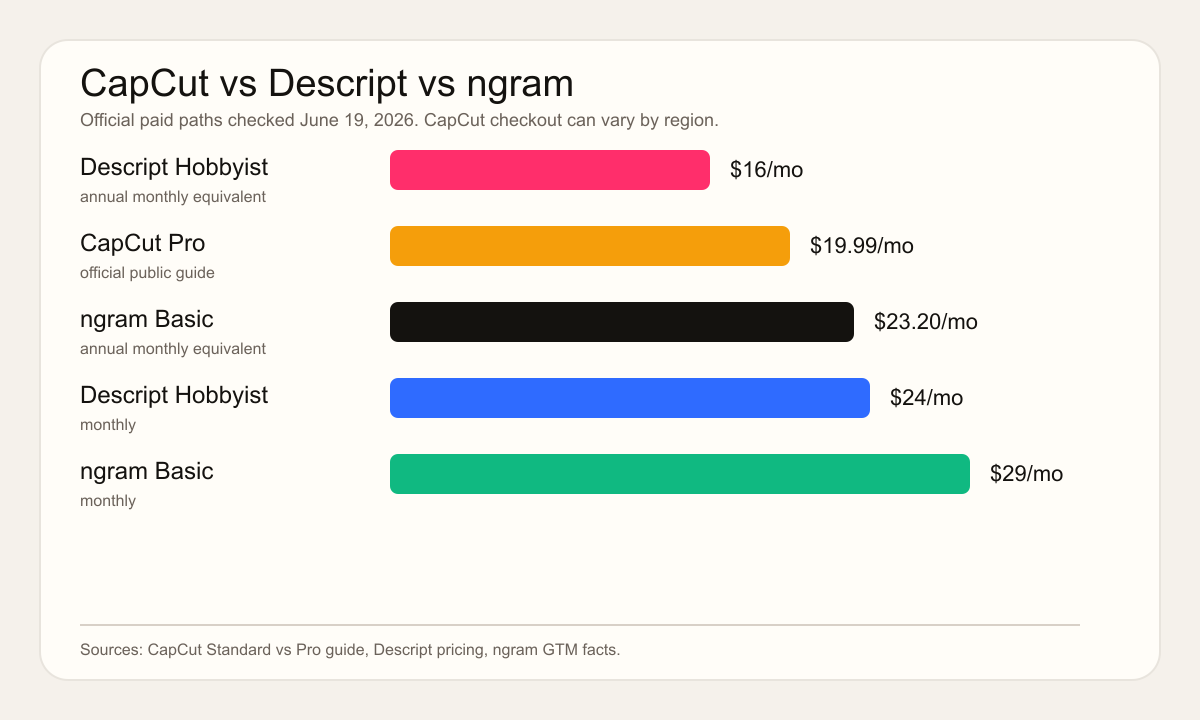
| Pricing snapshot on 2026-06-19 | CapCut Pro is listed at $19.99/mo or $179.99/yr in its public guide. CapCut does not anchor a universal Standard checkout price, and warns rates vary by region and platform. | Free plan, Hobbyist at $24/mo monthly or $16/mo annual, Creator at $35/mo monthly or $24/mo annual, Business at $65/mo monthly or $50/mo annual. | Free plan, Basic at $29/mo, Premium at $59/mo, Ultimate at $299/mo, with annual discounts and credits. |
| Choose it when | The video needs social pace, creator effects, mobile editing, and quick visual polish. | The recording already exists and the fastest path is editing what was said. | The team needs the message planned and rendered into a finished business video. |
Watch how ngram turns source material into a finished video:
Quick verdict
Pick CapCut if the work is mostly TikTok, Reels, Shorts, creator ads, quick product clips, or template-based social video. CapCut gives you a faster path to visual momentum, especially when you want effects, captions, background removal, text-to-speech, and mobile editing in the same workflow.
Pick Descript if the work is mostly spoken media. Descript's transcript model is the reason it remains hard to beat for podcasts, interviews, webinars, courses, and founder videos. If deleting a sentence should delete the corresponding media, Descript is the cleaner fit.
Use ngram if the asset does not exist yet. ngram is not a creator effects app and it is not a full transcript-first podcast editor. ngram is better when the team starts with source material and still needs the message, structure, scenes, voiceover, captions, brand treatment, and output versions.
CapCut: social video speed and visual control

CapCut is strongest when the output is a social video and the editor wants quick visual control. CapCut's online editor page describes a workflow that spans browser, desktop, and mobile, with speech-to-text, text-to-speech, transcribe video, templates, and basic editing tools. Its app-store copy and product pages also lean into effects, fonts, keyframes, slow motion, chroma key, stabilization, auto captions, motion tracking, and background removal.
CapCut has also moved beyond manual clip editing. Its AI video generator page lists AI avatars, AI templates, one-click text-to-video, AI brainstorming, script generation, voiceover choices, scene-by-scene building, synced subtitles, music, and export controls. Its background remover page adds one-click subject detection and chroma key. Its subtitle page positions auto captions as a core time-saver for web and desktop users.
The tradeoff is that CapCut is still mostly an editor. It can automate pieces of production, but you usually arrive with a concept, clips, template direction, and social format in mind. For a creator, that is a feature. For a product marketer trying to turn release notes into a launch video, that can still mean a lot of writing, ordering, and review work outside the editor.
Descript: transcript editing for recorded media

Descript's core advantage is that the transcript is linked to the media. The official Edit like a doc article says Descript transcribes your file, links the transcript to the audio or video, and updates the media when you delete or move words. That is why Descript feels natural for spoken-word projects. You can read the edit instead of hunting for it on a timeline.
Descript has layered AI on top of that model. Its video editing page lists text-based video editing, Underlord, filler-word removal, Studio Sound, Regenerate, AI avatars, translation, captions, collaboration, and Mac, Windows, and web access. Descript's Studio Sound page focuses on background-noise removal, echo removal, and voice enhancement. Its audio AI help page covers Edit for Clarity, Studio Sound, Remove Filler Words, Remove Retakes, Shorten Word Gaps, and Add Chapters.
The tradeoff is starting point. Descript is best after you have recorded or uploaded media. It can generate media and Underlord can act on your direction, but the product's center of gravity is still editing a recording by editing language. If the job is a new product explainer from a doc, URL, or deck, you will spend more time deciding the story before Descript becomes useful.
Workflow: timeline vs transcript
CapCut wins when the work is visual and clip-first. You are trimming, stacking, adding overlays, swapping templates, applying captions, removing backgrounds, testing effects, and exporting for a social format. Its official mobile workflow asks you to start a project, import clips, add audio, text, effects, transitions, stickers, captions, overlays, and then export with resolution and frame-rate controls.
Descript wins when the work is language-first. You are cutting sentences, removing tangents, tightening pauses, cleaning audio, making clips from a webinar, or handing a transcript to a reviewer. The reviewer can understand the edit by reading it, which is much harder in a visual timeline.
ngram fits before both workflows. It reads source material, extracts intent, writes a script, maps a storyboard, plans scenes, generates voiceover and captions, applies a brand kit, and then lets the user edit through chat, visual controls, script edits, scene regeneration, or timeline-v2. That is why ngram is a better third option for launch videos, training videos, sales enablement clips, and customer education videos that do not yet have a script.
Winner: workflow: CapCut wins for visual timeline edits and social clips. Descript wins for transcript-first spoken-media editing. ngram wins only when the source material still needs script, storyboard, voiceover, captions, and brand treatment.
AI features and automation
CapCut's AI stack is broad and social-friendly. CapCut's official pages list AI video making, avatars, script generation, templates, auto captions, text-to-speech, background removal, filler-word removal, AI voice generation, voice filters, and long-video-to-shorts tools. That is useful when the editor wants a faster path from clips to a polished social asset.
Descript's AI is more production-assistant oriented. Descript's Underlord help article calls Underlord an agentic co-editor that can act on your behalf. The public Underlord page shows jobs such as editing down a webinar, creating promo clips, hiding jump cuts with zooms, and creating a video from a LinkedIn post. Public Reddit threads praise the transcript model, but they also show why editors still supervise filler-word removal, gap shortening, and automated cuts.
ngram's automation is built around the plan, not just the edit. The agent extracts audience, goal, channel, and key messages from the prompt and sources. It then creates the script and storyboard before render, adds voiceover and captions, applies brand settings, and supports variants for channels, personas, and languages. That makes ngram the better option when the hard part is figuring out what the video should say.
Winner: AI automation: CapCut for social video shortcuts, Descript for transcript cleanup, and ngram for source-to-finished-business-video work.
Captions, audio, and spoken content
CapCut is strong on visible captions and fast social polish. Its subtitle page describes AI-generated synchronized captions, and its editor pages pair captions with templates, text overlays, sound effects, voice tools, and exports across devices. If the main job is a short captioned video for a feed, CapCut feels fast.
Descript is stronger when audio is the spine. Studio Sound, transcript editing, filler-word removal, retake removal, word-gap shortening, and chapter generation are aimed at people cleaning a recorded conversation. Reddit discussions are mixed in a useful way: users like the speed of text editing, but many still review automated filler and gap edits by hand because aggressive cleanup can damage timing or meaning.
ngram adds captions to every generated video by default and can generate AI voiceover from the script. It can also translate scripts, captions, and on-screen text for localized variants, then regenerate avatar or talking-head lip sync when that workflow applies. The key difference is that ngram plans captions and voiceover as part of the video, not as cleanup after recording.
Winner: spoken media: Descript. Winner: captioned short social clips: CapCut. Winner: narrated business videos from source material: ngram.
Pricing and value on June 19, 2026
CapCut's pricing is the least clean to compare because rates can vary by region, platform, taxes, and promotions. CapCut's own Standard vs Pro guide lists Pro at $19.99/mo, $179.99/yr, and team plans around $24.99/mo, then tells readers to check the platform in their country for current rates. Lower-tier pricing is harder to cite because CapCut pricing threads show checkout variance, so treat Standard as regional and platform-dependent rather than a universal public price.
Descript is easier to read. The current Descript pricing page lists Hobbyist at $24/mo monthly or $16/mo annual, Creator at $35/mo monthly or $24/mo annual, and Business at $65/mo monthly or $50/mo annual. The same page lists media hours, AI credits, export resolution, Underlord access, Studio Sound, filler-word removal, AI speech, stock media, Brand Studio on Business, and translation and dubbing on Business.
ngram is credit-based. The Free plan has 600 one-time credits. Basic is $29/mo with 3,000 monthly credits. Premium is $59/mo with 10,000 monthly credits. Ultimate is $299/mo with 50,000 monthly credits. Annual billing is 20% off. Credits cover usage-heavy work such as AI video generation and AI editing, while exports are unlimited and some features are unlimited by tier.
Winner: low-cost social editing: CapCut. Winner: predictable transcript editing: Descript. Winner: teams paying to avoid planning and assembly labor: ngram.
Team, brand, and governance
CapCut has team and cloud features, especially for teams coordinating social assets. Its cloud collaboration page describes shared projects, team editing, templates, storage, and real-time collaboration. That is useful for a creator team, but the product still reads as social-first rather than brand-governance-first.
Descript supports collaboration around production. Its video editing page mentions real-time collaboration, shared projects, comments, and team editing. Business also adds team-wide Brand Studio, while Descript's transcript view makes it easier for non-editors to review a spoken edit without opening a pro timeline.
ngram is built for business video reuse. Brand kits carry logos, colors, fonts, motion style, image style, voice and tone preferences, approved phrases, blocked phrases, CTAs, and example assets. Team workspaces, shared brand kits, custom face and voice libraries, shared asset galleries, hosted watch pages, embeds, and Zapier workflows make more sense when one message needs launch, sales, training, customer education, social, and localized versions.
Winner: governance: Descript wins for reviewing spoken edits through transcript workflows. CapCut wins for social teams close to the clip. ngram wins for reusable business-video brand controls across source, script, scenes, captions, and exports.
Where ngram fits between CapCut and Descript
This is a T2 comparison in ngram's competitor map. ngram covers a real slice of the video-editor job, but it is not a complete replacement for either product. ngram does not replace CapCut for mobile creator editing, trend effects, or hands-on social timelines. ngram does not replace Descript for transcript-first podcast editing or long-form spoken-word cleanup.
The overlap is finished business video from source material. Use the ngram vs CapCut comparison when the question is social editor vs business video engine. Use the ngram vs Descript comparison when the question is transcript editor vs source-to-video workflow. Use ngram's AI video creator for business page if your team needs to turn docs, URLs, decks, screenshots, and recordings into planned videos for launches, training, sales, support, or internal communication.
That stance keeps the recommendation useful. CapCut wins when you know the social edit you want. Descript wins when you know the recording you need to clean. ngram wins when the message itself still needs to become a video.
Decision guide by use case
- Short-form social video: Pick CapCut for TikTok, Reels, Shorts, creator ads, quick edits, and effect-heavy visual polish.
- Podcasts and interviews: Pick Descript because transcript editing, Studio Sound, filler-word removal, and clips map directly to that work.
- Product launches and explainers: Pick ngram when the source is a doc, URL, deck, screenshot set, or rough screen recording and the video still needs a story.
- Mobile editing: Pick CapCut because mobile is central to its workflow, while Descript is Mac, Windows, and web focused.
- Review by non-editors: Pick Descript when reviewers need to read the recording and comment on words. Pick ngram when reviewers need to approve the plan before render.
- Brand-controlled business video: Pick ngram when brand kits, approved phrases, blocked phrases, shared workspaces, variants, and hosted video pages matter more than creator effects.
Methodology
We checked official CapCut and Descript sources on June 19, 2026, then used public comparison pages from Ramp, OpusClip, Borumi, and Genesys Growth to understand the current search result shape. Those pages mostly agree on the main split: CapCut for social video speed, Descript for transcript-led production. The gap we added is the third workflow, source material to planned business video.
We also reviewed public Reddit threads about CapCut's Standard and Pro pricing and Descript's Underlord usage, filler-word removal, and transcript editing. We used those threads for qualitative sentiment only. We did not copy numerical ratings, and we treated official pricing and help documentation as the highest authority when sources disagreed.
Final verdict
CapCut vs Descript has no universal winner. CapCut is better for short-form social video, mobile edits, templates, creator effects, and fast visual output. Descript is better for transcript-first editing of recorded speech, especially podcasts, interviews, webinars, tutorials, and screen recordings.
ngram is the better third option when the buyer does not want another editing surface. If the source is a doc, URL, deck, screenshot set, or rough recording, and the output needs to be a scripted, storyboarded, branded business video, skip the timeline-vs-transcript debate and start with ngram.








