
Wistia pricing in 2026 starts at $0 for a single user and $79 a month for the Business plan, billed annually. That list price is rarely the whole bill. Seats, storage, bandwidth and AI credits are priced separately, and the plan that sends viewing data into your marketing tools costs $329 a month.
Plenty of pages still quote Plus, Pro and Advanced. Wistia stopped selling those plans to new customers on March 17, 2026, and the current lineup is priced differently. Below we cover every current plan, the costs that sit outside it, three worked examples and when another setup costs less.
Wistia pricing at a glance in 2026
Wistia sells four platform plans. Free costs $0 with one user, 25 GB of storage and 200 GB of bandwidth a month. Business costs $79 a month billed annually, with three users, 250 GB of storage and 1 TB of bandwidth. Business + Signals costs $329 a month billed annually. Enterprise is priced on request.
| Plan | Price | Users | Storage | Bandwidth a month |
|---|---|---|---|---|
| Free | $0 | 1 | 25 GB | 200 GB |
| Business | $79 a month | 3, then $25 each | 250 GB | 1 TB |
| Business + Signals | $329 a month | 3, then $25 each | 250 GB | 1 TB |
| Enterprise | Custom | Custom | From 1 TB | 2 TB |
Wistia's plan cards show annual prices. Monthly billing costs more: pricing trackers such as PricingSaaS list Business at $99 billed monthly. Every plan also comes with AI credits: 3,000 one-time on Free, 5,000 a month on Business and Business + Signals, and 12,500 a month on Enterprise.
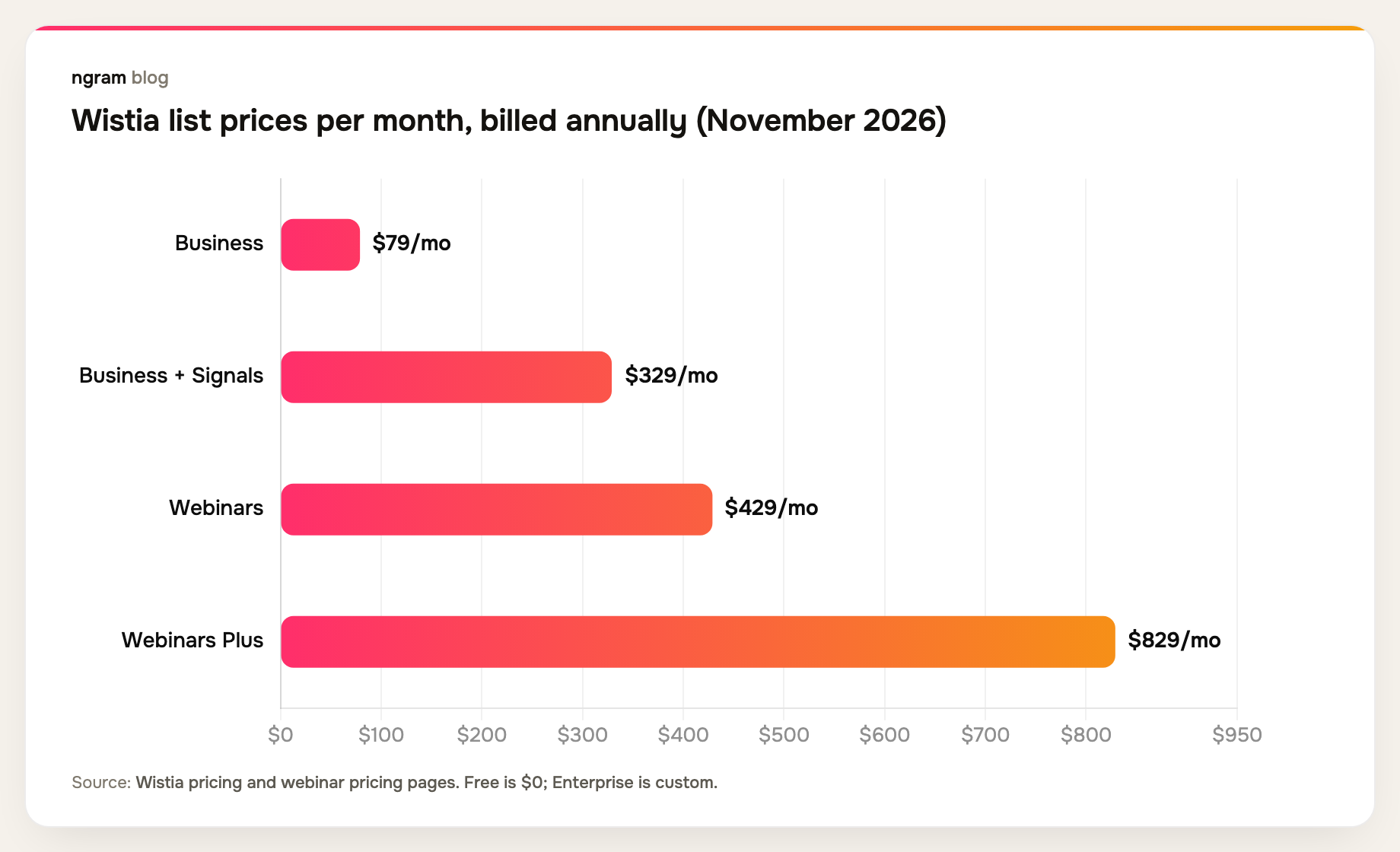
Live webinars are a separate product line. Webinars costs $429 a month and Webinars Plus $829 a month, both billed annually, and each adds $0.20 for every attendee and $2 for every minute over its limits. Webinars covers 500 attendees and 90-minute streams; Webinars Plus covers 1,000 attendees and three hours.
What each Wistia plan includes
Free
Free gives one user Wistia's player, basic view counts and its AI editing tools, with Wistia branding on every video. It is a hard ceiling rather than a starter tier: you cannot buy more storage, and once a month's 200 GB of bandwidth runs out, embeds keep playing for a few days and then stop until the next reset.
Business
Business is where most teams land. It removes Wistia branding and adds collections and channels, calls to action and forms, heatmaps and engagement graphs, A/B testing, CSV export and live chat support. Marketing-automation integrations and single sign-on are not included.
Business + Signals
Signals is the $250-a-month step up from Business. It connects Wistia to marketing-automation tools such as HubSpot, Marketo and Pardot, adds viewing data to contact records, and supports lead scoring, segmentation, triggered emails, sales alerts and revenue attribution. If nobody on your team will act on those signals, this tier is hard to justify.
Enterprise
Enterprise adds single sign-on, playback protection, a customer success manager, dubbing and AI audio descriptions, 2 TB of bandwidth and 12,500 credits a month. Pricing depends on users and usage, so you get a quote rather than a list price.
What changed in Wistia pricing in 2026
Two changes explain most of the conflicting numbers online. On March 17, 2026, Wistia introduced new plans for new customers with more storage included, and its older plans became legacy plans that can no longer be bought. Some legacy accounts may be moved to the closest current plan after notice.
The older plans charged by the number of videos. One reviewer on TrustRadius noted a small monthly charge for each video beyond a base amount, a model that no longer applies to new plans. In mid-October 2026, Wistia added AI credits to every plan and renamed its Automation Suite to Signals, without changing the $329 bundle price, according to PricingSaaS change tracking.
If a quote, review or comparison mentions Plus, Pro, Advanced or a per-video charge, it describes the old model.
The costs that sit outside Wistia's plan price
Extra seats
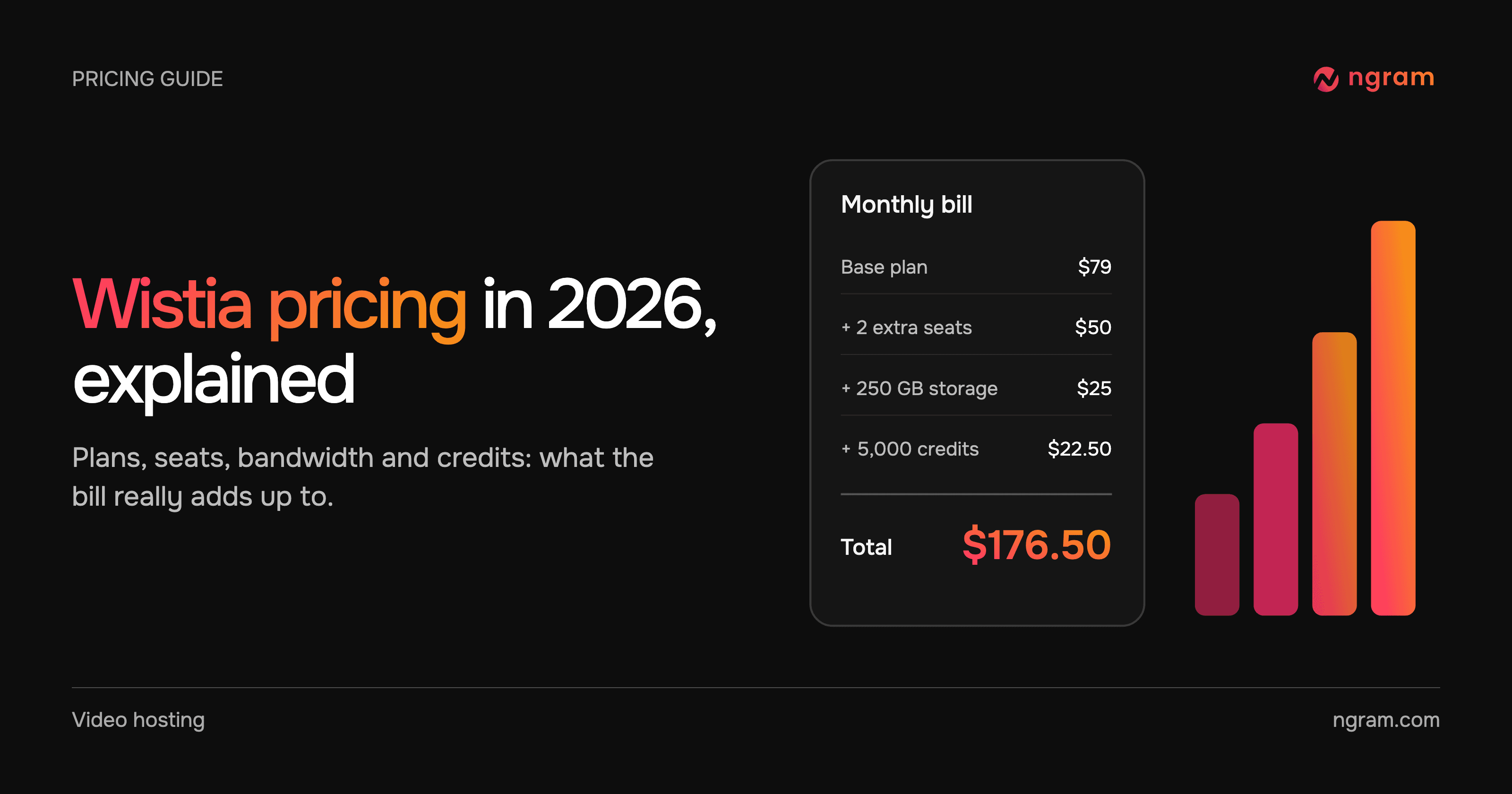
Business includes three users. Each extra user costs $25 a month on an annual plan or $31.25 on a monthly one. People who only need to watch videos can use the free Viewer role, which does not take a seat. A five-person team on Business pays $79 plus $50, or $129 a month; ten people pay $254 a month.
Bandwidth
Bandwidth is the data your videos use when people play them, and it grows with every view. Business includes 1 TB a month. Use beyond that is billed per GB on your monthly billing date; Wistia does not publish the rate on its pricing page. As a rough guide, a 100 MB video played 10,000 times uses about 1 TB.
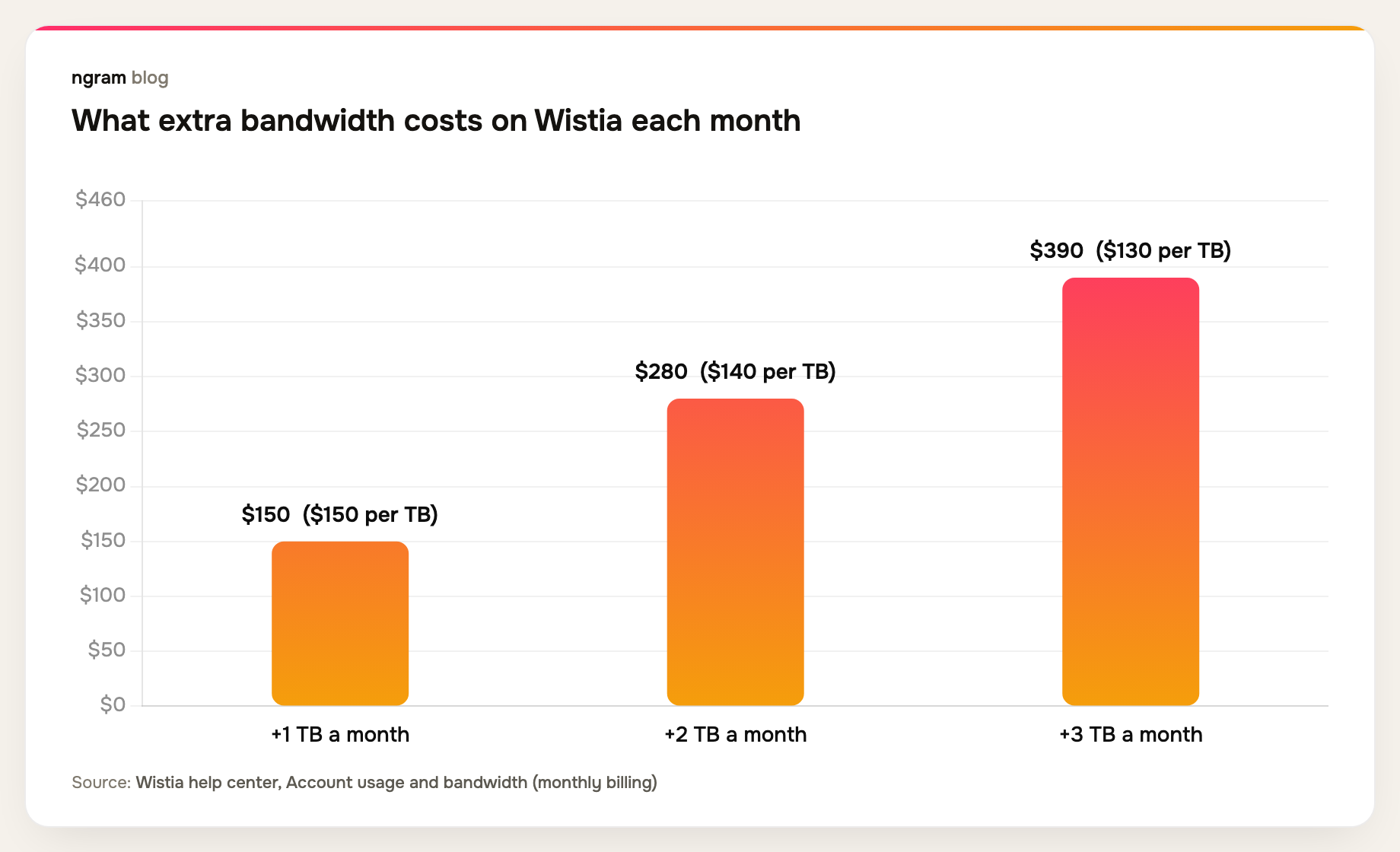
On monthly billing you can also subscribe to more bandwidth in advance: 1 TB for $150, 2 TB for $280 or 3 TB for $390 a month. The price per terabyte falls as you buy more, from $150 to $130.
Storage
If your library grows past the included storage, Wistia adds the smallest storage block that covers it on your billing date. Blocks cost $12 a month for 100 GB, $25 for 250 GB and $75 for 1 TB on annual billing, or $15, $31.25 and $93.75 on monthly billing.
AI credits
Wistia's AI features run on credits, and paid credits do not roll over. Business includes 5,000 a month. Extra credits cost $25 for a one-time pack of 4,000 or $22.50 a month for a 5,000-credit subscription. The per-minute cost depends on the job: dubbing uses 800 credits a minute, human-made captions 1,000, AI audio descriptions 400 and audio enhancement 8.
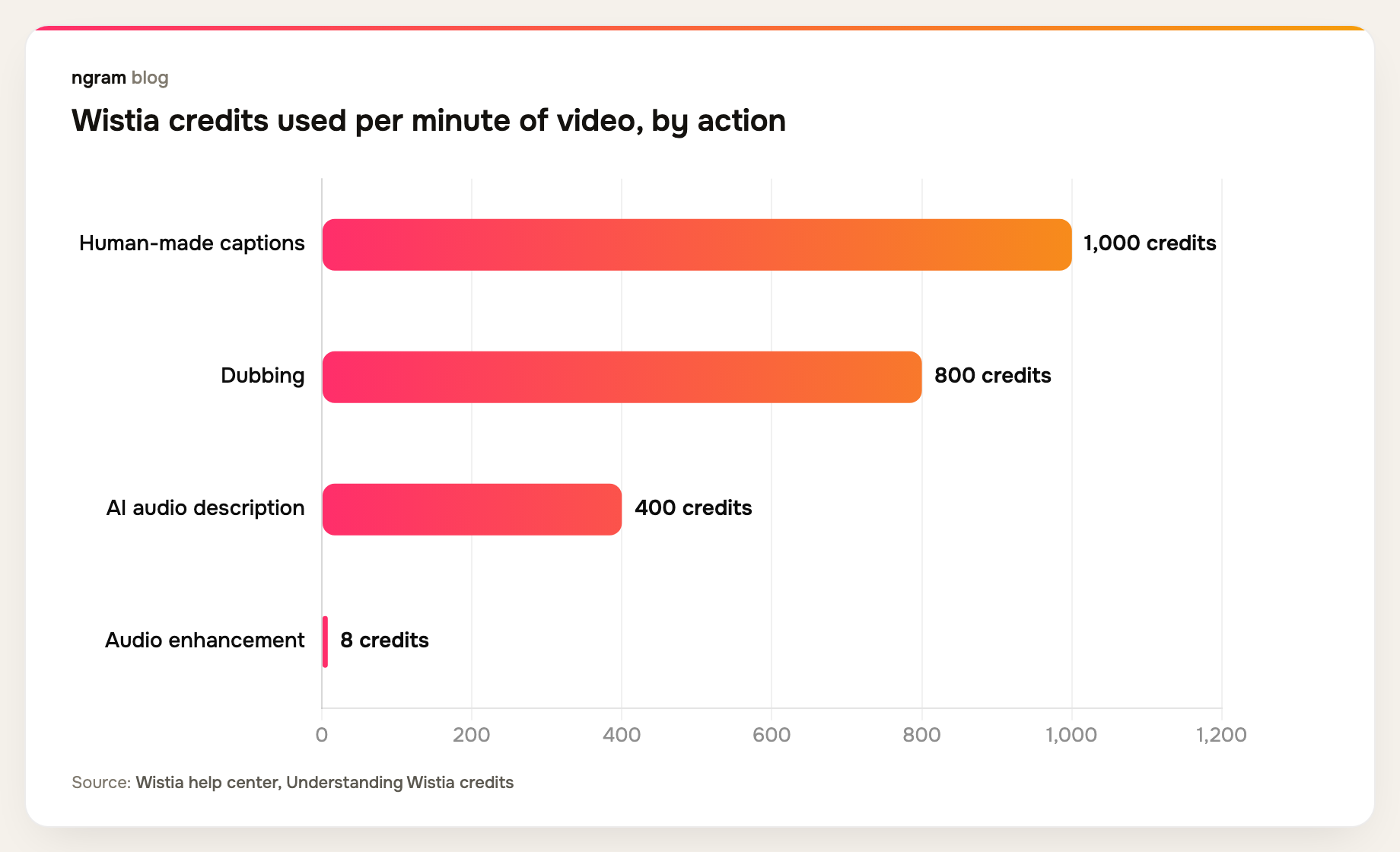
The numbers add up quickly. Dubbing one 10-minute video into a single language uses 8,000 credits, more than a month of the Business allowance.
Spending more time making and updating videos than hosting them? ngram makes the video from your own material, hosts it on a link that stays the same, and changes it when you ask. See how video hosting works in ngram.
How much does Wistia cost per year? Three example teams
These examples use Wistia's annual list prices, before bandwidth overages, storage blocks, extra credits, taxes or negotiated discounts.
| Team | Setup | Per month | Per year |
|---|---|---|---|
| Solo marketer | Business, up to 3 users | $79 | $948 |
| Five-person team syncing views to HubSpot | Business + Signals, 2 extra seats | $379 | $4,548 |
| Team running monthly webinars | Webinars plan | $429 | $5,148 |
Real spend tends to land above the starting price. Spend-management company SpendHound reports that small and mid-sized companies in its data pay an average of $5,030 a year for Wistia, across 141 companies, and enterprises pay $43,173 across 18. It also reports year-over-year increases of 8.35% for smaller companies and 6.37% for enterprises.
Is Wistia worth the price?
Video budgets are under pressure in both directions. In Wyzowl's 2026 survey of 266 respondents, 38% of marketers said video is getting more expensive and 30% said cheaper. The same survey found 46% of video marketers spend a third of their budget or less on video, and 17% aren't sure how much they spend.
Wistia is worth its price when your website is the main place people watch, your library is large, and your team will act on heatmaps, A/B tests and engagement data. In that case Business, and Signals if you run HubSpot, Marketo or Pardot, earns its cost.
It is harder to justify for a small library or a small audience. One TrustRadius reviewer said pricing can run over budget for a new business with many videos, and another called it expensive to start if you won't host a lot of content. It is also the wrong place to save money if the slow part of your work is making and updating the videos, not hosting them.
Wistia alternatives, by what you're paying for
Compare like for like. If you are paying for a video hosting platform alone, compare hosting plans. If your team also spends hours making and re-making videos, count that time as part of the price.
ngram: make, host and update the video in one place
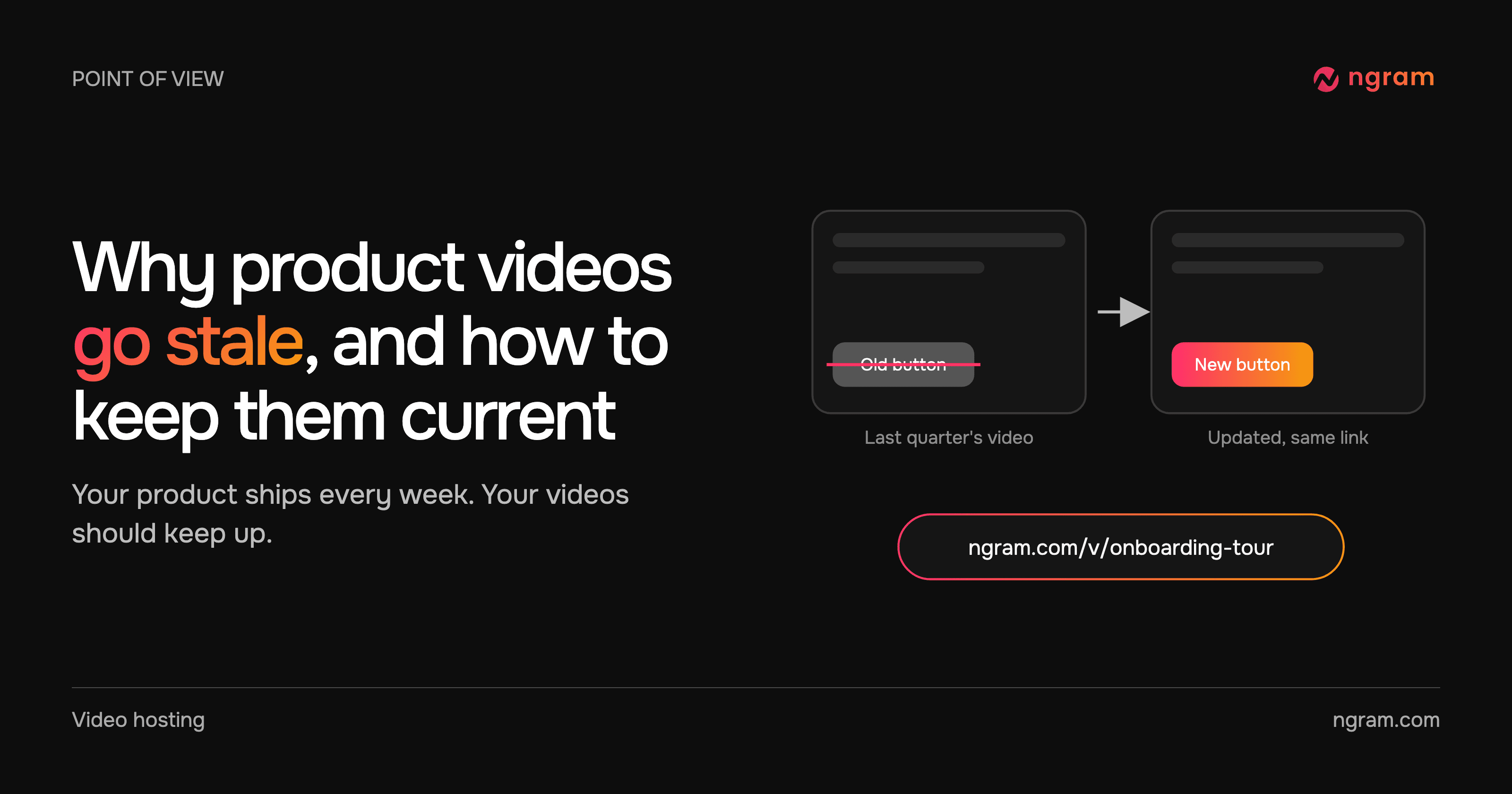
ngram makes the video from a document, product page or recording, hosts it and changes it when you ask. When a screen or a price changes, you ask for the edit, review it and choose Update, and the link and embeds you already shared play the new version.
- Free: public watch links, website embeds and view counts, with 1,000 credits a month.
- Basic, $29 a month: unlisted links, uploads that get captions, a transcript and chapters automatically, and no ngram badge.
- Premium, $59 a month: passwords, expiring links, a separate link for each person so you can see who watched, player branding and viewer heatmaps.
- Ultimate, $299 a month: buttons, quizzes and polls in the video, email gates and full analytics.
Annual billing takes 20% off each paid plan. See the full ngram plan comparison or the side-by-side ngram vs Wistia breakdown.
Vimeo
Vimeo's 2026 plans start with Creator from $9 a month billed annually, and its business plan, Studio, costs $400 a month billed annually with 10 seats. It suits teams managing a large library and live events. Read ngram vs Vimeo for the details.
Vidyard
Vidyard is built for sales teams that share video with buyers. Its Free plan allows up to five embeddable videos, and paid plans are priced per seat, with Teams and Enterprise quoted on request.
SproutVideo
SproutVideo is a white label video hosting service priced by storage and bandwidth tiers. Seed costs $15 a month or $12 billed annually, and the larger Sprout, Tree and Forest plans cost $35, $72 and $195 a month billed annually.
For a capability-by-capability view of these hosts, see our guide to the best video hosting platforms for business.
Frequently asked questions
How much does Wistia cost per month?
Business costs $79 a month billed annually, and third-party trackers list it at $99 billed monthly. Business + Signals costs $329 a month billed annually, and Enterprise is priced on request. Extra seats, bandwidth, storage and credits can add to that.
Is Wistia free?
Yes, Wistia has a Free plan for one user with 25 GB of storage, 200 GB of bandwidth a month and 3,000 one-time AI credits. Videos carry Wistia branding, and once the month's bandwidth runs out, embeds stop after a short grace period until the next reset.
Does Wistia charge per video?
Not on current plans. Since March 17, 2026, new plans are priced by users, storage, bandwidth and credits. Older Plus, Pro and Advanced plans charged for videos above a base amount.
How much does Wistia charge for extra users?
$25 a month per extra user on an annual plan, or $31.25 on a monthly plan. Business includes three users, and Viewer accounts are free.
What happens if you go over Wistia's bandwidth?
On paid plans, extra bandwidth is billed per GB on your monthly billing date, and you can subscribe to 1, 2 or 3 TB more in advance on monthly billing. On Free, you cannot go over: embeds stop after a few days until the next month.
Is there a cheaper alternative to Wistia?
It depends on what you need. ngram includes public links and embeds on its Free plan, and private video hosting with passwords, expiring links and who-watched tracking from $59 a month, and it also makes and updates the videos. SproutVideo starts at $12 a month billed annually for hosting alone.
If your next video also needs to be made, not just hosted, try ngram free and publish it from Hosted videos.