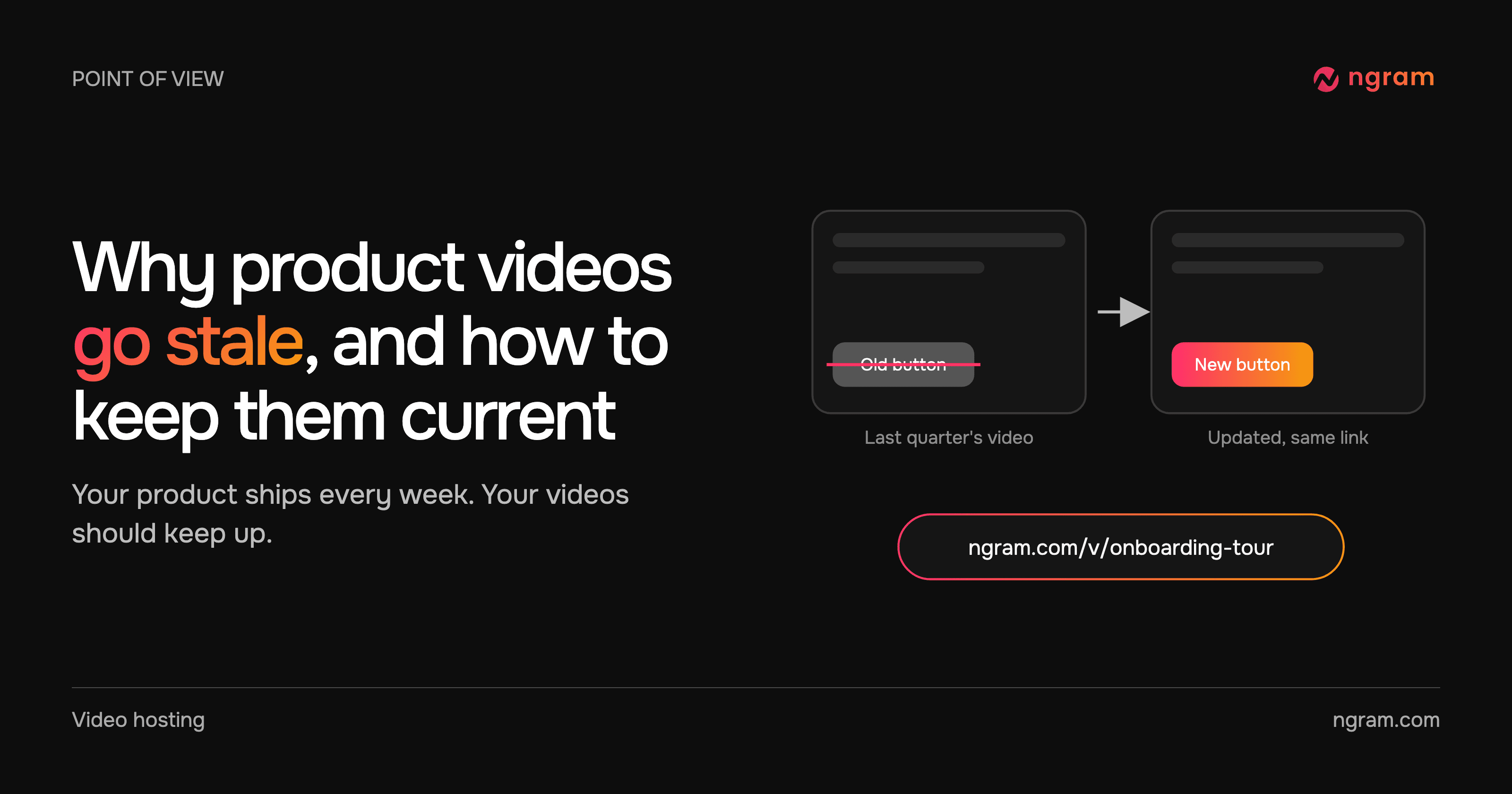

A new customer opens your onboarding video, follows along, and gets stuck at minute two. The button the narrator points to moved two releases ago. The video still has thousands of views and a prominent place in your help center, and it is now sending people to support.
This is the normal life of a product video. Products change every sprint; videos change when someone finds the time to re-record them. Here is why product videos go stale faster than any other content you publish, what disciplined teams do about it, and how to update product videos without re-recording them from scratch.
Video is how people learn your product
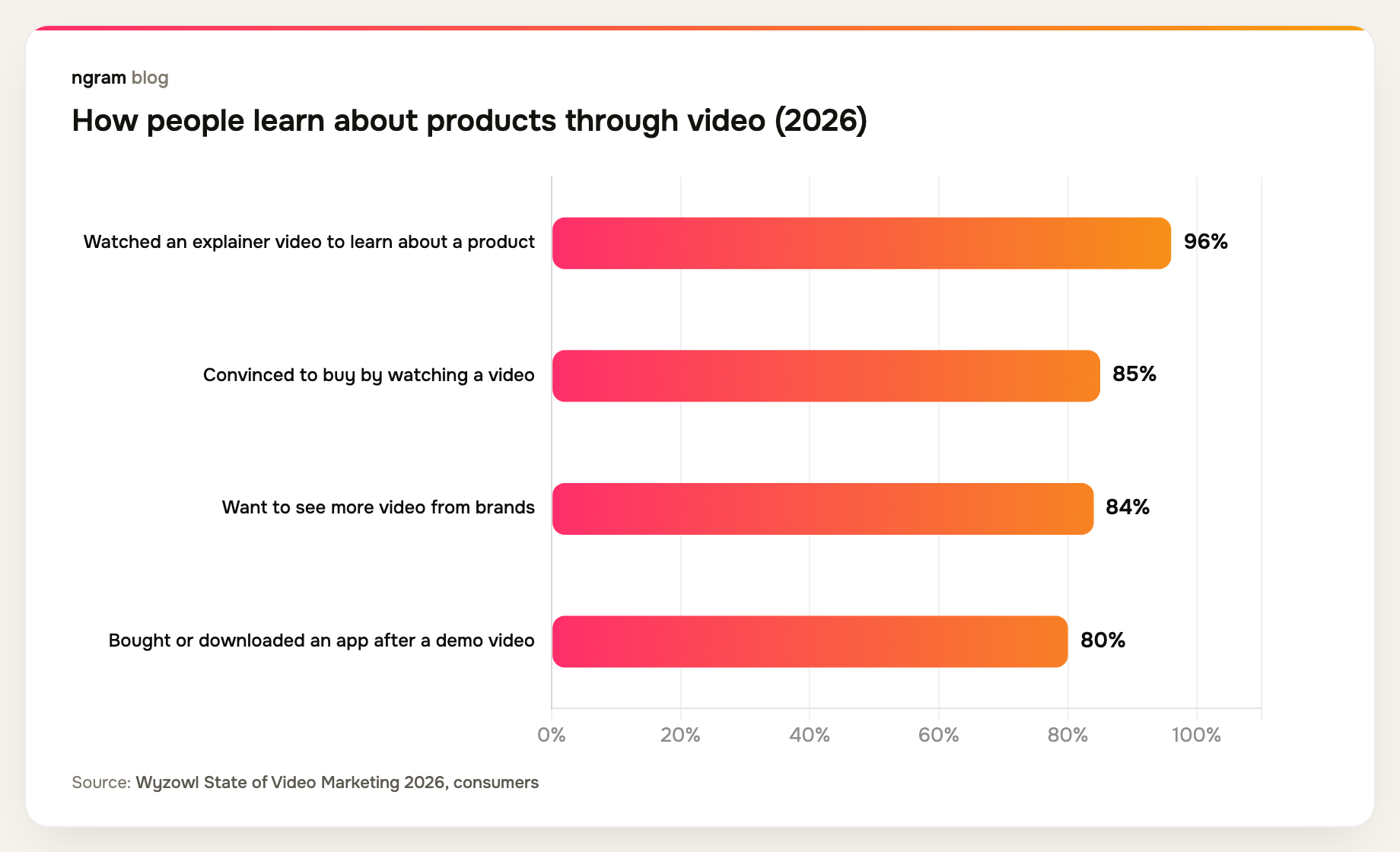
Customers lean on video more than on any other format when they evaluate and learn software. In Wyzowl's 2026 survey, 96% of people said they had watched an explainer video to learn about a product, and 80% had bought or downloaded an app after watching a demo.
That trust is exactly why a wrong video does damage. A reader will skim an outdated help article and work around it. A viewer copying the clicks they see on screen follows the old path step by step.
Why product videos go stale faster than the rest of your content
A help article is text. When a label changes, someone edits a sentence and publishes in a minute. A video bakes the interface, the narration, the pricing and the pacing into frames. Changing one screen usually means re-recording the scene, re-timing the voiceover and exporting the whole file again.
Cloudflare's documentation team puts it plainly in its video maintenance guidance: producing a video is only the beginning, and videos are harder to edit than written docs. That gap is why so many teams keep publishing new videos while the old ones quietly drift out of date.
The real cost is the copies, not the recording
Re-recording is the visible cost. The hidden one is every place the old file went. A finished MP4 gets uploaded to the help center, attached to onboarding emails, added to a course, dropped into a sales deck and posted in a partner portal. Each copy is a separate file that someone has to find and replace.
Most teams don't know where all the copies are, so they never finish the update. The new version goes up in one place, and the old one keeps playing everywhere else.
The fix is structural: share a link, not a file. When every place points to one hosted video, there is only one thing to update.
What disciplined teams do to keep videos current
Cloudflare's docs team describes a concrete routine. It checks published videos against the current documentation and product interface with AI-assisted reviews, and it relies on product managers and subject-matter experts to flag changes. When something changes, it updates the script, visuals or narration and replaces the video, avoiding a full re-record where it can. The team is also building screen demos generated from code, so footage can follow the product automatically.
Teams that keep their libraries current tend to share a few habits:
- They keep an inventory. Every video has an owner, a product area, the date it was last checked and a list of where it is shared.
- They watch the release notes. A change to a screen, a name or a price is the trigger to check every video that shows it.
- They triage before fixing. A slightly different color can wait. A moved button, a renamed feature or a wrong price is a functional error and gets fixed first.
- They keep videos short and modular. One task per video means one change touches one video, not a 20-minute tour.
- They verify on the reader's page. The update isn't done until the page a customer actually opens plays the new version.
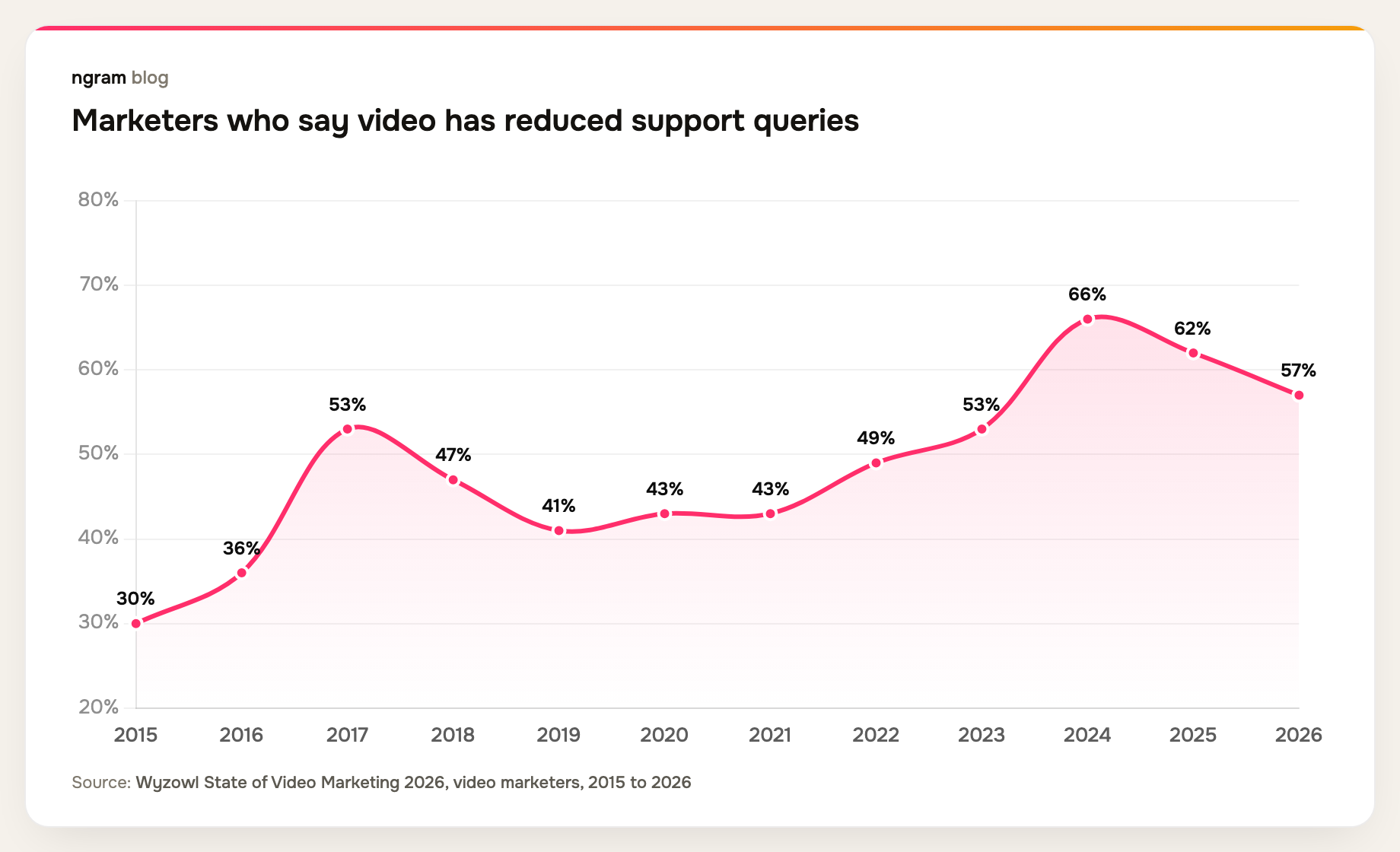
Support teams feel the difference most. In Wyzowl's survey, 57% of marketers said video has reduced support queries, up from 30% in 2015. A video that shows the wrong screen works against that, because viewers who get stuck come back to the queue.
How to update product videos without re-recording
The routine above still assumes someone has to rebuild the video by hand. ngram removes that step for videos it made. You open the video's conversation, describe the change in plain words, review the new version and choose Update. The watch link and every embed you already shared play the new cut.
We tested this on a short how-to video. The request was one sentence: change step three only, from copying a link to giving each viewer their own link. ngram rebuilt that step, kept the other scenes, voice and music, and the share panel showed that the live link was still playing the older cut until we chose Update.
For videos made elsewhere, you upload the revised file as a new version of the same hosted video and make it live; the hosted videos guide covers both paths. Either way, the copies problem disappears, because there is only one link to keep current.
Keep every video on one link that stays current. ngram makes the video, hosts it and changes it when you ask. See how video hosting works in ngram.
A maintenance routine you can start this week
- List your ten most-watched product videos and where each one is shared.
- Replace file copies with one hosted link or embed wherever you can, starting with customer onboarding videos.
- Assign an owner to each video and add it to the release checklist for the screens it shows.
- After each release, triage: fix functional errors this week and batch cosmetic ones.
- Check the change from the customer's side by opening the help article or email they would use.
Customer success teams that run onboarding at scale get the most from this, because their videos are watched the most and changed the most. See how ngram supports customer success teams.
Frequently asked questions
Why do product videos go out of date so quickly?
Product videos show exact screens, labels and prices, and those change with every release. Unlike a help article, a video can't be edited in a minute, so updates pile up until someone re-records it.
How often should product videos be updated?
Check them whenever a release changes a screen, name or price they show, and review the whole library at least once a quarter. Fix functional errors right away and batch cosmetic changes.
Can you update a video without re-recording it?
Yes. With ngram, you describe the change in chat and update the video on the same link, without re-recording.
How do I replace a video without changing the embed code?
Host it on a platform that keeps the link when the video changes. In ngram, choose Update after an edit, or upload a new version of an uploaded video and make it live. Every existing embed plays the new version.
Who should own video updates?
Give every video a named owner, usually whoever owns the product area it shows, and add video checks to the release checklist. Without an owner, nobody notices the drift until customers do.
Ready to keep your next video current? Try ngram free.