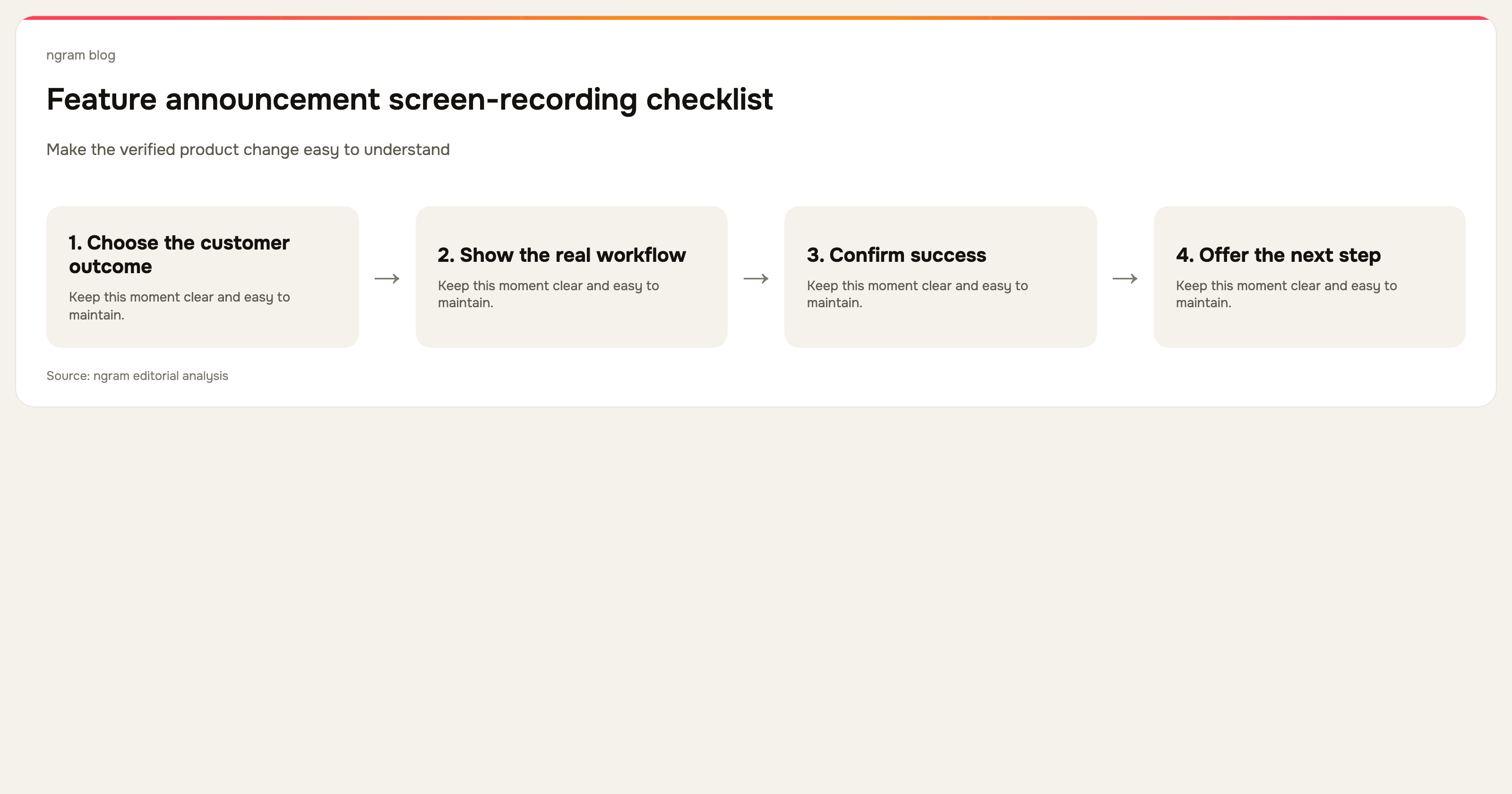

To make an AI explainer video, start with a source you can check, define one thing the viewer should understand, review the script and scene plan, generate a draft, then request one specific revision. Watch the exported file before publishing. This guide gives you a complete practice brief and a way to check whether the edit changed anything else.
For help choosing software, read the AI explainer video maker comparison. Here we focus on making an explanation from source material, including a short fictional process you can copy without uploading private documents.
See an explainer made with ngram
Made with ngram: Why Earth Has Seasons.
Why explainer videos work
If your product is hard to explain in a paragraph, you're not alone. That's exactly why explainer videos exist, and according to Wyzowl's 2026 Video Marketing Survey, 96% of people have watched an explainer video to learn about a product or service.
According to Wyzowl, 91% of businesses now use video as a marketing tool, and 93% of video marketers say video has increased user understanding of their product or service. Explainer videos specifically are the second most popular video type created by marketers, with 73% producing them regularly.
On the consumer side, 85% of people say they've been convinced to buy a product or service after watching a brand's video. And when asked how they'd prefer to learn about a product, 63% choose watching a short video over reading text, attending a webinar, or viewing an infographic.
Here's a snapshot of the key numbers:
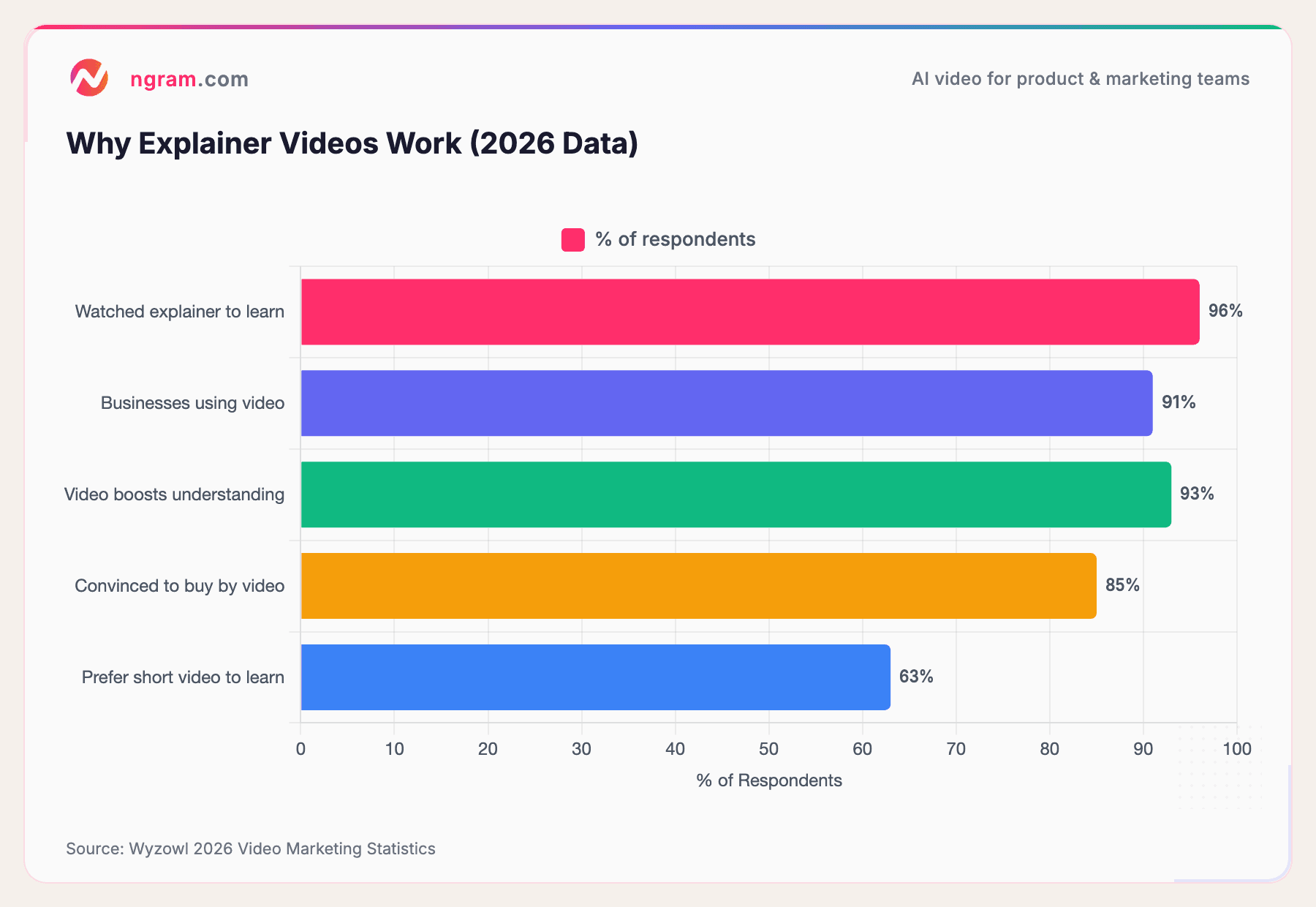
Source: Wyzowl 2026 Video Marketing Statistics
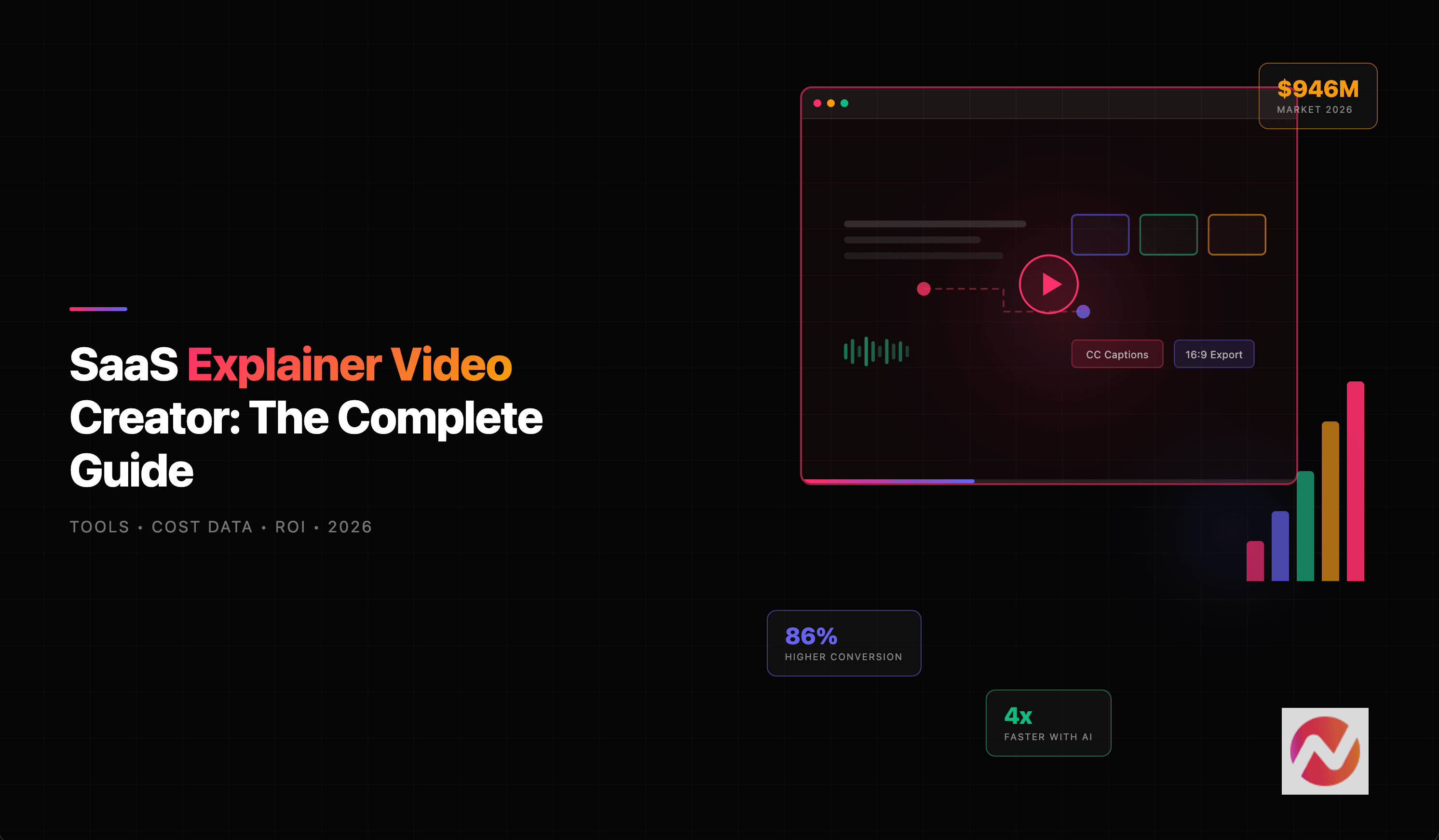
Landing pages with explainer videos convert up to 86% higher than those without. That's not a marginal improvement. It's the kind of lift that turns a mediocre landing page into a high-performing one.
How teams are adopting AI video
AI video creation isn't a niche anymore. The global AI video generator market is projected to grow from $847 million in 2026 to $3.35 billion by 2034, a compound annual growth rate of 18.8%, according to Fortune Business Insights. Some estimates are even more aggressive, with Grand View Research pegging the broader AI video market at $42.29 billion by 2030.
Adoption numbers tell the same story. According to recent industry data, 78% of marketing teams now use AI-generated video at least quarterly, 73% of Fortune 500 companies have integrated AI video tools, and the total number of monthly active users across AI video platforms reached 124 million in January 2026.
Here's the market trajectory:
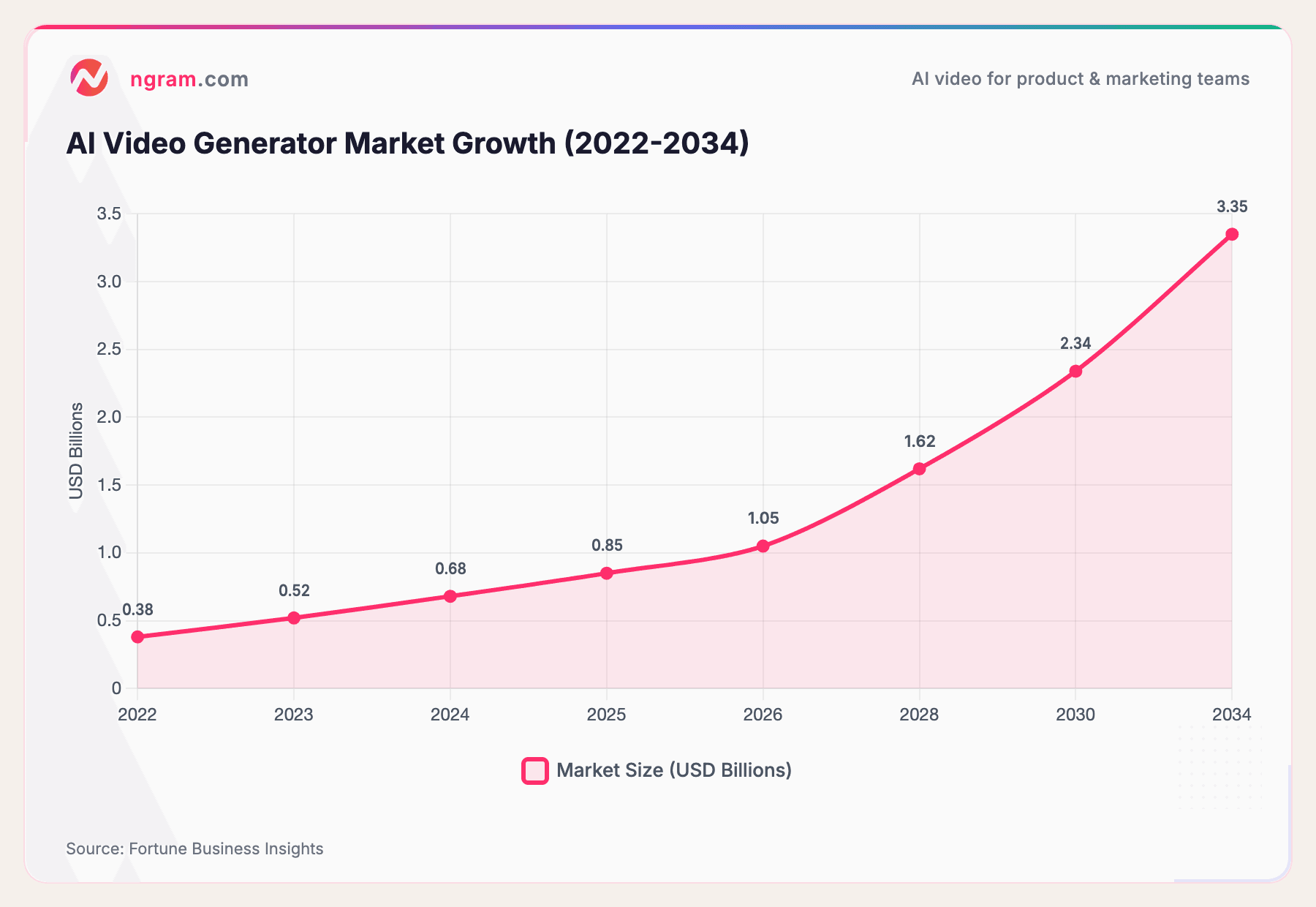
Source: Fortune Business Insights
The generation volume tells an even more dramatic story: an 840% increase in AI video generation between January 2024 and January 2026, according to recent industry research. The trajectory is clear. AI video creation is moving from "nice to have" to standard operating procedure.
1. Choose one question your source can answer
A useful explainer starts with a question. “How does a request reach the reviewer?” is small enough to explain and check. “How does our entire company work?” needs several videos. Choose the audience, what they already know, and the action they should take after watching.
Gather the current source and mark the facts that must survive editing. A document can supply the wording; a diagram can supply the relationship between steps. If the subject is a real procedure, use actual task footage when the viewer needs to see how to perform it. Generated imagery can illustrate an idea but cannot establish that a real action happened.
For other explainer jobs, see the explainer video guide and choose the source that matches your audience.
Script structure and pacing
The script is the most important part of any explainer video. A polished video with a weak script is still a weak video.
The most effective explainer video scripts follow a proven structure:
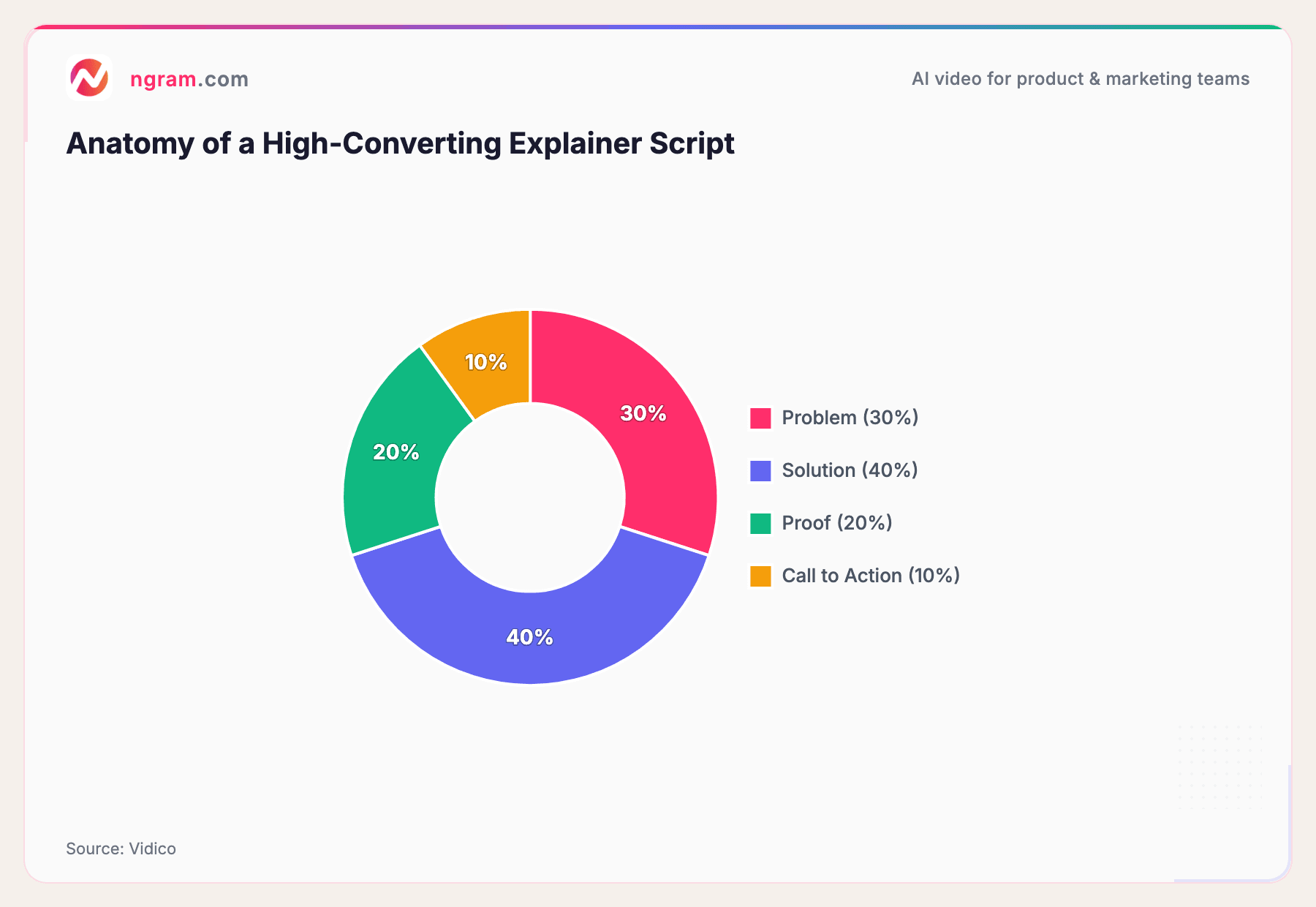
Source: Vidico
Spend roughly 30% on the problem (make the viewer nod along), 40% on the solution (show how it works), 20% on proof (social proof, results, testimonials), and 10% on a clear call to action.
Aim for 150 words per minute of final video. A 60-second explainer needs about 140-160 words. A 90-second video needs 210-230 words. The sweet spot for explainer video length is 60-90 seconds, as viewer retention drops significantly after that.
2. Copy this sample source and brief
The following source is an original fictional exercise. Select and copy it with the brief below, or save the source as a Markdown file on your computer. All the material needed for the exercise is on this page; there is no separate download to find.
Sample source: a fictional team's shared review queue. A request enters a queue with a title and a named owner. The owner checks that the brief contains the intended audience, required assets and due date. If something is missing, the owner asks the requester to add it. A complete brief goes to a reviewer. The reviewer either returns comments or marks it ready for production. This is a practice process, not a claim about a particular software product. No completion-time, revenue or productivity figures are supplied.
Copy the complete starter prompt. Replace the sample process only when you have another approved source ready.
Create a 45-second, 16:9 animated explainer for new team members learning how a shared review queue works. Use only the sample source below. The viewer should understand who moves a request forward and what happens when information is missing.
Structure: open with a request that cannot move forward because its brief is incomplete; introduce the owner; show the completeness check; show the reviewer returning comments or marking the request ready; finish with the CTA “Add the audience, assets and due date to your next request.”
Use simple labeled boxes and arrows, one idea per scene, readable text and calm English narration. Include an on-screen summary. Do not invent a software interface, customer, numerical result, automatic approval or deadline guarantee. Show me the Script and Production details before I approve production.
Source: Sample source: a fictional team's shared review queue. A request enters a queue with a title and a named owner. The owner checks that the brief contains the intended audience, required assets and due date. If something is missing, the owner asks the requester to add it. A complete brief goes to a reviewer. The reviewer either returns comments or marks it ready for production. This is a practice process, not a claim about a particular software product. No completion-time, revenue or productivity figures are supplied.
Keep the audience, learning outcome, scene sequence, duration, format and final action together. If you add a source URL, check that its contents are publicly reachable and current. Upload a permitted PDF or Markdown copy when the URL cannot be read. Remove customer identifiers and other private details before using a public example.
3. Review the plan in ngram before production
Open ngram Home after signing in. Paste the brief and attach your sources, then choose Create video. Review Script and Production details. Use Request changes to correct the proposed wording or visuals; choose Approve plan when the plan reflects the source.
Check that the script names the owner and reviewer correctly. The incomplete request should return to the requester for missing information; it should not bypass review. Inspect every arrow or scene transition for that same meaning. A polished diagram with the wrong direction teaches the wrong process.
4. Watch the draft and request one precise change
Watch once for meaning and again for presentation. Can a new teammate explain the steps without your help? Look for clipped labels, narration that outruns the diagram, and text that becomes too small on a phone. Compare the actual words and visuals against the source rather than treating a completed generation as approval.
Use chat or Make changes for a video revision. Give feedback beneath the preview sends product feedback; it is a different action. Try this revision request after a draft exists:
In the scene that explains an incomplete brief, replace “The owner asks for more information” with “The owner asks the requester to add the missing audience, assets or due date.” Keep the scene order, named roles, complete-brief path, visual style and final CTA unchanged. If the longer narration needs more time, tell me which scene timing changes. Do not add a new promise or metric.
- Changed check: the new sentence appears in narration, and any matching on-screen wording agrees.
- Preserved checks: owner and reviewer still have the same roles; the complete-brief path and ending remain intact.
- Presentation checks: the longer line is intelligible, the diagram stays readable, and any timing change is acceptable.
Compare the revised video with the first draft. Open Versions to view or download an earlier output. If something else changed, name the scene and ask ngram to correct it.
5. Check captions and the final MP4
New ngram outputs begin with captions off. Caption controls require a caption track, so check that one exists and review names and punctuation before relying on captions. Keep a written explanation alongside a public video for readers who prefer text or cannot use the audio.
A playable preview can appear before the final MP4 is ready. If Preparing download appears, wait for rendering, then download and play the file from beginning to end. Confirm the opening, corrected sentence, final CTA, picture and audio. An MP4 file is not proof that the source was understood correctly.
For a new channel, plan and inspect a separate cut in the required aspect ratio. Reframing can make a label unreadable even when the original looked good. Keep your source, accepted script, revision request and exported version together for the next process change.
What to check before starting
Review the current ngram plans and allowances before generation. The Free plan includes 1,000 credits per month, public video sharing and website embeds. Downloading video files requires a paid plan. Generation and revisions can use credits; unlimited paid-plan downloads do not mean unlimited generation.
Before publishing, ask someone familiar with the subject to check the wording and visuals.
Production costs by method
Here's what explainer video production typically costs by method:
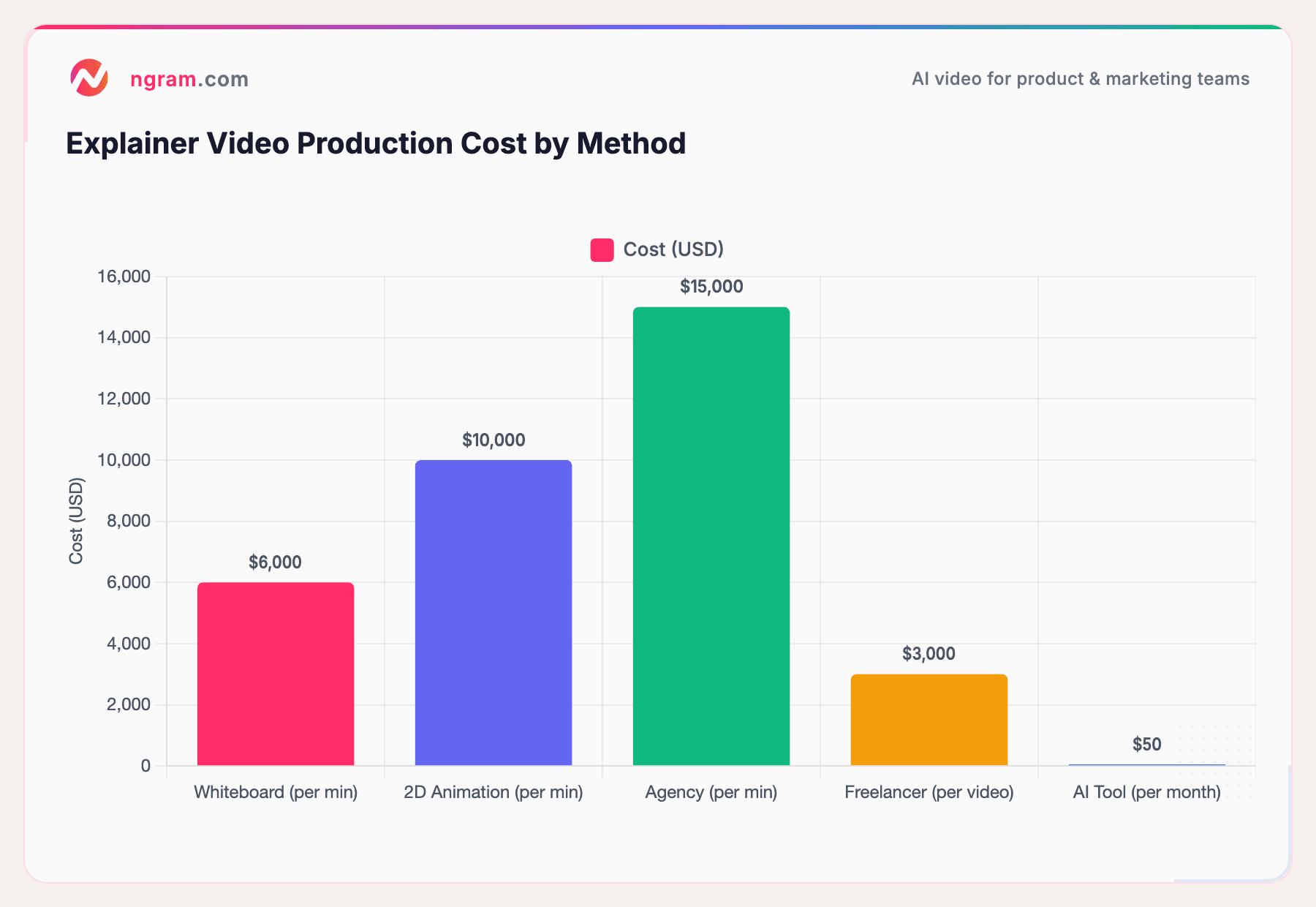
Sources: Advids, Clutch, industry research
The numbers are stark. A whiteboard explainer runs $2,000-$10,000 per minute. 2D animation costs $5,000-$15,000 per minute. Agencies charge $15,000+ per finished minute. Freelancers are cheaper at $1,050-$2,450 per video, but you're still looking at days of turnaround and revision cycles.
AI explainer video makers? Most charge $15-$90 per month, and many have free tiers. According to industry benchmarks, AI tools have driven a 91% cost reduction in video production, from an average of $4,500 per minute to $400 per minute. Production time has dropped from 13 days to 27 minutes for a 60-second video.
Questions about the workflow
Can I use my own source? Yes. Replace the fictional source with material you have permission to use, and update the prompt so its required facts and final action match. Review the generated script against that material before approval.
Can I make the video shorter? Ask for a shorter version with the same learning objective, then check which facts were removed. Duration is a brief constraint, not a reason to omit an essential step.
Make your first source-based explainer
Copy the complete prompt above before opening ngram. After signing in, paste it into Home and review the source and settings before choosing Create video. The link opens sign-in; it does not automatically attach this article or submit the practice brief.