

Search "Camtasia vs Clueso" and you are weighing two very different answers to the same question: how do I turn a screen recording into something useful. Camtasia is the veteran desktop editor, a multi-track timeline where you control every cut, zoom, and annotation by hand. Clueso is the newer AI tool that takes one rough recording and automatically produces both a polished video and a written step-by-step guide. This guide compares Camtasia vs Clueso on what actually decides the purchase: editing control, AI automation, documentation output, ease of use, and pricing. It also shows where a third option, ngram, beats both when your real job is a finished, on-brand business video built from your recording, doc, or URL.
Both tools are good at what they were built for. Camtasia wins on precision and creative control. Clueso wins on speed and on generating documentation alongside the video. The honest answer to "which is better" is "for which job," so we pick a winner per dimension instead of crowning one overall.
Camtasia vs Clueso at a glance
Here is the short version before the deep dive. ngram sits in the table because for many teams comparing these two, the real goal is a finished video built from source material, not a timeline to edit or a doc to publish.
| Tool | Best for | Starting price | Main distinction |
|---|---|---|---|
| ngram | Teams turning recordings, prompts, docs, and URLs into finished branded videos | Free, paid from $29/mo | Plans and builds the whole video, not just edits or docs |
| Camtasia | Trainers and marketers who want full manual editing control | Free trial, paid annual license (geo-priced) | Desktop multi-track timeline editor |
| Clueso | Support and product teams scaling tutorials and help docs | Free, paid from $120/mo annual | One recording becomes a video and a written guide |
Editing control versus automation
This is the core split, and it decides most of the comparison.
Camtasia is a desktop application built around a non-linear, multi-track timeline. You layer video, audio, text, and effects, and you control every second: cursor smoothing, behaviors, green screen, annotations, transitions, and precise trims. If your finished video has to look exactly the way you want, with hand-tuned timing and polished effects, Camtasia gives you control no automated tool matches. The cost is time and a learning curve.
Clueso bets entirely on automation. You record a workflow once, talking through it in your own words, even if the narration is rough, and its AI cleans the audio, rewrites the narration into a polished script, adds AI voiceover, auto-zooms, and captions, and applies a branded template. You do not edit a timeline frame by frame; you review and tweak an AI-generated result. For teams producing many tutorials, that speed is the whole point.
Winner: Camtasia for precise manual control, Clueso for automated speed. Pick based on whether you are crafting one high-production video or shipping many tutorials fast.
Both share a quieter limitation: each expects you to do the recording and, with Camtasia, much of the assembly. Teams whose source is a messy recording plus a release doc or a live URL still have to bridge that material into a video. That is where ngram comes in, and we cover it below.
Documentation and the script workflow
This is Clueso's signature feature and a clean dividing line.
Clueso generates a written, step-by-step SOP or help-center article from the same recording that produces the video, detecting each workflow step and pairing screenshots with instructions. For support, customer success, and product teams that need both a tutorial video and a doc, that two-outputs-from-one-recording model is a genuine time saver, and it translates voiceovers, captions, and docs into 35-plus languages.
Camtasia is strictly a video tool. It transcribes narration and removes filler words, but it cannot generate a written step-by-step guide or an HTML help article from your recording. It also expects you to arrive with a reasonably written script, since real script changes mean manually adjusting scenes and re-syncing audio and video.
Winner: Clueso, clearly, for anyone who needs documentation and a forgiving script workflow alongside the video. If you only need the video, this dimension does not apply.
ngram sits between the two on this point: it plans the script for you from your source material, but it produces video, not written help-center articles. If documentation is the deliverable, Clueso is the specialist, and we say so.
Ease of use and learning curve
Camtasia is approachable for a desktop editor, but it is still a desktop editor. New users get a capable tool with a real learning curve, and producing a polished video takes time even once you know it. Power users love that depth; occasional users can find it heavy for a quick how-to.
Clueso is built to be fast for non-editors. Record, let the AI assemble, review, publish. There is little to learn, which is exactly why support and product teams reach for it when they need volume. The trade-off is less granular control when you want to fine-tune a specific moment.
Winner: Clueso for speed and a gentle learning curve, Camtasia for depth once you invest the time.
Pricing and value
The two tools price on opposite philosophies, and the gap is large.
Camtasia is a one-time-feeling annual license. After TechSmith moved to annual subscriptions, it sells an Essentials tier and higher Create and Pro tiers, with the Pro tier adding AI-assisted workflows and collaboration. TechSmith geo-prices Camtasia, so the exact figures vary by region. Check TechSmith's pricing page for the current rate where you are. A free trial exports with a watermark until you upgrade. For an individual creator or trainer, it is affordable for a tool you use constantly.
Clueso is priced as a team SaaS. Plans start at $120 a month billed yearly, around $1,440 a year for about two users, with a Growth tier near $200 a month. That reflects the AI processing and the documentation engine, and it is aimed at teams scaling tutorials, not solo users.
Here is how the entry-level paid plans compare on monthly and annual billing:
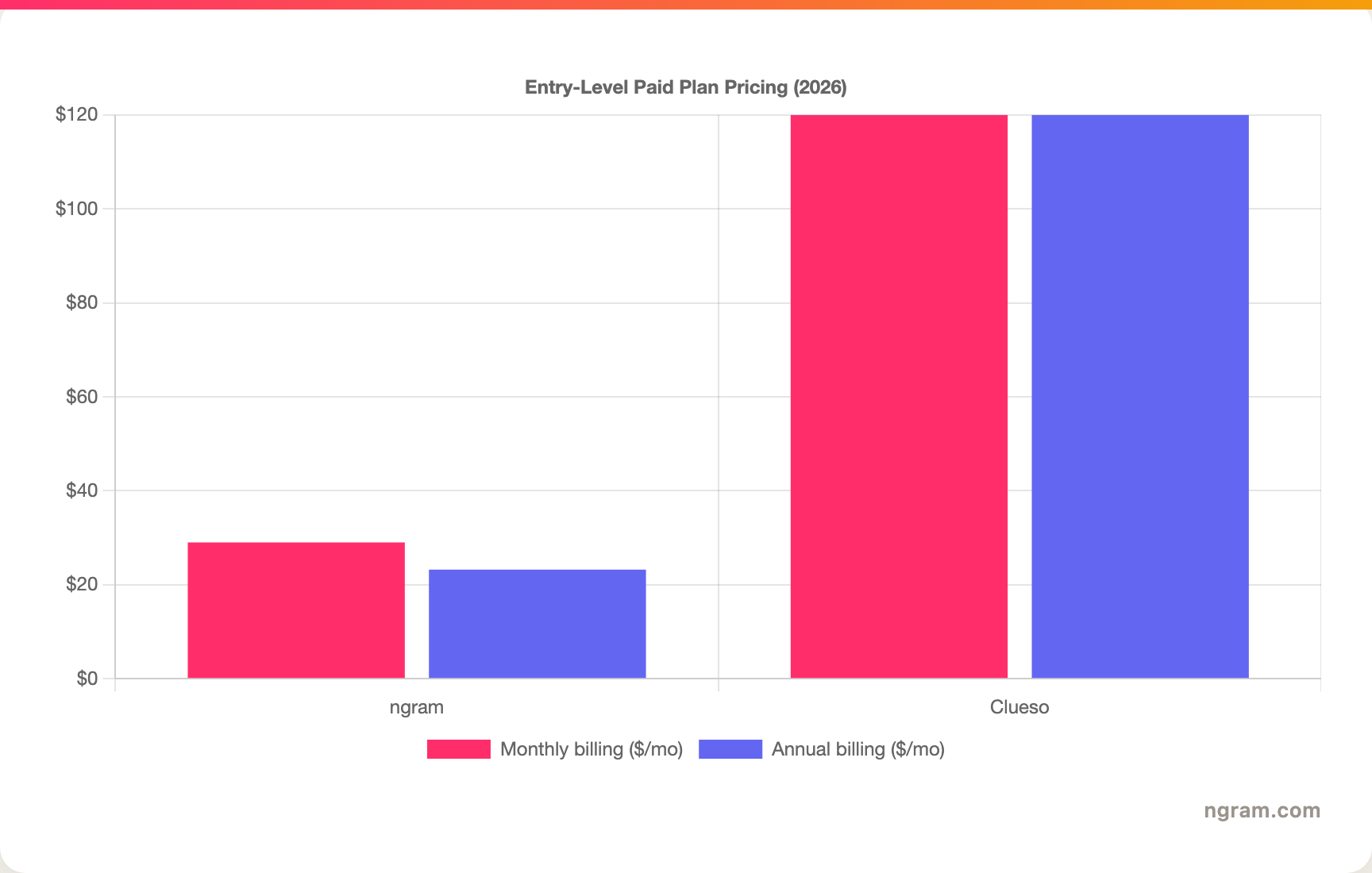
The chart leaves Camtasia out because TechSmith geo-prices it with no single published USD rate, so a clean per-month figure is not available. Note the billing reality behind the bars: Clueso's entry plan is billed yearly for roughly two seats, so its per-month figure is not a single-seat monthly rate. ngram's Basic plan is $29 a month, or $23.20 a month billed annually, with 3,000 credits a month shared across video, editing, and exports. Match the model to your team size before you decide.
Winner: Camtasia for the lowest per-user cost, Clueso for value only if you need its automation and docs, ngram for the most flexible monthly entry plan.
1. ngram, the better third option for most teams
Watch how ngram turns an idea into a finished video:
ngram does the core job both Camtasia and Clueso circle around, turning a screen recording into a polished video, and then goes further by planning the whole thing first. You give ngram a screen recording, a prompt, a PDF, a URL, a deck, or screenshots, and its agentic chat plans the script, storyboard, scenes, captions, and call to action for you to review before anything renders.
That plan-first workflow is the difference. A lot of "Camtasia vs Clueso" searches are really product demos, onboarding walkthroughs, feature announcements, or training clips where the source is a recording plus a release doc or a live product. ngram cleans up the recording with cursor smoothing, click emphasis, dead-air trimming, and smart zooms, then layers in product callouts, B-roll, captions, branded intros, and an optional avatar or talking-head presenter, all on brand. If you want to hand-edit every frame, Camtasia is still the deeper editor, and if your main deliverable is a written help article, Clueso is the specialist.
What makes ngram different
- Source-aware inputs - Start from a screen recording, prompt, PDF, URL, screenshot, raw video, or deck, not just a blank timeline.
- Plan before render - Review the script and storyboard in chat, fix direction early, then generate. No re-recording a 20-minute take.
- Screen-recording polish built in - Cursor smoothing, click emphasis, dead-air trim, smart zooms, and product callouts applied automatically.
- Brand kits - Logos, colors, fonts, and approved or blocked phrases applied automatically to every video.
- Localization built in - Translate script, captions, and on-screen text, generate multilingual voiceover, and re-lip-sync avatars per language.
- MP4 export - Finished videos export as MP4; separate media tools can derive GIF, WebM, PNG, or JPG from supplied media, with hosted and embeddable players.
Where ngram is honest about its limits
ngram produces video, not written help-center articles, so if your deliverable is a published SOP or knowledge-base doc, Clueso's documentation engine is the better fit. ngram also does not replace a full hand-editing timeline for someone who wants frame-level control over every effect, which is Camtasia's home turf. And ngram provides hosted video pages and embeds but has no generally available owner analytics surface, and its public security certifications are not published yet, so analytics-heavy or compliance-bound buyers should confirm needs first.
Who ngram is best for
ngram fits product marketing, growth, customer success, support, and training teams that turn recordings and business material into polished video repeatedly. For current plans and credits, check ngram pricing rather than stale screenshots, and for the direct head-to-heads see the ngram vs Camtasia comparison and the ngram vs Clueso comparison.
Ready to try ngram? Create your first video from a recording, prompt, doc, URL, deck, or screenshot. Start free
2. Camtasia
Camtasia by TechSmith is best for trainers, educators, and software marketers who want full manual control over a screen-recording video. Public details were checked against TechSmith's Camtasia pricing and product pages for this 2026 comparison.
Key features
- Multi-track timeline - Layer video, audio, text, and effects with frame-level control.
- Screen and webcam capture - Record your screen, camera, and audio in one pass.
- Editing depth - Cursor smoothing, behaviors, green screen, annotations, and transitions.
- AI assists - Avatars, voice and script generation, noise removal, transcription, captions, and translation on higher tiers.
- Desktop ownership - A mature local app, not a browser tool, with annual licensing.
What users say
Users praise Camtasia for control, reliability, and the quality of its finished output, and trust it for polished training and how-to content. The common cautions are the learning curve and the time it takes to produce a video by hand, plus the watermark on the free trial until you upgrade.
Best for
Choose Camtasia when you want precise, hands-on editing control and are willing to invest the time for a highly polished result.
3. Clueso
Clueso is best for support, customer success, and product teams that need to scale tutorial videos and help documentation from screen recordings. Public details were checked against Clueso's pricing and product pages for this 2026 comparison.
Key features
- Recording to video and doc - One screen capture produces a polished video and a written step-by-step guide.
- AI narration cleanup - Record in your own rough words; Clueso rewrites it into a structured script with AI voiceover.
- Auto-zoom and captions - Automatic emphasis, captions, and branded templates without manual editing.
- Documentation engine - Detects workflow steps and pairs screenshots with instructions for SOPs and help articles.
- Localization - Translates voiceovers, captions, and docs into 35-plus languages.
What users say
Reviewers like Clueso for how quickly it turns a rough recording into a usable video and doc, especially for help centers and onboarding content. The trade-offs are price for small teams and less granular control than a full editor, so highly produced marketing videos can sit outside its sweet spot.
Best for
Choose Clueso when you need both a tutorial video and a written guide from each recording, and speed matters more than frame-level control.
How we compared these tools
This is not a star rating. It is a decision-weighting model for buyers choosing between two screen-recording tools, with ngram included as the third option many of them actually need.
| Criteria | Weight | What we looked at |
|---|---|---|
| AI capabilities | 30% | Automated editing, narration cleanup, doc generation, and translation |
| Features | 30% | Editing depth, capture, source support, and export options |
| Ease of use | 20% | Time to a first finished video and learning curve |
| Value | 15% | Public pricing, licensing model, watermarks, and seats included |
| Support and community | 5% | Collaboration, templates, and team controls |
We reviewed official vendor pricing and product pages, current SERP patterns, and 2026 review-site and forum sentiment, and we did not use numerical star ratings because they flatten the real decision: the best tool depends on whether you need hand-editing control, automated docs and video, or a full source-to-video workflow.
Common questions
Is Camtasia better than Clueso?
Neither is better outright. Camtasia wins for precise manual editing and polished, high-production video, while Clueso wins for automated speed and for generating documentation alongside the video. Match the tool to the job, and consider ngram if your real need is a finished, branded video planned and built from your recording and source material.
Is Clueso cheaper than Camtasia?
No. Camtasia's entry plan is a geo-priced annual license, billed per user, while Clueso starts at $120 a month billed yearly for around two users. Camtasia is built for individual creators on a budget, Clueso for teams that need AI automation and documentation at a higher cost, so they suit very different buyers.
What is the best Camtasia and Clueso alternative?
For teams that need a finished video rather than a timeline to edit or a doc to publish, ngram is the strongest alternative because it plans and builds full videos from recordings, prompts, docs, and URLs, then adds screen-recording polish, callouts, captions, and branding. Camtasia and Clueso remain the specialist picks for hand-editing control and automated documentation respectively.
Which is better for creating help documentation, Camtasia or Clueso?
Clueso is the clear pick because it generates written step-by-step guides with screenshots from the same recording that makes the video, which Camtasia cannot do. ngram is the better fit when the deliverable is a polished video built from a recording and source material, but it produces video rather than published help-center articles.
Which one should you pick?
The Camtasia vs Clueso decision is really about your deliverable, not the recording. If you want full control to hand-craft a polished how-to or marketing video and you have the time, pick Camtasia. If you are a support or product team that needs to ship many tutorials and written guides fast from rough recordings, pick Clueso. If your actual job is turning a recording, doc, or URL into a finished, on-brand video, where the recording is one input among callouts, B-roll, and a planned narrative, ngram beats both. The mistake is choosing a tool by its category label instead of by the deliverable you owe. In 2026, workflow fit matters more than the label.
---
Try ngram free, your first video in under 5 minutes. Turn a screen recording, doc, URL, or prompt into a polished, on-brand video without hand-editing a timeline. Start free








