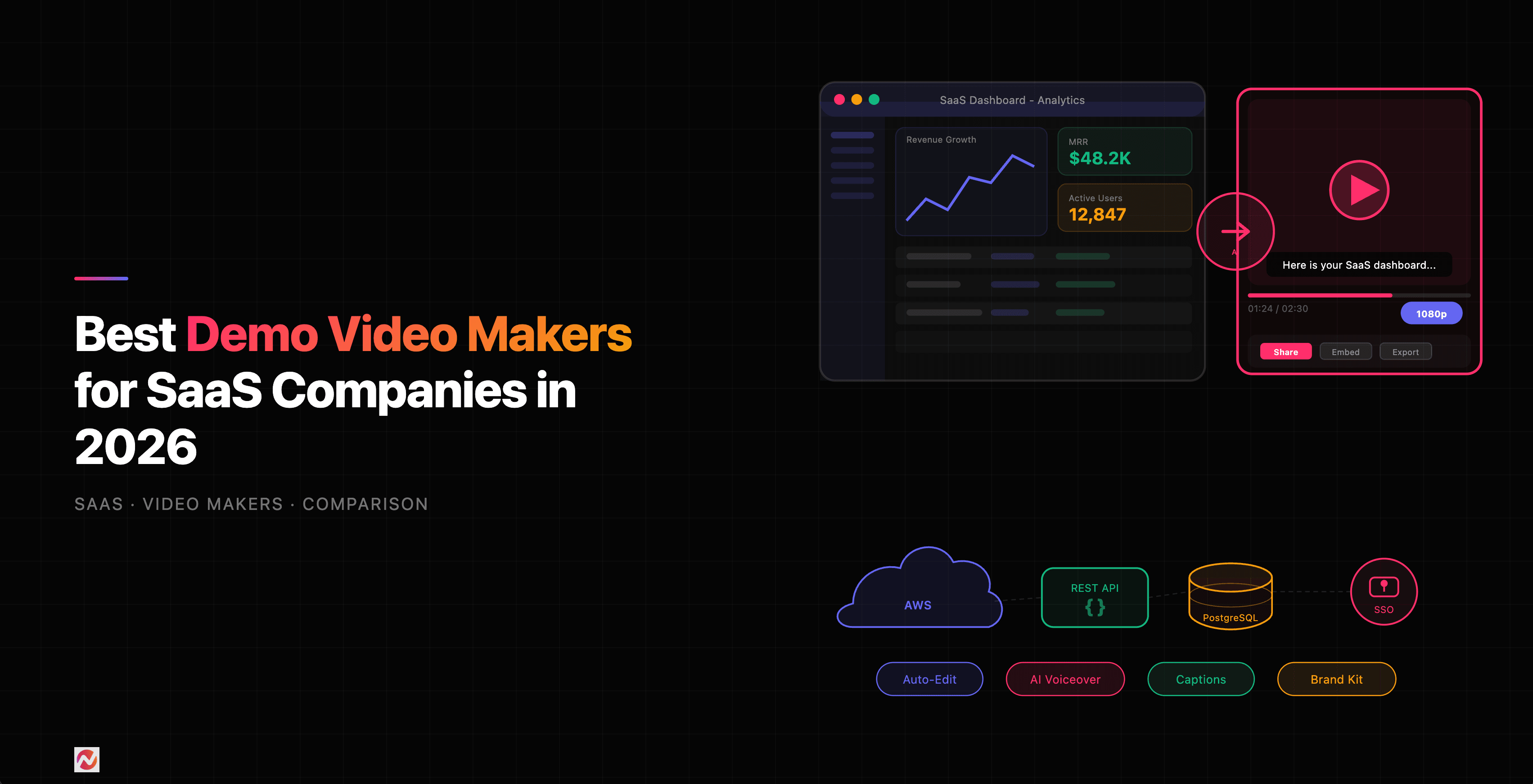

The best SaaS demo video maker depends on the job. ngram is the strongest fit here for polished, branded product videos from recordings and product source material. Loom is better for quick async follow-ups, Synthesia for avatar-led training, Vidyard for revenue workflows, and Supademo or Arcade for interactive tours.
This article focuses on SaaS-specific editorial comparison. For a broader cross-industry list, see our product demo video maker guide. If you want to see the ngram workflow before creating an account, go to the product demo workflow.
The Power of Demo Videos in SaaS
If you're building a SaaS product, you already know that first impressions matter. Prospects don't want to read documentation or sit through hour-long demos. They want to see your product in action, right now. According to Wyzowl's 2026 Video Marketing Report, 85% of people say watching a video has convinced them to buy a product or service, and demo videos are one of the highest-converting formats in tech.
But here's the challenge: creating polished, on-brand demo videos shouldn't require a video production team. Your sales reps need quick turnarounds. Your customer success team needs variants for different onboarding flows. Your product marketers need clips that match your brand guidelines. The right demo video maker handles all of this without friction.
We reviewed current vendor product and pricing pages on August 5, 2026, then compared the tools by their actual SaaS workflow: polished marketing video, async recording, avatar-led training, sales engagement, or interactive product tours.
Verification sources: Loom, Synthesia, Vidyard, Supademo, and Arcade.
Why SaaS Teams Need Different Tools
Demo video makers aren't one-size-fits-all. Unlike a general video editor, SaaS-specific tools need to handle:
Frequent product updates - You ship new features constantly. Your demo video tool must let you edit quickly without re-recording.
Multiple personas - Sales demos look different from onboarding videos. You need templates, branching, and personalization without rebuilding from scratch.
Brand consistency - Custom fonts, colors, logos, and motion patterns must stay consistent across 50+ videos. A brand kit matters.
Integration with your sales stack - Viewer analytics, shareable links, and CRM integrations let you track which prospects watched and what they clicked.
Async and synchronous workflows - Some teams need fast screen recordings for support tickets. Others need polished, scripted videos for marketing. The best tools handle both.
Let's look at the leaders.
1. ngram - The Full AI Production Powerhouse
ngram is purpose-built for SaaS teams that want to produce professional videos without a cameraman or editor. It's our top pick for teams that want speed, AI automation, and full creative control.
What makes ngram stand out:
You can start with raw footage, screen recordings, screenshots, URLs, or product documents. ngram drafts the script and scene plan for review, then applies smart zoom, cursor emphasis, captions, voiceover, motion graphics, and brand treatment. Production time depends on the source material, revisions, and final video length.
The brand kit feature is where SaaS teams really gain efficiency. Define your colors, fonts, and motion library once. Every video that flows through ngram inherits those standards automatically. No more manual tweaking across 50 videos.
ngram also handles the full pipeline. Record your screen right in the browser or import existing clips. Edit by chat or in a full timeline, with automatic silence removal, click emphasis, and cursor smoothing. Add brand-styled captions and AI voiceovers with broad multilingual coverage. Export in an MP4 export for different channels. You can host finished demos on shareable, brand-styled pages and embed them anywhere.
Best for: Product marketing teams, sales development reps, and customer success teams that need speed and consistency.
Pricing: From $29/month (annual billing). Enterprise plans include custom integrations.
2. Loom - The Async Communication Standard
Loom's advantage is a short record-and-share workflow. Capture the screen and webcam, add a title, and share the link as soon as the recording is ready.
What Loom does best:
One-click recording with automatic transcript generation. Viewers can jump to exact moments with timecode links. Basic editing (trim, blur, speed up) is built in. Embed videos directly in emails and Slack messages.
For quick internal demos, update videos, and support responses, Loom is hard to beat. Your team likely already uses it.
The limitation: Loom isn't designed for branded, polished marketing videos. Its editing is minimal. There's no automatic silence removal or AI voiceover. If you need production quality, you'll move to another tool.
Best for: Quick, internal demos. Async communication between teams. Sales follow-ups.
Pricing: Starter includes up to 25 videos per person, five-minute recordings, and 720p. Business is $18 per user per month before annual discounts; higher tiers add Loom AI and enterprise controls.
3. Synthesia - Training and Onboarding at Scale
Synthesia is built around AI avatars and text-to-video. Write a script, choose from the avatar library available on your plan, and the platform generates a presenter-led video with a synthetic voice.
What Synthesia excels at:
Synthesia supports more than 160 languages and voices, which makes it useful for localized training and onboarding. Translation allowances, avatar access, video minutes, and workspace controls vary by plan.
This is powerful for customer onboarding, compliance training, and internal education. You build once, translate automatically, and deploy globally.
Synthesia also provides templates for workflows such as feature walkthroughs and compliance training, with a slide-like editor for adapting scripts, visuals, and branding.
The limitation: Synthesia is text-first, not screen-first. If you need screen recording and editing (like capturing your product UI), you're limited to importing static screenshots or short clips. The avatars are professional but can feel slightly detached from actual product footage.
Best for: Compliance training, multilingual onboarding, customer education at scale.
Pricing: Basic is $0; Starter is $29 per month and Creator is $89 per month before annual discounts. Enterprise is custom, with plan-specific credits and video-minute limits.
4. Vidyard - Sales Engagement Meets Video
Vidyard bridges video creation and sales execution. It's designed for teams that need both quick screen recordings and sophisticated viewer tracking within their sales platform.
What Vidyard brings:
One-click screen recording (similar to Loom) with robust analytics. See not just who watched, but exactly when they paused, rewound, or skipped. Integrate directly with Salesforce and other CRMs. Some templates for product demos, but the strength is analytics and sales integration.
For sales teams that live in Salesforce, Vidyard's CRM integration is a game-changer. You track video engagement the same way you track email opens.
The limitation: Video editing is basic. There's no AI voiceover, auto-caption, or motion graphics. Vidyard is optimized for quick screen recordings, not polished production.
Best for: Sales teams using Salesforce or HubSpot. Revenue operations that need detailed engagement tracking.
Pricing: Vidyard currently offers Free, Starter, Teams, and Enterprise plans. Teams and Enterprise use custom pricing; integrations and analytics expand by tier.
5. Supademo - Interactive Demos for Hands-On Learners
Supademo flips the demo experience. Instead of watching passively, prospects click through your product interface and explore at their own pace. It's the closest thing to a live demo that scales.
What makes Supademo unique:
You record your product demo once. Supademo captures the flow but lets viewers choose their own path. They can click to see feature details, skip sections, or branch into alternate flows. Built-in analytics show exactly which features excited prospects and where they got stuck.
This is particularly powerful for product-led growth motions. Prospects get hands-on experience without a sales call. Your team sees behavioral intent data that informs follow-ups.
The limitation: Supademo is UI-focused. It's best for SaaS products with clear user interfaces. If your product is primarily data visualization or highly technical, a linear video might convert better.
Best for: Product-led growth teams. Self-service onboarding flows. Feature education.
Pricing: Free supports five guided demos for one creator. Scale is $38 per creator per month, while Growth starts at $350 per month for five creators.
6. Arcade - Embedded Walkthroughs for Product Insiders
Arcade is the embedded demo platform. Instead of sending a separate video link, Arcade videos live inside your product, knowledge base, or help center. They auto-play contextually.
What Arcade specializes in:
Record a feature walkthrough once. Embed it in your product so users see it at the exact moment they need it. Viewers can pause and jump back to their task seamlessly. Arcade handles responsive design automatically so videos look great on mobile and desktop.
For customer success and product teams, embedded walkthroughs reduce support tickets. Users discover features without opening a ticket.
The limitation: Arcade is good for internal walkthroughs but not optimized for external marketing videos. No AI voiceover or advanced editing.
Best for: Help centers, onboarding flows, in-product guidance.
Pricing: Free includes one published demo and one published video. Growth is $50 monthly or $42.50 per seat per month with annual billing; Enterprise is custom.
Feature Comparison: What Matters Most
Here's where each tool excels across the features SaaS teams care about most:
Raw video quality and professional editing capabilities put ngram at the top. Supademo wins on interactivity and viewer engagement metrics. Synthesia dominates multilingual scaling. Loom wins on speed and simplicity. Vidyard leads for sales integration. Arcade is best for embedded in-product use.
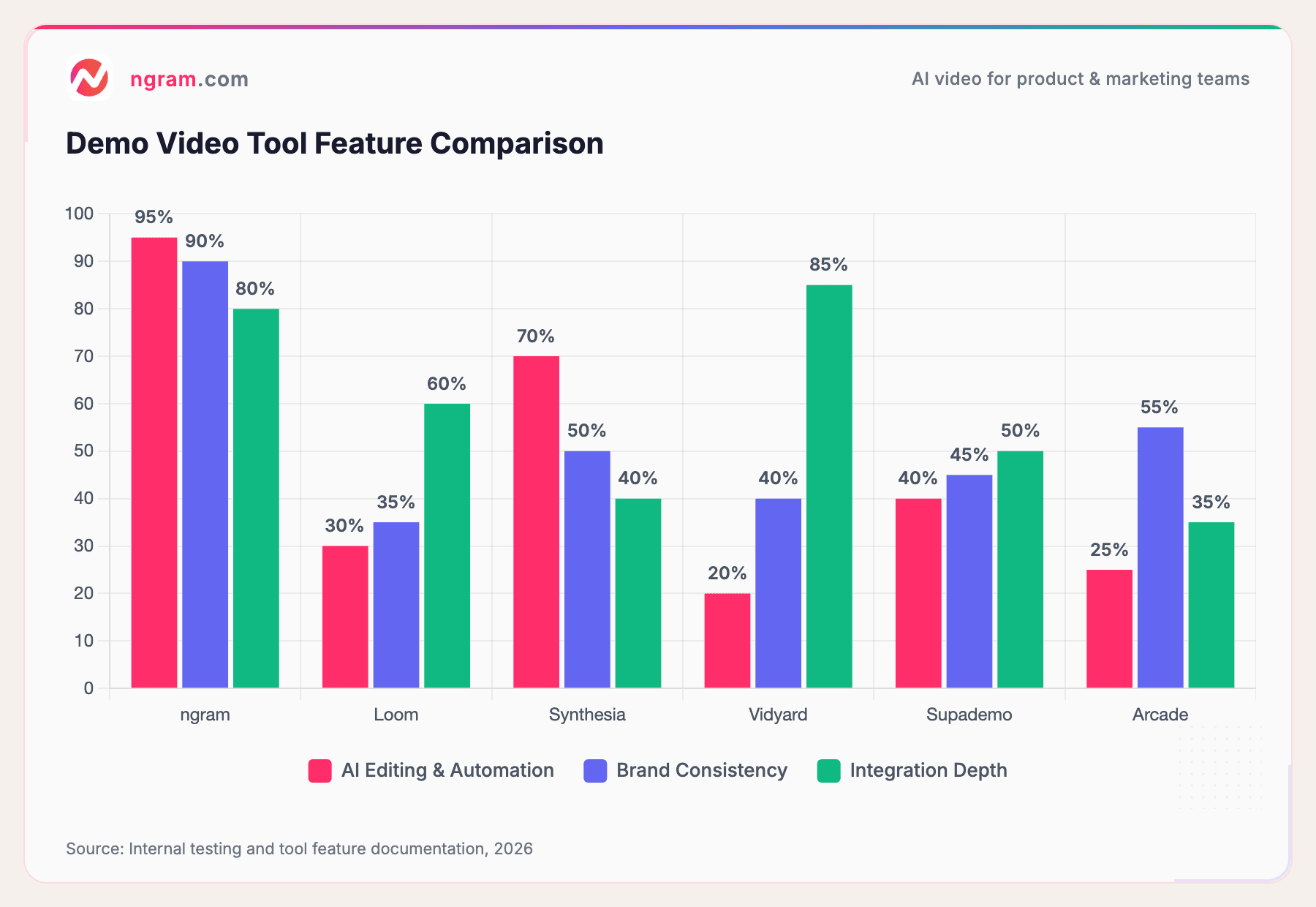
Source: Editorial comparison of current vendor product and pricing documentation, reviewed August 5, 2026.
This chart groups the tools across three decision dimensions. ngram covers the broadest source-to-polished-video workflow in this set, while Vidyard is purpose-built for revenue integrations. The right choice depends on the workflow you need to own.
Market Growth: The Demo Video Opportunity
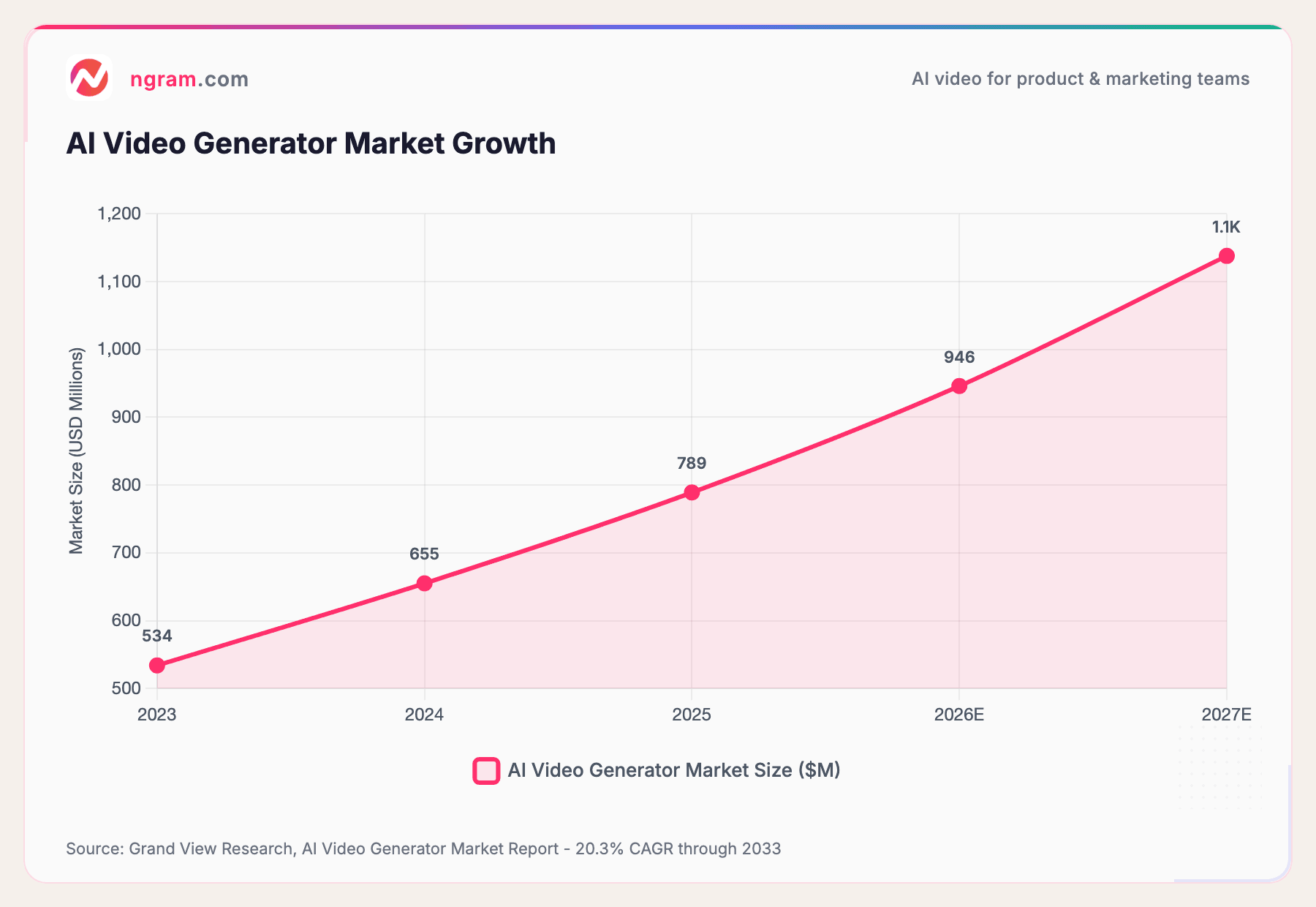
The demo video market is heating up. SaaS teams are shifting from long-form sales calls to demo-first engagement. Here's what the market shows:
Source: Grand View Research, AI Video Generator Market Report - 20.3% CAGR through 2033
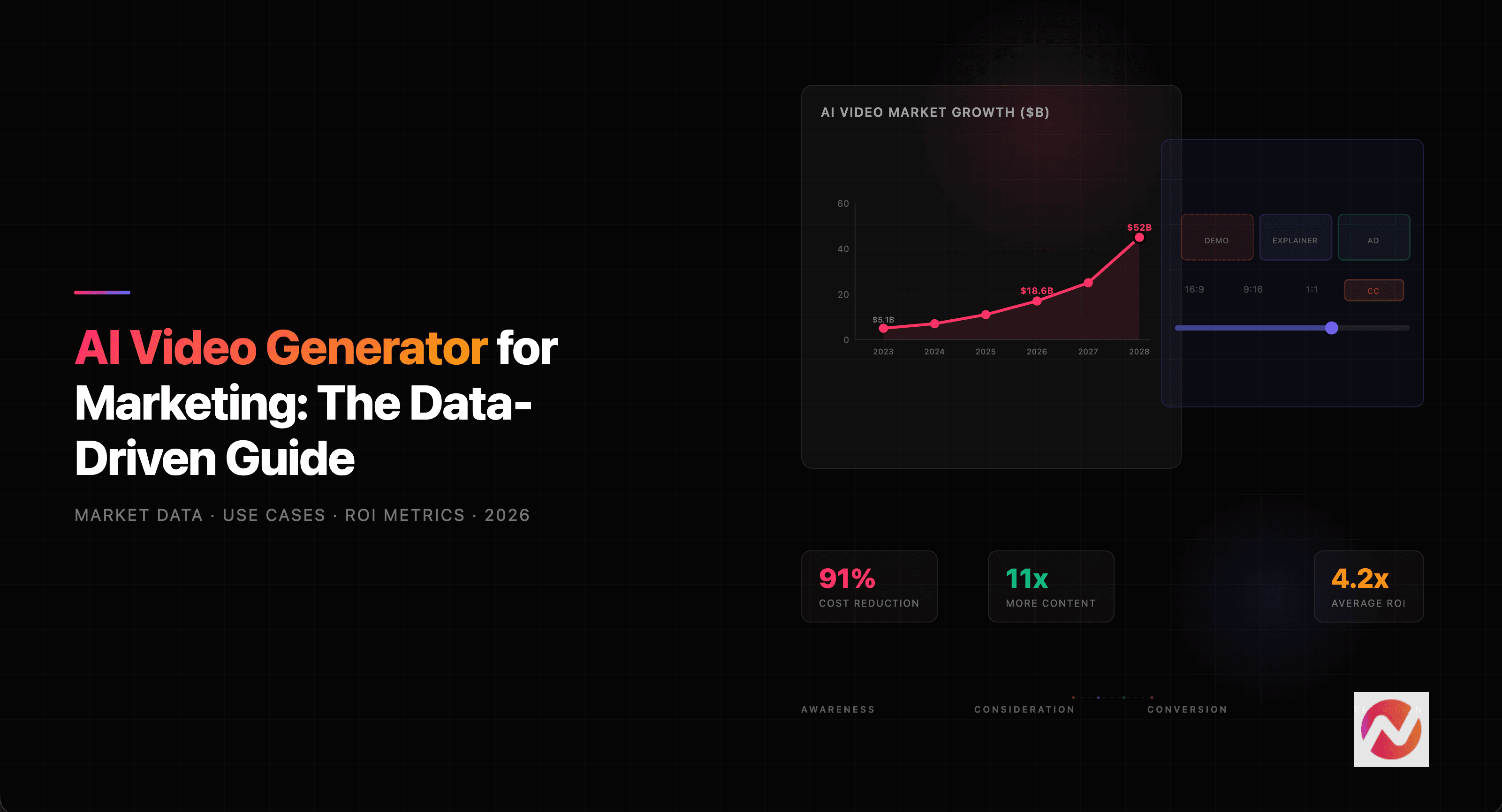
The AI video generator market hit $789 million in 2025 and is projected to reach $946 million in 2026, growing at a 20.3% CAGR through 2033. SaaS teams are moving past simple screen recording into AI-powered, multi-channel video production. Teams that invest in the right tooling now gain a competitive advantage in sales and customer success.
How to Choose: A Quick Decision Framework
Let's simplify. Here's how we think about the decision:
Choose ngram if: You need professional, branded videos fast. Your team creates 10+ videos per month. You want AI automation to handle editing and effects. You care about consistent brand kits and hosted, shareable video pages.
Choose Loom if: You need the fastest way to record and share. Your demos are mostly for internal use or quick follow-ups. You don't need advanced editing or branding consistency.
Choose Synthesia if: You need to scale training or onboarding globally. You're creating multilingual content. Your content is more script-based than screen-recording based.
Choose Vidyard if: Your team lives in Salesforce. You need sophisticated viewer engagement analytics tied to revenue. Sales team tracking matters more than production quality.
Choose Supademo if: You want prospects to engage hands-on instead of passively watching. You're running product-led growth motions. Understanding viewer intent is critical.
Choose Arcade if: You're embedding demos inside your product or help center. In-product guidance and onboarding are top priorities.
Adoption Trends: What SaaS Teams Are Actually Using
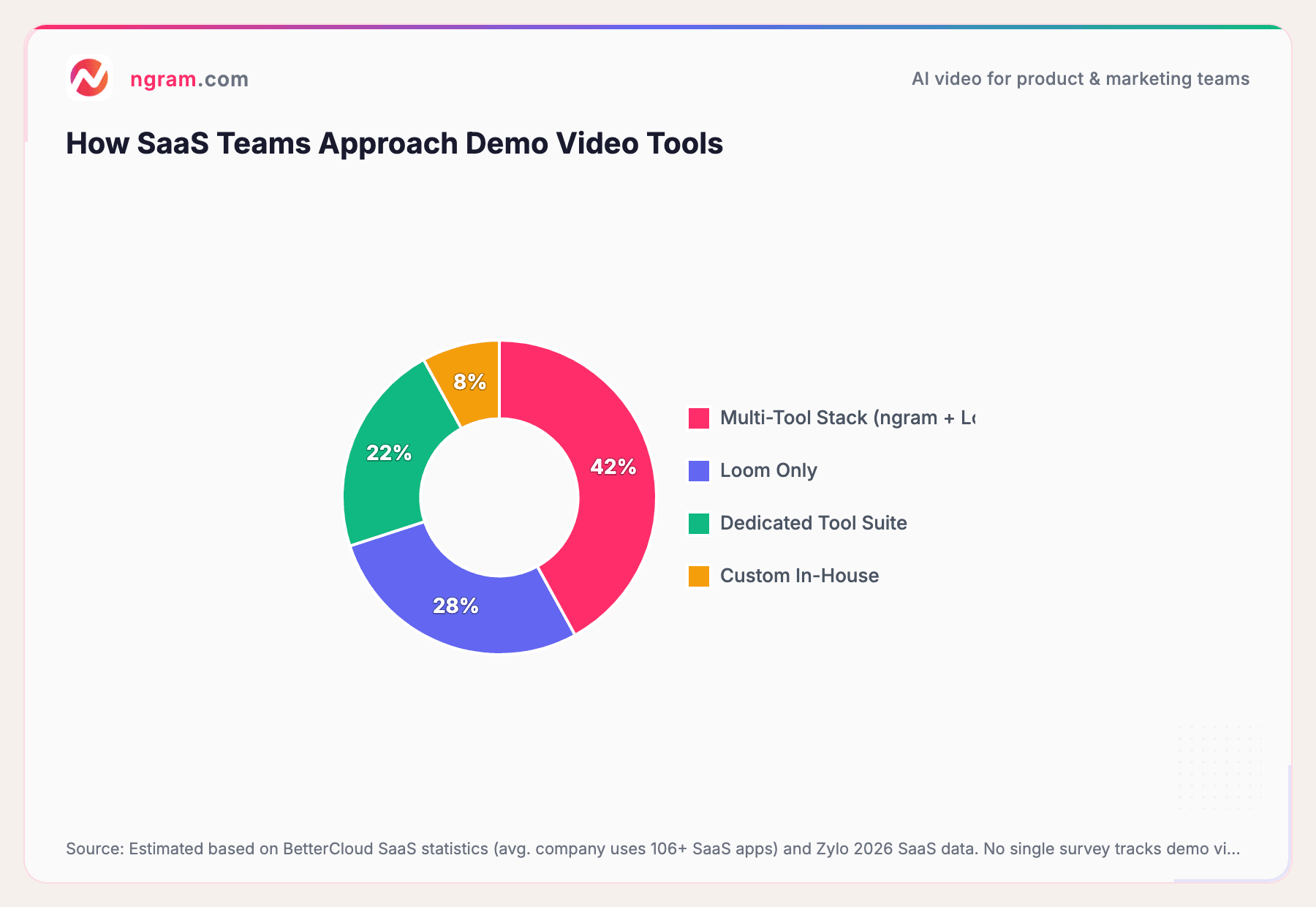
Industry patterns suggest clear trends in tool adoption by team size and function:
Source: Estimated based on BetterCloud SaaS statistics (avg. company uses 106+ SaaS apps) and Zylo 2026 SaaS data. No single survey tracks demo video tool stacking specifically.
The pattern is clear: a large share of successful SaaS teams use a multi-tool stack. They use Loom for quick recordings but lean on a dedicated platform like ngram for polished marketing and sales content. One tool doesn't handle everything well. The winners pick complementary tools.
Implementing Your Demo Video Strategy
Choosing a tool is just the start. Here's how successful SaaS teams think about implementation:
Step 1: Audit your current workflows. Where are demos needed most? Sales follow-ups? Onboarding? Customer support? Product marketing? Different workflows need different tools.
Step 2: Assign ownership. Who creates demos? Sales reps? A dedicated video producer? Customer success reps? Ownership determines tool complexity. Sales reps need simplicity. Producers need power.
Step 3: Build templates. Don't start from scratch with each video. Create demo "templates" for common flows: feature overview, objection handling, getting started guide. Reuse the structure.
Step 4: Set analytics expectations. You're investing in video creation. What metrics matter? Click-through rates? Time watched? Prospect behavior? Define what success looks like.
Step 5: Iterate and consolidate. You'll likely start with a multi-tool setup. After 90 days, you'll know which tools your team actually uses. Consolidate and deepen expertise.
Want to see how ngram's planning, editing, and brand-kit workflow fits your SaaS demo process? Start with the product demo workflow, then create an account once the approach fits your team. See the product demo workflow.
Internal Resources and Further Reading
For deeper dives into specific use cases, check out these ngram resources:
Learn about creating effective product demo videos that actually convert prospects.
Explore our demo video maker tool and see how it compares to alternatives.
For SaaS-specific needs, our SaaS solution page covers workflows for sales, customer success, and product teams.
Discover more about how to create a product demo with step-by-step guidance.
Frequently Asked Questions
What is the best demo video maker for SaaS sales teams?
For most SaaS sales teams, the answer depends on your CRM integration needs and demo style. If you use Salesforce, Vidyard offers the deepest integration with engagement analytics. If you need polished, branded videos that reflect your product quality, ngram's AI editing and brand kit are unmatched. Many teams use both: Loom for quick internal demos, ngram for external marketing content.
Can I create interactive demos that let prospects explore features themselves?
Yes. Supademo and Arcade are built specifically for interactive, hands-on demos where viewers control the flow. Both record your product UI once and let viewers navigate at their pace. This approach has higher engagement rates than passive video watching, especially for product-led growth motions.
How much time does it actually take to create a demo video?
It depends on the source material, revisions, video length, and tool. Loom is designed for immediate record-and-share workflows. ngram adds a reviewable script and storyboard before producing a branded video, while Synthesia builds presenter-led video from a script. Use a real project in your own environment to estimate turnaround.
Do I need to hire a video producer to create professional demos?
Not anymore. Modern demo video makers include AI editing (automatic captions, silence removal, voiceovers), brand kits (consistent colors and fonts), and templates that make production-quality videos accessible to non-technical teams. Your sales reps or CS team can create professional videos without a dedicated producer.
How do I measure ROI on demo videos?
Track these metrics: Time to first demo (faster is better), viewer engagement (% who watch to end), CRM engagement lift (did viewers move faster through your pipeline), and conversion impact (do demo-viewers convert at higher rates). Tools like Vidyard provide detailed engagement analytics, while ngram provides hosted video pages and embeds but has no generally available owner analytics surface. Start with one key metric that matters to your business.
Should I use the same demo video tool for sales, onboarding, and marketing?
Most mature SaaS teams use 2-3 tools. Quick internal demos and follow-ups go through Loom. Polished marketing and sales content goes through ngram. Onboarding and training might use Synthesia for multilingual scaling or Arcade for in-product guidance. Pick tools that specialize in their use case.
Can I edit a demo video after publishing it?
Yes, with the right tool. Most modern demo makers let you update, re-cut, or re-host videos without changing the shared link. This is critical for SaaS because your product changes weekly. You need to refresh demo content without breaking 50 existing links.
The Bottom Line
Demo videos are no longer nice-to-have content for SaaS companies. They're essential to sales velocity, onboarding efficiency, and product positioning. The demo video maker market has matured to the point where every tool serves a specific workflow well.
Your decision isn't "which single tool?" It's "which tools, in what order, for which workflows?" Most successful teams start with Loom for simplicity, add a production tool like ngram for polish, and add specialized tools (Synthesia, Supademo) based on specific needs.
Start small. Pick one workflow: sales follow-ups, onboarding, or marketing. Choose a tool that fits. After 30 days, evaluate. Did it save time? Did it improve conversion? Use that signal to expand. You'll find the right mix.