
Video automation is most useful when it starts with an event your team already trusts. A release is approved, a CRM record changes, a customer signs up, or a product is updated. Instead of asking someone to notice that event and start a video by hand, the workflow can pass the approved context into ngram and keep moving.
Check the account linked to viaSocket before testing a video request. API-key video creation requires Basic or higher and sufficient credits. Creating a key on a Free account does not enable this action.
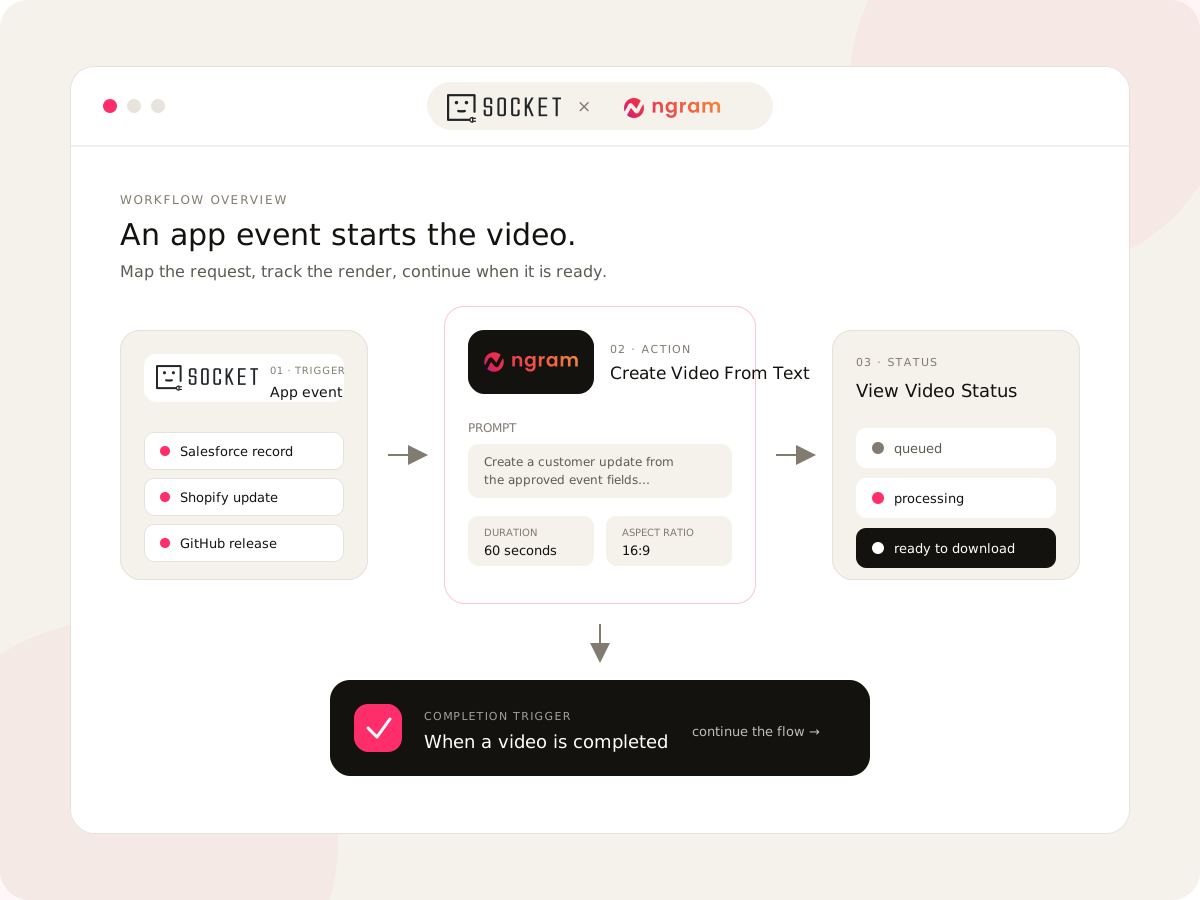
With viaSocket and ngram, the video automation loop has four parts: choose the event, map the request, create and track the render, then continue the workflow when the video is complete. The integration is live and supports Create Video From Text, View Video Status, and a When a video is completed trigger.See the live viaSocket integration to explore the current connector details.
What video automation means in practice
A useful video automation workflow does not try to remove every human decision. It removes the repeated handoffs around a clear decision. Your team still approves the message, audience, and purpose. The workflow handles the predictable movement of that approved information into a video request and then returns the result to the system that started the work.
- The trigger provides the business context, such as a release note, form response, CRM change, or commerce update.
- The ngram action receives mapped text plus the intended duration and aspect ratio for the video.
- View Video Status lets the workflow distinguish queued, processing, failed, and ready-to-download states.
- The completion trigger starts the next action after ngram finishes the render.
That separation matters. The event that starts the work does not need to know how to write a script, choose a voice, or assemble scenes. ngram handles the video planning and production system, while viaSocket carries the request and the result between the apps your team already uses.
Pass a completed video to the right record
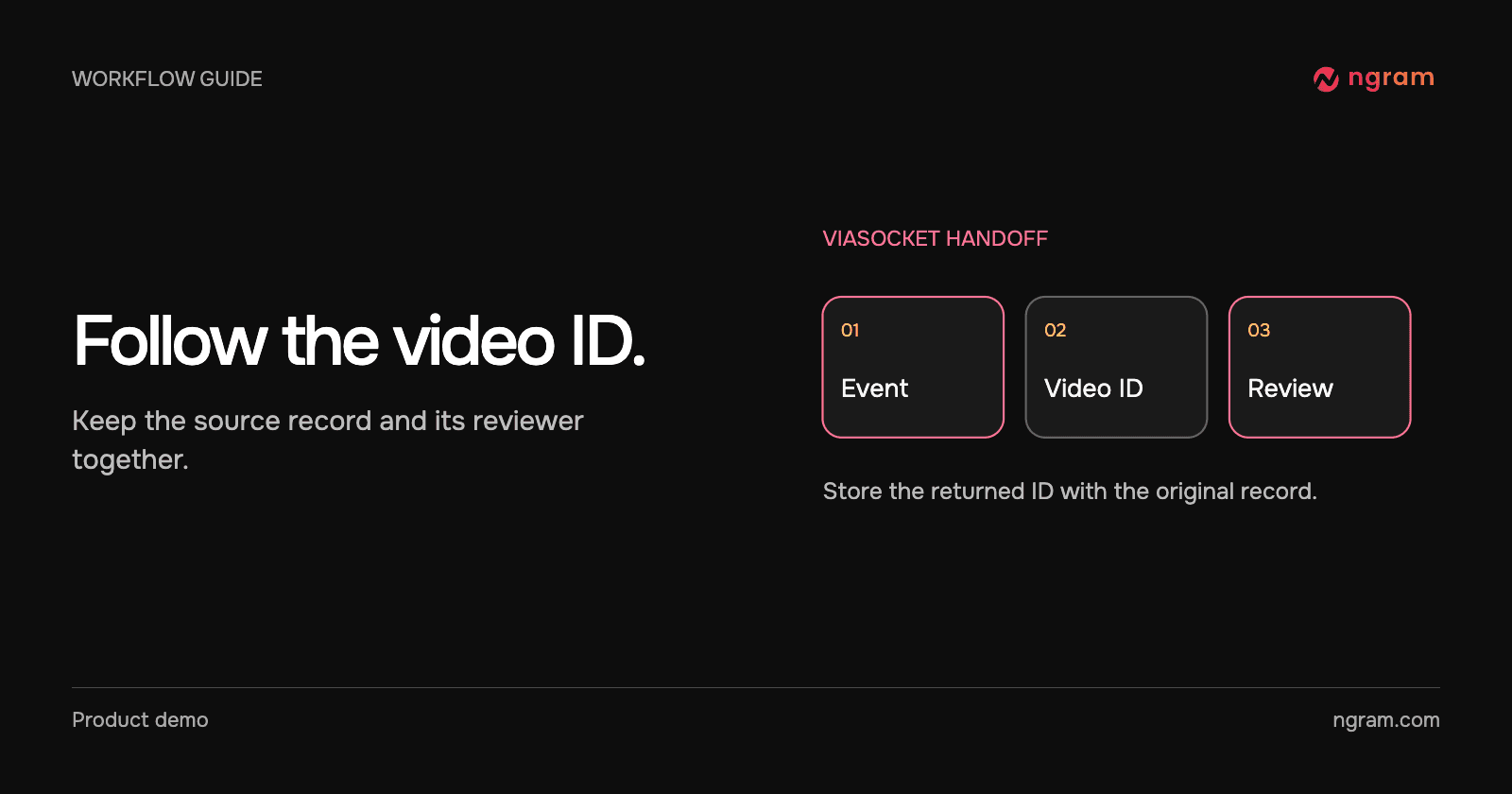
Suppose an approved release note should become a partner update. Map the release ID and approved change into the Create Video From Text action. Save the returned video ID with the source record. Submission starts the job; it does not mean the video is ready to send.
Use View Video Status while testing or a completed-video trigger for the next step. Match the returned video to the original release ID and send the finished link to the partner editor. If no result arrives, inspect the stored job before starting another. The viaSocket integration describes the available actions.
The illustrated form example shows where a request and status check fit. Verify that destination with a sample record in your own workflow.
How to build a video automation workflow
1. Choose the event that should start the video
Start with an event that has a clear owner and a useful source of truth. The live integration page calls out CRM updates, form responses, commerce events, and release activity as natural starting points. Google Sheets, Gmail, Slack, HubSpot, Salesforce, Shopify, Airtable, and GitHub are examples of systems that can supply the event or the data behind the request.
The best trigger is specific enough that the workflow can decide what to say. A generic new row event may be too broad. A row marked Ready for announcement gives the workflow a better boundary and makes review easier.
2. Map the approved message into Create Video From Text
Map the fields that give ngram enough context to make the first cut useful: the source message, the audience, the goal, the call to action, the target duration, and the output shape. For a release video, that might be the release summary, the feature benefit, and the link to the product page. For a sales video, it might be the prospect's role, the problem they are evaluating, and the next step you want them to take.Test a text-to-video request first if you want to validate the prompt before connecting it to a live event.
3. Track the render instead of guessing
Video rendering is an asynchronous step, so the workflow needs an explicit status path. viaSocket's View Video Status action returns whether the render is queued, processing, failed, or ready to download. That gives the rest of the workflow a real state to react to instead of relying on a fixed wait time.
4. Continue when the video is complete
The final step is where the automation becomes useful to the rest of the business. When ngram reports a completed video, viaSocket can pass the result to the next workflow step. That could mean updating a row, notifying a channel, attaching a video to a record, or handing the asset to a person for a final review.
Four video automation use cases to start with
Feature announcements from release events
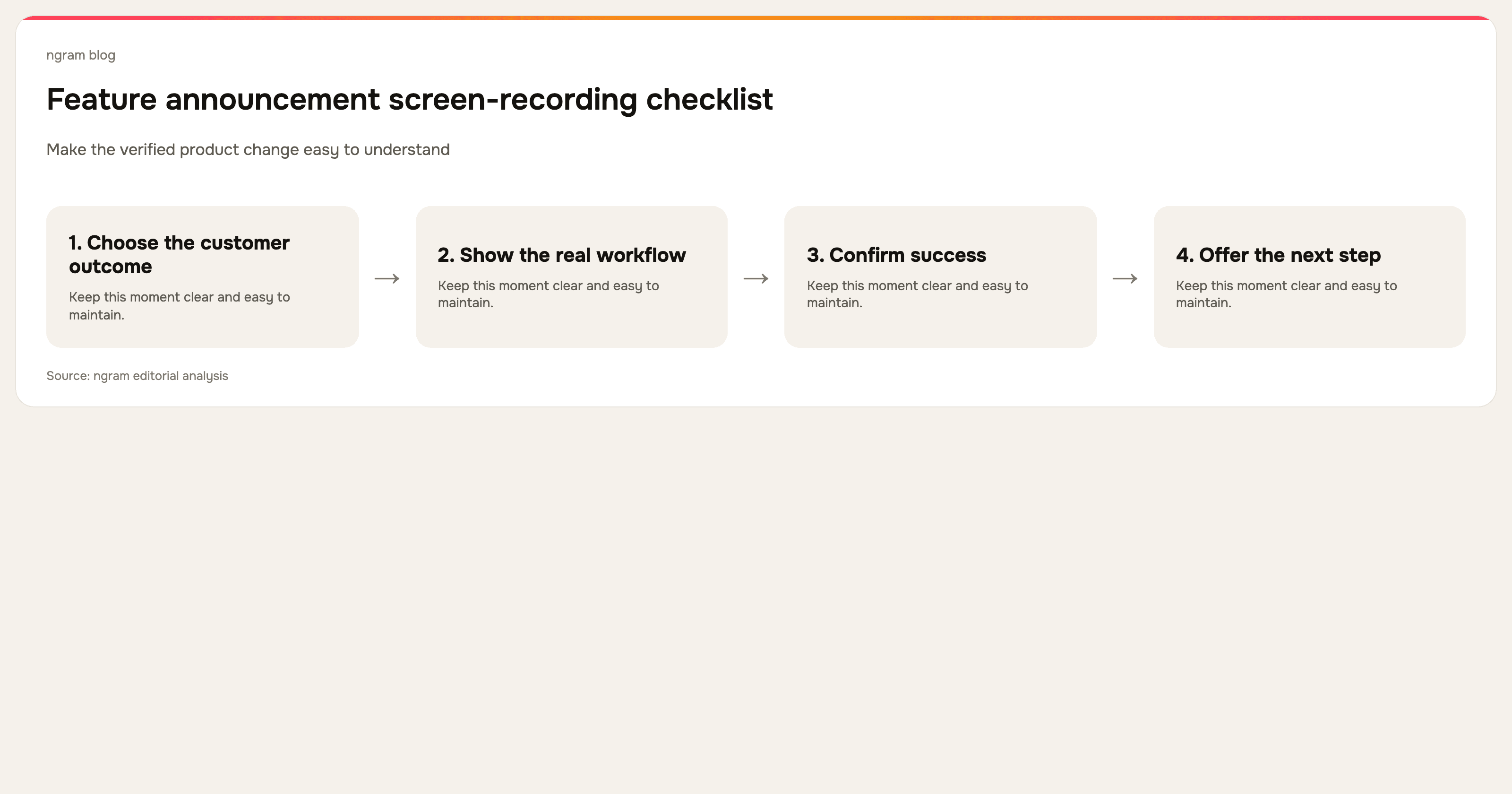
A product or GitHub event can pass an approved change summary into ngram. The resulting feature announcement video can then move into a launch checklist, a review queue, or a publishing workflow. This is a natural fit for teams that already keep release information in a project system but want the update to reach people in a more useful format.See the feature announcement workflow
Prospect videos from CRM changes
When a prospect moves into a defined stage, the CRM can provide the context for a focused sales video. The workflow can map the account details into a controlled prompt, render a draft, and return the result to the sales process for review before it goes to the prospect. The important boundary is approval: automate the first cut, not an unreviewed promise.Explore the sales prospecting use case
Onboarding videos from new-customer events
A new customer event can start an onboarding render using approved account context, product guidance, and the next milestone. After the video is ready, the workflow can return the link to the customer record or notify the customer success owner. This turns a repeatable part of onboarding into a repeatable video workflow without making every account manager start from a blank page.
Product videos from commerce updates
A Shopify event can supply product details, source copy, and a destination for a fresh product video. The completed render can then move into a campaign or commerce workflow. This works best when the source fields are structured and the video brief has clear rules for claims, format, and review.
Keep the human review where it matters
The strongest video automation systems automate movement, not judgment. Define which fields are trusted, which prompts are approved, who reviews the first cut, and what happens when a render fails. A short review step protects product claims, customer context, and brand voice while keeping the repetitive production work out of the critical path.
ngram's Brand Kit can carry the workspace's logos, colors, fonts, motion direction, and language guardrails into the video workflow. That gives automated renders a consistent starting point while keeping the script, scenes, and final edit open to human review.Learn how the brand system works.
Frequently Asked Questions
What is video automation?
Video automation is a workflow that moves structured information from a business event into a video creation step, then returns the finished result to the process that started it. It can automate request setup, render tracking, notifications, and handoffs while leaving message approval and final review with the team.
What can viaSocket do with ngram?
The live connector can create a video from mapped text, return the render status, and trigger a follow-up workflow when the video is complete. The create action also accepts the intended duration and aspect ratio, with an optional completion webhook for systems that need a callback.
Do I need to automate the entire video process?
No. A good starting point is to automate the repetitive handoff into a first draft and keep approval before publication. You can also automate only the status and notification steps, then let a person decide when to open and refine the finished video.
Which teams can use this workflow?
Product marketing can turn release events into announcement videos. Sales enablement can start prospect videos from CRM context. Customer success can trigger onboarding videos, support teams can request focused answer videos, developer relations can respond to GitHub activity, and e-commerce teams can create product videos from commerce events.
How should I start?
Choose one event, one video outcome, and one owner for review. Test the text payload in ngram, connect the viaSocket action, verify the status path, and only then add the completion step that returns the result to your broader workflow.
If you want to test the pattern,start with ngram and connect the first workflow event that already has a clear owner and source of truth.